云手机
云手机
云手机


文档指南
请输入


云手机
产品动态
控制台指南
服务端 OpenAPI 文档
实例管理
实例属性管理
镜像管理
资源管理
屏幕布局管理
应用管理
应用生命周期管理
云手机操控
网络配置与管理
端口映射管理
DNS 管理
ADB 管理
历史版本
2023-10-30
【旧版】实例管理
【旧版】实例属性管理
【旧版】云机管理
【旧版】镜像管理
【旧版】机房管理
【旧版】资源管理
【旧版】屏幕布局管理
【旧版】应用管理
【旧版】云手机操控
【旧版】网络配置与管理
【旧版】端口映射管理
2022-08-01
【旧版】实例管理
【旧版】镜像管理
【旧版】机房管理
【旧版】资源管理
【旧版】屏幕布局管理
【旧版】应用管理
【旧版】云手机操控
【旧版】标签管理
【旧版】通用服务
服务端 SDK 参考
客户端 SDK 参考
最佳实践
Mobile Use Agent
产品动态
最佳实践
API 参考
配置管理
代理运行配置
安全策略
任务管理
Computer Use Agent
产品动态
正式接入 CUA
API 参考
配置管理
代理运行配置
任务管理
- 文档首页
 云手机Computer Use Agent最佳实践使用 OpenAPI 接入 CUA
 复制全文
 下载 pdf
使用 OpenAPI 接入 CUA
 文档反馈
 问问助手
除控制台操作外,Computer Use Agent(CUA)还为您提供了 OpenAPI,您可以通过 OpenAPI 将任务下发、状态查询等能力嵌入自有业务系统。
- 将 AccessKey、SecretKey 配置为环境变量 VOLC_ACCESSKEY 、VOLC_SECRETKEY。
- export VOLC_ACCESSKEY="<Your-Access-Key-ID>" export VOLC_SECRETKEY="<Your-Secret-Access-Key>"
- 在您的本地环境中执行如下命令,安装火山引擎 Python SDK。
- pip install volcengine-python-sdk
- 参考如下示例代码进行接入。
- import osimport timeimport uuidimport volcenginesdkcorefrom volcenginesdkcore.rest import ApiExceptionif __name__ == '__main__':# 从环境变量获取 AK/SKak = os.environ.get("VOLC_ACCESSKEY")sk = os.environ.get("VOLC_SECRETKEY")# 配置 SDKconfiguration = volcenginesdkcore.Configuration()configuration.ak = akconfiguration.sk = skconfiguration.region = "cn-beijing"# 创建 API 客户端api_instance = volcenginesdkcore.UniversalApi(volcenginesdkcore.ApiClient(configuration))# -----------------------------# 请替换为实际参数# -----------------------------ecs_id = "" # CUA 节点对应的 ECS 实例 IDtos_bucket = "" # TOS 桶名称tos_endpoint = "" # TOS endpoint,例如:https://tos-cn-beijing.volces.comtos_region = "" # TOS region,例如:cn-beijinguser_prompt = "打开浏览器并搜索火山引擎"try:# =========================================================# 1. 创建 noVNC 拉流会话# 接口:CreateCuaNodeNoVNCSession# 服务:cua 版本:2024-01-01# =========================================================novnc_body = {}if ecs_id:novnc_body["Ecsid"] = ecs_idif not novnc_body:raise ValueError("Id 和 Ecsid 需要二选一传入,不能都为空")novnc_resp = api_instance.do_call(volcenginesdkcore.UniversalInfo(method="POST",action="CreateCuaNodeNoVNCSession",service="cua",version="2024-01-01",content_type="application/json"),volcenginesdkcore.Flatten(novnc_body).flat())print("\nCreateCuaNodeNoVNCSession response:")print(novnc_resp)novnc_result = novnc_resp.get("Result", novnc_resp)print("\nnoVNC 会话信息:")print("ViewerUrl :", novnc_result.get("ViewerUrl"))print("WebsocketUrl:", novnc_result.get("WebsocketUrl"))print("ExpiresAt :", novnc_result.get("ExpiresAt"))# =========================================================# 2. 运行 Agent 任务# 接口:RunAgentTaskOneStep# 服务:ipaas 版本:2023-08-01# =========================================================run_body = volcenginesdkcore.Flatten({"RunName": "computer-use 测试 demo","ThreadId": str(uuid.uuid4()),"AgentType": "cua","Ecsid": ecs_id,"UserPrompt": user_prompt,"TosBucket": tos_bucket,"TosEndpoint": tos_endpoint,"TosRegion": tos_region}).flat()run_resp = api_instance.do_call(volcenginesdkcore.UniversalInfo(method="POST",action="RunAgentTaskOneStep",service="ipaas",version="2023-08-01",content_type="application/json"),run_body)print("\nRunAgentTaskOneStep response:")print(run_resp)run_info = run_resp.get("Result", run_resp)run_id = run_info["RunId"]print("\nRunId:", run_id)# =========================================================# 3. 轮询 Agent 当前步骤# 接口:ListAgentRunCurrentStep# 服务:ipaas 版本:2023-08-01# 状态 3/5/6/7 表示任务结束# =========================================================time.sleep(5) # 等待任务开始执行while True:step_resp = api_instance.do_call(volcenginesdkcore.UniversalInfo(method="GET",action="ListAgentRunCurrentStep",service="ipaas",version="2023-08-01",content_type="application/json"),volcenginesdkcore.Flatten({"RunId": run_id}).flat())print("\nListAgentRunCurrentStep response:")print(step_resp)step_info = step_resp.get("Result", step_resp)if step_info.get("Status") in [3, 5, 6, 7]:print("\n任务已结束,最终状态:", step_info.get("Status"))breaktime.sleep(2) # 继续轮询# =========================================================# 4. 获取 Agent 任务结果# 接口:GetAgentResult# 服务:ipaas 版本:2023-08-01# =========================================================result_resp = api_instance.do_call(volcenginesdkcore.UniversalInfo(method="GET",action="GetAgentResult",service="ipaas",version="2023-08-01",content_type="application/json"),volcenginesdkcore.Flatten({"RunId": run_id}).flat())print("\nGetAgentResult response:")print(result_resp)except ApiException as e:print(f"API Exception: {e}")except Exception as e:print(f"General Exception: {e}")
- 调用流程说明
- 调用 CreateCuaNodeNoVNCSession 接口,创建 noVNC 可视化会话。
- 调用 RunAgentTaskOneStep 接口,传入 UserPrompt(自然语言指令)、目标节点 EcsId 等参数下发任务,返回 RunId。
- 调用 ListAgentRunCurrentStep 接口,通过 RunId 轮询任务当前执行步骤,配合回调地址获取最终结果。
- 调用 GetAgentResult 接口,通过 RunId 查看任务执行结果。
- 参数说明
- 下表为您汇总了示例代码中需要您自行填写的参数信息。
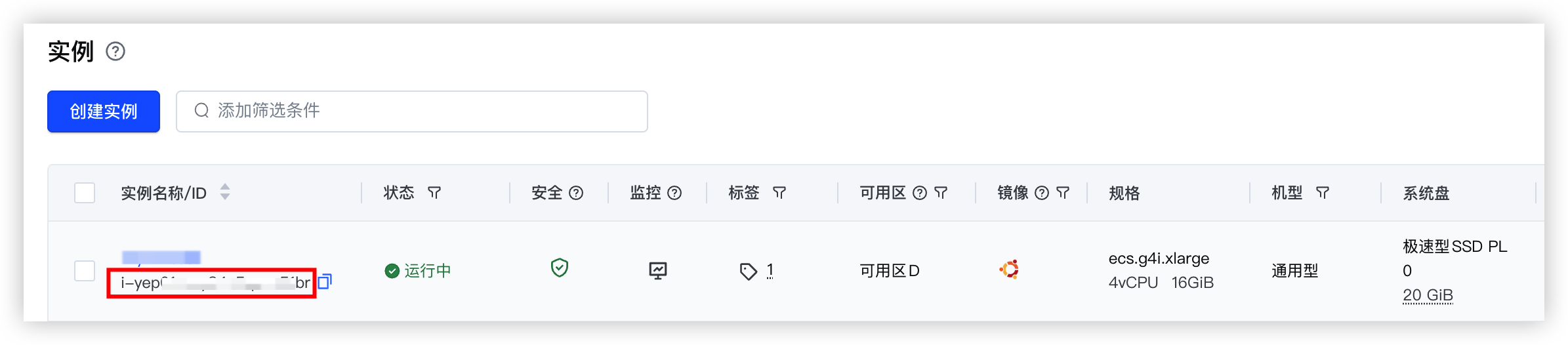
- 参数说明参数说明ecs_idtos_buckettos_endpoint tos_region
最近更新时间:2026.09.23 20:55:20
这个页面对您有帮助吗?
有用
有用
无用
无用