You need to enable JavaScript to run this app.
文档中心
云搜索服务

云搜索服务

复制全文
下载 pdf
向量检索
云搜索服务混合检索技术:原理解析与云上实践
复制全文
下载 pdf
云搜索服务混合检索技术:原理解析与云上实践
混合检索(Hybrid Search)是一种综合运用多种搜索技术的智能检索方法,通过结合不同检索范式的优势来提升搜索效果,它可以帮助大模型快速筛选出最相关、最有价值的数据,更精准地满足用户复杂多样的搜索需求。随着大模型技术的不断发展和应用场景的日益拓展,混合检索的重要性也愈发凸显。​
问题定义​
当前的 OpenSearch 集群中,主要支持两种查询方式:​
  • 文本搜索(Lexical Search):使用查询中的关键词,与数据库中保存的文本段进行精确匹配,简单通用,无需进行特定的训练也能对不同的数据集有较好的效果。​
  • 适用场景:使用短词、作者名等搜索书籍;输入错误码搜索日志。​
  • 向量检索(Vector Search):使用查询中的 embedding 向量,与数据库中的向量进行匹配,可识别错别字及同义词等语义层面的信息。​
  • 适用场景:使用关键词、同义词搜索论文及片段;使用关键词搜索相似的商品图片;在论坛、知识库中根据问题搜索出对应的回复。​
两种查询方式各有优点,看起来是一种互为补充的关系,如果能将两种查询结合在一起,直观上查询效果将会得到提升。一种直观的方式是类似预先查询语句,即将两个查询语句的返回结果分数进行加权求和并返回。​
​
// 加权求和的混合查询:​
{​
"query": {​
"bool": {​
"should": [​
{​
"constant_score": {​
"${关键词查询}",​
"boost": 0.4​
}​
},​
{​
"constant_score": {​
"${向量查询}",​
"boost": 0.6​
}​
}​
]​
}​
}​
}​
​
但这种查询方式比较简单,但是也存在一些不足:​
  • 查询分数量级不同:语义查询的打分通过向量间的相似度比较来完成,分数范围基本在 0~1 之间(除一些特殊场景外);关键词查询的打分由 BM25 算法来进行,没有一个限定的分数范围。因此直接将两者的分数进行加权求和,最终的返回结果会极大地倾斜向关键词查询的结果。​
  • 权重变化调整频繁:每组精心设置好的权重仅针对特定的查询语句和数据集生效,一旦查询发生变化,或数据集有增删改动,开发人员就需要重新调整权重,无法做到人力提效。​
  • 业务场景受限:部分业务需要依据返回的分数绝对值进行业务逻辑判断,而当前的简单混合查询返回分数没有明确的范围限制,也就无法支撑相关场景;​
解决方案​
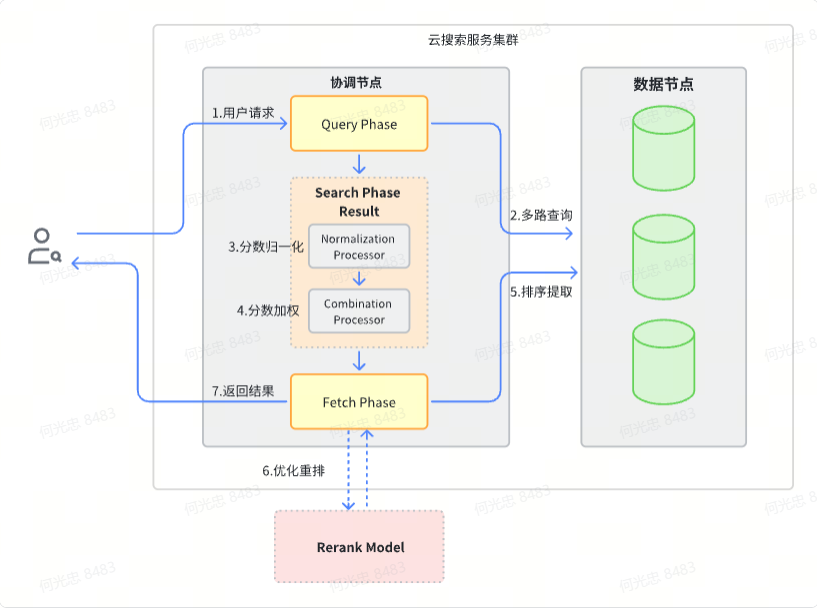
为解决上述的缺陷,云搜索在原先的两阶段查询中,原生支持分数归一化和加权求和两个步骤,这样便可以充分结合多路查询的优势,达到互补的效果。​
同时为了能够更加显著地提升用户搜索结果的相关性,云搜索服务混合检索功能除了支持现有的向量和文本融合打分之外,还支持可插拔的 rerank 模型重排阶段,允许用户根据自身的实际需求和特定场景,调用不同类型的模型(自定义模型、内置模型)对返回结果执行进一步的调优,整个查询过程得到了进一步的拓展和完善。​
  • 查询阶段:执行多路查询,并得到多路查询的中间结果,其中包含已排好序的分数​
  • 归一化阶段:归一化方法是将不同尺度或量纲的数据转换为统一标准尺度的一系列技术,在这个阶段 ES 节点会针对每个查询,执行相应的归一化算法。​
  • 加权求和阶段:在多个查询间,将归一化打分结果进行融合与排序。​
  • Fetch 阶段:根据排好序的最终结果,提取文档的全部数据。​
  • (可选)rerank 模型重排阶段:将查询结果进一步传给 rerank 模型,得到进一步的调优结果。​
​Image​​
归一化算法​
归一化有多种不同的算法,云搜索服务当前支持的算法如下:​
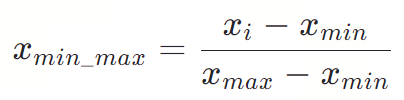
计算当前所有数据中的最小值 x_min,以及最大值 x_max,然后将每条数据减去最小值并除以区间范围,转化成目标数据。归一化后的数据范围固定为[0, 1]。​
​​​
特点:​
  • 计算简单,线性均匀变化,满足绝大多数归一化场景。​
  • 无法很好地处理异常点,当序列中存在极大或者极小值时,转化后的数据点会集中偏移。​
  • 当命中的数据量比较少时,会出现偏差,比如返回两个分数很高的数据值,归一化之后,一个为 0,一个为 1。​
l2​
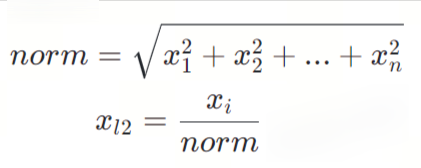
计算当前所有数据的 L2 范数 norm,然后将每个数据除以 L2 范数,转化成目标数据。归一化后的数据范围固定为[0, 1]。​
​​​
特点:​
  • 不会改变原始数据的正负性,较大程度保持了各个数据点间的相对距离关系。​
rrf​
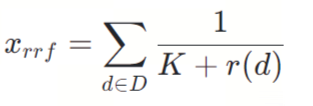
统计每条数据,在不同的序列中对应的排序位置 r(d),然后将排序分数加上固定的参数值 K 后,取倒数并相加,最终得到目标数据。​
​​​
计算示例:​
说明​
为便于计算,此处取 K=0。​
​
Query 1 结果排序​
Query 2 结果排序​
RRF 结果打分​
A 1​
E 1​
A:1 / 1 + 1 / 3 = 1.3​
E:1 / 5 + 1 / 1 = 1.2​
C:1 / 3 + 1 / 2 = 0.83​
B:1 / 2 + 1 / 4 = 0.75​
D:1 / 4 + 0 = 0.25​
B 2​
C 2​
​
C 3​
A 3​
​
D 4​
B 4​
​
E 5​
无​
​
​
特点:​
  • 只考虑数据的相对排序结果,适用于数据实际的分数值可以忽略的场景。​
  • 不同数据集的效果,与 K 的选择会有一定的关系,默认 K=60。​
计算当前所有数据中的平均值 μ,以及样本标准差 σ,然后将每条数据进行正态分布处理,转化成目标数据。结果数据大于 0 表示正相关,小于 0 则表示负相关,归一化后的数据范围不固定(在实现时,会将小于 0 的分数,赋予一个大于 0 的较小值,例如 0.001)。​
​​​
特点:​
  • 相比于 min_max 和 l2,对异常点的处理效果更好,适用于最大最小值未知的场景。​
  • 假设原始数据的分布近似于高斯分布,否则归一化的效果可能很差。​
加权求和算法​
无特殊要求,一般选择 arithmetic_mean 即可。​
每个结果序列,授予的权重为:​
​​​
每条数据与对应的权重相乘并求和,然后除以权重的总和,得到结果:​
​​​
每条数据取对数之后,与对应的权重相乘并求和,然后除以权重的总和,再通过指数函数得到结果:​
​​​
每条数据取倒数之后,与对应的权重相乘后求和,然后再用权重的总和除以前面的运算,得到结果:​
​​​
使用方式​
使用向量进行查询​
  1. 创建 Search Pipeline 和索引。​
  1. 创建 Search Pipeline,配置相关的归一化方法和加权求和方法,以及 rerank 模型地址。​
  • ​
    // 创建 Search Pipeline​
    ​
    PUT /_search/pipeline/min-max-search-pipeline​
    {​
    "description": "Post processor for hybrid search",​
    "phase_results_processors": [​
    {​
    "normalization-processor": {​
    "normalization": {​
    "technique": "min_max", // 归一化方法​
    "parameters": {​
    }​
    },​
    "combination": {​
    "technique": "arithmetic_mean", // 加权求和方法​
    "parameters": {​
    "weights": [​
    0.4,​
    0.6​
    ]​
    }​
    }​
    }​
    }​
    ],​
    "response_processors": [ // rerank 重排配置(可选)​
    {​
    "remote_rerank": {​
    "ml_opensearch": {​
    "remote_config": {​
    "method": "POST",​
    "url": "", // rerank 模型地址​
    "headers": {​
    "Content-Type": "application/json"​
    },​
    "advance_request_body": {​
    "model": "" // 模型名称​
    }​
    }​
    },​
    "context": {​
    "document_fields": [​
    "size" // 重排字段信息 ​
    ]​
    }​
    }​
    }​
    ]​
    }​
    ​
  1. 创建索引,将先前创建的 Search Pipeline 配置到 index.search.default_pipeline 字段中。可先不配置,在后续查询时指定。​
  • ​
    // 创建索引​
    ​
    PUT products-shirts​
    {​
    "settings": {​
    "index": {​
    "knn": true,​
    "knn.algo_param.ef_search": 100,​
    "number_of_shards": 1,​
    "number_of_replicas": 0,​
    "search.default_pipeline": "min-max-search-pipeline" // 对应的 Search Pipeline 名称​
    }​
    },​
    "mappings": {​
    "properties": {​
    "item_vector": {​
    "type": "knn_vector",​
    "dimension": 3,​
    "method": {​
    "name": "hnsw",​
    "space_type": "l2",​
    "engine": "lucene",​
    "parameters": {​
    "ef_construction": 100,​
    "m": 16​
    }​
    }​
    }​
    }​
    }​
    }​
    ​
  1. 写入数据。​
  • 使用向量写入数据。​
  • ​
    // 写入数据​
    ​
    POST _bulk​
    { "index": { "_index": "products-shirts", "_id": "1" } }​
    { "item_vector": [5.2, 4.4, 8.4], "size" : "large", "rating" : 5 }​
    { "index": { "_index": "products-shirts", "_id": "2" } }​
    { "item_vector": [5.2, 3.9, 2.9], "size" : "small", "rating" : 4 }​
    { "index": { "_index": "products-shirts", "_id": "3" } }​
    { "item_vector": [4.9, 3.4, 2.2], "size" : "xlarge", "rating" : 9 }​
    { "index": { "_index": "products-shirts", "_id": "4" } }​
    { "item_vector": [4.2, 4.6, 5.5], "size" : "large", "rating" : 6}​
    { "index": { "_index": "products-shirts", "_id": "5" } }​
    { "item_vector": [3.3, 4.5, 8.8], "size" : "medium", "rating" : 8 }​
    { "index": { "_index": "products-shirts", "_id": "6" } }​
    { "item_vector": [6.4, 3.4, 6.6], "size" : "small", "rating" : 9 }​
    { "index": { "_index": "products-shirts", "_id": "7" } }​
    { "item_vector": [4.2, 6.2, 4.6], "size" : "small", "rating" : 5 }​
    { "index": { "_index": "products-shirts", "_id": "8" } }​
    { "item_vector": [2.4, 4.0, 3.0], "size" : "small", "rating" : 8 }​
    { "index": { "_index": "products-shirts", "_id": "9" } }​
    { "item_vector": [1.4, 3.2, 9.0], "size" : "small", "rating" : 5 }​
    { "index": { "_index": "products-shirts", "_id": "10" } }​
    { "item_vector": [7.0, 9.9, 9.0], "size" : "xlarge", "rating" : 9 }​
    { "index": { "_index": "products-shirts", "_id": "11" } }​
    { "item_vector": [3.0, 2.3, 2.0], "size" : "large", "rating" : 6 }​
    { "index": { "_index": "products-shirts", "_id": "12" } }​
    { "item_vector": [5.0, 1.0, 4.0], "size" : "large", "rating" : 3 }​
    ​
混合查询​
使用提前创建的 search_pipeline​
​
// 混合查询​
​
GET products-shirts/_search?search_pipeline=min-max-search-pipeline //可指定 Search Pipeline名称​
{​
"size": 5,​
"query": {​
"hybrid": {​
"queries": [​
{​
"match": {​
"size": {​
"query": "large"​
}​
}​
},​
{​
"knn": {​
"item_vector": {​
"vector": [ // 查询向量​
2,​
3,​
3​
],​
"k": 3,​
"filter": {​
"bool": [​
{​
"term": {​
"filed": "a"​
}​
},​
{​
"range": {​
"age": {​
"gte": 20​
}​
}​
}​
]​
}​
}​
}​
}​
]​
}​
},​
"ext": { // rerank重排配置(Optional)​
"remote_rerank": {​
"query_context": {​
"query_text": "rerank test" // rerank查询问题​
}​
}​
}​
}​
​
使用临时 search_pipeline​
可在每次查询时灵活配置不同的权重。​
​
// 混合查询​
​
GET products-shirts/_search​
{​
"size": 5,​
"query": {​
"hybrid": {​
"queries": [​
{​
"match": {​
"size": {​
"query": "large"​
}​
}​
},​
{​
"knn": {​
"item_vector": {​
"vector": [ // 查询向量​
2,​
3,​
3​
],​
"k": 3,​
"filter": {​
"bool": [​
{​
"term": {​
"filed": "a"​
}​
},​
{​
"range": {​
"field": {​
}​
}​
},​
{​
"geo_point" {​
}​
}​
]​
}​
}​
}​
}​
]​
}​
},​
"ext": { // rerank 重排配置(可选)​
"remote_rerank": {​
"query_context": {​
"query_text": "rerank test" // rerank 查询问题​
}​
}​
},​
"search_pipeline" : { // 临时 search_pipeline​
"phase_results_processors": [​
{​
"normalization-processor": {​
"normalization": {​
"technique": "min_max", // 归一化方法​
"parameters": {​
}​
},​
"combination": {​
"technique": "arithmetic_mean", // 加权求和方法​
"parameters": {​
"weights": [​
0.4,​
0.6​
]​
}​
}​
}​
}​
]​
}​
}​
​
使用自然语言进行查询​
  1. 创建 Pipeline 和索引。​
  1. 创建 Ingest Pipeline,用于自动将写入的数据转化成 embedding 向量。​
  • ​
    // 创建写入的 default_pipeline​
    ​
    PUT _ingest/pipeline/remote_embedding​
    {​
    "description": "text embedding pipeline for remote inference",​
    "processors": [​
    {​
    "remote_embedding": {​
    "remote_config": { ​
    "method": "POST",​
    "url": "https://xxxx",​
    ""​
    "params": { //主要是在 http url 中注入 token 密钥等(openstudio)​
    "token": ""​
    },​
    "headers" : { //主要是在 http header 里面注入信息例如 token user等等​
    "Content-Type" : "application/json"​
    },​
    "advance_request_body" : { //这个对应 OpenAi 协议中的 model​
    "model" : "sentence-transformers/paraphrase-multilingual-MiniLM-L12-v2"​
    }​
    },​
    "field_map": {​
    "name": "name_knn",​
    "desc": "desc_knn"​
    }​
    }​
    }​
    ]​
    }​
    ​
  1. 创建 Search Pipeline,配置相关的归一化方法和加权求和方法,以及 rerank 模型地址。​
  • ​
    // 创建 Search Pipeline​
    ​
    PUT /_search/pipeline/min-max-search-pipeline​
    {​
    "description": "Post processor for hybrid search",​
    "request_processors": [ // 向量转化算子​
    {​
    "remote_embedding": {​
    "remote_config": { ​
    "method": "POST",​
    "url": "https://xxxx",​
    ""​
    "params": { //主要是在 http url 中注入 token 密钥等(openstudio)​
    "token": ""​
    },​
    "headers" : { //主要是在 http header 里面注入信息,例如 token user 等​
    "Content-Type" : "application/json"​
    },​
    "advance_request_body" : { //对应 OpenAi 协议中的 model​
    "model" : "sentence-transformers/paraphrase-multilingual-MiniLM-L12-v2"​
    }​
    }​
    }​
    }​
    ],​
    "phase_results_processors": [ // 归一化和加权算子​
    {​
    "normalization-processor": {​
    "normalization": {​
    "technique": "min_max", // 归一化方法​
    "parameters": {​
    }​
    },​
    "combination": {​
    "technique": "arithmetic_mean", // 加权求和方法​
    "parameters": {​
    "weights": [​
    0.4,​
    0.6​
    ]​
    }​
    }​
    }​
    }​
    ],​
    "response_processors": [ // rerank 重排配置(可选)​
    {​
    "remote_rerank": {​
    "ml_opensearch": {​
    "remote_config": {​
    "method": "POST",​
    "url": "", // rerank 模型地址​
    "headers": {​
    "Content-Type": "application/json"​
    },​
    "advance_request_body": {​
    "model": "" // rerank 模型名称​
    }​
    }​
    },​
    "context": {​
    "document_fields": [​
    "desc" // 重排字段信息 ​
    ]​
    }​
    }​
    }​
    ]​
    }​
    ​
  1. 创建索引。​
  • 将先前创建的 Ingest Pipeline 配置到 index.default_pipeline 字段中。此处可先不配置,随后在写入时指定。​
  • 将先前创建的 Search Pipeline 配置到 index.search.default_pipeline 字段中。此处可先不配置,随后在写入时指定。​
  • ​
    // 创建索引​
    ​
    PUT remote_semantic​
    {​
    "settings": {​
    "index": {​
    "knn": true,​
    "knn.algo_param.ef_search": 100,​
    "number_of_shards": 1,​
    "number_of_replicas": 0,​
    "default_pipeline": "remote_embedding", // 对应的 Ingest Pipeline 名称​
    "search.default_pipeline": "min-max-search-pipeline" // 对应的 Search Pipeline 名称​
    }​
    },​
    "mappings": {​
    "properties": {​
    "desc_knn": {​
    "type": "knn_vector",​
    "dimension": 384,​
    "method": {​
    "name": "hnsw",​
    "engine": "nmslib",​
    "space_type": "cosinesimil"​
    }​
    },​
    "name_knn": {​
    "type": "knn_vector",​
    "dimension": 384,​
    "method": {​
    "name": "hnsw",​
    "engine": "nmslib",​
    "space_type": "cosinesimil"​
    }​
    },​
    "desc": {​
    "type": "text"​
    },​
    "name": {​
    "type": "text"​
    }​
    }​
    }​
    }​
    ​
  1. 写入数据。​
  • 使用自然语言写入数据。​
  • ​
    // 写入数据​
    ​
    POST remote_semantic/_doc?refresh​
    {​
    "desc": "red",​
    "name": "t-shirt"​
    }​
    ​
混合查询​
使用提前创建的 search_pipeline​
​
// 混合查询​
GET remote_semantic/_search?search_pipeline=min-max-search-pipeline //可指定 Search Pipeline 名称​
{​
"size": 5,​
"query": {​
"hybrid": {​
"queries": [​
{​
"match": {​
"size": {​
"query": "large"​
}​
}​
},​
{​
"remote_neural": {​
"desc_knn": { // 搜索的 knn 域​
"query_text": "yellow", // 搜索的内容​
"k": 3​
}​
}​
}​
]​
}​
},​
"ext": { // rerank 重排配置(可选)​
"remote_rerank": {​
"query_context": {​
"query_text": "rerank test" // rerank 查询问题​
}​
}​
}​
}​
​
使用临时的 search_pipeline​
可以在每次查询时灵活配置不同的权重。​
​
// 混合查询​
GET remote_semantic/_search​
{​
"size": 5,​
"query": {​
"hybrid": {​
"queries": [​
{​
"match": {​
"size": {​
"query": "large"​
}​
}​
},​
{​
"remote_neural": {​
"desc_knn": { // 搜索的 knn 域​
"query_text": "yellow", // 搜索的内容​
"k": 3​
}​
}​
}​
]​
}​
},​
"ext": { // rerank 重排配置(可选)​
"remote_rerank": {​
"query_context": {​
"query_text": "rerank test" // rerank 查询问题​
}​
}​
},​
"search_pipeline" : { // 临时 search_pipeline​
"phase_results_processors": [​
{​
"normalization-processor": {​
"normalization": {​
"technique": "min_max", // 归一化方法​
"parameters": {​
}​
},​
"combination": {​
"technique": "arithmetic_mean", // 加权求和方法​
"parameters": {​
"weights": [​
0.4,​
0.6​
]​
}​
}​
}​
}​
]​
}​
}​
​
测试结果​
随机选取不同规模的数据集,以 NDCG 为衡量指标,使用 BEIR 评估框架进行相关性评估,分别对简单的 bool(向量+文本)查询和不同归一化算法下的 Hybrid 混合查询进行实验,测试结果如下表所示。​
说明​
  • NDCG 通常是用来衡量和评价搜索结果算法,关联度越高得分越高;高关联度的结果排序越靠前得分越高。而 Recall 指标通常是不考虑返回结果的排序位置的。​
  • BEIR 是一个旨在为基于自然语言处理的检索模型提供测评的评估框架,为开发者提供了丰富的工具及示例。​
  • 相比简单的 bool 查询,使用了不同算法的 Hybrid 混合查询后,三个数据集的查询结果平均分别提升了 6%、25%、12%。其中在 NFCorpus 数据集中,使用 Hybrid - rrf 算法能够获取较大提升;在 FIQA 和 Quora 数据集中,使用 Hybrid - zscore 算法能够获取较大提升。​
​
数据集​
NFCorpus​
​
​
FIQA​
​
​
Quora​
​
​
方式|指标​
NDCG@5​
NDCG@10​
NDCG@100​
NDCG@5​
NDCG@10​
NDCG@100​
NDCG@5​
NDCG@10​
NDCG@100​
bool 向量+文本​
0.3398​
0.3123​
0.282​
0.2194​
0.2446​
0.3004​
0.7262​
0.746​
0.7721​
Hybrid - min_max​
0.3604​
0.3271​
0.2968​
0.2644​
0.289​
0.3522​
0.8028​
0.8189​
0.8402​
Hybrid - min_max 对比 bool 结合​
6.10%​
4.70%​
5.20%​
20.50%​
18.20%​
17.20%​
10.50%​
9.80%​
8.80%​
Hybrid - rrf​
0.3626​
0.3327​
0.306​
0.2712​
0.3017​
0.3738​
0.8138​
0.83​
0.8506​
Hybrid - rrf 对比 bool 结合​
6.70%​
6.50%​
8.50%​
23.60%​
23.30%​
24.40%​
12.10%​
11.30%​
10.20%​
Hybrid - zscore​
0.3604​
0.3288​
0.2963​
0.298​
0.3281​
0.3883​
0.8512​
0.8666​
0.8804​
Hybrid - zscore 对比 bool 结合​
6.10%​
5.30%​
5.10%​
35.80%​
34.10%​
29.30%​
17.20%​
16.20%​
14.00%​
​
实践案例​
最佳实践​
火山客户​
  • 某论文检索公司:向量数据规模 40 亿+,论文检索场景,关键词匹配专业术语,语义检索论文概要。​
  • 某专利检索公司:向量数据规模 30 亿+,专利检索场景,全文匹配专利分类条目,语义检索摘要、正文信息。​
  • 某游戏公司:游戏辱骂治理场景,文本精确匹配辱骂语言,语义检索多语种、同义性辱骂信息。​
  • 某物料采购公司:商品检索场景,文本精确匹配商品类目和属性,向量检索商品内容。​
​
最近更新时间:2025.09.22 18:43:15
这个页面对您有帮助吗?
有用
有用
无用
无用