E-MapReduce
E-MapReduce


- Documentation
 E-MapReduceBest practices for EMR Serverless queuesSparkServerless Spark integration with Ranger authorization
 Copy page
 Download PDFCopy pageDownload PDF
When using EMR Serverless queue computing resources to run jobs, you may need to implement fine-grained access control for databases, tables, and columns to enhance the security of data access. This article provides a practical approach: the authorizing party enables the Ranger service and configures permission management, while the accessing party submits jobs containing user information. The Ranger service then authorizes the accessing party's user.
The authorizing party's cluster must enable the Ranger service and configure user and access permission policies. When the accessing party's queue submits jobs, specify the username of the authorizing party's cluster in the Spark parameters so that the Ranger service of the authorizing party's cluster can recognize and authorize the user.
To ensure that the Ranger authorization service can manage permissions for Spark access and retain audit logs, you need to configure the Ranger service and related parameters on the Spark side. For configuration methods, refer to Install and configure the Kyuubi Spark AuthZ plugin.
This article provides a more convenient way to confirm configuration parameters: The Hadoop cluster where the authorizing party resides usually has the Ranger on Spark service enabled by default. You only need to uniformly add spark. as a prefix to the service's configuration parameters and write them into the EMR Serverless Spark configuration parameters. This allows you to quickly and accurately complete the Ranger parameter configuration on the Spark side of the accessing party using semi-managed cluster parameters.
When using the authorization feature of EMR Serverless Spark integrated with the Ranger service, the following requirements apply:
The EMR Serverless queue must be network-connected to the Ranger service, supporting access via VPC network or public IP.
tip
To connect using a public IP, you need to manually bind the public IP after the compute group is created. Enabling public network access poses security risks. Proceed with caution.
Service limits for the authorizing party and accessing party:
Identity
Support and limitations
Authentication party
Supported authentication parties:
- Ranger service enabled in EMR on ECS clusters.
- Ranger service enabled in local IDC clusters.
Access party
Supported access parties:
- Spark jobs submitted by general compute groups in EMR Serverless queues with External HMS enabled.
- Spark jobs submitted via Kyuubi Gateway in EMR Serverless queues with External HMS and enabled (only applicable when the authentication party does not have Kerberos service enabled).
tip
For configuration External HMS, see operation guidance Configure external HMS.
Queues using LAS Catalog as the metadata service are currently not supported.
Enable Ranger on Spark service
Typically, the Hadoop cluster has the Ranger service enabled by default and the Ranger on Spark service activated. Taking an EMR On ECS cluster as an example, you can go to Cluster details > Service list > Ranger to check whether the Ranger Spark Plugin is enabled. For detailed information about Ranger service start/stop and the default status of Ranger authorization, see Permissions management.
Add users and configure permission policies
Create cluster users on the authorizing party's cluster as user entities for Ranger permission policies, and grant appropriate permissions to users. The subsequent accessing party will use this username to access the authentication cluster, and authorization will be performed by the Ranger service.
Using an EMR On ECS cluster as the authentication cluster example, the following configurations are required:
- Add user information. For detailed operation instructions, see User management.
- Configure permissions for the user.
- Cluster management interface>Access link>Click the Ranger UI access link > Enter the Ranger Admin UI interface.
- Enter the login password for the Ranger Admin UI. For details on how to obtain the login password, see: Overview.
- Go to Ranger admin > Access Manager > HADOOP SQL > Click the service name in the HADOOP SQL section, such as default_hive, to enter the permission editing interface.
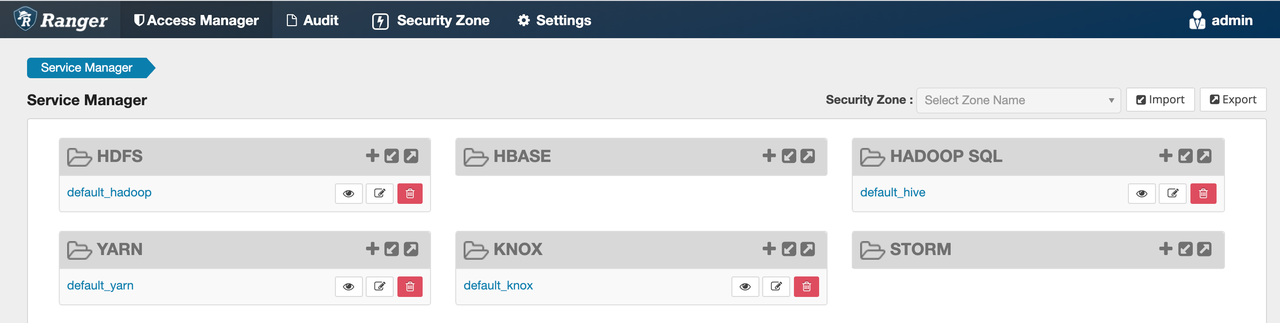
- Configure the data access policy Ranger Policy.
- Add the target user to the Ranger Policy.
General configuration: Spark configure Ranger parameters
Log in to EMR Console . In the left navigation bar of the console, click Resources > on ECS > Cluster Name to enter the specific cluster details page. Click the left Service list> Spark > Service parameterstab.
View
ranger-spark-audit.xml (Ranger Spark audit configuration file)andranger-spark-security.xml (Ranger Spark authentication configuration file). For parameter descriptions, see the parameter description table below.
ranger-spark-security.xml (Ranger Spark authentication configuration)Parameter name
Parameter value
Parameter description
xasecure.add-hadoop-authorizationtrue
Whether to overlay Hadoop native authorization; usually set to false
ranger.plugin.spark.policy.pollIntervalMs30000
Policy polling interval, unit: milliseconds, controls policy refresh frequency
ranger.plugin.spark.policy.rest.urlhttp://<RANGER_ADMIN_HOST>:6080Ranger Admin service address; Spark pulls permission policies from this address
ranger.plugin.spark.policy.source.implorg.apache.ranger.admin.client.RangerAdminRESTClientPolicy source implementation class; usually keep the default value
ranger.plugin.spark.policy.cache.dir/etc/ranger/<service-name>/policycachePolicy cache directory; policies are read from local cache when offline
ranger.plugin.spark.service.name<your-hive-service-name>Corresponding Hive Service name in Ranger. When submitting a Spark task, the Ranger Spark Plugin will look up and execute the corresponding permission policy under this Hive Service. The value entered is the Service name under the HADOOP SQL category in the Ranger console, usually default_hive.
ranger-spark-audit.xml (Ranger Spark audit configuration)
Parameter name
Parameter value
Parameter description
xasecure.audit.is.enabledtrue
Whether to enable Ranger audit; true means enabled
xasecure.audit.provider.summary.enabledfalse
Whether to enable audit log summary; merges identical operations to reduce log volume
xasecure.audit.destination.solrfalse
Whether to write audit logs to Solr
xasecure.audit.destination.elasticsearchtrue
Whether to write audit logs to Elasticsearch
xasecure.audit.destination.elasticsearch.urlshttp://<ES_HOST>:<ES_PORT>Elasticsearch address, such as http://host:9200
xasecure.audit.destination.elasticsearch.index<your-index-name>Elasticsearch index name
xasecure.audit.destination.elasticsearch.user<your-es-user>Elasticsearch authentication username; leave blank if no authentication
xasecure.audit.destination.elasticsearch.password<your-es-password>Elasticsearch authentication password
xasecure.audit.destination.elasticsearch.protocolhttps
Protocol type, such as http or https
xasecure.audit.destination.elasticsearch.port<ES_PORT>Elasticsearch port, such as 9200
xasecure.audit.destination.sparkfalse
Whether to write audit logs to Spark; usually set to false
Add the prefix
spark.uniformly to the parameters ofranger-spark-audit.xmlandranger-spark-security.xml. Configure them in the EMR Serverless Spark job or EMR Serverless Kyuubi Gateway parameters. After executing the job, Spark authentication and auditing will be completed.tip
Kyuubi Gateway Spark configuration entry: Queue details page>Gateway Management>Gateway details page>Parameter configuration. For more information, see Create and manage Kyuubi Gateway.
Example Spark parameters:
-- Ranger Admin (management) service address; Spark pulls permission policies from here
set spark.ranger.plugin.spark.policy.rest.url=http://<RANGER_ADMIN_HOST>:<RANGER_PORT>;

-- Corresponding Spark/Hive service name in Ranger; policies are matched by this name
set spark.ranger.plugin.spark.service.name=<RANGER_SERVICE_NAME>;

-- Ranger policy polling interval (milliseconds); 5000ms = refresh policies every 5 seconds
set spark.ranger.plugin.spark.policy.pollIntervalMs=5000;

-- Ranger policy retrieval implementation class; uses REST API to obtain policies from Ranger Admin
set spark.ranger.plugin.spark.policy.source.impl=org.apache.ranger.admin.client.RangerAdminRESTClient;

-- Ranger local policy cache directory; policies can be read from cache when network is interrupted
set spark.ranger.plugin.spark.policy.cache.dir=/etc/ranger/<RANGER_SERVICE_NAME>/policycache;

-- Enable Ranger audit log functionality
set spark.xasecure.audit.is.enable=true;

-- Enable audit log writing to the Elasticsearch (distributed search engine) destination
set spark.xasecure.audit.destination.elasticsearch=true;

-- Elasticsearch service address (IP or domain name)
set spark.xasecure.audit.destination.elasticsearch.urls=<ES_HOST>;

-- Elasticsearch index name for audit log writing
set spark.xasecure.audit.destination.elasticsearch.index=<ES_INDEX_NAME>;

-- Username for connecting to Elasticsearch
set spark.xasecure.audit.destination.elasticsearch.user=<ES_USERNAME>;

-- Password for writing audit logs to Elasticsearch
set spark.xasecure.audit.destination.elasticsearch.password=<YOUR_ES_PASSWORD>;

-- Communication protocol between audit logs and Elasticsearch (http or https)
set spark.xasecure.audit.destination.elasticsearch.protocol=http;

-- Elasticsearch service port
set spark.xasecure.audit.destination.elasticsearch.port=9200;
Scenario 1: Submitting a job via the queue's Kyuubi Gateway
tip
When the accessing party has enabled the general compute group of Kyuubi Gateway, the authentication party must disable the Kerberos service.
Access an EMR on ECS cluster without Kerberos enabled:
Connect to the Kyuubi Gateway of the EMR Serverless queue using Beeline and submit a job. For detailed information about the Kyuubi Gateway, see Connect to Kyuubi Gateway and Submit Job.
beeline -u "jdbc:hive2://192.168.214.X:10009/;?queue_name=<YOUR_QUEUE_NAME>;kyuubi.engine.share.level=connection;kyuubi.session.spark.version=4.1;hive.server2.proxy.user=<YOUR_ECS_USERNAME>" -n <YOUR_AK> -p <YOUR_SK>
Parameters | Note |
|---|---|
| Must be configured as the Endpoint (including port number) of the Kyuubi Gateway service. You can obtain the Endpoint information on the details page of the corresponding Gateway. |
| The network IP and port of Kyuubi Gateway. Enter the Kyuubi address from the Serverless Spark queue details page. |
| Name of the queue or compute group resource where the job runs.
|
| Engine share level: Connection means each connection exclusively uses a Spark Engine, providing the highest isolation. |
| Specify the Spark version used for this session. Enter the version number supported by the queue or compute group. |
| Proxy user. The actual identity executing the Spark job, that is, the ECS cluster user with permissions set in the Ranger Policy. Ranger performs permission checks based on this username. |
| The ECS cluster user with permissions set in the Ranger Policy. Ranger performs permission checks based on this username. |
| Access Key (AK) of the Serverless queue user |
| Secret Key (SK) of the Serverless queue user |
Scenario 2: The target cluster has Kerberos enabled, and the queue's general compute group submits a job,
- Configure the queue's Kerberos authentication information. Log in to the primary node of the EMR on ECS cluster, use the
vim /etc/krb5.confcommand to view thekrb5.conffile, copy the file, and paste it in the Queue Details > Kerberos Authentication Configuration box. Align with the ECS cluster krb5.conf. After completion, click Save. For detailed operations, see Log in to the cluster and Access a Kerberos cluster with Serverless Spark. - To submit a job, for example, to access a Kerberos-enabled cluster via the EMR Serverless queue general compute group, see the sample job:
-- Kerberos principal, in the format username@REALM, used for identity authentication
set spark.kerberos.principal=<YOUR_KERBEROS_PRINCIPAL>;

-- Path to the keytab (key table file) in TOS (object storage). Spark uses it to automatically complete Kerberos authentication; manual kinit is not required
set serverless.spark.kerberos.keytab.path=tos://<your-bucket>/<path>/<your-username>.keytab;

-- Enable SASL (security authentication layer) authentication for Hive Metastore (metadata service). Must be set to true in Kerberos scenarios
set spark.hive.metastore.sasl.enabled=true;

-- Kerberos principal of the HMS (Hive Metastore Service), used for mutual trust between Spark and HMS
set spark.hive.metastore.kerberos.principal=hive/<HMS_HOST>@<REALM>;

-- Only the Driver (driver node) uses the cross-VPC (private network) channel; the Executor (worker node) does not use the cross-VPC channel, saving subnet IP resources
set serverless.cross.vpc.driver.only.enabled = true;

-- Ranger Admin (management endpoint) service address. The Spark plugin pulls permission policies from here
set spark.ranger.plugin.spark.policy.rest.url=http://<RANGER_HOST>:<RANGER_PORT>;

-- Enable cross-VPC DNS resolution to ensure Serverless Spark can access the internal domain names of external clusters
set serverless.cross.vpc.dns.resolve.enabled = true;

-- Corresponding Spark/Hive service name in Ranger. Policies are matched by this name
set spark.ranger.plugin.spark.service.name=<RANGER_SERVICE_NAME>;

-- Ranger policy pull interval (milliseconds). 5000ms = refresh policies every 5 seconds
set spark.ranger.plugin.spark.policy.pollIntervalMs=5000;

-- Enable Ranger audit log functionality
set spark.xasecure.audit.is.enable=true;

-- Password for writing audit logs to Elasticsearch (distributed search engine)
set spark.xasecure.audit.destination.elasticsearch.password=<YOUR_ES_PASSWORD>;

-- Elasticsearch service port
set spark.xasecure.audit.destination.elasticsearch.port=9200;

-- Load the Ranger Spark authorization extension plugin to trigger permission verification before SQL execution
set spark.sql.extensions=org.apache.kyuubi.plugin.spark.authz.ranger.RangerSparkExtension;

-- Communication protocol between audit logs and Elasticsearch (http or https)
set spark.xasecure.audit.destination.elasticsearch.protocol=http;

-- Enable writing audit logs to the Elasticsearch destination
set spark.xasecure.audit.destination.elasticsearch=true;

-- Elasticsearch service address (IP or domain name)
set spark.xasecure.audit.destination.elasticsearch.urls=<ES_HOST>;

-- Name of the Elasticsearch index for writing audit logs
set spark.xasecure.audit.destination.elasticsearch.index=<ES_INDEX_NAME>;

-- Ranger policy fetch implementation class, uses REST API to obtain policies from Ranger Admin
set spark.ranger.plugin.spark.policy.source.impl=org.apache.ranger.admin.client.RangerAdminRESTClient;

-- Local cache directory for Ranger policies, policies can be read from the cache if the network is interrupted
set spark.ranger.plugin.spark.policy.cache.dir=/etc/ranger/<RANGER_SERVICE_NAME>/policycache;

-- Username for connecting to Elasticsearch
set spark.xasecure.audit.destination.elasticsearch.user=<ES_USERNAME>;

-- Test SQL: View all currently accessible databases
show databases
Scenario 3: The target cluster does not have Kerberos enabled, and the queue's general compute group submits a job
When the target cluster does not have Kerberos enabled, you need to specify the service User in the Spark parameters. Key parameters:
-- Driver node runs as this Spark user, and Ranger authorizes based on this username
spark.kubernetes.driverEnv.SPARK_USER=<YOUR_ECS_USERNAME>

-- Executor node runs as this Spark user, consistent with the Driver node
spark.executorEnv.SPARK_USER=<YOUR_ECS_USERNAME>

-- Driver node runs as this Hadoop user, and Ranger authorizes based on this username
spark.kubernetes.driverEnv.HADOOP_USER_NAME=<YOUR_ECS_USERNAME>

-- Executor node runs as this Hadoop user, consistent with the Driver node
spark.executorEnv.HADOOP_USER_NAME=<YOUR_ECS_USERNAME>
Sample job:
-- Ranger Admin service address, Spark plugin fetches permission policies from here
set spark.ranger.plugin.spark.policy.rest.url=http://<RANGER_HOST>:<RANGER_PORT>;

-- Enable cross-VPC (Virtual Private Cloud) DNS resolution to ensure Serverless Spark can access external cluster domain names
set serverless.cross.vpc.dns.resolve.enabled = true;

-- Corresponding Spark/Hive service name in Ranger, policies are matched by this name
set spark.ranger.plugin.spark.service.name=<RANGER_SERVICE_NAME>;

-- Driver node runs as this Hadoop user, and Ranger authorizes based on this username
set spark.kubernetes.driverEnv.HADOOP_USER_NAME=<YOUR_ECS_USERNAME>;

-- Executor node runs as this Spark user, consistent with the Driver node
set spark.executorEnv.SPARK_USER=<YOUR_ECS_USERNAME>;

-- Ranger policy fetch interval (milliseconds), 5000ms = refresh policies every 5 seconds
set spark.ranger.plugin.spark.policy.pollIntervalMs=5000;

-- Enable Ranger audit log feature
set spark.xasecure.audit.is.enable=true;

-- Password for writing audit logs to Elasticsearch (distributed search engine)
set spark.xasecure.audit.destination.elasticsearch.password=<YOUR_ES_PASSWORD>;

-- Elasticsearch service port
set spark.xasecure.audit.destination.elasticsearch.port=9200;

-- Load the Ranger Spark authorization extension plugin to trigger permission verification before SQL execution
set spark.sql.extensions=org.apache.kyuubi.plugin.spark.authz.ranger.RangerSparkExtension;

-- Executor node runs as this Hadoop user
set spark.executorEnv.HADOOP_USER_NAME=<YOUR_ECS_USERNAME>;

-- Communication protocol between audit logs and Elasticsearch (http or https)
set spark.xasecure.audit.destination.elasticsearch.protocol=http;

-- Enable writing audit logs to the Elasticsearch destination
set spark.xasecure.audit.destination.elasticsearch=true;

-- Elasticsearch service address (IP or domain name)
set spark.xasecure.audit.destination.elasticsearch.urls=<ES_HOST>;

-- Name of the Elasticsearch index for writing audit logs
set spark.xasecure.audit.destination.elasticsearch.index=<ES_INDEX_NAME>;

-- Ranger policy fetch implementation class, uses REST API to obtain policies from Ranger Admin
set spark.ranger.plugin.spark.policy.source.impl=org.apache.ranger.admin.client.RangerAdminRESTClient;

-- Driver node runs as this Spark user
set spark.kubernetes.driverEnv.SPARK_USER=<YOUR_ECS_USERNAME>;

-- Local cache directory for Ranger policies, policies can be read from the cache if the network is interrupted
set spark.ranger.plugin.spark.policy.cache.dir=/etc/ranger/<RANGER_SERVICE_NAME>/policycache;

-- Username for connecting to Elasticsearch. For audit log recording
set spark.xasecure.audit.destination.elasticsearch.user=<ES_USERNAME>;

-- Test SQL: Query all data in hivezmn table under test_spark_copy database
select * from test.hivedb;
In the Ranger Policy, user2 is prohibited from accessing row data
When using user2 to submit a job and access data, the job fails with an error. Check the job log:
