Terraform
Terraform


Document

- Documentation
 TerraformTerraform Tool GuideConfiguration guideTerraform command lineOther commands
 Copy page
 Download PDF
Terraform command line
Other commands
Copy pageDownload PDFOther commands
terraform validate
Used for quickly detecting syntax errors in configuration files. This command eliminates the need to run the terraform plan/apply command to identify error locations and causes.
- If no error is detected, the output is as follows:
- $ terraform validateSuccess! The configuration is valid.
- If any errors are detected, the output is as follows:
- $ terraform validateError: Missing required argumenton main.tf line 1, in resource "volcengine_vpc" "foo":1: resource "volcengine_vpc" "foo" {The argument "cidr_block" is required, but no definition was found.Error: Unsupported argumenton main.tf line 3, in resource "volcengine_vpc" "foo":3: cidr = "172.16.0.0/16"An argument named "cidr" is not expected here. Did you mean "id"?
terraform fmt
Used for formatting all .tf files in the current directory and its subdirectories for a unified coding style.
terraform graph
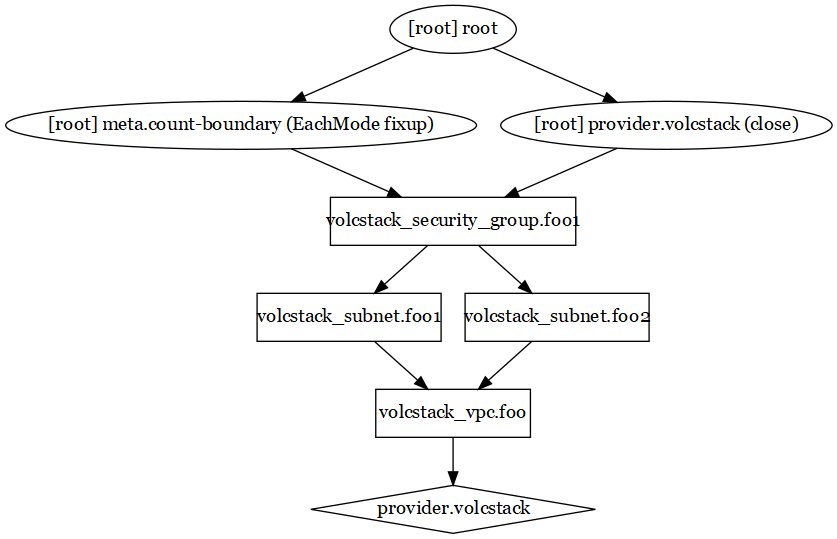
Used for outputting visualized dependency relationships between resources in DOT format according to configuration files and execution plans.
$ terraform graph
digraph {
compound = "true"
newrank = "true"
subgraph "root" {
"[root] provider.volcengine" [label = "provider.volcengine", shape = "diamond"]
"[root] volcengine_security_group.foo1" [label = "volcengine_security_group.foo1", shape = "box"]
"[root] volcengine_subnet.foo1" [label = "volcengine_subnet.foo1", shape = "box"]
"[root] volcengine_subnet.foo2" [label = "volcengine_subnet.foo2", shape = "box"]
"[root] volcengine_vpc.foo" [label = "volcengine_vpc.foo", shape = "box"]
"[root] meta.count-boundary (EachMode fixup)" -> "[root] volcengine_security_group.foo1"
"[root] provider.volcengine (close)" -> "[root] volcengine_security_group.foo1"
"[root] root" -> "[root] meta.count-boundary (EachMode fixup)"
"[root] root" -> "[root] provider.volcengine (close)"
"[root] volcengine_security_group.foo1" -> "[root] volcengine_subnet.foo1"
"[root] volcengine_security_group.foo1" -> "[root] volcengine_subnet.foo2"
"[root] volcengine_subnet.foo1" -> "[root] volcengine_vpc.foo"
"[root] volcengine_subnet.foo2" -> "[root] volcengine_vpc.foo"
"[root] volcengine_vpc.foo" -> "[root] provider.volcengine"
}
}
You can run the dot command to visualize the output result into a graph:
$ Install graphviz according to the operating system.
$ terraform graph | dot -Tsvg > test.svg
terraform import
Used for importing existing resources into the state file. The command is terraform import <RESOURCE_TYPE>.<RESOURCE_NAME> <RESOURCE_ID>.
$ terraform import volcengine_vpc.foo vpc-mjhlf3gs61hc5smt1ajya7ct
volcengine_vpc.foo: Importing from ID "vpc-mjhlf3gs61hc5smt1ajya7ct"...
volcengine_vpc.foo: Import prepared!
Prepared volcengine_vpc for import
volcengine_vpc.foo: Refreshing state... [id=vpc-mjhlf3gs61hc5smt1ajya7ct]
Import successful!
The resources that were imported are shown above. These resources are now in
your Terraform state and will henceforth be managed by Terraform.
terraform taint
Used for manually marking a resource as tainted. When you run the terraform apply command after marking the resource, Terraform deletes and rebuilds the resource. The command is terraform taint <RESOURCE_TYPE>.<RESOURCE_NAME>.
$ terraform taint volcengine_subnet.foo
Resource instance volcengine_subnet.foo has been marked as tainted.
If you run the terraform show command after marking the resource as tainted, you can find the state of the resource becomes tainted:
$ terraform show
...
# volcengine_subnet.foo: (tainted)
resource "volcengine_subnet" "foo" {
...
}
terraform untaint
Used for manually changing the state of a resource from tainted to normal. This command reverses the action of the terraform taint command. The command is terraform untaint <RESOURCE_TYPE>.<RESOURCE_NAME>.
$ terraform untaint volcengine_subnet.foo
Resource instance volcengine_subnet.foo has been successfully untainted.
terraform console
Used for opening the interactive console where you can try and test expressions and built-in functions.
$ terraform console
> length("Hello,world!")
12
Last updated: 2025.06.26 17:44:39
All rights reserved © Beijing Volcano Engine Technology Co., Ltd2024
