You need to enable JavaScript to run this app.
文档中心
AI 数据湖服务

AI 数据湖服务

复制全文
下载 pdf
最佳实践
方舟大模型系列调用教程
复制全文
下载 pdf
方舟大模型系列调用教程
本文介绍如何在 LAS 中访问火山方舟大模型服务平台提供的模型及操作示例:​
前提条件​
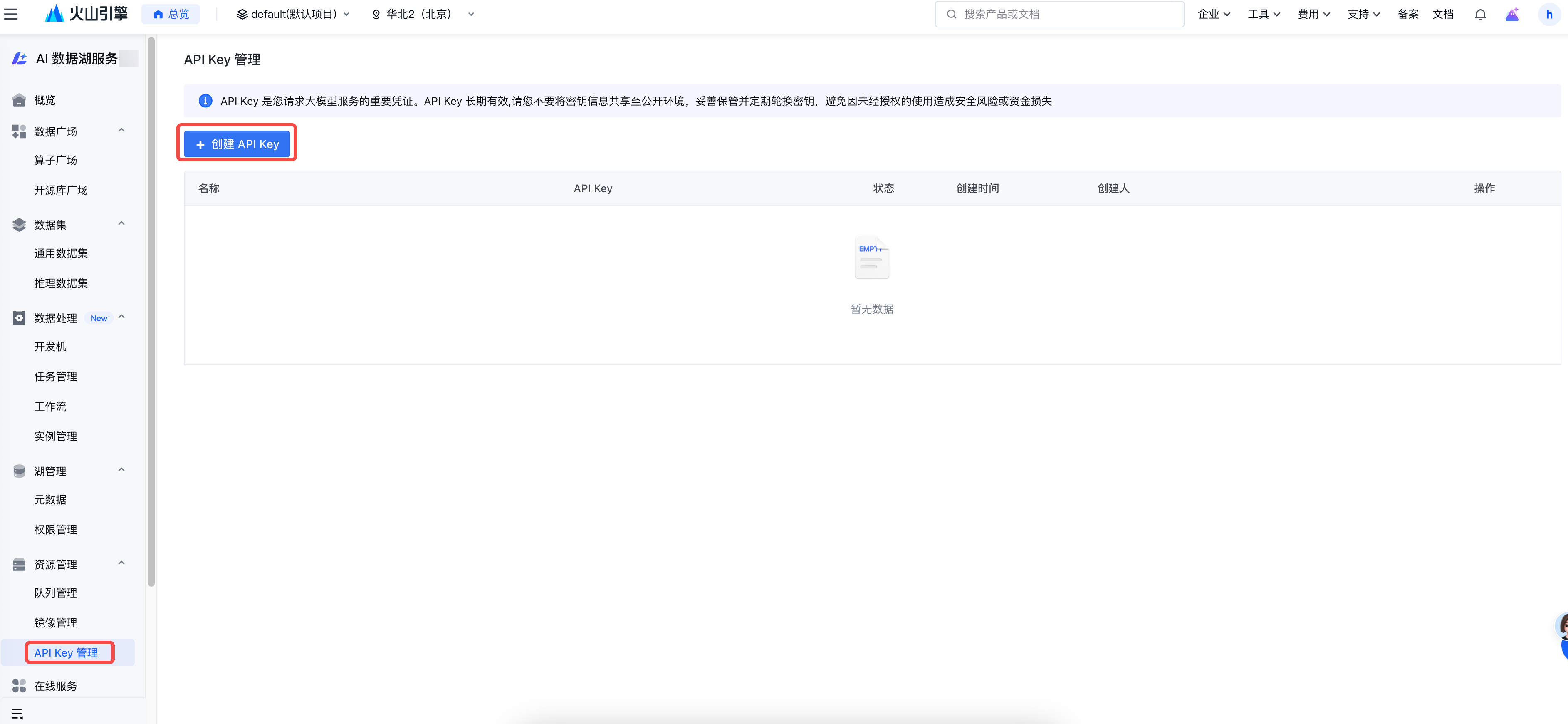
  • 在 AI 数据湖服务中创建 API KEY,并配置环境变量:LAS_API_KEY。​
​​​
  • 使用开发机方式调用豆包算子,请提前创建开发机,请参考创建开发机。​
  • 使用任务管理调用豆包算子,请提前创建任务,请参考任务管理。​
操作指导​
AI 数据湖服务(LAS)支持通过 API Key 管理模块注册并访问火山方舟提供的大模型(支持在 LAS 中访问的模型参考数据广场 - 算子广场 - 方舟大模型系列),涵盖深度思考、图文向量化等场景。​
以下将分别介绍具体使用方法,包括基础使用示例和参数介绍。​
说明​
当调用豆包系列模型时,若 version 字段未指定具体模型版本,如 "version": "260428",系统将默认使用火山方舟发布的最新模型版本。​
深度思考​
针对方舟上提供的深度思考模型,采用 AI 数据湖提供的算子,可以方便地对数据进行批量计算。支持的模型示例有:​
  • doubao-seed-2-0-mini-260428​
  • doubao-seed-2-0-lite-260428​
  • ......​
快速入门​
下面以模型 doubao-seed-2-0-mini-260428 为例进行介绍。登录开发机执行下面代码:​
​
from __future__ import annotations​
​
import daft​
from daft import col​
from daft.las.functions.ark_llm.ark_llm_thinking_vision import ArkLLMThinkingVision​
from daft.las.functions.udf import las_udf​
​
if __name__ == "__main__":​
# 需配置环境变量 LAS_API_KEY : LAS_API_KEY 通过在 AI 数据湖服务页面上创建获取​
queries = {​
"query": [​
"帮我规划5月去新疆的10天旅行安排",​
]​
}​
​
df = daft.from_pydict(queries)​
df = df.with_column(​
"llm_result",​
las_udf(​
ArkLLMThinkingVision,​
construct_args={​
"model": "doubao-seed-2-0-mini-260428",​
"multimodal_type": "text",​
"inference_type": "online",​
},​
)(col("query")),​
)​
​
df = df.with_column("reasoning_content", col("llm_result").struct.get("reasoning_content"))​
df = df.with_column("llm_result", col("llm_result").struct.get("llm_result"))​
​
output_pd_df = df.to_pandas()​
df.show()​
​
基础使用​
下面演示下,使用 doubao-seed-2-0-mini-260428 模型,对 TOS 中视频数据进行处理,输出视频路径、视频理解结果(llm_result)、思维链(reasoning_content),并将结果保存到 TOS 中。​
​
from __future__ import annotations​
​
import os​
​
import ray​
​
import daft​
from daft import col​
from daft.las.functions.ark_llm.ark_llm_thinking_vision import ArkLLMThinkingVision​
from daft.las.functions.udf import las_udf​
from daft.las.io.tos import TOSConfig​
​
# 下面两行,是将单机程序转化为分布式任务提交到 Ray 集群中。在“任务管理”执行时需要下面 2 行内容。开发机调试无需下面 2 行。​
ray.init()​
daft.context.set_runner_ray("ray://127.0.0.1:10001")​
​
def run_pipeline(input_tos_dir, output_tos_path):​
input_s3_dir = input_tos_dir.rstrip('/') ​
tos_config = TOSConfig.from_env()​
io_config = daft.io.IOConfig(s3=tos_config.to_s3_config())​
​
# 加载 TOS 上的「input_s3_dir」路径下的所有 mp4 文件​
df = daft.from_glob_path(​
f"{input_s3_dir}/*.mp4",​
io_config=io_config,​
)​
​
# 调用 ArkLLMThinkingVision 函数,对每个视频文件进行推理​
df = df.with_column(​
"response",​
las_udf(​
ArkLLMThinkingVision,​
construct_args={​
"model": "doubao-seed-2-0-mini-260428",​
"multimodal_type": "video",​
"prompt": "视频里有什么?",​
"inference_type": "online",​
},​
)(col("path")),​
)​
​
# 从推理结果中提取 reasoning_content 和 llm_result 字段​
df = df.with_column("reasoning_content", col("response").struct.get("reasoning_content"))​
df = df.with_column("llm_result", col("response").struct.get("llm_result"))​
​
# 选择需要的字段​
df = df.select("path", "llm_result", "reasoning_content")​
​
# 写入 TOS 上的「output_tos_path」路径​
df.write_csv(output_tos_path, io_config=io_config)​
​
if __name__ == "__main__":​
input_tos_dir = os.getenv("input_tos_dir", "input_tos_dir").replace("tos://", "s3://", 1)​
output_tos_path = os.getenv("output_tos_path", "output_tos_path").replace("tos://", "s3://", 1)​
run_pipeline(input_tos_dir, output_tos_path)​
​
设置环境变量:​
​
# TOS配置参数,由于数据是放在TOS,需要配置TOS的参数信息​
export TOS_ENDPOINT="https://tos-cn-beijing.ivolces.com"​
export LAS_TOS_ACCESS_KEY="xxx"​
export LAS_TOS_SECRET_KEY="xx="​
export LAS_API_KEY="xxx"​
​
# TOS上输入文件路径​
export input_tos_dir="xx"​
# TOS上输出文件路径​
export output_tos_path="xx"​
​
​
操作步骤​
  • 在开发机中调试步骤:​
  1. 在开发机中, 将上述代码保存到某个路径中,示例 doubao_think_demo.py​
  1. 将本次实践所需的视频数据存入 TOS 并在代码中配置文件路径​
  1. 设置上述环境变量,在input_tos_dir中配置视频数据所在的 TOS 地址​
  1. 在开发机中调试上述代码:python doubao_think_demo.py​
  1. 将上述开发机任务通过 LAS 控制台 > 数据处理 > 开发机创建自定义镜像(保存镜像)。配置命名空间、镜像名称、版本、开发机等参数将镜像存放至火山镜像仓库​
  1. 在任务管理中创建任务,选择自定义镜像或在火山镜像仓库中找到上述镜像的保存路径,配置脚本执行命令,完成后创建该任务​
  1. 在任务管理中执行任务,在实例管理中通过日志和 Daft UI 查看任务的进展。​
常用参数介绍​
上述示例中,ArkLLMThinkingVision 类用于访问方舟内的模型进行推理。请求体、使用方式以及请求参数配置说明如下:​
​
las_udf(​
ArkLLMThinkingVision,​
construct_args={​
"model": "doubao-seed-2-0-mini-260428",​
"multimodal_type": "video",​
"prompt": "视频里有什么?",​
"inference_type": "online",​
},​
)​
​
​
参数名​
是否必填​
默认值​
参数解释​
示例​
model​
是​
​
  • 模型名称​
doubao-seed-2-0-mini-260428​
version​
否​
模型的最新版本​
模型版本​
260428​
multimodal_type​
否​
image​
媒体内容类型,指定处理的是图像、视频、还是文本数据。可选值:​
  • image:图片​
  • video:视频​
  • text:文本​
video​
system_text​
否​
​
系统提示内容,以 system 角色作为模型的输入​
你是一位专业的视频内容策划助手​
prompt​
否​
​
用户提示词,用于指导模型的行为。配置该字段时,会和输入的文本拼接,以 user 角色方式输入给模型。同时,该字段也可以配置为{query},此时,输入的文本会替换掉该字段.​
视频里有什么?​
inference_type​
否​
batch​
推理类型,支持在线推理和批量推理。​
  • online: 采用方舟平台提供的在线推理模块进行推理​
  • batch:采用方舟平台提供的批量推理模块进行推理​
建议白天采用 online 模式。​
online​
​
其他参数的解释,请参考 AI 数据湖算子广场中的介绍。​
图文向量化​
针对方舟上提供的图文向量化模型,采用 AI 数据湖提供的算子,很方便对数据进行批量计算。支持的模型示例有:​
  • doubao-embedding-vision​
  • ......​
快速入门​
​
from __future__ import annotations​
​
import os​
​
import daft​
from daft import col​
from daft.las.functions.ark_llm.doubao_embedding_vision import DoubaoEmbeddingVision​
from daft.las.functions.udf import las_udf​
​
if __name__ == "__main__":​
# 需配置环境变量 LAS_API_KEY : LAS_API_KEY 通过在 LAS 服务页面上创建获取​
TOS_TEST_DIR = os.getenv("TOS_TEST_DIR", "tos_bucket")​
samples = {​
"image_path": [f"tos://{TOS_TEST_DIR}/doubao_embedding_vision/cat_ip_adapter.jpeg"],​
"text": ["猫"],​
}​
​
df = daft.from_pydict(samples)​
# 计算图片和文本的向量化数据​
df = df.with_column(​
"embedding_for_image_text",​
las_udf(​
DoubaoEmbeddingVision,​
construct_args={​
"image_format": "jpeg",​
},​
)(col("image_path"), col("text")),​
)​
​
# 计算图片向量化数据​
df = df.with_column(​
"embedding_for_image",​
las_udf(​
DoubaoEmbeddingVision,​
construct_args={​
"image_format": "jpeg",​
},​
)(col("image_path")),​
)​
​
# 计算文本向量化数据​
df = df.with_column(​
"embedding_for_text",​
las_udf(​
DoubaoEmbeddingVision,​
construct_args={​
"multimodal_type": "text",​
},​
)(col("text")),​
)​
df.show()​
​
常用参数介绍​
上述示例中,DoubaoEmbeddingVision 类用于访问方舟内的模型进行推理。请求体、使用方式以及请求参数配置说明如下:​
​
las_udf(​
DoubaoEmbeddingVision,​
construct_args={​
"multimodal_type": "text",​
},​
)​
​
​
参数名​
是否必填​
默认值​
参数解释​
示例​
model​
否​
doubao-embedding-vision​
模型名称。实际支持的模型列表以对应算子文档为准,当前可参考图文 embedding(豆包系列模型)。​
doubao-embedding-vision​
version​
否​
模型最新的版本​
模型版本​
250615​
multimodal_type​
否​
image​
媒体内容类型,指定处理的是图像、视频、还是文本数据。可选值:​
  • image:图片​
  • video:视频​
  • text:文本​
video​
​
其他参数的解释,请参考 AI 数据湖算子广场中的介绍。​
​
最近更新时间:2026.11.02 20:28:21
这个页面对您有帮助吗?
有用
有用
无用
无用