RDS for PostgreSQL
RDS for PostgreSQL


Document

- Documentation
 RDS for PostgreSQL Best practicesBuilding an intelligent interactive Q&A system based on RDS for PostgreSQL
 Copy page
 Download PDF
Best practices
Building an intelligent interactive Q&A system based on RDS for PostgreSQL
Copy pageDownload PDFBuilding an intelligent interactive Q&A system based on RDS for PostgreSQL
This topic describes how to implement an enterprise-level smart interactive Q&A system with RDS for PostgreSQL and a large language model (LLM). It explains the rationale of the system, the PostgreSQL vectorized storage and retrieval techniques, and interaction techniques of the LLM.
Background
In the era of big data, enterprises have established their own knowledge bases and provided retrieval methods to query knowledge. However, as the wiki content grows in size, common search methods are increasingly overwhelmed by the massive volumes of data, becoming slower and less efficient to present the results needed. The emergence of AI-generated content (AIGC) such as ChatGPT opens up a smarter way of knowledge retrieval, that is, Q&A, featuring higher efficiency and accuracy and a better user experience in many aspects.
However, aigc exhibits obvious limitations for enterprises in specific vertical fields, including the longer training period of large models and lack of expertise in specific fields. these limitations often lead to ai "hallucinations" (that is, complete nonsense from the ai). To address this issue, the following two methods are generally adopted:
- Fine Tune method: "tames" the large language model.
- In this method, supervised fine-tuning is made on the large language models to distill results leveraging field-specific knowledge. it features high flexibility, but requires much computing power and human resources, with a high overall cost. besides, enterprises are required to constantly monitor and update the model to keep it up to date with the latest field-specific knowledge. This approach is highly flexible but requires substantial computing power and talent resources, resulting in high overall costs. In addition, enterprises need to continuously monitor and update models to stay aligned with evolving domain knowledge.
- Prompt Engineering method: Transform "yourself".
- This method is based on vector databases along with sufficient conversational context and reference materials. It refines the Q&A questions (prompts) that interact with the large language model. In essence, it combines inductive reasoning of the large language model with vectorized information retrieval to quickly build a Q&A system that can understand specific contexts and logic. This method is relatively cost-effective.
Next, this article demonstrates how to use RDS for PostgreSQL as a vector database with the Prompt Engineering method.
Core concepts and rationale
Core concept: Vector embedding
Vector embedding is a widely used concept in natural language processing and machine learning. Various texts, images, or other signals can be converted into vectorized embeddings through certain algorithms. In vector space, similar words or signals are closer together. This property represents the relationship and similarity between words or signals. Vector embedding is a widely used concept in natural language processing and machine learning. Different types of texts, images, and other signals can be converted into vectorized embeddings through certain algorithms. In a vector space, similar words or signals are closer in distance. This feature makes vector space suitable to represent the relationship and similarity between words or signals. For example, to convert the following three sentences into two-dimensional vectors (x, y) through a certain vectorized modeling algorithm, we can first mark the positions of these vectors in a coordinate system, and their distances in the two-dimensional coordinate system show their similarity. Specifically, the closer the distance, the more similar the content.as shown in the figure below: The details are as follows:
“今天天气真好,我们出去放风筝吧”
“今天天气真好,我们出去散散步吧”
“这么大的雨,我们还是在家呆着吧”

Prompt engineering process principles
As mentioned above, users need to continuously adjust input prompts to obtain professional answers in the relevant field. The closer the input prompts are to the question, the more professional the output by the model. The closer the input prompts are to the question, the more professional the output by the model.
The prompt engineering process is shown in the following figure:
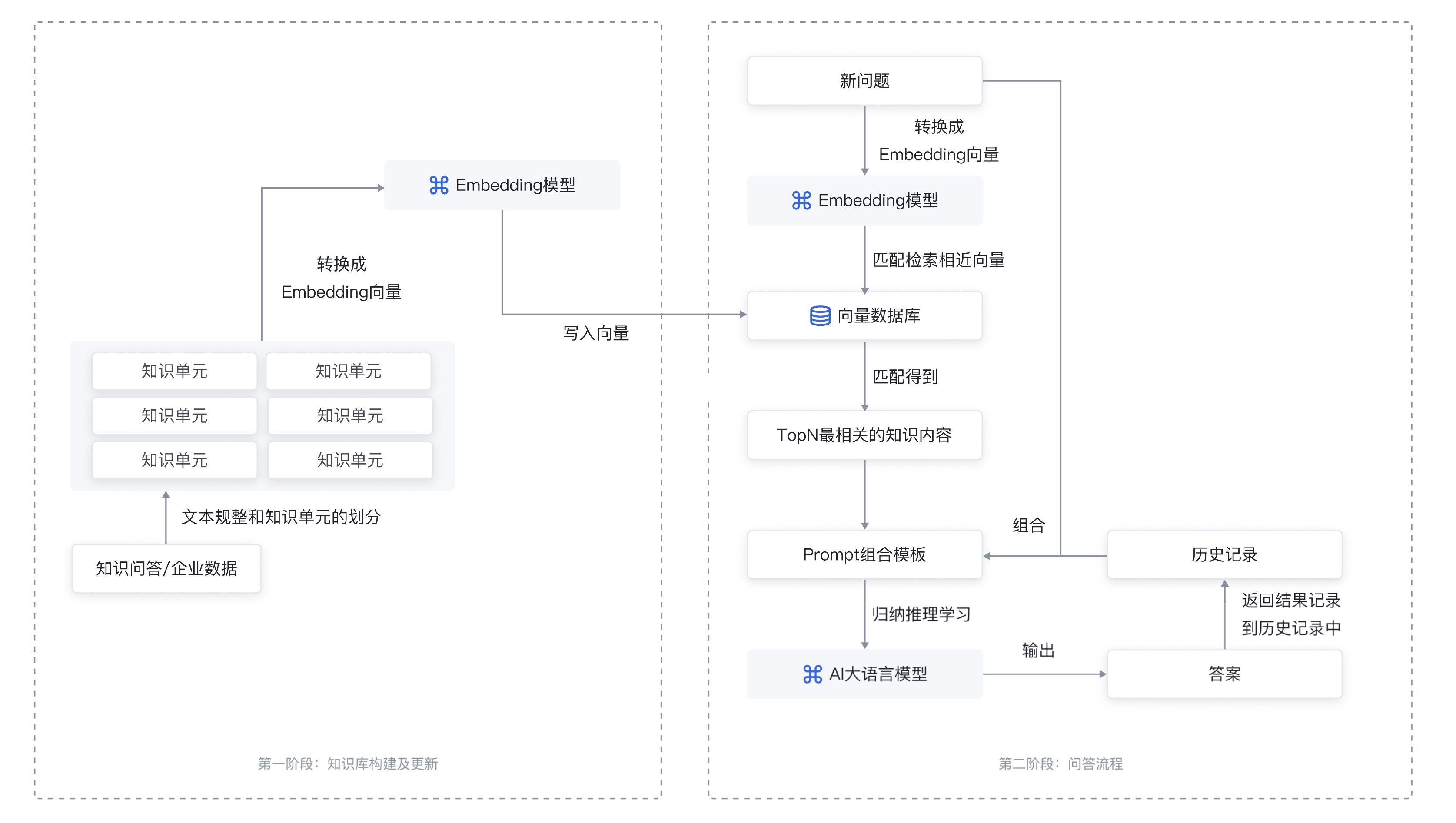
The prompt engineering workflow can be roughly divided into two stages: building an enterprise-specific vectorized knowledge base + questions and answers.
- This section demonstrates the process of building an enterprise-specific "Database Advisor" Q&A system as an example.
- All documents in the enterprise's wiki are divided into segments of appropriate sizes and then transformed into embeddings with the embedding transformation algorithm, such as OpenAI's modeling API and stored in the vectorized database of RDS for PostgreSQL.
-
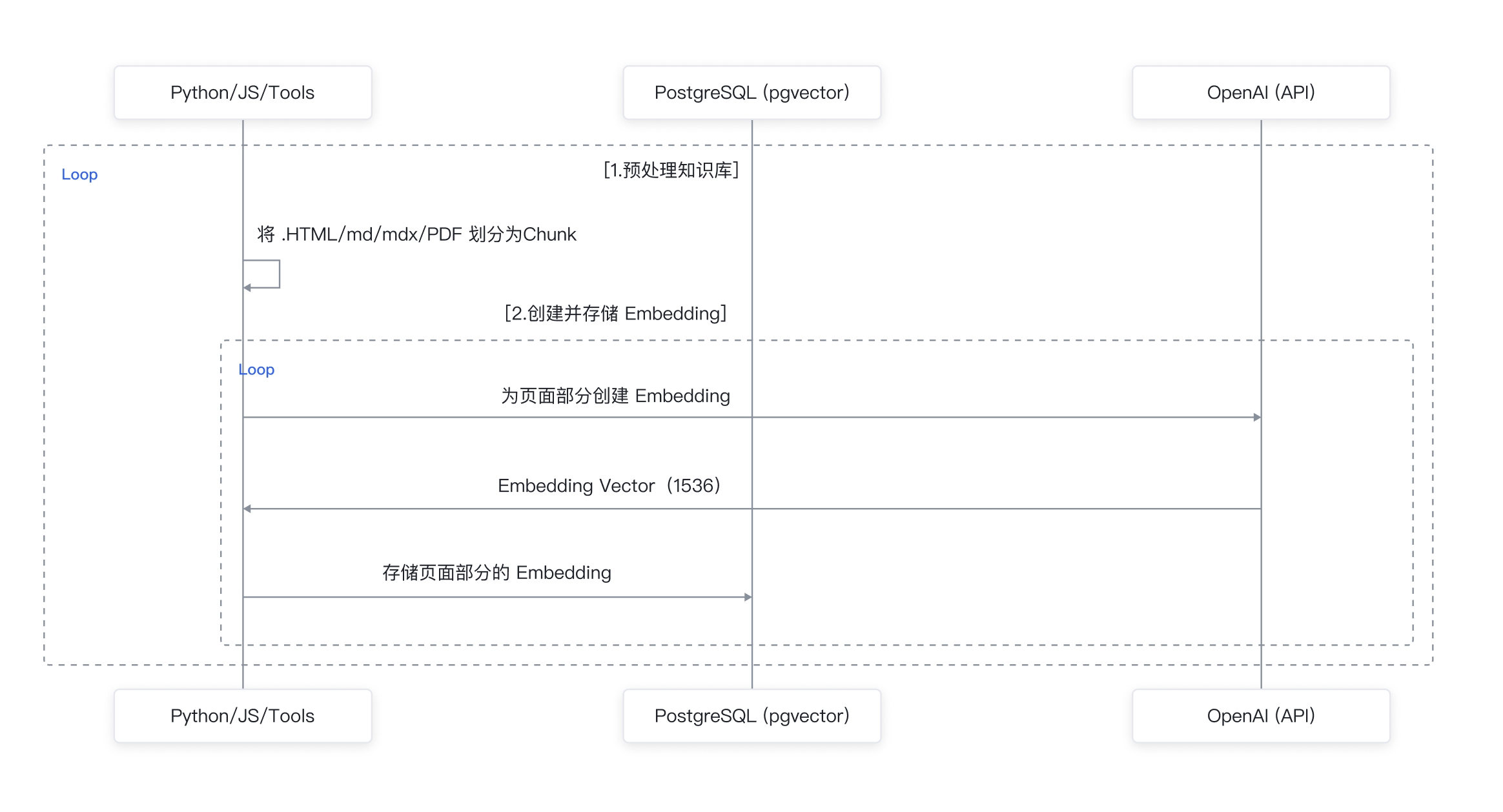
- 2 Questions and answers
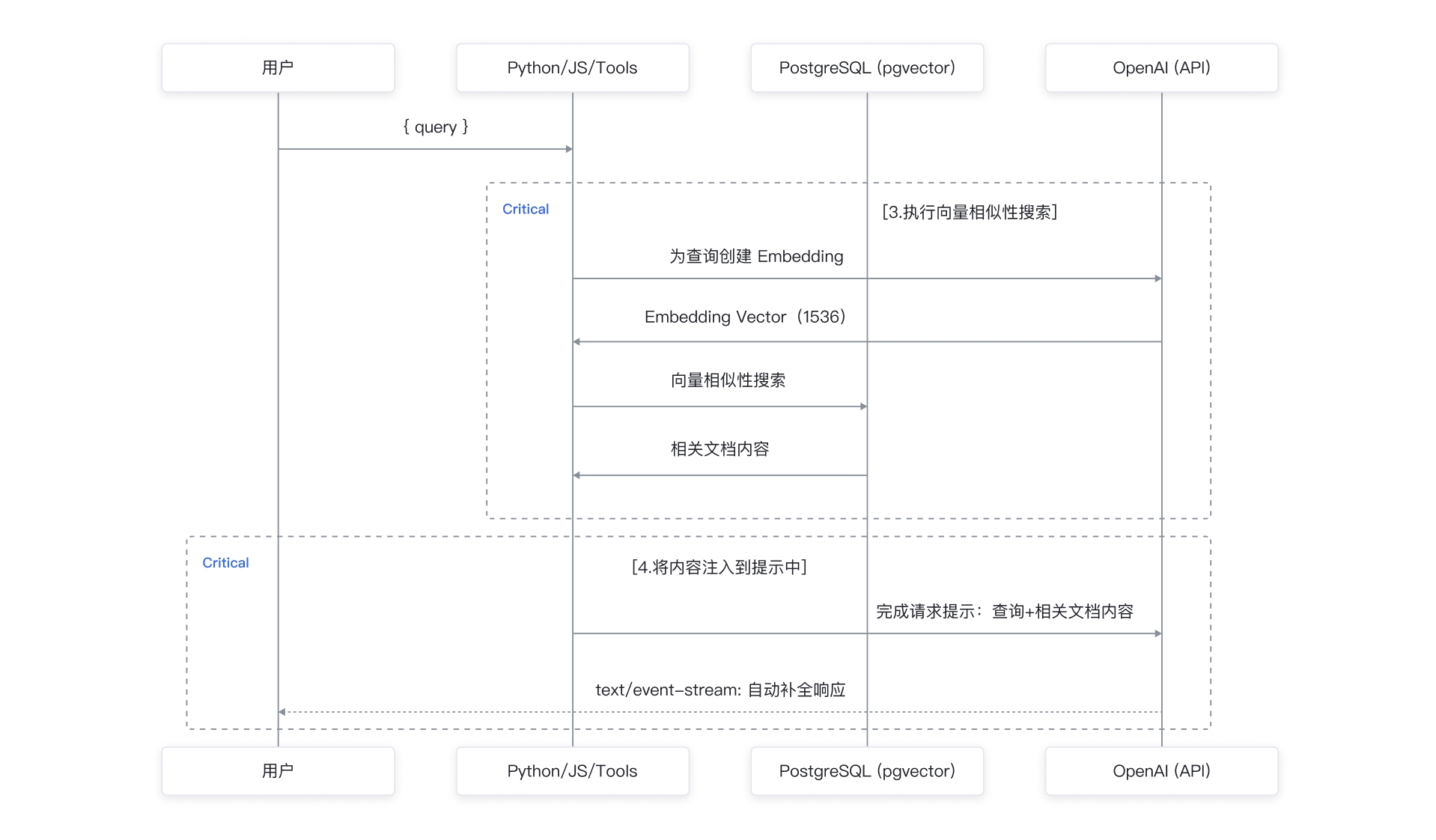
- First, the Q&A system receives the user's questions and converts the questions into embeddings for similarity searches in vectorized questions to retrieve the most relevant top N knowledge units. The system then pieces together the questions, the most relevant top N knowledge units, and chat history into a new question by using a prompt template. The large language model understands the optimized question and returns the relevant result. The system finally returns the result to the user. The process is shown in the figure below:
-
Advantages of RDS for PostgreSQL as a vector database
With the pg_vector extension provided by RDS for PostgreSQL, you can build a vector database optimized for efficient storage and retrieval of vectors. Compared with other vector databases, the vector database built on RDS for PostgreSQL has the following advantages:
- Easy to get started: A database instance is all you need to build a special-purpose vector database, without engaging professional AI experts or building other large-scale, complex distributed clusters. Its API is compatible with the current SQL syntax and does not require customized scheduling of frameworks or endpoints.
- Cost-effective: The existing database instances can be used, without the need to additionally purchase massive cluster resources.
- Real-time data updates and availability: Vector data can be added and updated within milliseconds while retaining the transaction properties, saving your worries about data disorder.
- Supporting high concurrency and easy scaling: RDS for PostgreSQL supports several thousand TPS in vectorized scenarios. You can scale up read-only nodes with one click to address performance bottlenecks and increase the overall throughput easily and instantly.
- Supporting high vector dimensions: pg_vector also supports high vector dimensions. Supports up to 16,000-dimension vectors, meeting most vector storage and usage scenarios.
Prerequisites
- An ECS instance has been created, or a local host with a Linux environment installed is used as the client to access the database.
- The OpenAI secret API key is ready and OpenAI is available in your network environment.
Training procedure
This section demonstrates the process of building an enterprise-specific "Database Advisor" Q&A system as an example. The knowledge base example used is the PostgreSQL 15 official documentation, attached at the end of this topic.
tip
The environment is built based on Debian 9.13. Dependency package installation may slightly vary among different environments.
The following process includes two main script files: the knowledge base construction script generate-embeddings.ts attached at the end of the document, and the Q&A script queryGPT.py shown in the example code of 2.2 asking and answering section. It is recommended to organize the project directory as follows:
.
├── package.json // ts依赖包
├── docs
│ ├── PostgreSQL15.mdx // 知识库文档
├── script
│ ├── generate-embeddings.ts // 构建知识库
│ ├── queryGPT.py // 问答脚本
Learning stages
1.1 Creating PostgreSQL instance
Log in to the RDS for PostgreSQL console to create an instance, then create a database and account. For detailed information on creating a PostgreSQL instance, database, and account, refer to RDS for PostgreSQL quick guide
1.2 Creating extension
Go to the test database and create a pg_vector extension.
create extension if not exists vector;
Create the database and table, where the embedding field in the doc_chunks table refers to the vector of the knowledge segment.
-- record document information
create table docs (
id bigserial primary key,
-- parent document ID
parent_doc bigint references docs,
-- document path
path text not null unique,
-- document checksum
checksum text
);
-- record chunk information
create table doc_chunks (
id bigserial primary key,
doc_id bigint not null references docs on delete cascade, -- document ID
content text, -- chunk content
token_count int, -- quantity of tokens in chunk
embedding vector(1536), -- embedding vector converted from chunk
slug text, -- unique identifier generated for title
heading text -- title
);
1.3 Building vector knowledge base
On the client machine, split the knowledge base document content into appropriately sized segments, convert them into embedding vectors through OpenAI's embedding API, and store them in the database. Refer to the script generate-embeddings.ts (see the attachment at the end).
warning
This script only supports markdown format files.
- Install pnpm.
- curl -fsSL https://get.pnpm.io/install.sh | sh -
- Install nodejs. For more information, refer to NodeSource Node.js Binary Distributions.
- sudo apt-get updatesudo apt-get install -y ca-certificates curl gnupgsudo mkdir -p /etc/apt/keyringscurl -fsSL https://deb.nodesource.com/gpgkey/nodesource-repo.gpg.key | sudo gpg --dearmor -o /etc/apt/keyrings/nodesource.gpgNODE_MAJOR=16echo "deb [signed-by=/etc/apt/keyrings/nodesource.gpg] https://deb.nodesource.com/node_$NODE_MAJOR.x nodistro main" | sudo tee /etc/apt/sources.list.d/nodesource.listsudo apt-get updatesudo apt-get install nodejs -y
- Install typescript dependency (package.json).
- pnpm run setuppnpm install tsx
- Modify generate-embeddings.ts, set the OpenAI key, PostgreSQL concatenated string, and markdown document directory.
- #这里需要将 user、passwd、127.0.0.1、5432 替换为实际数据库用户、密码、数据库地址、端口const postgresql_url = 'pg://user:passwd@127.0.0.1:5432/database';const openai_key = '-------------';const SOURCE_DIR = path.join(__dirname, 'document path');
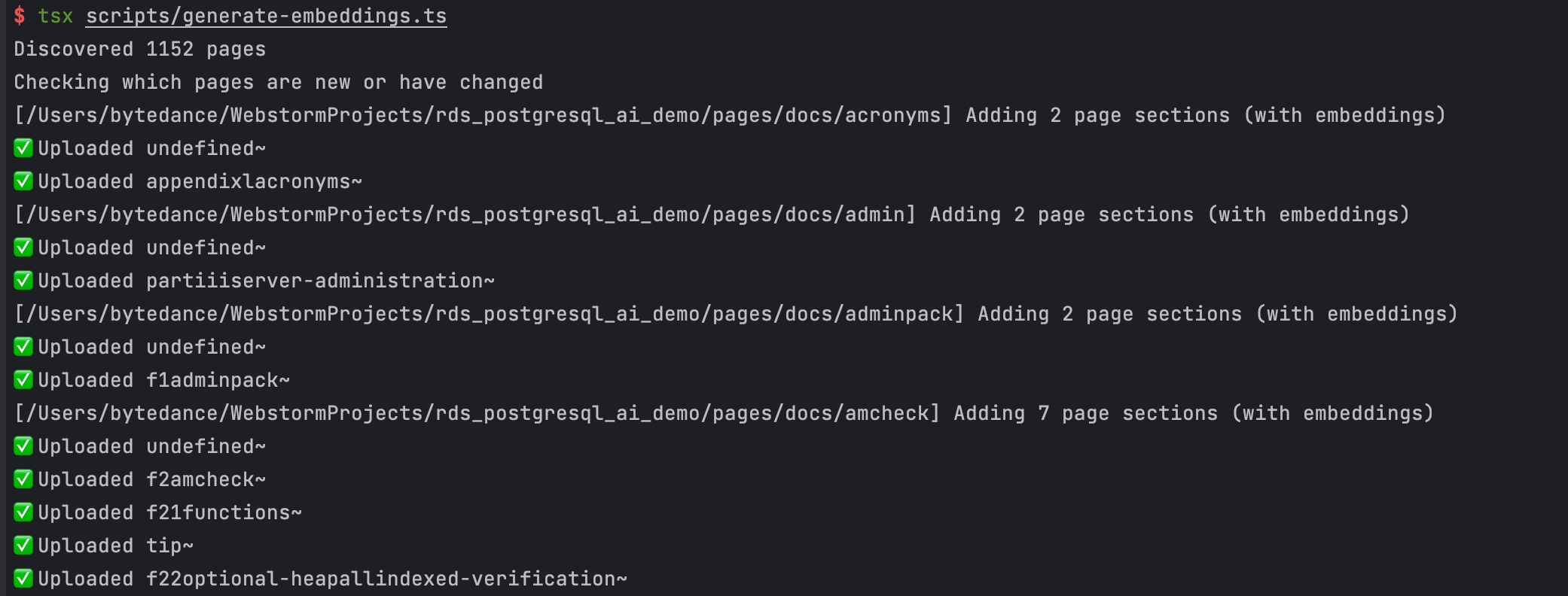
- Run the script to generate the document vector embedding and insert it into the database.
- pnpm tsx script/generate-embeddings.ts
The running process is shown in the figure below:
View the built wiki and search for the docs table:

Earch for the docs_chunk table to check whether the vectors are batch imported successfully:
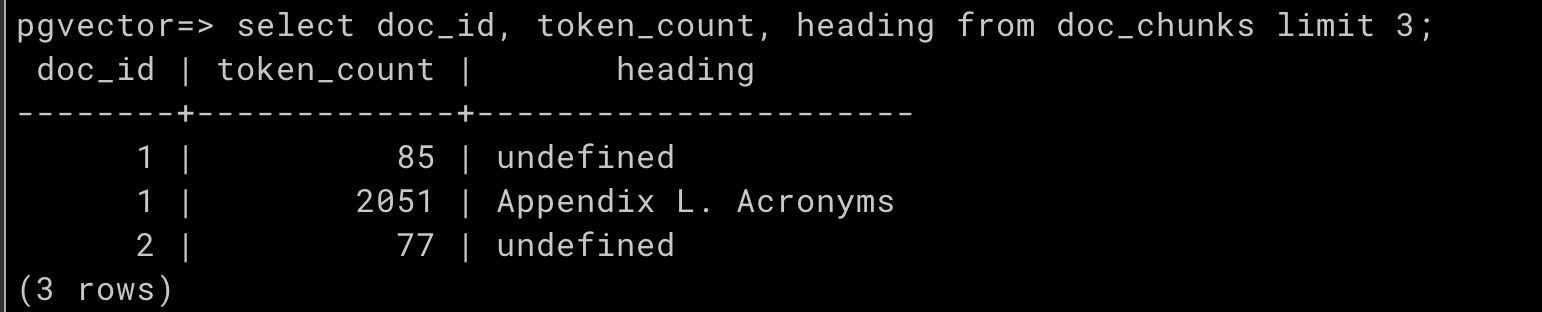
2. Q&A phase
2.1 Create similarity calculation functions
To facilitate application use, use the custom functions feature of PostgreSQL to create functions built into the database. The application only needs to call PostgreSQL, and this function can retrieve vector matching results within the application. The example uses "inner product" to calculate vector similarity.
create or replace function match_chunks(chunck_embedding vector(1536), threshold float, count int, min_length int)
returns table (id bigint, content text, similarity float)
language plpgsql
as $$
begin
return query
select
doc_chunks.id,
doc_chunks.content,
(doc_chunks.embedding <#> chunck_embedding) * -1 as similarity
from doc_chunks
-- chunk content exceeds the set length
where length(doc_chunks.content) >= min_length
-- The dot product is negative because of a Postgres limitation, so we negate it
and (doc_chunks.embedding <#> chunck_embedding) * -1 > threshold
order by doc_chunks.embedding <#> chunck_embedding
limit count;
end;
$$;
2.2 Questions and answers
The following Python program receives questions and implements the "Q&A" function of prompt engineering as described above. Then it sends the answer integrating "logical thinking" + "in-depth field-specific knowledge" to the user.
import os, psycopg2, openai
def query_handler(query = None):
if query is None or query == "":
print('请输入有效问题')
return
query = query.strip().replace('\n', ' ')
embedding = None
try:
# Use GPT to convert questions into embedding vectors
response = openai.Embedding.create(
engine="text-embedding-ada-002", # Fixed to text-embedding-ada-002
input=[query],
)
embedding = response.data[0].embedding
except Exception as ex:
print(ex)
return
content = ""
con = None
try:
# Configure postgres and connect to the database
# host:127.0.0.1,port:5432,user:test,password:test,database:test
params = postgresql_url.split(',')
database, user, password, host, port = "test", "test", "test", "127.0.0.1", "5432"
for param in params:
pair = param.split(':')
if len(pair) != 2:
print('POSTGRESQL_URL error: ' + postgresql_url)
return
k, v = pair[0].strip(), pair[1].strip()
if k == 'database':
database = v
elif k == 'user':
user = v
elif k == 'password':
password = v
elif k == 'host':
host = v
elif k == 'port':
port = v
# connect postgres
con = psycopg2.connect(database=database, user=user, password=password, host=host, port=port)
cur = con.cursor()
# query several chunks closest to the question from the database
sql = "select match_chunks(\'[" + ','.join([str(x) for x in embedding]) + "]\', 0.78, 5, 50)"
cur.execute(sql)
rows = cur.fetchall()
for row in rows:
row = row[0][1:-2].split(',')[-2][1:-2].strip()
content = content + row + "\n---\n"
except Exception as ex:
print(ex)
return
finally:
if con is not None:
con.close()
try:
# organize the question and chunk content, send to GPT
prompt = '''Pretend you are GPT-4 model , Act an database expert.
I will introduce a database scenario for which you will provide advice and related sql commands.
Please only provide advice related to this scenario. Based on the specific scenario from the documentation,
answer the question only using that information. Please note that if there are any updates to the database
syntax or usage rules, the latest content shall prevail. If you are uncertain or the answer is not explicitly
written in the documentation, please respond with "I'm sorry, I cannot assist with this.\n\n''' + "Context sections:\n" + \
content.strip().replace('\n', ' ') + "\n\nQuestion:\"\"\"" + query.replace('\n', ' ') + "\"\"\"\n\nAnswer:"
print('\n正在处理,请稍后。。。\n')
response = openai.ChatCompletion.create(
engine="gpt_openapi", # fixed to gpt_openapi
messages=[
{"role": "user", "content": prompt}
],
model="gpt-35-turbo",
temperature=0,
)
print('回答:')
print(response['choices'][0]['message']['content'])
except Exception as ex:
print(ex)
return
os.environ['OPENAI_KEY'] = '-----------------------'
os.environ['POSTGRESQL_URL'] = 'host:127.0.0.1,port:5432,user:test,password:test,database:test'
openai_key = os.getenv('OPENAI_KEY')
postgresql_url = os.getenv('POSTGRESQL_URL')
# openai config
openai.api_type = "azure"
openai.api_base = "https://example-endpoint.openai.azure.com"
openai.api_version = "2023-XX"
openai.api_key = openai_key
def main():
if openai_key is None or postgresql_url is None:
print('Missing environment variable OPENAI_KEY, POSTGRESQL_URL(host:127.XX.XX.XX,port:5432,user:XX,password:XX,database:XX)')
return
print('我是您的PostgreSQL AI助手,请输入您想查询的问题,例如:\n1、如何创建table?\n2、给我解释一下select语句?\n3、如何创建一个存储过程?')
while True:
query = input("\n输入您的问题:")
query_handler(query)
if __name__ == "__main__":
main()
Using the script
Using the script requires completing the following steps:
- The OpenAI key and PG concatenated string in the above snippet should be updated to the correct key and concatenated string:
- os.environ['OPENAI_KEY'] = '-----------------------'os.environ['POSTGRESQL_URL'] = 'host:127.0.0.1,port:5432,user:test,password:test,database:test'
- Modify the GPT parameters:
- openai.api_type = "azure"openai.api_base = "https://example-endpoint.openai.azure.com"openai.api_version = "2023-XX"
- Modify the bot's self-introduction to give the user a quick overview of the bot's specialized expertise. The self-introduction here explains the role of the bot as a database expert.
- prompt = '''Pretend you are GPT-4 model , Act an database expert.I will introduce a database scenario for which you will provide advice and related sql commands.Please only provide advice related to this scenario. Based on the specific scenario from the documentation,answer the question only using that information. Please note that if there are any updates to the databasesyntax or usage rules, the latest content shall prevail. If you are uncertain or the answer is not explicitlywritten in the documentation, please respond with "I'm sorry, I cannot assist with this.\n\n''' + "Context sections:\n" + \content.strip().replace('\n', ' ') + "\n\nQuestion:\"\"\"" + query.replace('\n', ' ') + "\"\"\"\n\nAnswer:"
- Install script dependency:
- pip install psycopg2-binarypip install openaipip install 'openai[datalib]'
Verify the script
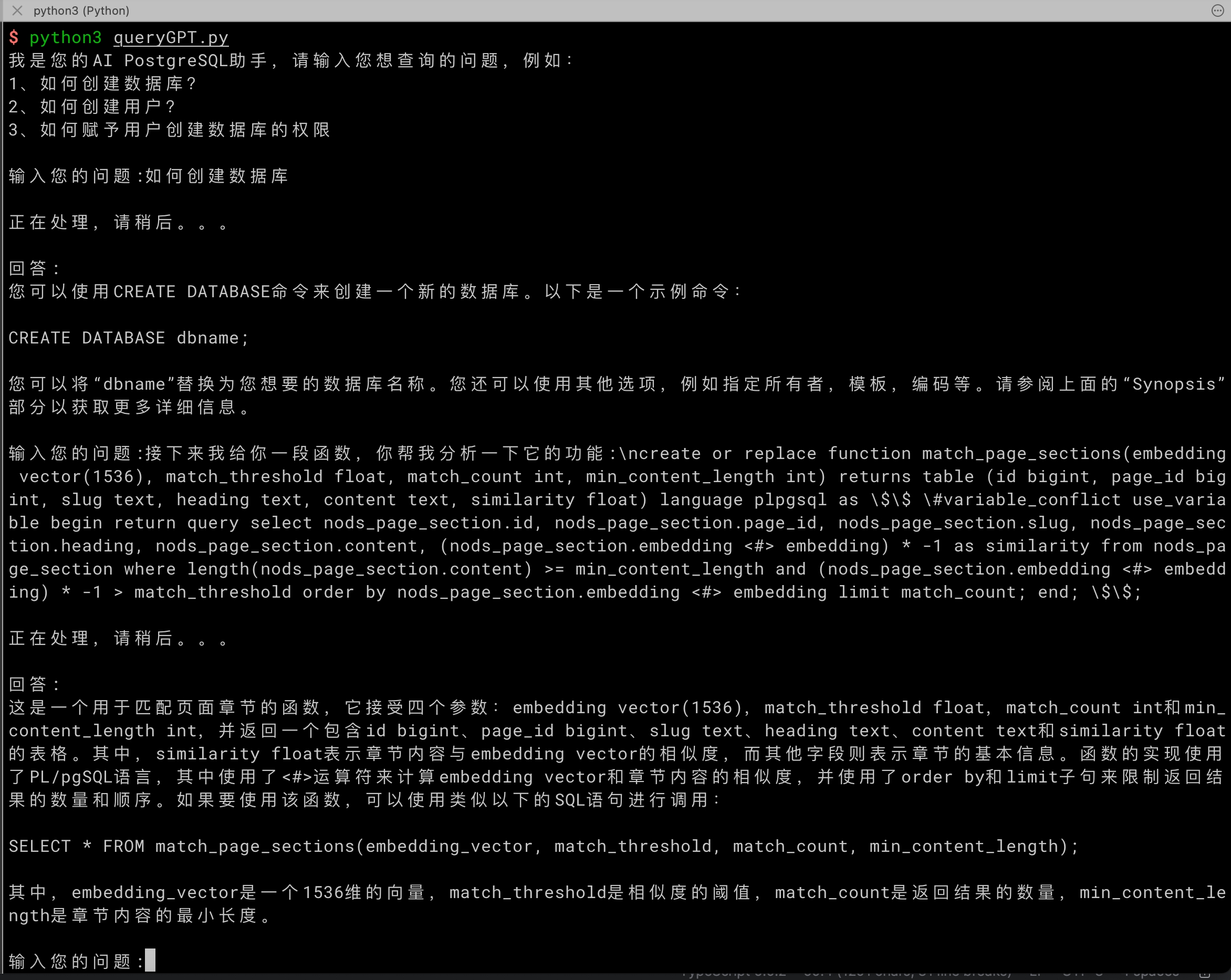
You have obtained an enterprise-level exclusive intelligent Q&A system so far.
Reference
Last updated: 2025.11.17 16:15:13
All rights reserved © Beijing Volcano Engine Technology Co., Ltd2024
