PrivateLink
PrivateLink


Document

- Documentation
 PrivateLinkUser GuideEndpoint serviceEndpoint service overview
 Copy page
 Download PDF
Endpoint service
Endpoint service overview
Copy pageDownload PDFEndpoint service overview
Overview
Service providers use Endpoint Services to allow service consumers to connect.
Classification
PrivateLink supports the following two types of Endpoint Services:
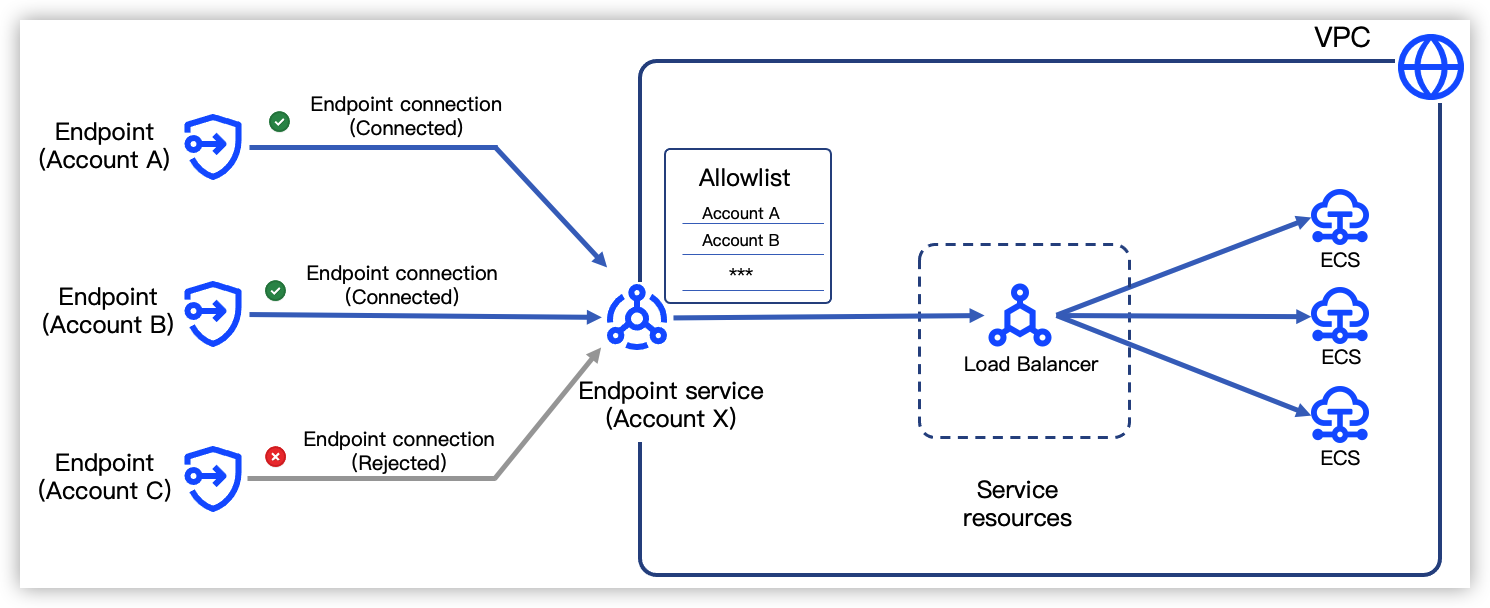
- Normal Endpoint Service: Created and managed by user accounts as service providers, with default names automatically generated in the format com.volces.privatelink.<RegionID>.<EndpointServiceID>.
- Currently supported service resources are: Classic Load Balancer (CLB), Application Load Balancer (ALB), Network Load Balancer (NLB). Before manually creating an Endpoint Service, you need to prepare the service resources. For detailed configuration, see CLB Getting Started, ALB Getting Started, NLB Getting Started.
-
- VolcanoEngine Service: These are created and managed by official VolcanoEngine services (e.g., Torch Object Storage (TOS)) as the service provider. The service name is fixed and cannot be changed. PrivateLink currently supports endpoint services of this type, as listed in the following table.
tip
To use the services listed in the table below, please first contact your Account Manager to complete the authorization and addition process.
- VolcanoEngine Official ServiceEndpoint service nameSupported endpoint typescom.volces.privatelink.<regionID>.tosInterface Endpointcom.volces.privatelink.<regionID>.tos-s3
- Interface Endpoint
- Gateway Endpoint
com.volces.privatelink.<regionID>.mirrorsInterface Endpointcom.volces.privatelink.<regionID>.cloudkmsInterface Endpointcom.volces.privatelink.<regionID>.ntp0Interface Endpointcom.volces.privatelink.<regionID>.ntp1com.volces.privatelink.<regionID>.ntp2com.volces.privatelink.<regionID>.ntp3com.volces.privatelink.<regionid>.<endpointserviceid>- Vector database: Currently supported in the Beijing and Shanghai regions. The Endpoint Service IDs are as follows:
- China (Beijing) region: epsvc-rs25gmj0oni8v0x57obx82b
- China (Shanghai) region: epsvc-22j10guw53mdc7r2qr1bv7jna
- Knowledge base: Currently only supported in the China (Beijing) region. The Endpoint Service ID is epsvc-mj91dz38j9c05smt1adwxax5
Interface Endpointcom.volces.privatelink.cn-beijing.epsvc-13fttjtxjpwxs3n6nu5ihxth3tipCurrently, only China (Beijing) region is supported.Interface Endpointcom.volces.privatelink.cn-guangzhou.epsvc-36t38ec67vr40383g0x5wn07vtipCurrently supports only China (Guangzhou) region.Interface Endpointcom.volces.privatelink.<regionID>.tlsInterface Endpointcom.volces.privatelink.<regionID>.veimagexInterface Endpointcom.volces.privatelink.<regionID>.vmp-aggqueryInterface Endpointcom.volces.privatelink.<regionID>.vmp-pushonlyInterface Endpointcom.volces.privatelink.<regionID>.vmp-writeonlyInterface Endpointcom.volces.privatelink.<regionID>.vmp-readonlyInterface Endpoint
Endpoint service bandwidth
The bandwidth of an Endpoint Service varies depending on its service type.
- When the endpoint service is a VolcanoEngine service, its bandwidth is determined by the official specifications of that service. To adjust the bandwidth, see corresponding product documentation.
- When the Endpoint Service is a normal service, its bandwidth is limited by the service resource and is the lower value between the bandwidth of the CLB/ALB/NLB instance and the bandwidth of the backend servers.
- To adjust the CLB instance bandwidth, see Modifying a CLB instance type.
- To adjust the backend server bandwidth, see Modifying an ECS instance type.
- The bandwidth of ALB instances, NLB instances cannot be adjusted.
tip
The PrivateLink support for ALB, NLB service resources is in beta stage. For trial requests, contact your account manager.
Configuration procedures
The configuration process for the endpoint service is shown below.
- Create endpoint service: Create an endpoint service instance, select the Load Balancer resource that provides the service.
- Add allowlist: Grant account authorization for cross-account endpoints, enabling them to access this endpoint service. Configuration of this step is not required when accessing from an endpoint in the same account.
- View endpoint service: Check the status of the Endpoint Service and the status of endpoint connections established on it to confirm successful configuration.
Last updated: 2026.03.27 10:07:25
All rights reserved © Beijing Volcano Engine Technology Co., Ltd2024
