PrivateLink
PrivateLink


Document

- Documentation
 PrivateLinkBest PracticesIDC shared cloud Torch Object Storage service
 Copy page
 Download PDF
Best Practices
IDC shared cloud Torch Object Storage service
Copy pageDownload PDFIDC shared cloud Torch Object Storage service
This topic explains how to share the VolcanoEngine Torch Object Storage (TOS) with an on-premises IDC via the PrivateLink service.
Scenarios
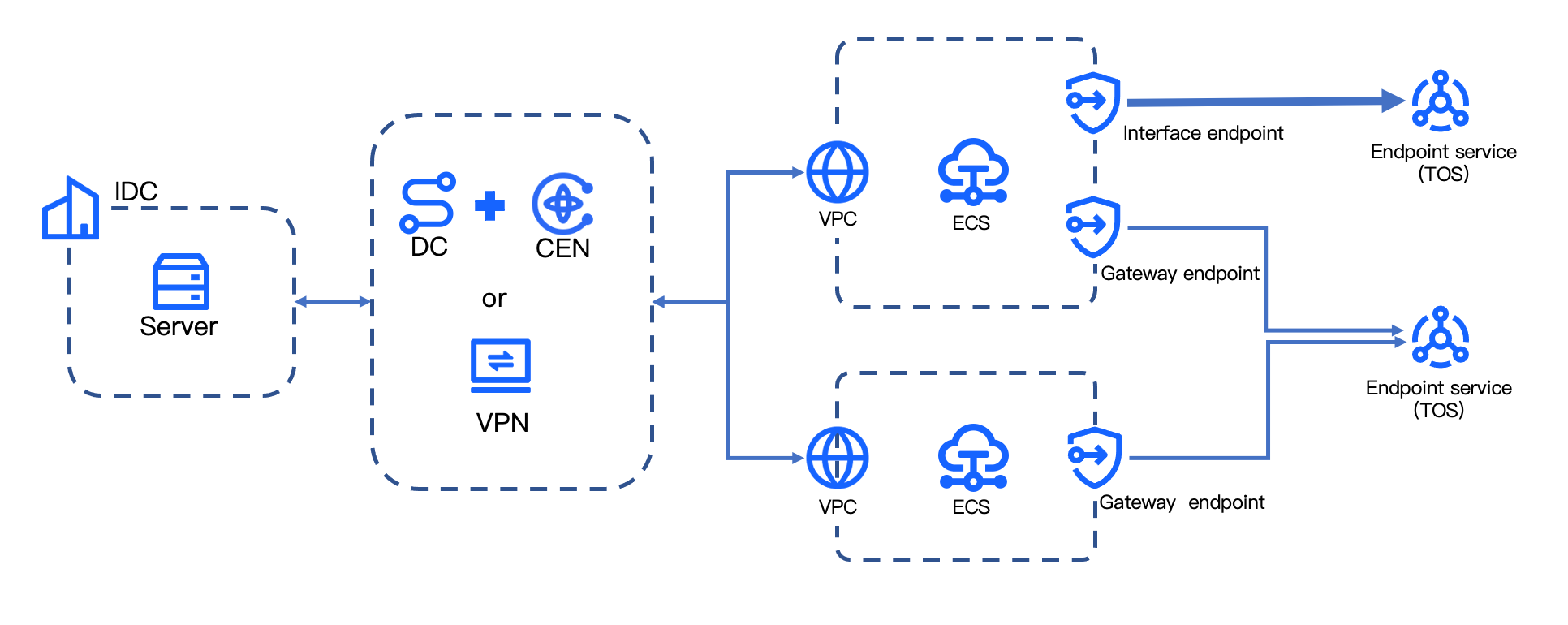
Whether from a Virtual Private Cloud (VPC) or an on-premises IDC, you can use PrivateLink to securely access Torch Object Storage (TOS) while avoiding public endpoint conflicts common in multi-cloud environments.
Cloud as a Service refers to public cloud services provided by cloud vendors. VolcanoEngine's cloud services are deployed in the 100.64.0.0/10 CIDR block, such as the TOS service.
This topic provides configuration guidance for different scenarios when using PrivateLink to access TOS services.
- The default domain names for Endpoint Services and Interface Endpoints only contain the instance ID and region information, and do not identify the specific cloud service type. To differentiate between cloud service types and bucket objects via PrivateLink, use the wildcard domain name feature of Interface Endpoints.
- When accessing TOS through an Interface Endpoint, PrivateLink allows all traffic from the target VPC to TOS by default. To control bucket access scope via PrivateLink, use a Gateway Endpoint.
- PrivateLink natively supports HTTP protocol access. If you need to use the HTTPS protocol, see Accessing Torch Object Storage through a custom domain name.
The specific network architecture is shown in the following diagram.
Prerequisites
- A VPC, subnet, and Elastic Compute Service (ECS) have been created. For detailed operations, see Creating a Virtual Private Cloud and Purchasing an ECS instance.
- For on-premises IDC access to TOS via PrivateLink, first establish connectivity between your IDC and the VPC. Please choose the appropriate configuration steps based on your cloud connectivity service.
- Using Direct Connect and Cloud Enterprise Network (CEN): see Direct Connect Getting started.
- Using Virtual Private Network (VPN) connection: see Virtual Private Network connection getting started.
- When using Gateway Endpoints, ensure you have the target private bucket name.
Configuration procedures
Step 1: Obtain endpoint service name
The endpoint service is created by the business party integrated with PrivateLink. Contact your account manager to authorize the corresponding VolcanoEngine service to your account, then obtain the endpoint service name as shown in the table below.
VolcanoEngine Cloud Services | Service name |
Torch Object Storage (TOS) | com.volces.privatelink.regionID.tos-s3 |
tip
Replace the Region ID in the service names listed in the table above as needed. This topic uses the service name com.volces.privatelink.cn-beijing.tos-s3 as an example.
Step 2: Create Endpoint
Select the appropriate endpoint type based on your specific use case.
Create an interface endpoint
- Select interface as the Type.
- Endpoint Service: Select the name obtained in Step 1.
After the interface endpoint is successfully created, you can view the endpoint domain name on the endpoint list page.
- The default endpoint domain format is: Endpoint ID.Endpoint Service ID.region ID.privatelink.volces.com.
- The wildcard domain format is: *.Endpoint ID.Endpoint Service ID.region ID.privatelink.volces.com.
Creating a gateway endpoint
- Type: Select gateway.
- Endpoint Service: Select the name obtained in Step 1.
- Configure access policies according to your specific requirements. For example, to grant read-only access to a specific private bucket and all its objects via PrivateLink, configure the access policy as follows:
-
Step 3: Result verification
- Log in to a server within your on-premises IDC or VPC.
- For Interface Endpoints, execute the ping command targeting the Endpoint Domain name to test network connectivity. For Gateway Endpoints, skip this step.
warning
If the interface endpoint has the wildcard domain name enabled, please note during validation that the * in the endpoint domain name must be replaced with any string, or you can directly use the root domain name.
- Access TOS by calling APIs or SDKs to validate functionality.
- For example, to list all objects in a specific bucket via PrivateLink, the request parameters are described as follows:
- Interface Endpoint
- When making API calls, set the Host header to the endpoint's domain name.
- Taking the example of calling the API to list objects, a sample request is shown below.
-
- When accessing via SDK, using Go SDK as an example: Pass in the accessKey and secretKey as the AK and SK of the account to which the endpoint belongs, pass in the endpoint as the endpoint domain, pass in the region as the region ID to which the endpoint belongs, pass in the bucketName as the name of the bucket to be accessed.
- Gateway Endpoint
- When accessing via API or SDK, configure all parameters with your TOS information. Access to authorized buckets and operations will succeed, while attempts to access unauthorized buckets will return a permission error.
Last updated: 2026.06.29 18:25:50
All rights reserved © Beijing Volcano Engine Technology Co., Ltd2024
