E-MapReduce
E-MapReduce


- Documentation
 E-MapReduceEMR on ECS best practicesVolcano Engine EMR migration guideData migration
 Copy page
 Download PDFCopy pageDownload PDF
This article introduces the data migration operations between Volcano Engine E-MapReduce (EMR) and the source Hadoop cluster.
1. Dedicated connection
Before performing migration, a 1Gb or 10Gb dedicated connection must be established between the source VPC and the Volcano Engine VPC to ensure migration speed, security, and stability.
tip
Migration speed evaluation:
- Dedicated line bandwidth: 10Gb = 1.25GB
- Data volume: 100T = 100*1024 = 102400 GB
- Migration time: 102400/1.25/3600 = 22.75 hours
Once the dedicated connection is established, large-scale, uninterrupted data migration can begin.
2. Migrate HDFS data
After connecting the EMR cluster and the source Hadoop cluster, you can use the Distcp tool for data migration and verification. The typical command for migrating data is as follows:
hadoop distcp hdfs://源端hdfs文件夹 hdfs://目标端hdfs文件夹
warning
Configure the domain names and IP addresses of each node in the source cluster in the /etc/hosts file of each node in the target cluster.
2.1 HDFS parameter performance tuning
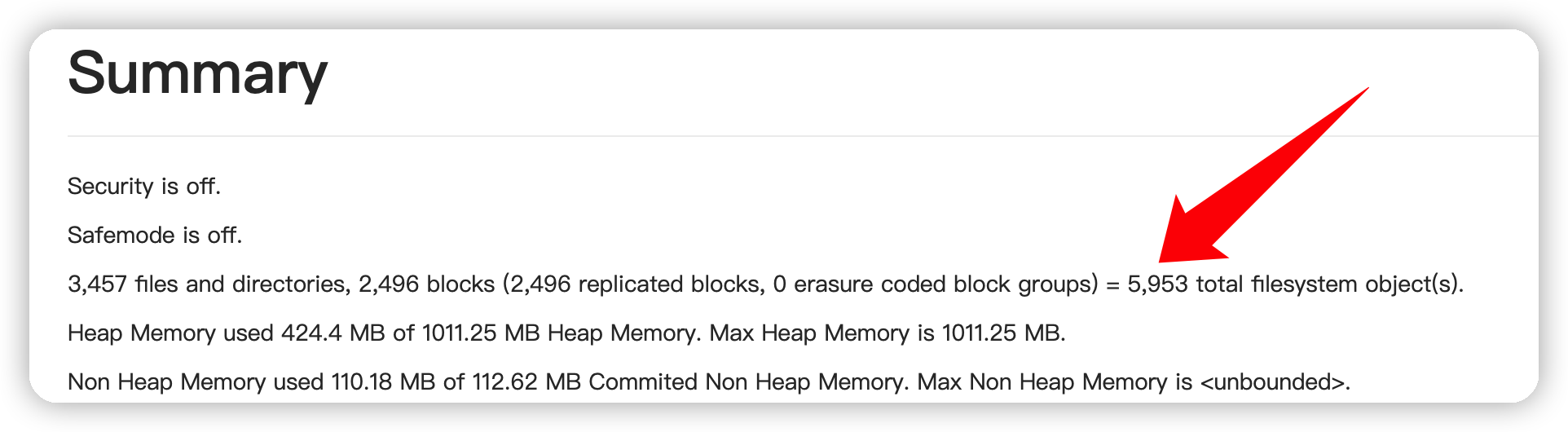
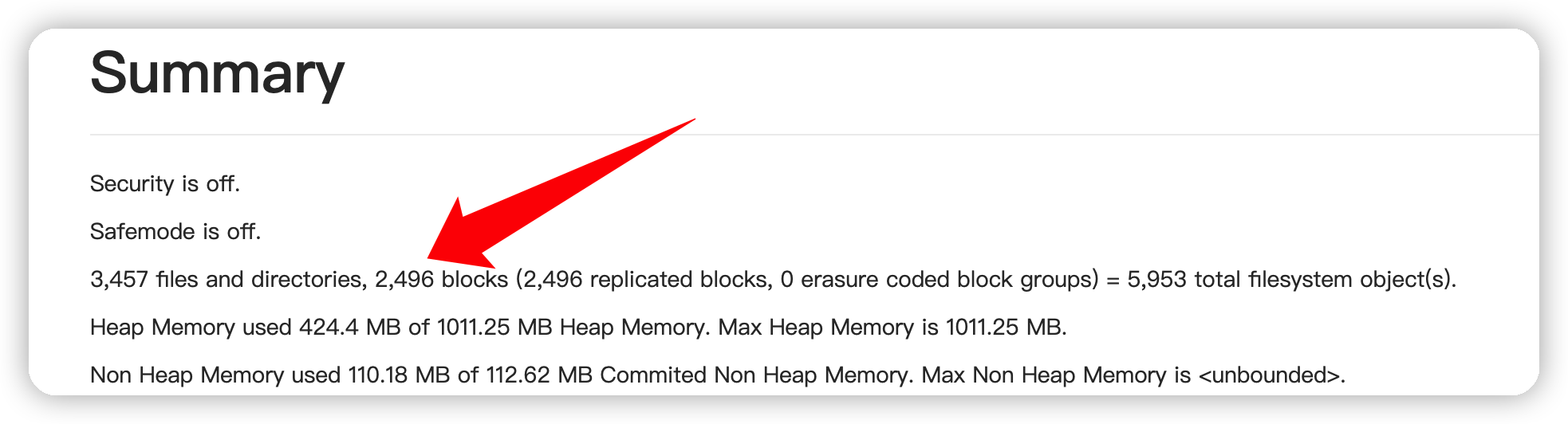
HDFS performance tuning mainly focuses on resource usage. Proper resource allocation can improve HDFS stability and read/write efficiency. The Volcano EMR console provides an HDFS UI entry point, which can be used for HDFS diagnostics and tuning.
tip
HDFS UI access link prerequisites:
- The cluster access link requires the ECS ID instance of the emr-master-1 node to be bound to an Elastic Public IP. For details, see Bind public IP .
- In Cluster Details > Access Links > Quick Service Port Configuration, add the source address and corresponding port to the allowlist to continue accessing.
Common HDFS tuning items include:
Parameter | Recommended value (may vary depending on business and resource conditions) | Description |
|---|---|---|
namenode_heapsize | (Number of files + number of blocks) ÷ 1,000,000 × 512 MB | As seen in the HDFS UI, if there are too many small files, it will cause a memory capacity bottleneck for the NameNode. |
dtnode_heapsize | Number of file blocks Blocks ÷ 1,000,000 × 3 ÷ number of DataNode nodes × 2048 MB | As seen in the HDFS UI, if there are too many small files, it will cause a memory capacity bottleneck for the DataNode. |
dfs.namenode.handler.count | 20×Log(2)N (where N is the number of DataNodes; can be calculated using a scientific calculator) | The number of threads NameNode uses to handle RPC. |
dfs.datanode.handler.count | 20 | The number of threads DataNode uses to handle RPC; appropriately increasing this value improves DataNode RPC service concurrency. Increasing the number of threads will increase DataNode memory requirements. |
dfs.blocksize | ≈ Disk throughput (MB/s) | If the block is too small, it reduces the service capability of the NameNode and causes additional addressing time when uploading and reading a file. If the block is too large, in case of an exception, retransmission is required, resulting in network IO consumption and less flexibility. |
dfs.datanode.failed.volumes.tolerated | 1 (If there is only one data disk, set this parameter to 0) | Fault directory tolerance; that is, if the number of failed disks is less than this parameter value, the DataNode is still considered available. |
fs.trash.interval | 360 | The number of minutes after which checkpoint files are deleted. If set to 0, the trash feature is disabled. |
fs.trash.checkpoint.interval | 30 | The interval in minutes between two trash checkpoints. This value should be set to less than or equal to the value of fs.trash.interval. If the configuration item is set to 0, then the value of this configuration item will be set to the value of fs.trash.interval. |
3. Migrate object storage data to TOS
If the source Hadoop cluster uses a compute-storage separation architecture or stores some data in object storage, the object storage data from the source must be migrated to TOS. Using Volcano Engine Storage Migration Service , you can migrate data from other cloud providers' object storage services online to Volcano Engine Object Storage TOS.
3.1 Create a migration task
- Log in to the Storage Migration Service console.
- On the Migration Task List page, click Create Migration Task.
- On the Configure source and destination page, set the parameters for the source and destination, as well as the relevant task parameters. For detailed task configuration procedures, see Create migration task .
3.2 Set lifecycle rules to optimize storage costs
The lifecycle management feature of object storage sets lifecycle rules for files based on their last modification time, periodically converting files in the bucket to the specified storage type or deleting them to reduce storage costs. For a complete explanation of lifecycle management, refer to Complete lifecycle management documentation .
4. Migrate streaming data
4.1 Migrate Kafka data
Apache Kafka is an open-source stream processing platform developed by the Apache Software Foundation. Its persistence layer is essentially a large-scale publish/subscribe message queue based on a distributed transaction log architecture, making it highly valuable as enterprise-grade infrastructure for handling streaming data.
Apache Flume or MirrorMaker can be used to migrate source Kafka data to Volcano EMR Kafka.
Migrating Kafka data using Apache Flume
Apache Flume is a distributed, reliable, and highly available system for collecting, aggregating, and transmitting massive amounts of log data. Supports customization of various data senders in log systems for data collection. Flume supports simple data processing and the ability to write data to various data sources, such as text, HDFS, TOS, and more. Apache Flume can be used to transfer data between two Kafka clusters.
To migrate Kafka data using Apache Flume, you need to configure channel information in the Flume configuration file flume.properties, including source and sink information, for example:# KAFKA_sources a1.sources.r1.type = org.apache.flume.source.kafka.KafkaSource a1.sources.r1.batchSize = 5 a1.sources.r1.batchDurationMillis = 10 a1.sources.r1.kafka.bootstrap.servers =<source-kafka-host1:port1,source-kafka-host2:port2...> a1.sources.r1.kafka.topics = flume-test a1.sources.r1.kafka.consumer.group.id = flume-group a1.sources.r1.channels=c1 a1.channels.c1.type=memory a1.channels.c1.capacity=10 a1.channels.c1.transactionCapacity=10 # KAFKA_sinks a1.sinks.k1.channel = c1 a1.sinks.k1.type = org.apache.flume.sink.kafka.KafkaSink a1.sinks.k1.batchSize = 5 a1.sinks.k1.kafka.topic = flume-target a1.sinks.k1.kafka.bootstrap.servers = <target-kafka-host1:port1,target-kafka-host2:port2...> a1.sinks.k1.custom.encoding=UTF-8 a1.sinks.k1.kafka.producer.acks=1Migrating Kafka data using MirrorMaker
MirrorMaker is a standalone tool used for data synchronization between two Kafka clusters. MirrorMaker can be regarded as an integration of Kafka producer and consumer, where the consumer consumes data from the source Kafka cluster and the producer pushes the data to the target Kafka cluster. For instructions on using MirrorMaker, refer to Kafka Mirroring(MirrorMaker).
5 Migration to Volcano EMR OLAP
5.1 Using Volcano Engine EMR ClickHouse cluster
ClickHouse is an open-source columnar database management system (RDBMS) primarily used for OLAP. ClickHouse adopts a massively parallel processing (MPP) and shared-nothing architecture, providing linear scalability from single-node standalone mode to cluster mode with thousands of servers.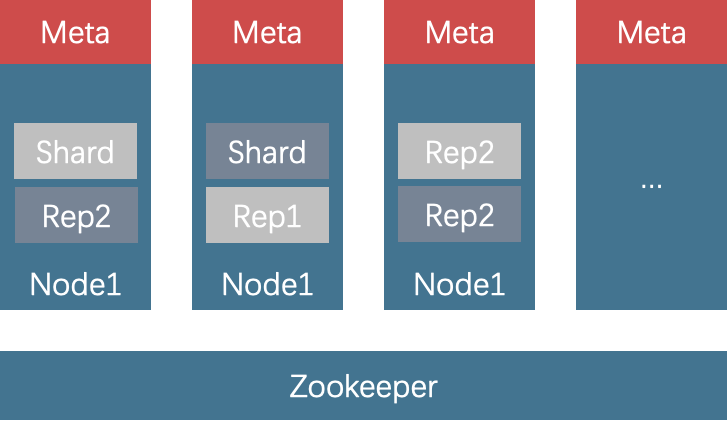
ClickHouse delivers powerful data query performance and is well-suited for business scenarios with high requirements for analytical query performance and timeliness, such as real-time data warehouses, behavioral analysis, and interactive analysis, which are typical use cases for ClickHouse. ClickHouse is widely used in the advertising, finance, and industrial internet industries.
ClickHouse is also a unified storage and compute database engine, so during migration, it is necessary to ensure the consistency of metadata and incremental/historical data.
Metadata migration
Metadata migration can be performed by usingshow create tableto obtain the corresponding table creation statement, and then creating the table in the target cluster.show create table table_name;Incremental data migration
For real-time tables, that is, tables with real-time data insertion through Flink tasks or tables synchronized with Binlog using cloud tools such as database transmission services, data migration requires distinguishing between incremental data and historical data. Incremental data can be synchronized by creating Volcano Engine EMR Flink tasks or DTS tasks.Historical data migration
Historical data can be migrated using clickhouse-copier. For offline tables, when performing historical data migration, if new tasks are created, you can use theenabled_partitionsconfiguration item to delete the partition data affected by the new tasks and then re-import it.
5.2 Using the Volcano Engine EMR Doris cluster
Apache Doris is a simple, high-performance, and unified analytical database that is compatible with the MySQL protocol, uses columnar storage, supports a vectorized engine, and allows data import from HDFS/S3 or MySQL Binlog/Kafka. Doris is commonly used in real-time data warehouse scenarios. In addition, through the Multi-Catalog feature, it can act as an execution engine to query data in the data lake.
5.2.1 Use Doris to build real-time data warehouses and data lakes
- Doris as a data lake execution engine
Doris supports reading Hive, Iceberg, and Hudi tables, and supports Parquet, Orc, and TEXT storage formats. Through the Multi-Catalog feature, as an execution engine for the data lake, Doris can read and write relevant data.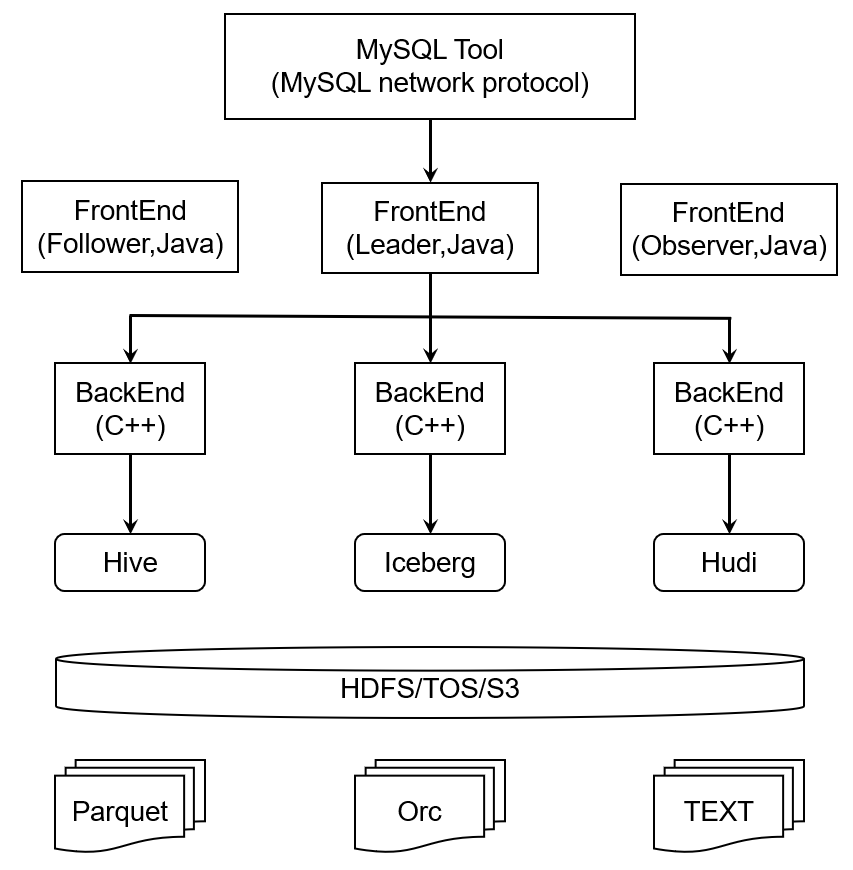
- Real-time data warehouse scenarios
Real-time data warehouses require second-level visibility after streaming data ingestion, second-level or sub-second data query performance, QPS on the order of ten thousand, real-time metric aggregation, and multidimensional analysis. Flink+Doris is a typical real-time data warehouse architecture. Data is processed in real time by Flink and then written to Doris, with Doris serving as the execution engine for online business and real-time analytical queries.
5.3 Migrate Apache Kudu
Kudu can be migrated using Impala and/or community-provided Kudu Backup and Restore tools.
5.3.1 Use Kudu Backup and Restore tools to complete Kudu migration
EMR Kudu supports community version 1.14, and you can use the community-provided backup and restore tools to migrate data. For more information, see Kudu backup and restore.
## Backup
spark-submit --class org.apache.kudu.backup.KuduBackup kudu-backup2_2.11-1.14.0.jar \
  --kuduMasterAddresses master1-host,master-2-host,master-3-host \
  --rootPath hdfs:///kudu-backups \
  foo bar

 ## Restore
 spark-submit --class org.apache.kudu.backup.KuduRestore kudu-backup2_2.11-1.14.0.jar \
  --kuduMasterAddresses master1-host,master-2-host,master-3-host \
  --rootPath hdfs:///kudu-backups \
  foo bar
