Growth Analysis DataFinder
Growth Analysis DataFinder


- Documentation
 Growth Analysis DataFinderData Analysis and GovernanceData ManagementData GovernanceStorage Details (Original Data Quality)
 Copy page
 Download PDFCopy pageDownload PDF
Data warehousing details (raw data quality) A module for understanding the warehousing situation after the data in the project is reported, which can quickly view the number of current project warehousing/abandonment events, count the number of events hitting various error types, and view data detailed logs.
DataFinder supports configuring abnormal warehousing monitoring alarms. After the configuration is completed, when subsequent data warehousing is abnormal, an alarm message will be triggered according to the alarm rules.
tip
- The monitoring alarm configuration result will affect the alarm message when subsequent data is warehoused. If the monitoring alarm is not configured, although the monitoring alarm will not be triggered, you can still actively view the abnormal data information on the obvious page of warehousing verification.
- The current data that supports checksum alarms include: events (excluding virtual events), event attributes, and user attribute data.
- After the monitoring task is created, it will take effect in about 10 minutes.
Click the Create Monitoring Alert button in the upper right corner of the page to configure the monitoring alarm parameters in the pop-up page.
Monitor the configuration. According to the interface prompts, configure parameters such as monitoring objects and monitoring rules.
Parameter
Configuration instructions
Monitor name
Customize the monitoring name for subsequent identification of monitoring rules.
Monitoring object & monitoring object related parameters
- Select the monitoring object type as event, event attribute, or user attribute according to the monitoring needs.
- Different types of monitoring objects need to be selected according to the interface prompts, corresponding to specific events, event attributes, and user attributes. Event properties further select the associated event name.
Error type
You can select the validation rules to monitor in the drop-down list, which contains the DataFinder preset validation rules and custom validation rules currently supported by the validation object.
tip
See below for the full list of validation rules preset by DataFinder Reference: Preset Data Validation Rules; the list of custom validation rules that have been created can be viewed on the validation rule configuration page, see for details Validation Rule Configuration.
Monitoring rules
Currently supports configuration monitoring rules trigger condition is any condition is met or cumulative conditions are met. For example, when the monitoring object is an event:
- Any condition is met: The monitoring alarm will only be triggered when any one of the warehousing events meets the monitoring rules.
- Accumulation conditions are met: When the cumulative number of all warehousing events meets the monitoring rules, a monitoring alarm will be triggered.
The current monitoring rule that triggers an alarm is the number of abnormal data that does not meet the validation rule within a period of time.
- You can configure the monitoring time range and data volume limit according to the interface prompts.
- Support configuring multiple monitoring rules, and the logical relationship between each monitoring rule is "OR".
Monitoring range
(Not supported when the monitoring object is a user property )You can filter through event attributes, and support configuring multiple filter conditions. The logical relationship between filter conditions can be uniformly set to "OR" or "AND".
warning
When using event property values for monitoring scope filtering, the configuration results of property values are case-sensitive, so:
- When using preset event properties , because the DataFinder automatically processes all preset event property values to lowercase during reporting, you need to configure the event property values to lowercase.
For example, when the preset event property is reported as "iOS", it will be processed as "ios" after warehousing, so you need to configure it as "ios" here. - When using the custom event property , the DataFinder does not process the reported results of the event property, you need to configure it according to the actual reported results.
Alarm settings. Configure the monitoring period and the sending channel of the alarm message according to the interface prompts.
If you want the alert message to be sent to the enterprise group, you need to create a webhook message for the corresponding enterprise group on the DataFinder, see details Webhook Management.After creating the monitoring alarm, you can go to the alarm management page to view the corresponding monitoring alarm list, as well as the abnormal data and alarm data corresponding to the monitoring alarm rules. For details, please refer to Alarm Management.
The following is a general guide for viewing, analyzing, and processing abnormal data on the data entry details page.
List of warehousing events
You can view the list of rights events currently in storage and its related abnormal data and other information on the warehousing verification details page.
- Event Name: Name of the reported event
- SDK type: web, mp (Mini Program), app, empty means reporting data through non-SDK such as http api. At this time, the "SDK version" is also empty
- SDK version: SDK version number
- Error type: The type of error the event was detected for, including event errors and attribute errors; see section 3. Data Validation Rules for validation rules
- Number of received pieces: The number of data pieces received by the system, and the data legitimacy verification has not been carried out at this time
- Number of discarded items: The number of items that the data did not enter the system due to errors, quantity exceeding limits, etc
- Number of warehouses: The number of data pieces that can be queried when entering the system
- Number of exception attributes: The number of times the exception attribute is included. Attribute exceptions usually only cause the relevant attribute to be discarded, without affecting the event itself
View full exception data details
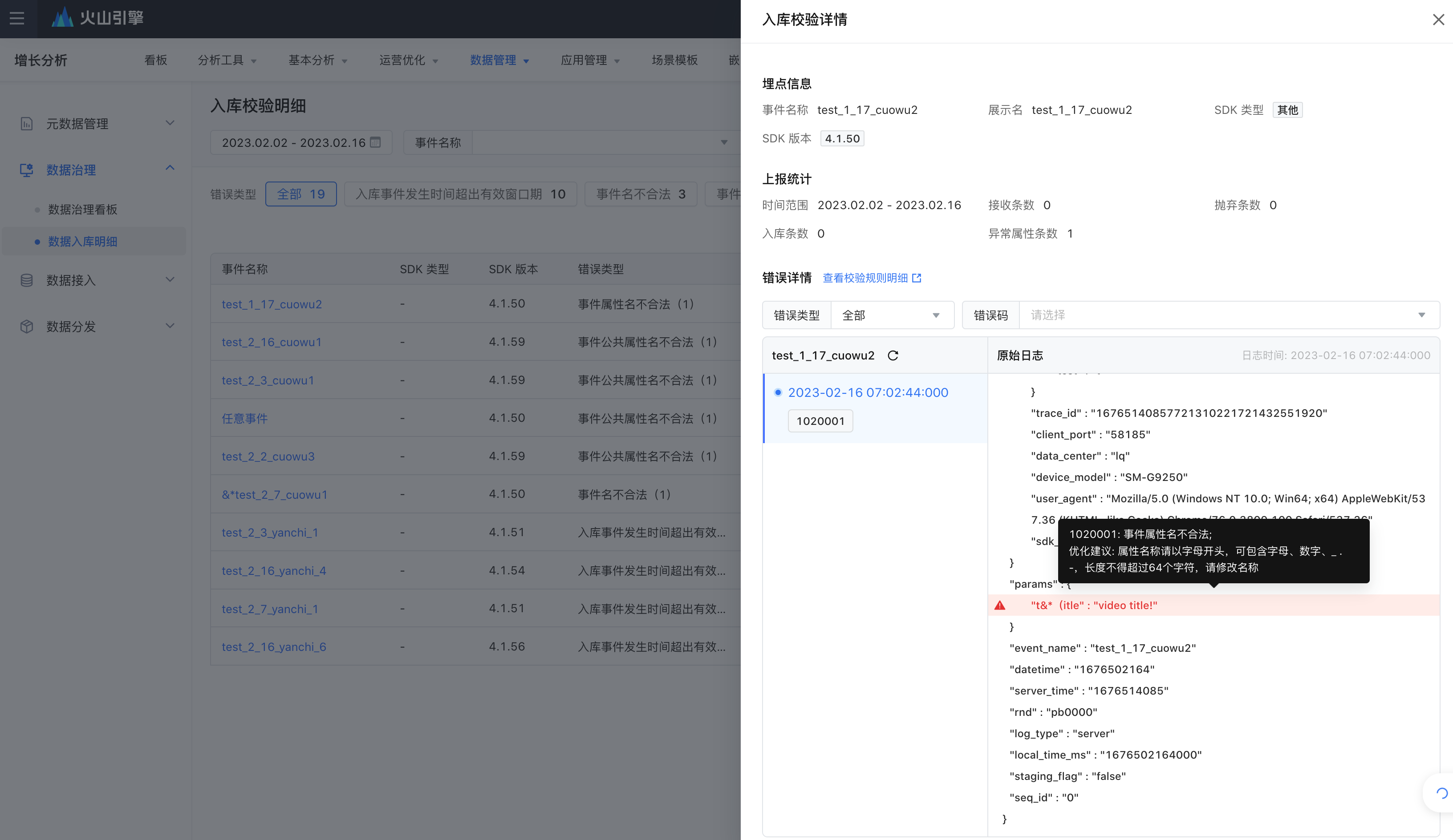
You can click on the event name on the left side of the list to view the error details of the event. The system will automatically display the latest 10 error logs for the current event. You can filter by error type and error code to locate the specific error type.
warning
- The details only support viewing the records of the last 7 days.
- Events/properties that are disabled, as well as event properties whose reporting type is inconsistent with the metadata registry, are simply discarded; if you want to view such data in the data details, you need to set the event public property $data_validation_test reporting value to true.
AI Lab: Intelligent Event Anomaly Monitoring
warning
The intelligent monitoring function of abnormal events has been turned off and will be offline in the near future. Please pay attention.
DataFinder AI Lab is a multi-dimensional intelligent assistant provided by DataFinder combined with AI large model capabilities, including AI event anomaly detection capabilities. After turning on the event abnormality monitoring switch of the AI Lab, the subsequent AI Lab will automatically scan and monitor the reported events for you, and prompt you for suspected problems identified by the AI, further improving the identification and governance efficiency of reported events.
Download error details
- Click "Download" on the far right of each event to export a list of error data for that event.
- Click "Download Error Details" in the upper right corner of the list to export the full error data list.
View the details of the monitoring alarm abnormal data
In the SaaS cloud native environment, if you have configured monitoring alarms, after receiving the monitoring alarm message notification, you can view the number of alarms and abnormal data of the corresponding monitoring rules on the alarm management page. Please see for details Alarm Management.
DataFinder has preset common data warehousing verification rules for you. If the verification rules are not met when the event is warehoused, the entire event will be intercepted. The preset event verification rules and warehousing exceptions include the following situations.
tip
The current DataFinder also supports you to customize data validation rules according to business needs. Please refer to the alarm prompt configuration for creating custom validation rules and custom validation rules Validation Rule Configuration.
Error code | Error description | Validation rule | Optimization suggestions |
|---|---|---|---|
1010001 | Event name is invalid |
| Event names begin with a letter and can include letters, numbers, _. -, the length must not exceed 255 characters, please modify the name |
1010002 | Event names conflict with system reserved event name rules | Not a preset event name starting with $and __ | Conflict with the system reserved event name rules, event names must not start with $or __, please start with a letter, can contain letters, numbers, _. -, the length must not exceed 255 characters, please modify the name |
1010003 | Event name conflicts with virtual event name | Same name as the created virtual event | The event name must not have the same name as the virtual event. Please modify the name |
1010004 | number of events exceeded | More than 1000 events in a single application, the event falls metadata status = -2, the slotting tag is closed, the event is not built, and the attributes are not dropped from the library | The number of events has reached the upper limit, and new events cannot be added. Please go to the meta-event list page and "disable" useless events. |
1010006 | The time of the warehousing event exceeds the valid window period | The event occurred within the last 7 days or beyond the next 24 hours | Event tracking occurred earlier than the past 7 days, and event reporting is delayed. It is recommended to check the network link situation on the client side, or improve the reporting frequency (need to modify the SDK configuration) |
1010007 | Event metadata not accepted or blacklisted | Events not registered/accepted or marked as blacklisted | If you need the event to be warehoused, please change the event status to "enabled" or "hidden". |
1010008 | Event metadata does not exist | Event metadata does not exist | After opening the strong verification, the first report will prompt that the metadata does not exist, and it can be warehoused normally after acceptance. |
When only an attribute exception is detected, it will not affect the warehousing of the event, but the abnormal attribute will be intercepted and not warehoused. Attribute exceptions include the following:
Error code | Error description | Validation rule | Optimization suggestions |
|---|---|---|---|
1020001 | Invalid event property name |
| Property names begin with a letter and can include letters, numbers, _. -, the length must not exceed 64 characters, please modify the name |
1020002 | Event property names conflict with system reservation rules | Not a preset event name starting with $and __ | The event property name conflicts with the system reservation rules. The name must not start with $and __. Please modify the name |
1020003 | The number of attributes per event exceeds the limit | A single event suggests 300 properties, more than 300 but not more than 500, the status is set to 0, which means build is disabled, but can be displayed on the page; more than 500 states are set to -2, which means hidden and not built | The number of single event attributes has reached the upper limit of 300, and the excess part cannot be warehoused. Please go to the metadata-event attribute list page and disable the useless event attribute. |
1020004 | Invalid event attribute data type | Inconsistent with the attribute data type recorded in metadata, and the strong conversion failed | The actual reported data format is inconsistent with the attribute data type recorded in the metadata, and the strong transfer fails; please adjust the report according to the registration type, or modify the registered data type |
1020005 | Invalid event property value |
| If the attribute value exceeds 2048/1024 characters, the excess part will be truncated and cannot be put into storage. It is recommended to adjust the reported value. |
1020006 | Event property not accepted or in blacklist | Event properties Event not registered/not accepted or marked as blacklisted | If you need this property to be warehoused normally, please change the property status to "enabled" or "hidden". |
1020007 | Event attribute metadata does not exist | Event attribute metadata does not exist | After opening the strong verification, the first report will prompt that the metadata does not exist, and it can be warehoused normally after acceptance. |
1030001 | Event public property name is invalid |
| Property names begin with a letter and can include letters, numbers, _. -, the length must not exceed 64 characters, please modify the name |
1030002 | Event public property names conflict with system reservation rules | Not a preset event name starting with $and __ | The event public property name conflicts with the system reservation rules. Property names must not start with $and __. Please modify the name |
1030003 | The number of common attributes of a single application event exceeds the limit | More than 300 (100 in privatization 4.6 and below) event public properties with status set to -2 do not participate in the build | The number of event public properties has reached 300, and the excess part cannot be warehoused. Please go to the metadata-event property list page and disable the useless event public properties. |
1030004 | Invalid event attribute data type | Inconsistent with the attribute data type recorded in metadata, and the strong conversion failed | The actual reported data format is inconsistent with the attribute data type recorded in the metadata, and the strong transfer fails; please adjust the report according to the registration type, or modify the registered data type |
1030005 | Invalid event public property value |
| If the attribute value exceeds 2048/1024 characters, the excess part will be truncated and cannot be put into storage. It is recommended to adjust the reported value. |
1030006 | Event public property not accepted or blacklisted | Event public property not accepted or blacklisted | If you need this property to be warehoused normally, please change the property status to "enabled" or "hidden". |
1030007 | Event public attribute metadata does not exist | Event public attribute metadata does not exist | After opening the strong verification, the first report will prompt that the metadata does not exist, and it can be warehoused normally after acceptance. |
1040001 | Invalid user property name |
| Property names begin with a letter and can include letters, numbers, _. -, the length must not exceed 64 characters, please modify the name |
1040002 | The number of user attributes exceeds the limit | The number of user attributes exceeds the 500 limit | The number of user attributes has reached the upper limit, and new attributes cannot be added. Please go to the user attribute list page and "disable" useless attributes. |
1040003 | Invalid user attribute type | Inconsistent with the attribute data type recorded in metadata, and the strong conversion failed | The actual reported data format is inconsistent with the attribute data type recorded in the metadata, and the strong transfer fails; please adjust the report according to the registration type, or modify the registered data type |
1040004 | Invalid user attribute value |
| If the attribute value exceeds 2048/1024 characters, the excess part will be truncated and cannot be put into storage. It is recommended to adjust the reported value. |
1040005 | User attributes not accepted or in the blacklist | User attributes not accepted or in the blacklist | If you need this property to be warehoused normally, please change the property status to "enabled" or "hidden". |
1040007 | User attribute metadata does not exist | User attribute metadata does not exist | After opening the strong verification, the first report will prompt that the metadata does not exist, and it can be warehoused normally after acceptance. |
Q1: What is the relationship between the number of discards and the number of exception attributes?
The number of warehoused items = the number of received items - the number of discarded items. Since the attribute abnormality only affects the attribute warehousing and does not cause the entire data to be discarded, the number of abnormal attribute items is not directly linked to the discarded item. The number of abnormal attribute items is the number of attribute abnormalities detected in all the received items.
Q2: Can the number of discarded items be compensated?
The number of discarded items cannot be replenished at present, so it is recommended that you pay attention to the governance dashboard, deal with data abnormalities in a timely manner, and avoid data loss.
Q3: Why can't I see the error log details?
The detailed data only retains the log data of the last 7 days, and the data over 7 days only supports viewing the statistical results, not the logs.
