Application Performance Management Plus
Application Performance Management Plus


Document

- Documentation
 Application Performance Management PlusUser guideServer monitoringFAQHow to fix the possible network packet latency caused by the old server-agent on some images?
 Copy page
 Download PDF
FAQ
How to fix the possible network packet latency caused by the old server-agent on some images?
Copy pageDownload PDFHow to fix the possible network packet latency caused by the old server-agent on some images?
Issue description
Old server-agent (below v1.0.31) may cause host network packet latency on non‑default VKE images.
Cause analysis
On those images, server-agent enables many protection rules, increasing logs and CPU scheduling delays, which may occasionally impact packet transfer.
Solutions
The server-agent collects host metrics, logs, and traces. For performance, it must run as a privileged container, so existing agents need privilege elevation.
Select one of the two solutions below based on your actual server-agent deployment method.
Method 1: Manually modify the YAML configuration
If you deployed server-agent manually via YAML, edit its YAML file to set it as a privileged container.
- Run the kubectl command in your cluster to open the server-agent editing page.
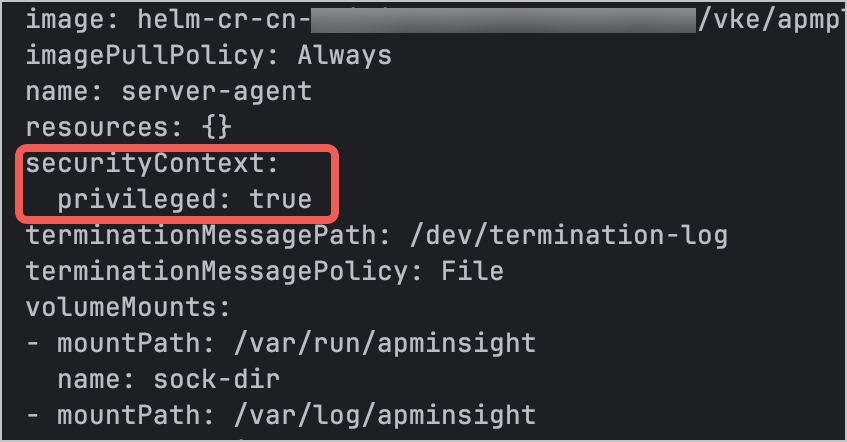
- Add privileged: true under securityContext to make server-agent a privileged container.
Method 2: Upgrade the VKE APMPlus add-on
If you deployed server-agent via the VKE console, upgrading the add-on to the latest version can fix the issue.
tip
The add-on defaults to the latest version. This issue has been fixed in v1.0.31.
- Log in to the VKE console, select Cluster in the left navigation pane, and click the target cluster.
- In the cluster management page, select Addons in the left navigation pane, and find the apmplus-server-agent add-on in the Monitoring tab.
- Click Upgrade in the upper-right corner of the add-on card to upgrade the add-on to the latest version.
Validate results
- Go to the VKE console and check whether server-agent has been successfully started in your cluster. Expected result: All instances of the server-agent daemon set are in the running state.
- Go to the APMPlus console and check for anomalies in host, Docker, and process monitoring data. Expected result: Monitoring data returns to normal.
Last updated: 2026.08.18 15:18:15
All rights reserved © Beijing Volcano Engine Technology Co., Ltd2024
