Message Queue for RabbitMQ
Message Queue for RabbitMQ


Document

- Documentation
 Message Queue for RabbitMQBest practicesRabbitMQ business migrationHow to confirm cluster messages have been fully consumed
 Copy page
 Download PDF
RabbitMQ business migration
How to confirm cluster messages have been fully consumed
Copy pageDownload PDFHow to confirm cluster messages have been fully consumed
During the RabbitMQ business migration process, the old cluster can only be decommissioned after confirming that all messages in the old cluster have been consumed. When both the number of consumable messages and the number of unconsumed messages are zero, it indicates that the old consumer has consumed all messages. You can view these two values in the following two ways:
- Open source Web UI
- Open source API
View through the open-source Web UI
- Log in to the open-source RabbitMQ console via a browser.
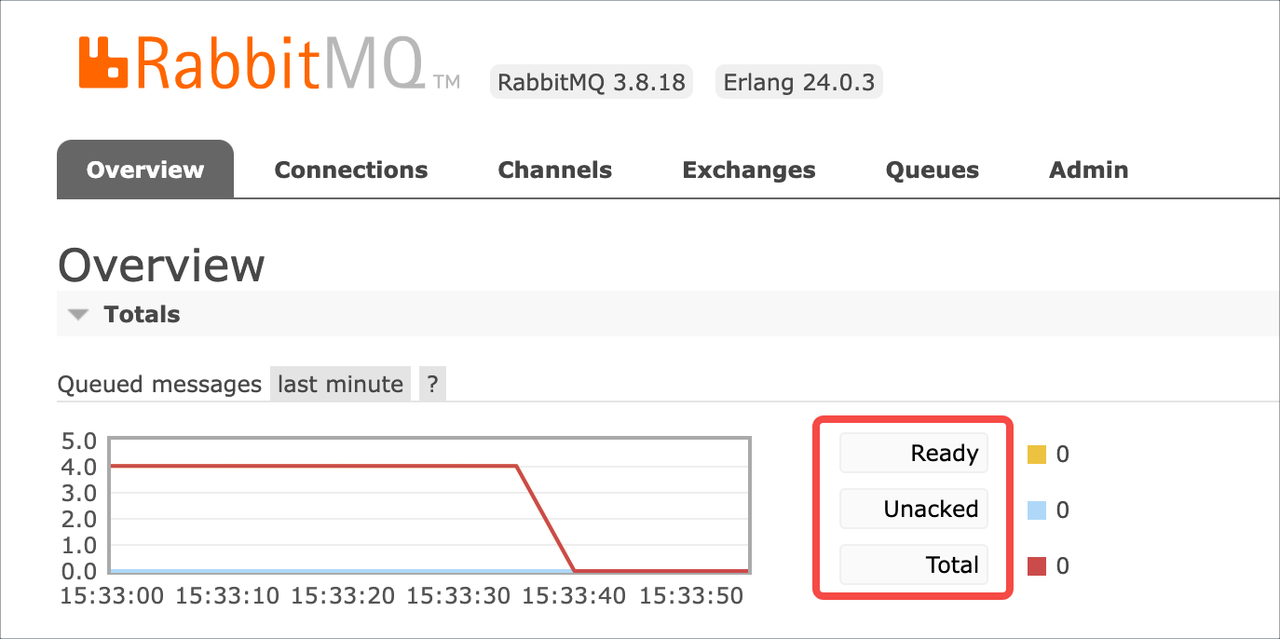
- On the Overview tab, expand Totals.
- View relevant data in the Queued messages table. When the number of consumable messages (Ready), the number of unconsumed messages (Unacked), and the total number of messages (Total) are all zero, it indicates that all stored messages in the old cluster have been consumed.
View using an open-source API
You can also view relevant data by calling the open-source API.
RabbitMQ API:
curl -s -u username:password -XGET http://ip:port/api/overview
Parameter description:
Parameters | DescriptionDescription |
username | The account for logging in to the Web UI of the old RabbitMQ cluster. |
password | The password for logging into the Web UI of the old RabbitMQ cluster. |
ip | Access point domain name for the old RabbitMQ Cluster Web UI. |
port | Old RabbitMQ cluster Web UI port (default: 15672) |
An example of the response from this interface is as follows:
"queue_totals":{
"messages":0,
"messages_details":{
"rate":0.0
},
"messages_ready":0,
"messages_ready_details":{
"rate":0.0
},
"messages_unacknowledged":0,
"messages_unacknowledged_details":{
"rate":0.0
}
}
In the returned information, queue_totals represents data related to consumption. Specifically:
- messages_ready: Number of consumable messages
- messages_unacknowledged: Number of unconsumed messages
When all of the above parameters are zero, it means that the messages from the old cluster have been fully consumed.
Last updated: 2025.10.17 15:42:04
All rights reserved © Beijing Volcano Engine Technology Co., Ltd2024
