Message Queue for RabbitMQ
Message Queue for RabbitMQ


Document

- Documentation
 Message Queue for RabbitMQBest practicesPractical approaches for handling excessive data backlog in RabbitMQ
 Copy page
 Download PDF
Best practices
Practical approaches for handling excessive data backlog in RabbitMQ
Copy pageDownload PDFPractical approaches for handling excessive data backlog in RabbitMQ
During actual use, the message consumption capability of a RabbitMQ instance may not keep up with the production capability, or in scenarios where messages are produced and accumulate before being consumed, a large number of messages may pile up in the RabbitMQ instance. This can cause the cluster's memory and disk to reach high watermarks, blocking message production and consumption.
Use lazy queues
Application scenarios
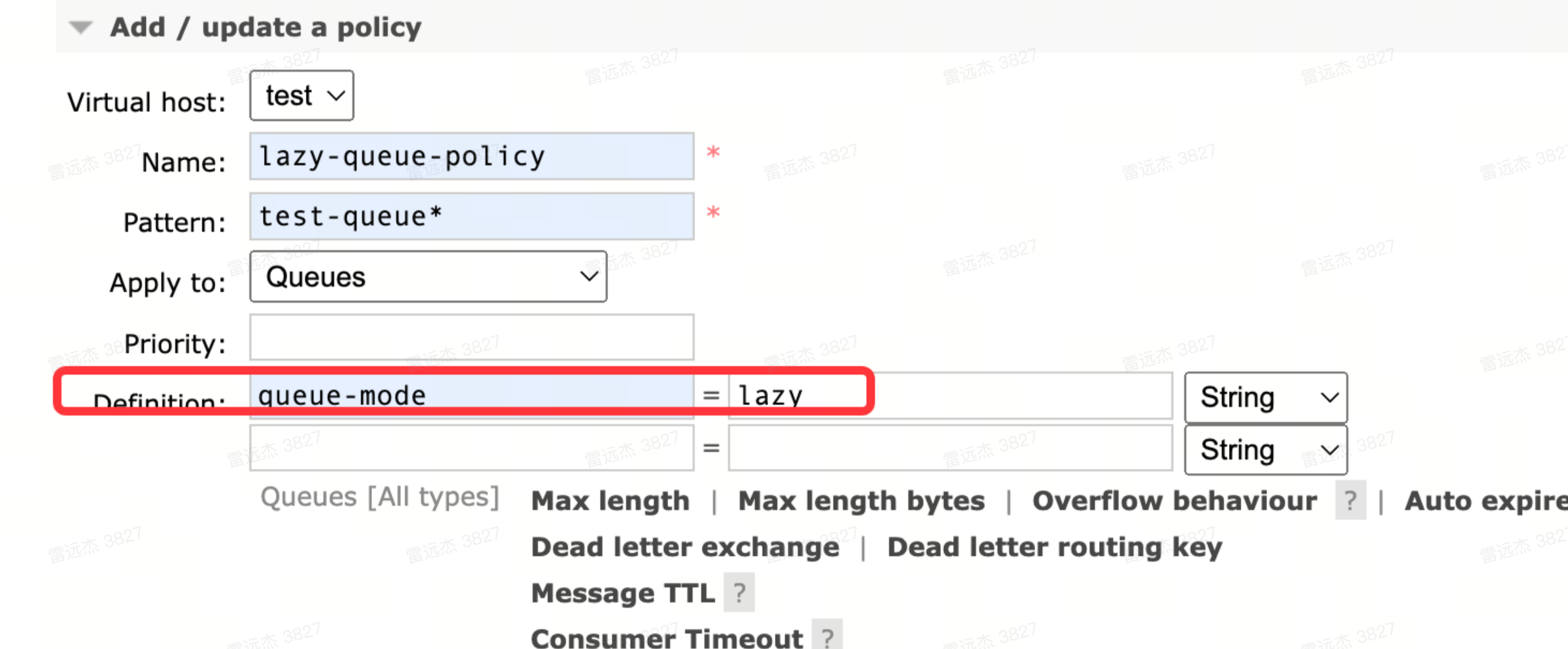
If you are not particularly sensitive to data latency, you can use lazy queues. By default, data in lazy queues is written directly to disk and is only loaded into memory when it is actually consumed. Lazy queues not only ensure data reliability, but also speed up node Restart.
Currently, for RabbitMQ version 3.8 instances, users need to manually configure the lazy policy, while version 3.12 instances are lazy queues by default and do not require user configuration. Therefore, when applying for an instance, it is highly recommended to choose version 3.12.
Configuration example
The manual configuration of a lazy queue for a RabbitMQ 3.8 instance is shown in the following figure.
Use a lower QoS
Application scenarios
If you want to speed up consumption when RabbitMQ has accumulated a large number of messages, set a higher QoS value for consumers. However, when a large number of messages are pulled to the client for consumption, messages may not be acknowledged in time, resulting in accumulation in RabbitMQ's memory and causing memory overflow. Therefore, in cases where there is a large backlog of data, it is recommended to use a smaller QoS to gradually consume the backlog, thereby reducing its accumulation.
Configuration example
The following example sets the QoS value for consumers in a RabbitMQ instance to 5.
tip
When both the connections number and the number of channels are low, you may consider appropriately increasing the QoS value.
channel.basicQos(5);
Consumption timeout settings
Application scenarios
Currently, the default consumption timeout for Message Queue for RabbitMQ instances is 5 minutes. It is not recommended to set this value too high, because if a consumption exception occurs, consumption may become stuck, resulting in a growing backlog of messages.
Avoid starting a large number of connections and channels at once
When there is a large backlog of unconsumed messages in RabbitMQ, you should avoid starting a large number of connections and channels (approximately 10,000) at once. Otherwise, a large volume of messages may be read from RabbitMQ into memory simultaneously, which can lead to RabbitMQ running out of memory.
Monitoring and alarm
Application scenarios
To prevent a large backlog of message consumption in RabbitMQ that could impact business operations, you can configure Cloud Monitor alarm rules for relevant Message Queue for RabbitMQ metrics.
Configuration example
Instance dimension
- Number of consumable messages
- If the consumption backlog continues to increase and the accumulated amount is large, you should monitor alarms.
- Unacknowledged message count
- This mainly addresses the situation where messages have already been pulled from the RabbitMQ server, but the consumer has not acknowledged them, so the messages keep accumulating in RabbitMQ's memory.
Broker Dimension
- memory high watermark
- When the memory high watermark is reached, service production and consumption may be blocked.
- Disk high water level
- When the disk high water mark is reached, the production and consumption activities of the business may be blocked.
For detailed information about alarm rule configuration, please refer to the recommended alarm rules.
Configure message TTL
Application scenarios
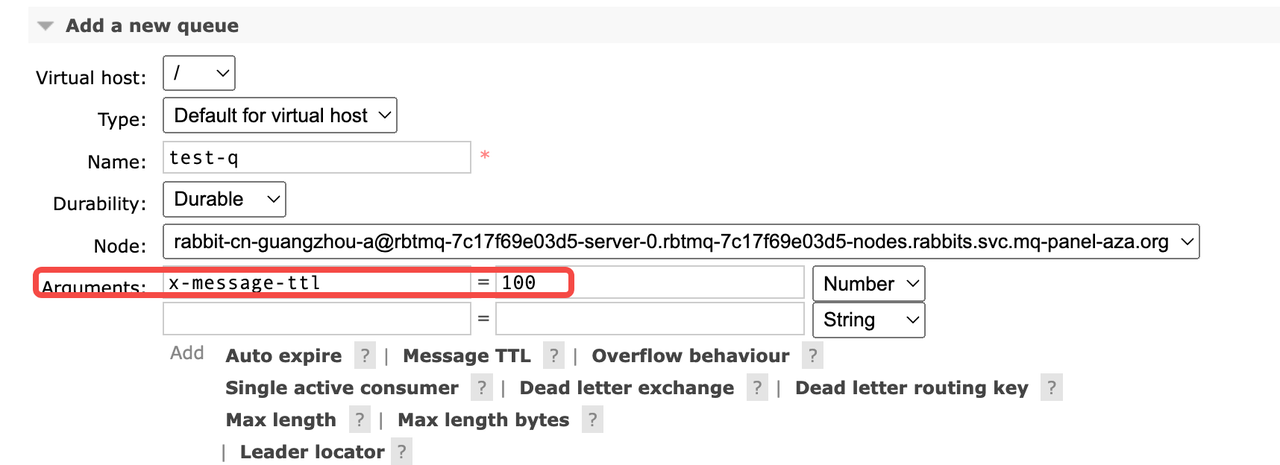
In RabbitMQ version 3.12, if business messages are not particularly important, you can configure the TTL parameter for messages (applicable only to version 3.12). After configuration, messages that are not consumed after a certain period will automatically expire and be cleaned up, ensuring that Cluster resource levels remain stable.
Configuration example
The configuration of the message TTL parameter in RabbitMQ version 3.12 is shown in the following figure.
Mirror Queue
If mirroring is configured for a classic queue, the mirrored queue will clear its local data and then perform a full synchronization after all replicas go offline abnormally at the same time, which can result in the loss of all messages in the queue. Therefore, when a significant backlog of messages has already accumulated in a mirrored queue, you should try to avoid starting too many consumers to prevent excessive message backlog, thereby causing multiple nodes to experience simultaneous memory overflow and abnormal node shutdown.
Last updated: 2025.10.17 15:48:02
All rights reserved © Beijing Volcano Engine Technology Co., Ltd2024
