API 网关
API 网关


文档指南

请输入


- 文档首页
 API 网关最佳实践使用 API 网关实现多集群南北流量管理
 复制全文
复制全文 下载 pdf
使用 API 网关实现多集群南北流量管理
 文档反馈
文档反馈 问问助手
问问助手API 网关支持对接火山引擎容器服务(VKE)集群和自定义集群,为多集群提供强大的南北向流量管理功能。本文介绍常见的南北向流量管理场景和配置方式。
背景信息
API 网关支持对接容器服务集群和注册集群,允许连接并管理不同地域、不同基础设施上的标准 Kubernetes 集群,纳管范围涵盖本地集群、第三方公有云集群、IDC 自建集群、边缘集群等满足 CNCF(Cloud Native Computing Foundation)标准的 Kubernetes 集群。实现多集群管理能力。API 网关能够为多云、多集群提供托管的云原生网关功能,实现高可用、高扩展的 Ingress 流量管理方式。可实时动态获取不同集群中部署的 Service 信息,作为 Service 对外提供服务的流量入口。同时提供 Upstream 流量分配,方便用户进行服务的灰度发布,实现敏捷迭代、平滑升级。
本文通过一个 service-demo 服务和两个改造过的标准 Nginx 镜像为例,为您演示在 API 网关对接多集群时,如何实现多集群南北向流量管理。
前提条件
- 容器服务 VKE
- 已开通容器服务。
- 已创建容器服务集群,详情请参见 创建集群。
- 已注册自定义集群,详情请参见 通过代理方式注册现有集群。
- API 网关
- 已开通 API 网关。
- 已创建网关实例,详情请参见 创建实例。
步骤一:导入集群
- 登录 API 网关控制台。
- 在顶部导航栏,选择目标地域。
- 在左侧导航栏选择 后端管理 > 容器集群导入。
-
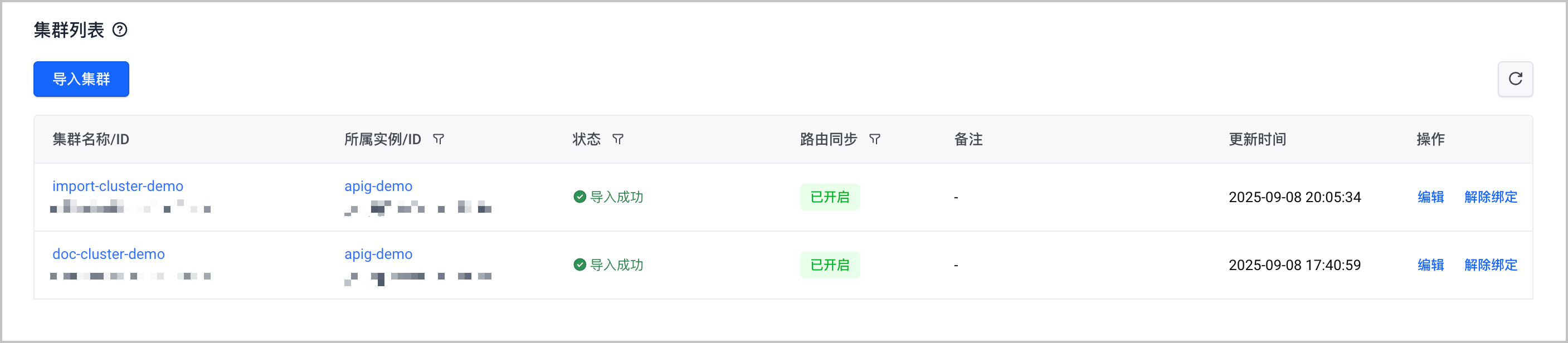
步骤二:部署应用
- 使用以下 YAML 配置,在容器服务集群中部署应用和服务。
- 使用以下 YAML 配置,在注册集群中部署另一个版本的应用和服务。
步骤三:创建 Upstream
- 登录 API 网关控制台。
- 在顶部导航栏,选择目标地域。
- 在左侧导航栏选择 后端管理 > Upstream 列表。
- 在 Upstream 列表页面,单击 创建 Upstream,创建容器服务类型的 Upstream。详情请参见 创建容器服务类型 Upstream。
-
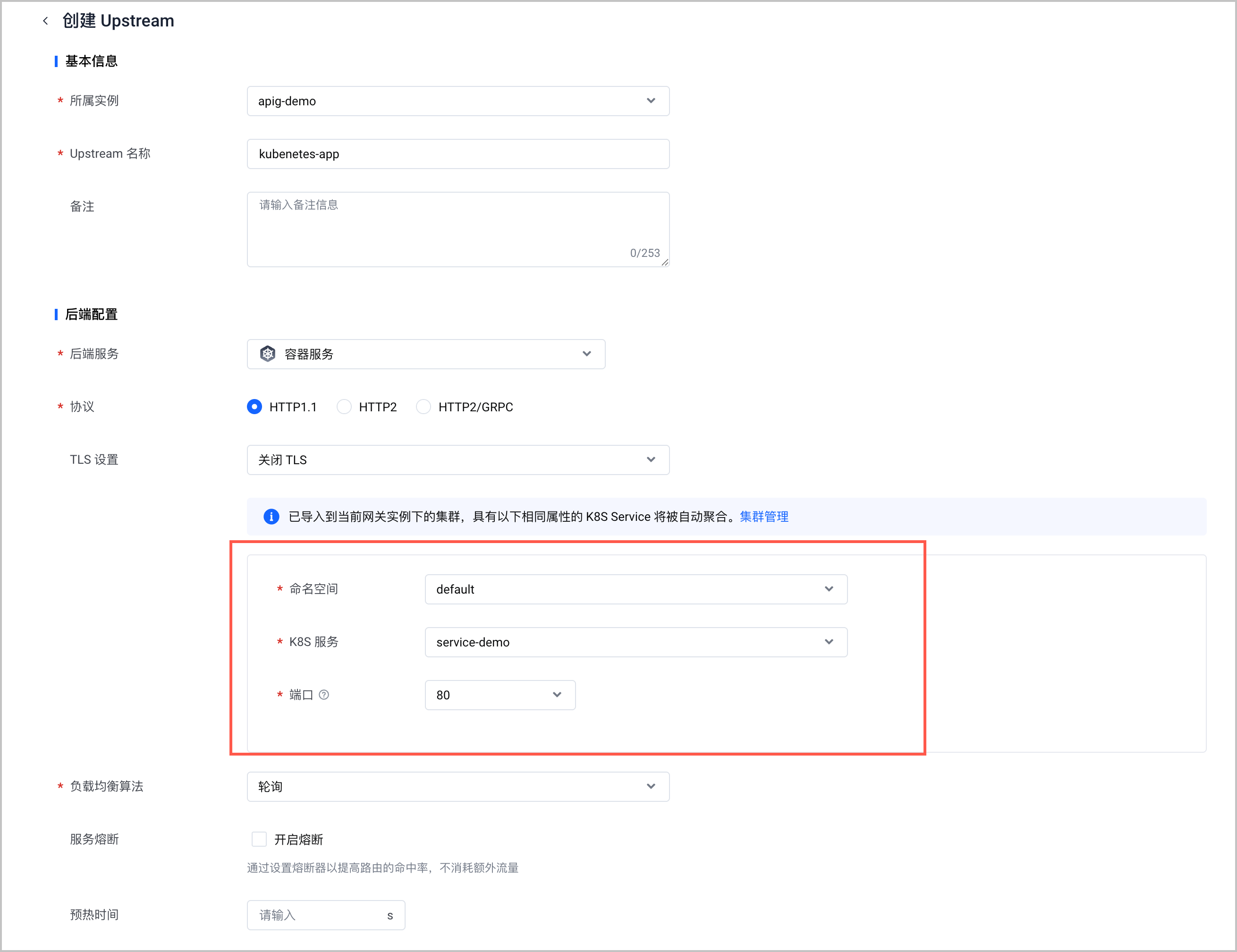
步骤四:使用 API 网关管理多集群南北向流量
场景 1:默认负载均衡到同名服务后端
API 网关可实时动态获取不同集群中部署的 Service 信息,作为 Service 对外提供服务的流量入口。默认情况下,API 网关会将流量负载均衡到所有集群中同名服务的后端,所有副本均衡。因此,流量被路由到不同集群中的比例,与不同集群中的应用副本数的比例相同。例如在本例中,容器服务集群和自定义集群中应用副本数分别为 4:1,则流量被路由到容器服务集群和自定义集群中的比例也为 4:1。流量转发示意图,如下所示。
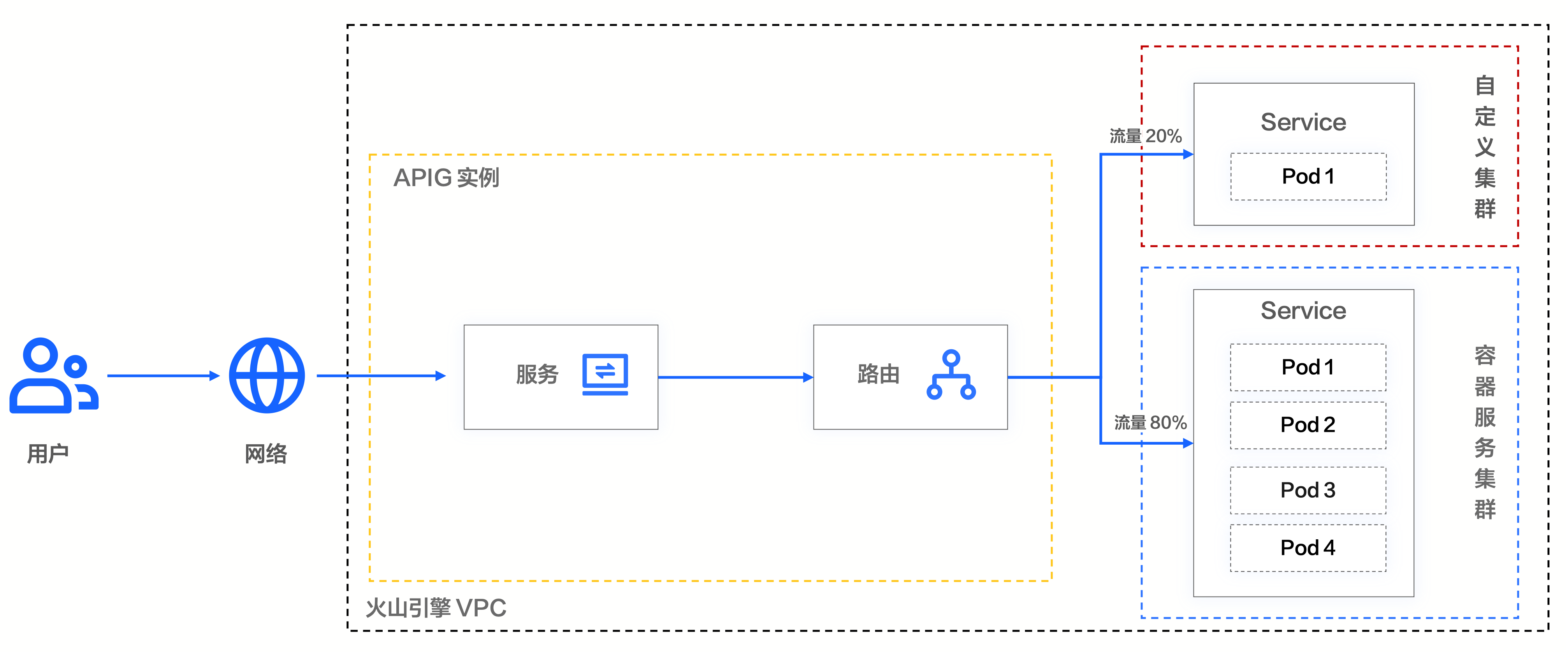
配置步骤如下:
- 在左侧导航栏选择 路由管理 > 路由列表。单击 创建路由,配置路由信息。选择容器服务类型的 Upstream,并配置应用权重为 100%。即将 100% 的流量转发至对应的 Upstream 中。更多配置详情,请参见 管理路由。
-
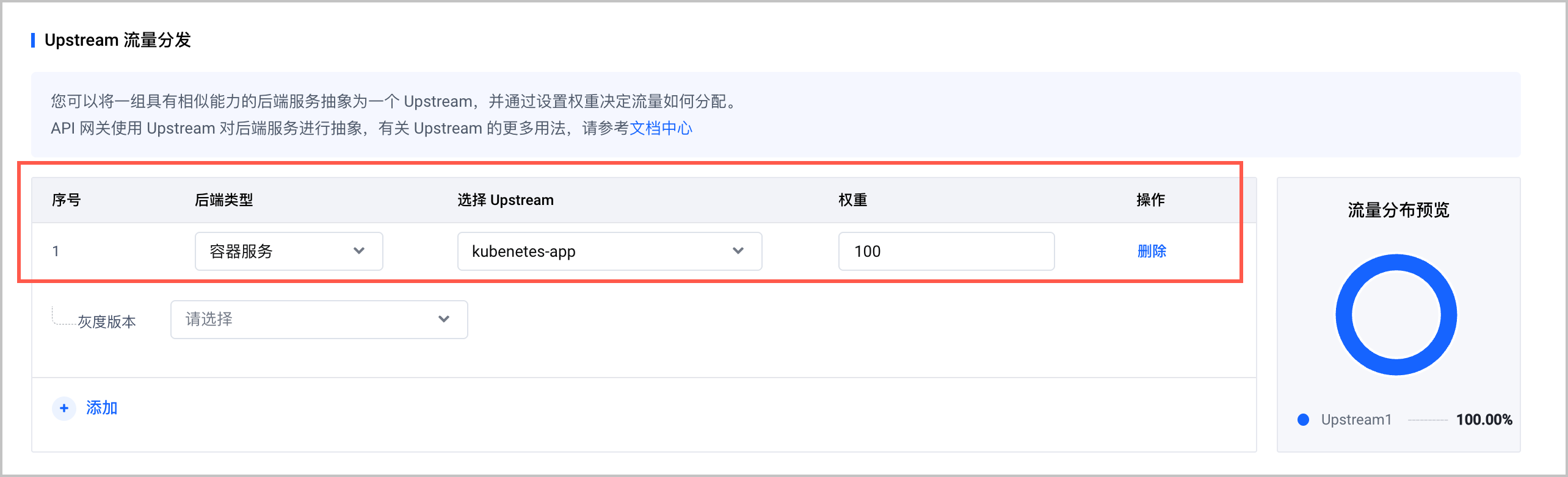
- 执行以下命令,进行 10 次访问测试。其中,xxx.xxx.xxx.xxx为 API 网关实例的访问入口 IP 地址,获取方式请参见 添加访问入口。
预期结果如下,10 个请求中有 2 个请求转发至注册集群,流量比例与应用副本数比例一致,符合预期。
场景 2:基于权重进行流量路由
在多集群场景下,API 网关支持在 Upstream 中指定灰度版本,并在配置路由时指定各灰度版本的权重。API 网关会基于权重进行流量转发。流量转发示意图,如下所示。
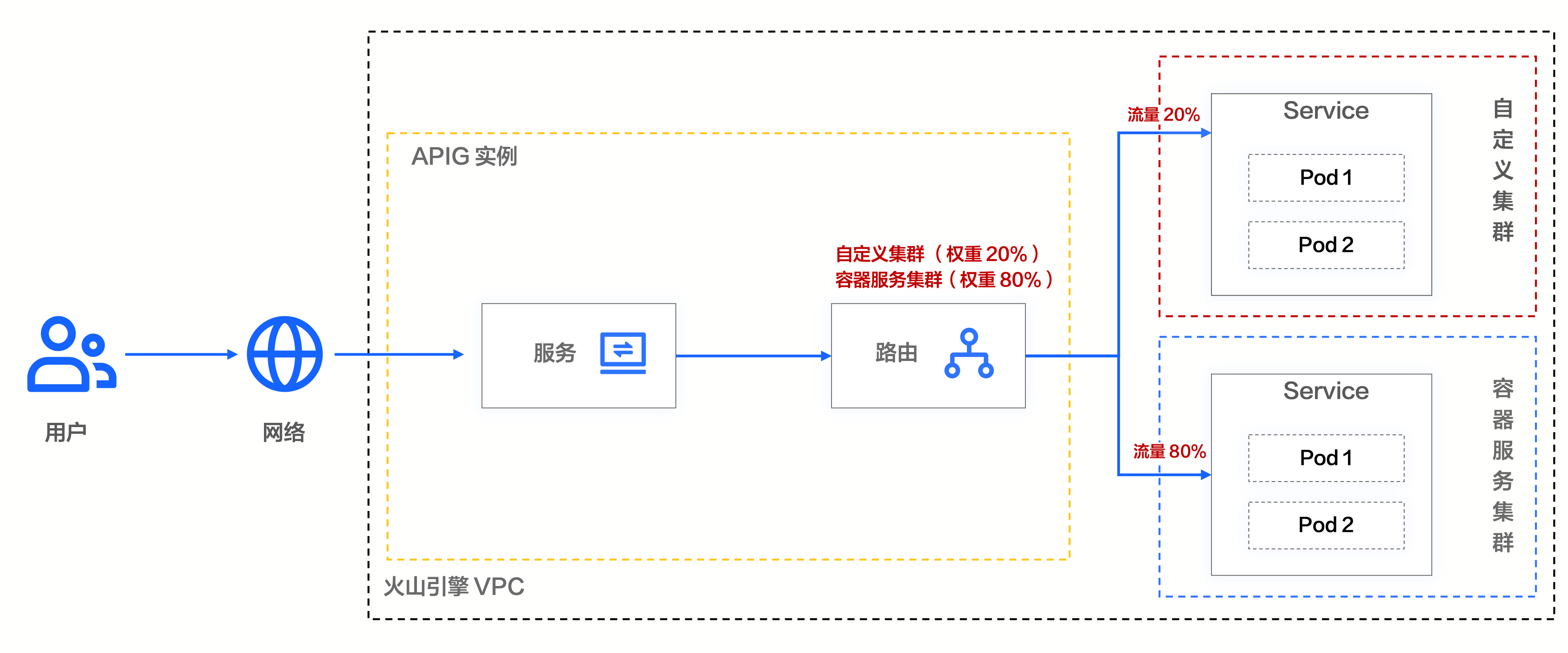
配置步骤如下:
- 在左侧导航栏选择 后端管理 > Upstream 列表。 在 Upstream 列表页面,单击目标 Upstream 名称,进入 Upstream 概览页面。
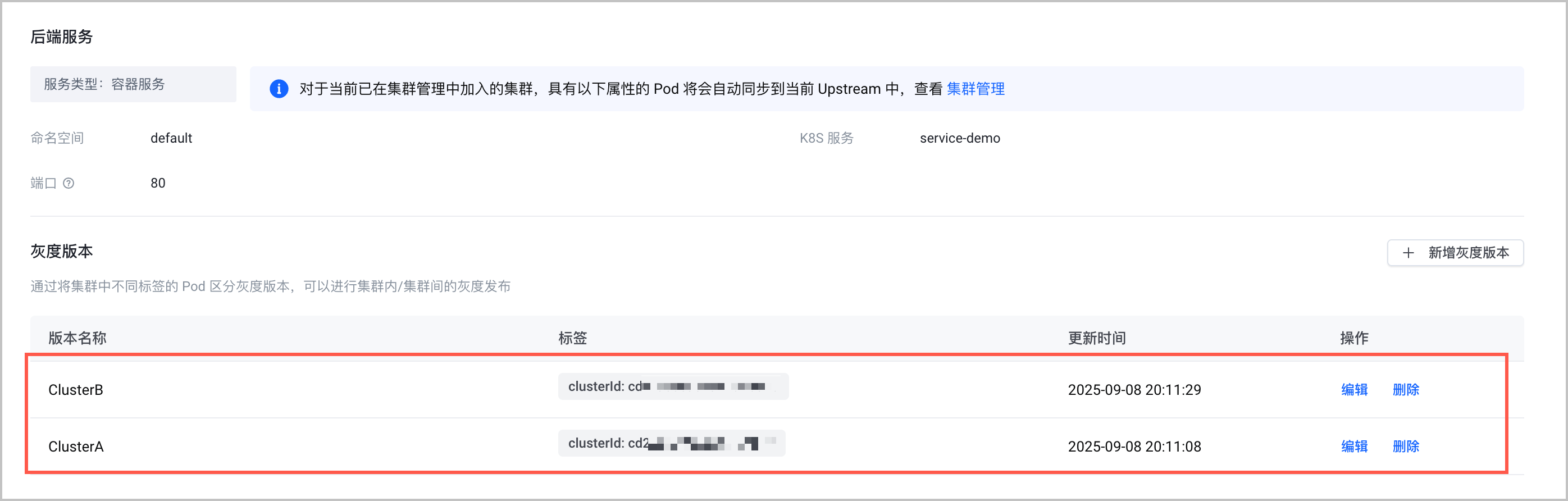
- 单击 新增灰度版本,为 Upstream 添加版本标识。该标识对应 Pod 中的spec.template.metadata.labels配置,详情请参见上文步骤二。本文中使用集群 ID 标识,例如clusterId:cd2vajnv989sp6***。更多配置详情,请参见 管理容器服务类型 Upstream 版本。
-
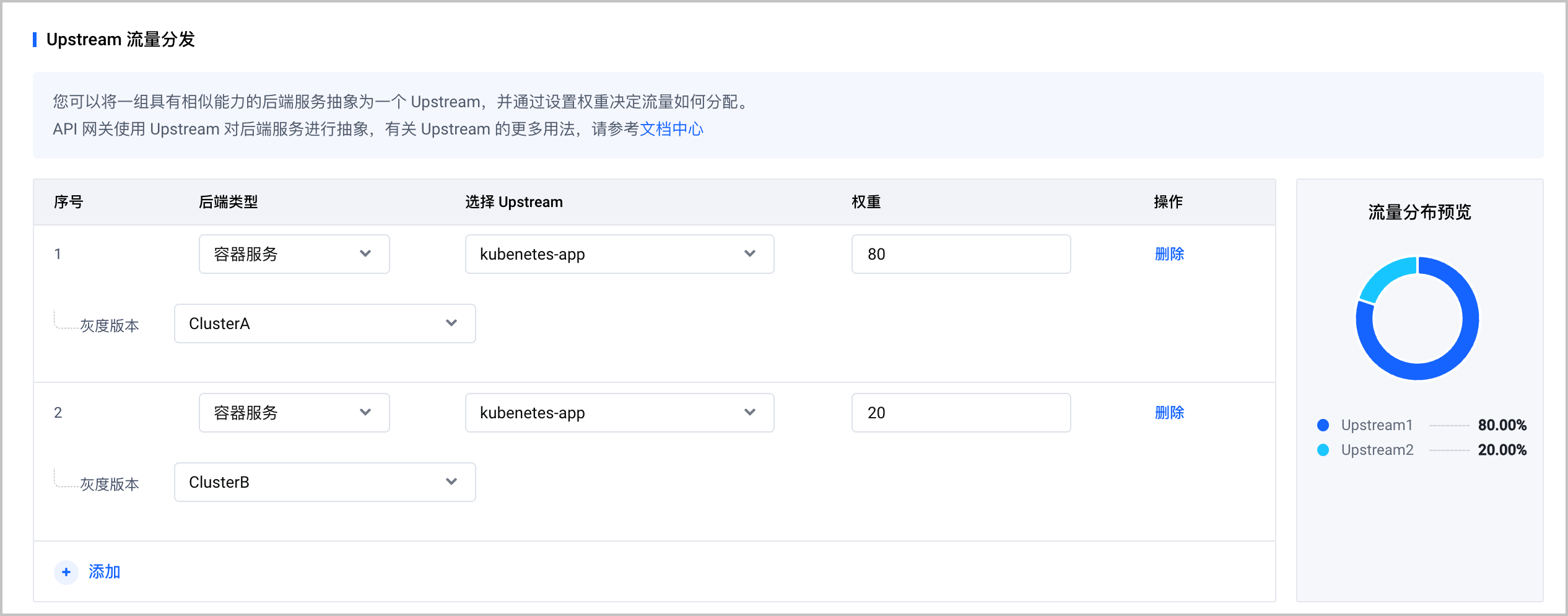
- 在左侧导航栏选择 路由管理 > 路由列表。单击 创建路由,配置路由信息。选择容器服务类型的 Upstream,并将流量按所需权重转发至不同的集群。在本例中,容器服务集群的权重为 80%,自定义集群的权重为 20%。更多配置详情,请参见 管理路由。
-
- 执行以下命令,进行 10 次访问测试。其中,xxx.xxx.xxx.xxx为 API 网关实例的访问入口 IP 地址,获取方式请参见 添加访问入口。
预期结果如下,10 个请求中有 2 个请求转发至注册集群,流量比例与权重一致,符合预期。
场景 3:流量仅路由到指定集群
当配置基于权重进行流量路由时,如果在路由中仅指定了一个目标集群,且配置权重为 100%。就可以实现仅路由到该指定集群的目的。流量转发示意图,如下所示。
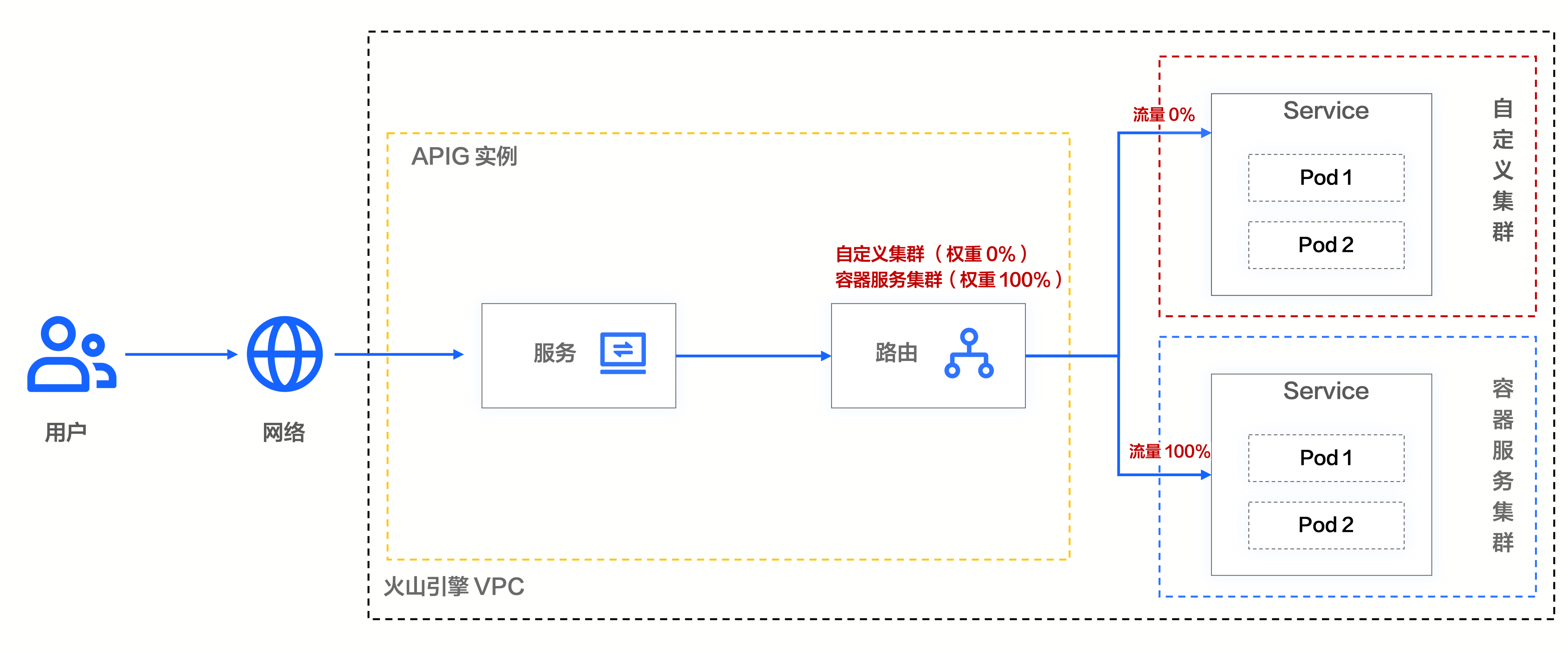
配置步骤如下:
- 在左侧导航栏选择 后端管理 > Upstream 列表。 在 Upstream 列表页面,单击目标 Upstream 名称,进入 Upstream 概览页面。
- 单击 新增灰度版本,为 Upstream 添加版本标识。该标识对应 Pod 中的spec.template.metadata.labels配置,详情请参见上文步骤二。本文中使用集群 ID 标识,例如clusterId:cd2vajnv989sp6***。更多配置详情,请参见 管理容器服务类型 Upstream 版本。
-
- 在左侧导航栏选择 路由管理 > 路由列表,单击 创建路由,配置路由信息。选择容器服务类型的 Upstream,并配置应用权重为 100%,并在 灰度版本 中指定集群。详情请参见 管理路由。
-
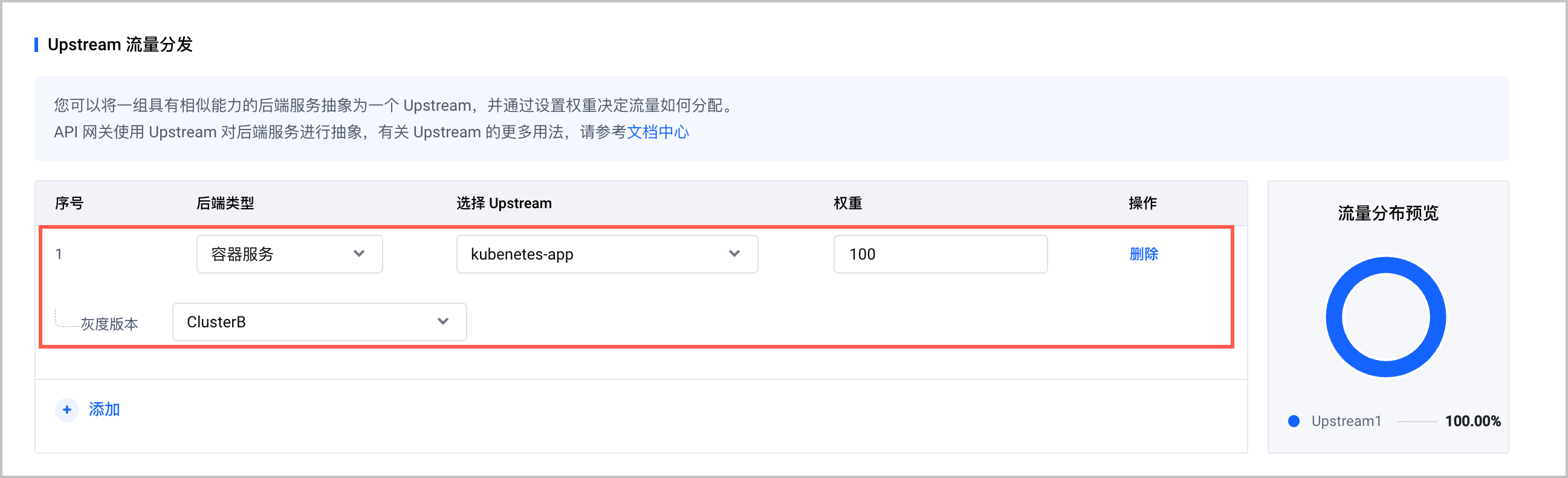
- 执行以下命令,进行 10 次访问测试。其中,xxx.xxx.xxx.xxx为 API 网关实例的访问入口 IP 地址,获取方式请参见 添加访问入口。
预期结果如下,所有请求均转发至指定集群,符合预期。
场景 4:基于 Header 进行流量路由
在多集群场景下,API 网关支持在 Upstream 中指定灰度版本,并在配置路由时通过 Header 进行流量路由。流量转发示意图,如下所示。
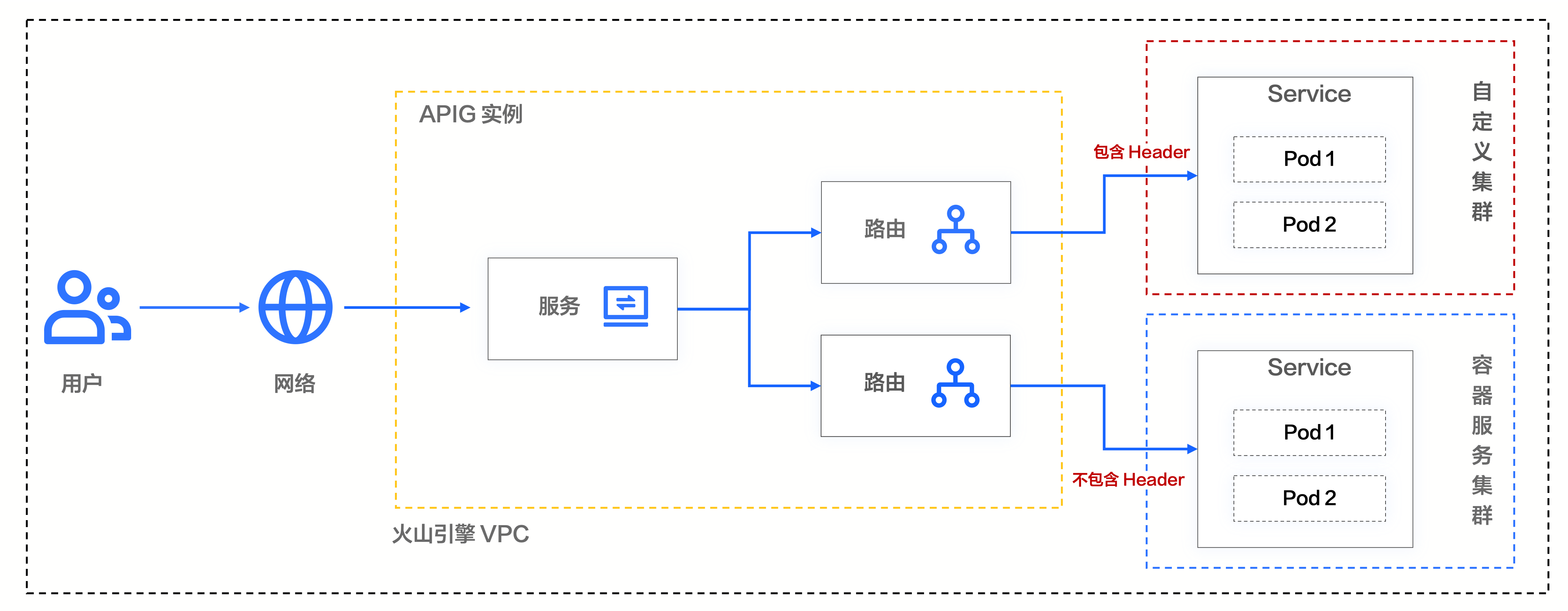
配置步骤如下:
- 在左侧导航栏选择 后端管理 > Upstream 列表。 在 Upstream 列表页面,单击目标 Upstream 名称,进入 Upstream 概览页面。
- 单击 新增灰度版本,为 Upstream 添加版本标识。该标识对应 Pod 中的spec.template.metadata.labels配置,详情请参见上文步骤二。本文中使用集群 ID 标识,例如clusterId:cd2vajnv989sp6***。更多配置详情,请参见 管理容器服务类型 Upstream 版本。
-
- 在左侧导航栏选择 路由管理 > 路由列表。单击 创建路由,配置路由信息。
- 配置不包含 Header 的路由,并指定转发的集群。本例中不包含 Header 的流量,转发至容器服务集群。
-
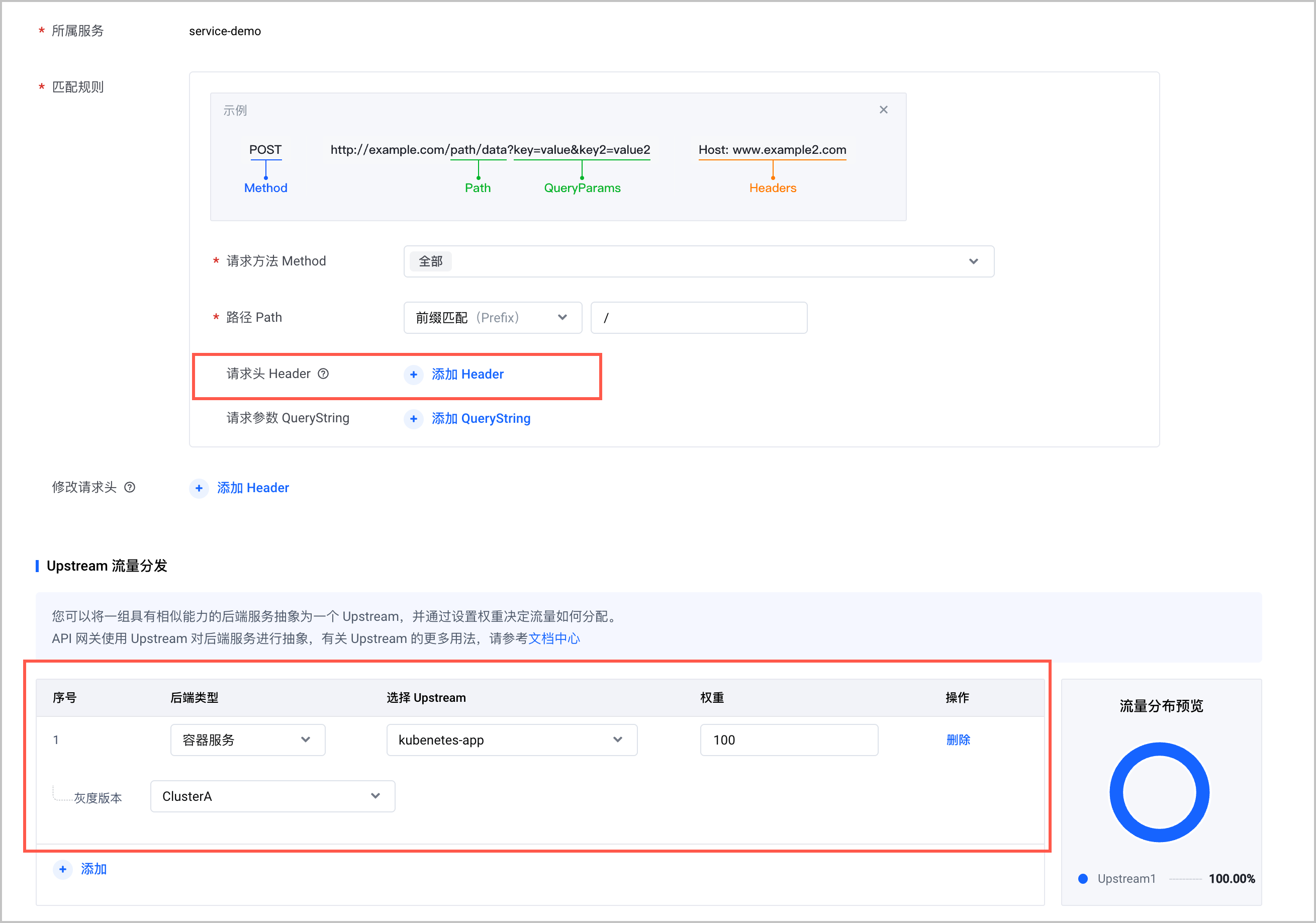
- 配置包含 Header 的路由,并指定转发的集群。本例中 Header 为foo:bar,转发至自定义集群。
-
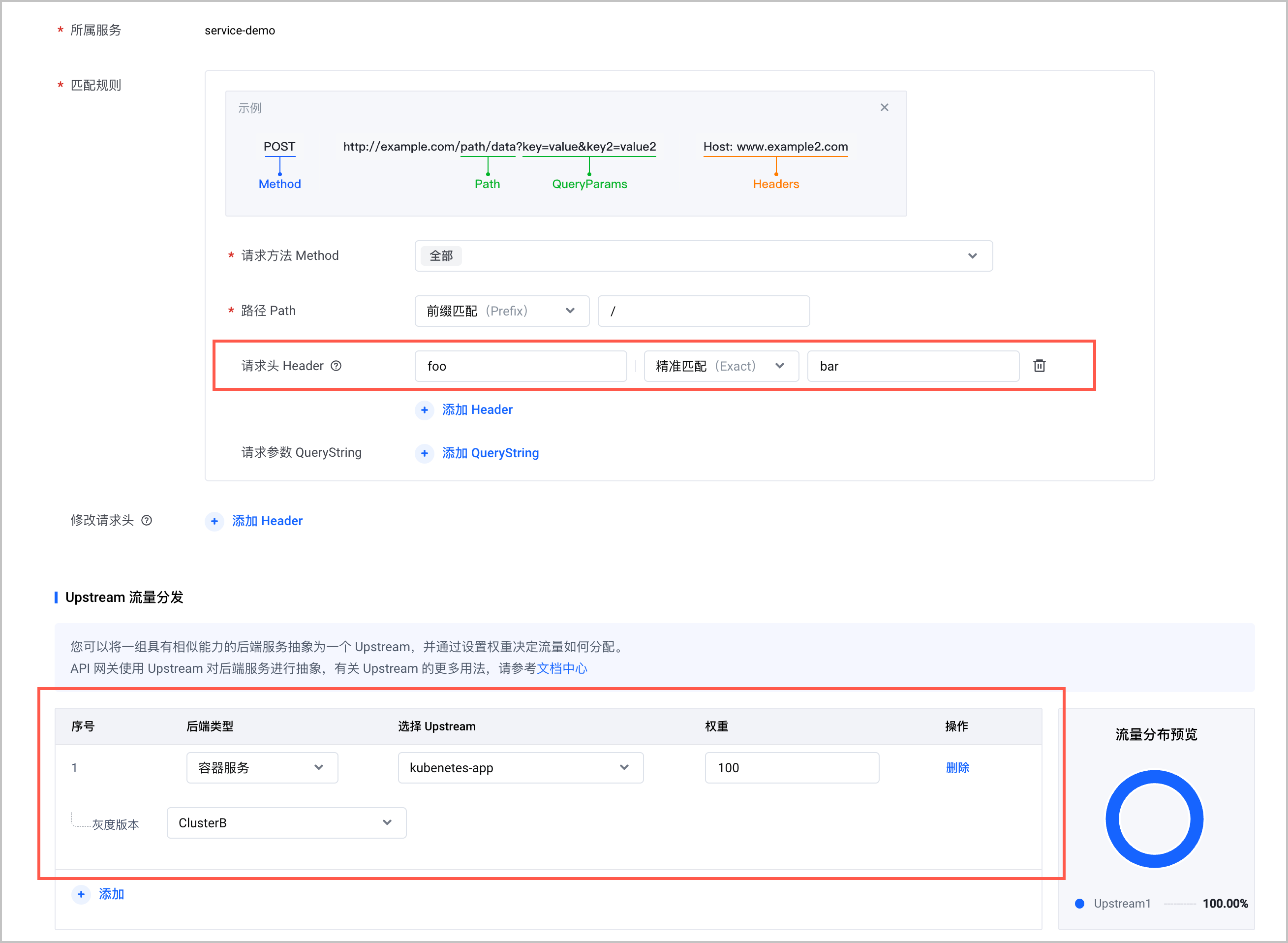
- 执行以下命令,进行 10 次访问测试。其中,xxx.xxx.xxx.xxx为 API 网关实例的访问入口 IP 地址,获取方式请参见 添加访问入口。
预期结果如下,当访问流量中不包含 Header 时,均转发至容器服务集群,符合预期。
- 执行以下命令,包含 Header 再进行 10 次访问测试。其中,xxx.xxx.xxx.xxx为 API 网关实例的访问入口 IP 地址,获取方式请参见 添加访问入口。
预期结果如下,当访问流量中包含 Header 时,均转发至自定义集群,符合预期。
最近更新时间:2025.09.12 11:56:05
这个页面对您有帮助吗?
有用
有用
无用
无用