You need to enable JavaScript to run this app.
文档中心
API 网关

API 网关

复制全文
下载 pdf
最佳实践
通过 API 网关使用 Gateway API
复制全文
下载 pdf
通过 API 网关使用 Gateway API
Gateway API 是 Kubernetes 社区定义的新一代流量路由标准,API 网关已支持该标准。本文介绍如何通过 API 网关开启 Gateway API 能力,并通过声明式的 Gateway 和 HTTPRoute 资源将集群内服务暴露给外部用户进行访问。​
说明​
【邀测·申请试用】:该功能目前处于邀测阶段,如需使用,请联系您的客户经理。​
背景信息​
Gateway API 是由 Kubernetes SIG-Network 社区主导的下一代服务网络路由规范,为集群流量治理提供了标准化、可扩展且面向角色分离的声明式接口。与传统 Ingress API 相比,Gateway API 引入了更精细的资源层级模型,将基础设施管理者(GatewayClass)、集群运维人员(Gateway)和应用开发者(HTTPRoute)的职责清晰分离,同时原生支持多协议、多租户、流量权重、Header 匹配等高级路由能力。​
API 网关已全面兼容 Kubernetes Gateway API 标准。您只需在容器集群中创建符合规范的 Gateway 和 HTTPRoute 等资源,API 网关即可自动完成配置同步与路由下发,实现从声明式定义到流量转发。API 网关当前支持的资源如下。​
​
资源类型​
说明​
GatewayClass​
定义网关实现类型的集群级资源,标识具体的网关控制器。​
Gateway​
定义流量入口点的配置,包括协议、端口、域名等监听参数。一个 Gateway 绑定一个 GatewayClass。​
HTTPRoute​
定义 HTTP 请求路由规则的资源,支持路径匹配、Header 匹配、权重分流等多种转发策略,绑定到指定的 Gateway 上生效。​
​
前提条件​
  • 已创建 API 网关实例,且已开启 GatewayAPI 能力。具体操作,请参见 创建 API 网关实例。​
  • 已创建容器服务(VKE)集群,版本在 v1.24 及以上。具体操作,请参见 创建集群。​
操作步骤​
步骤一:配置 Gateway API 同步​
  1. 登录 API 网关控制台。​
  1. 在顶部导航栏,选择目标地域。​
  1. 在左侧导航栏 实例管理 下拉框中选择目标实例后,单击 容器集群接入。​
  1. 在 集群列表 页面,单击 导入集群。​
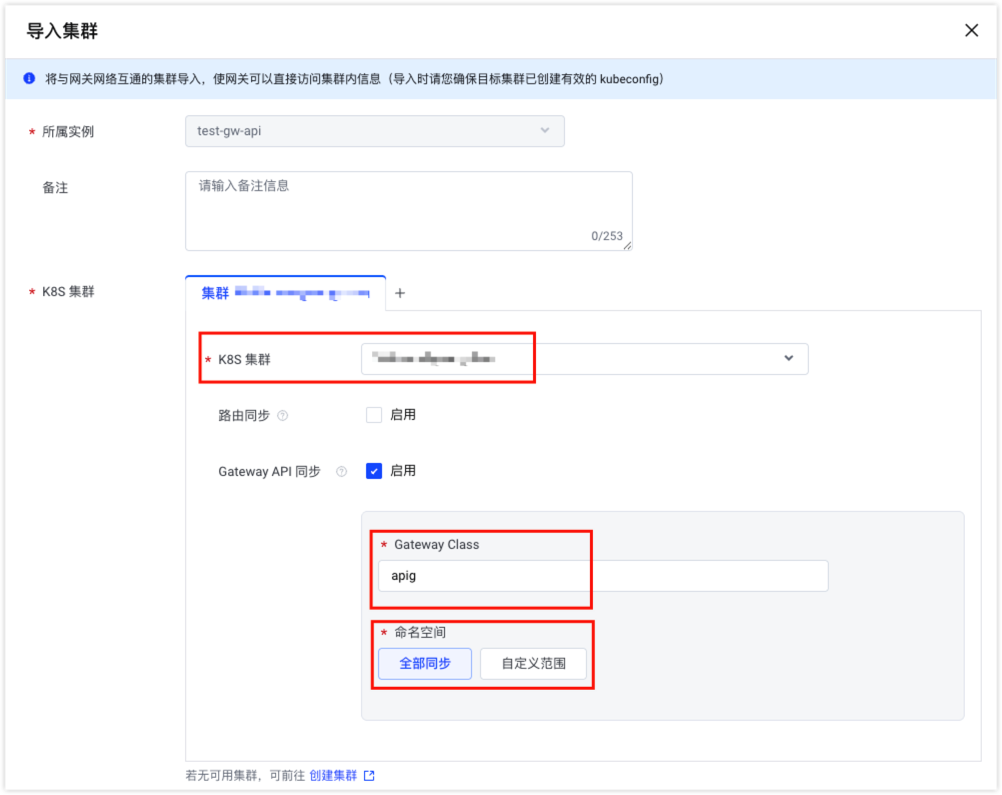
  1. 在导入集群页面,选择需要导入的集群,在 Gateway API 同步 区域,根据需要配置 Gateway Class 和 命名空间,目前仅支持配置一种 Gateway Class 类型,然后单击 确定。​
  • ​​​
步骤二:安装 Gateway API CRD​
您需要先完成 VKE 集群和 kubectl 的连接后,通过 kubectl 客户端执行下述及后续操作。具体操作,请参见 使用 kubectl 连接集群。​
执行以下命令,为您的容器集群安装 Gateway API CRD,若您的集群中已安装,请跳过该步骤。​
​
kubectl apply -f https://github.com/kubernetes-sigs/gateway-api/releases/download/v1.4.0/standard-install.yaml​
​
说明​
当前网关兼容的 Gateway API CRD 最高版本为 v1.4.0,上述命令以 Gateway API CRD 的 v.1.4.0 版本为示例,并非强制使用该版本。​
步骤三:部署示例应用​
  1. 创建nginx-demo.yaml文件,内容如下。​
  • ​
    apiVersion: apps/v1​
    kind: Deployment​
    metadata:​
    name: nginx-demo # 资源名称​
    namespace: default # 命名空间名称​
    spec:​
    replicas: 1 # Pod 实例个数​
    selector:​
    matchLabels:​
    app: nginx-demo # 通过标签选择器匹配 Pod​
    template:​
    metadata:​
    labels:​
    app: nginx-demo # Pod 的标签,需与 selector 一致​
    spec:​
    containers:​
    - image: doc-cn-beijing.cr.volces.com/vke/nginx-demo:v1.0 # 容器镜像地址,可以替换为您自己的镜像​
    name: nginx # 容器名称​
    ports:​
    - containerPort: 80 # 容器开放的端口​
    protocol: TCP # 网络协议​
    ---​
    apiVersion: v1​
    kind: Service​
    metadata:​
    name: nginx-demo # 服务名称​
    namespace: default # 命名空间名称​
    spec:​
    type: ClusterIP​
    ports:​
    - port: 80 # Service 对外提供服务的端口​
    targetPort: 80 # 容器端口,即工作负载对外提供服务的端口号或端口名称,例如:Nginx 开放的默认端口号为 80​
    protocol: TCP # 端口协议​
    selector:​
    app: nginx-demo # 需要与上述 selector 的 matchLabels 参数值保持一致​
    ​
  1. 执行以下命令,部署应用。​
  • ​
    kubectl apply -f nginx-demo.yaml​
    ​
  1. 执行以下命令,确认应用的运行状态。​
  • ​
    kubectl get pods -l app=nginx-demo​
    ​
  • 预期结果如下,STATUS状态显示为Running时表示应用正在运行中。​
  • ​
    NAME READY STATUS RESTARTS AGE​
    nginx-demo-6c8b449b8f-xxxxx 1/1 Running 0 30s​
    ​
步骤四:部署 Gateway 和路由​
  1. 自定义 GatewayClass,创建gatewayclass.yaml文件。​
  • ​
    apiVersion: gateway.networking.k8s.io/v1​
    kind: GatewayClass​
    metadata:​
    name: apig # GatewayClass名称,此处与步骤一中 GatewayClass 值保持一致​
    spec:​
    controllerName: gateway.volcengine.io/apig/controller​
    ​
  1. 执行以下命令部署 GatewayClass。​
  • ​
    kubectl apply -f gatewayclass.yaml​
    ​
  1. 创建gateway.yaml文件配置 Gateway 和路由,内容如下。​
  • ​
    apiVersion: gateway.networking.k8s.io/v1​
    kind: Gateway​
    metadata:​
    name: apig-gateway # Gateway 实例名​
    namespace: default # 所属命名空间​
    spec:​
    gatewayClassName: apig # GatewayClass 名称和上述文件中配置保持一致​
    listeners:​
    - name: http # 监听器名称​
    protocol: HTTP # 监听协议​
    port: 80 # 监听端口​
    hostname: "*.example.com" # 匹配的域名​
    allowedRoutes:​
    namespaces:​
    from: Same​
    ---​
    apiVersion: gateway.networking.k8s.io/v1​
    kind: HTTPRoute​
    metadata:​
    name: nginx-route # 路由规则名称​
    namespace: default # 所属命名空间​
    spec:​
    parentRefs:​
    - name: apig-gateway # 绑定的 Gateway 名称,需要与上述 metadata 的 name 参数值保持一致​
    hostnames:​
    - "demo.example.com" # 该路由匹配的域名​
    rules:​
    - matches:​
    - path:​
    type: PathPrefix # 路径匹配类型,前缀匹配​
    value: / # 匹配所有路径​
    backendRefs:​
    - kind: Service # 后端资源类型​
    name: nginx-demo # 后端服务名称,需要与步骤三中的配置保持一致​
    port: 80 # 后端服务端口​
    ​
说明​
  • 当backendRefs指向 Inference Service 对应的后端时,控制器会按照当前 watch 逻辑将其翻译为 APIG 侧容器类型 Upstream。HTTPRoute 的权重、match 条件仍按 Gateway API 语义处理;数据面能力由 APIG Route 和容器类型 Upstream 共同承载。​
  1. 执行以下命令,部署 Gateway 和路由规则。​
  • ​
    kubectl apply -f gateway.yaml​
    ​
  1. 等待约 2 分钟后,执行以下命令,确认 Gateway 状态。​
  • ​
    kubectl get gateway apig-gateway​
    ​
  • 预期结果如下,PROGRAMMED状态显示为True时表示 Gateway 已就绪。​
  • ​
    NAME CLASS ADDRESS PROGRAMMED AGE​
    apig-gateway apig nlb-xxxx True 2m​
    ​
  1. 确认路由已被正确监听。​
  1. 在顶部导航栏,选择目标地域。​
  1. 在左侧导航栏 实例管理 下拉框中选择目标实例后,单击 路由列表,如果列表中包含在容器侧创建的 Gateway API 路由,说明路由已被正确监听。​
步骤五:测试应用访问​
  1. 在左侧导航栏 实例管理 下拉框中选择目标实例后,单击 实例概览。​
  1. 在 访问入口 区域,获取网关接入点地址。​
  1. 执行以下命令访问应用,执行时需要替换获取的网关接入点地址。​
  • ​
    curl -H "Host: demo.example.com" http://<网关接入点地址>/version​
    ​
  • 预期结果如下。​
  • ​
    <!DOCTYPE html>​
    <html>​
    <head>​
    <title>Welcome to nginx!</title>​
    <style>​
    html { color-scheme: light dark; }​
    body { width: 35em; margin: 0 auto;​
    font-family: Tahoma, Verdana, Arial, sans-serif; }​
    </style>​
    </head>​
    <body>​
    <h1>Welcome to nginx!</h1>​
    <p>If you see this page, the nginx web server is successfully installed and​
    working. Further configuration is required.</p>​
    ​
    <p>For online documentation and support please refer to​
    <a href="http://nginx.org/">nginx.org</a>.<br/>​
    Commercial support is available at​
    <a href="http://nginx.com/">nginx.com</a>.</p>​
    ​
    <p><em>Thank you for using nginx.</em></p>​
    </body>​
    </html>​
    ​
场景示例​
以下示例参考自 Gateway API 官方文档,更丰富的实践场景请参考 Gateway API 官方用户指南。​
场景一:按照权重对流量切分​
通过设置后端多个服务的权重,可以将请求按比例分发到不同的服务,常用于灰度发布场景。​
  1. 创建nginx.yaml文件,部署两个 nginx 应用。其中old-nginx服务返回字符串This is the old version of nginx,new-nginx服务返回字符串This is the new version of nginx。​
  • ​
    apiVersion: apps/v1​
    kind: Deployment​
    metadata:​
    name: old-nginx # 资源名称,代表旧版本服务​
    spec:​
    replicas: 1​
    selector:​
    matchLabels:​
    run: old-nginx # 通过标签选择器匹配 Pod​
    template:​
    metadata:​
    labels:​
    run: old-nginx # Pod 的标签,需与 selector 一致​
    spec:​
    containers:​
    - image: doc-cn-beijing.cr.volces.com/vke/nginx-demo:v2.0 # 容器镜像地址,可以替换为您自己的镜像​
    imagePullPolicy: Always ​
    name: old-nginx # 容器名称​
    ports:​
    - containerPort: 80 # 容器开放的端口​
    protocol: TCP # 网络协议​
    restartPolicy: Always​
    ---​
    apiVersion: v1​
    kind: Service​
    metadata:​
    name: old-nginx # 旧版本服务名称​
    spec:​
    type: ClusterIP​
    ports:​
    - port: 80 # Service 对外提供服务的端口​
    targetPort: 80 # 容器端口,即工作负载对外提供服务的端口号或端口名称,例如:Nginx 开放的默认端口号为 80​
    protocol: TCP # 端口协议​
    selector:​
    run: old-nginx # 需要与上述 selector 的 matchLabels 参数值保持一致​
    ---​
    apiVersion: apps/v1​
    kind: Deployment​
    metadata:​
    name: new-nginx # 资源名称,代表新版本服务​
    spec:​
    replicas: 1​
    selector:​
    matchLabels:​
    run: new-nginx # 通过标签选择器匹配 Pod​
    template:​
    metadata:​
    labels:​
    run: new-nginx # Pod 的标签,需与 selector 一致​
    spec:​
    containers:​
    - image: doc-cn-beijing.cr.volces.com/vke/nginx-demo:v3.0 # 容器镜像地址,可以替换为您自己的镜像​
    imagePullPolicy: Always​
    name: new-nginx # 容器名称​
    ports:​
    - containerPort: 80 # 容器开放的端口​
    protocol: TCP # 网络协议​
    restartPolicy: Always​
    ---​
    apiVersion: v1​
    kind: Service​
    metadata:​
    name: new-nginx # 新版本服务名称​
    spec:​
    type: ClusterIP​
    ports:​
    - port: 80 # Service 对外提供服务的端口​
    targetPort: 80 # 容器端口,即工作负载对外提供服务的端口号或端口名称,例如:Nginx 开放的默认端口号为 80​
    protocol: TCP # 端口协议​
    selector:​
    run: new-nginx # 需要与上述 selector 的 matchLabels 参数值保持一致​
    ​
  1. 创建httproute-weight.yaml文件。​
  • ​
    apiVersion: gateway.networking.k8s.io/v1​
    kind: HTTPRoute​
    metadata:​
    name: demo-weight # 路由规则名称​
    spec:​
    parentRefs:​
    - name: apig-gateway # 绑定的 Gateway 名称​
    hostnames:​
    - "weight.example.com" # 该路由匹配的域名​
    rules:​
    - matches:​
    - path:​
    type: PathPrefix # 路径匹配类型,前缀匹配​
    value: / # 匹配所有路径​
    backendRefs:​
    - kind: Service # 后端资源类型​
    name: old-nginx # 旧版本服务名称​
    port: 80 # 后端 Service 端口​
    weight: 90 # 流量权重,约 90% 的请求路由到此服务​
    - kind: Service # 后端资源类型​
    name: new-nginx # 新版本服务名称​
    port: 80 # 后端 Service 端口​
    weight: 10 # 流量权重,约 10% 的请求路由到此服务​
    ​
说明​
weight字段为相对权重值。上述配置中表示约 90% 的流量路由到old-nginx,约 10% 的流量路由到new-nginx。​
  1. 执行以下命令,部署应用和路由规则。​
  • ​
    kubectl apply -f nginx.yaml​
    kubectl apply -f httproute-weight.yaml​
    ​
  1. 执行以下命令,进行多次访问应用验证流量分配。​
  • ​
    for i in {1..10}; do curl -s -H "Host: weight.example.com" http://<网关接入点>/; echo; done​
    ​
  • 预期结果如下,大部分返回This is the old version of nginx,少量返回This is the new version of nginx,比例接近 9:1。​
  • ​
    This is the old version of nginx​
    This is the old version of nginx​
    This is the old version of nginx​
    This is the old version of nginx​
    This is the old version of nginx​
    This is the old version of nginx​
    This is the old version of nginx​
    This is the old version of nginx​
    This is the new version of nginx​
    This is the old version of nginx​
    ​
场景二:基于 Header 的灰度路由​
通过 Header 匹配规则,可以将携带特定请求头的流量路由到灰度服务,未携带则路由到稳定版本。该方式常用于在不影响线上用户的前提下,对灰度版本进行验证。​
  1. 在上述部署示例的基础上,为nginx-demo部署灰度版本服务。创建nginx-canary.yaml文件,其中new-canary服务返回字符串This is the new version of nginx。​
  • ​
    apiVersion: apps/v1​
    kind: Deployment​
    metadata:​
    name: nginx-canary # 资源名称,代表灰度版本服务​
    namespace: default # 命名空间名称​
    spec:​
    replicas: 1​
    selector:​
    matchLabels:​
    app: nginx-canary # 通过标签选择器匹配 Pod​
    template:​
    metadata:​
    labels:​
    app: nginx-canary # Pod 的标签,需与 selector 一致​
    version: v3​
    spec:​
    containers:​
    - image: doc-cn-beijing.cr.volces.com/vke/nginx-demo:v3.0 # 容器镜像地址,可以替换为您自己的镜像​
    imagePullPolicy: Always​
    name: nginx # 容器名称​
    ports:​
    - containerPort: 80 # 容器开放的端口​
    protocol: TCP # 网络协议​
    ---​
    apiVersion: v1​
    kind: Service​
    metadata:​
    name: nginx-canary # 服务名称,代表灰度版本服务​
    namespace: default # 命名空间名称​
    spec:​
    type: ClusterIP​
    ports:​
    - port: 80 # Service 对外提供服务的端口​
    targetPort: 80 # 容器端口,即工作负载对外提供服务的端口号或端口名称,例如:Nginx 开放的默认端口号为 80​
    protocol: TCP # 端口协议​
    selector:​
    app: nginx-canary # 需要与上述 selector 的 matchLabels 参数值保持一致​
    ​
  1. 执行以下命令,部署灰度版本应用nginx-canary。​
  • ​
    kubectl apply -f nginx-canary.yaml​
    ​
  1. 创建httproute-canary.yaml文件,配置基于 Header 的灰度路由规则,该配置定义了两条路由规则,携带请求头env: canary的流量路由到灰度版本nginx-canary,其余流量路由到稳定版本nginx-demo。​
  • ​
    apiVersion: gateway.networking.k8s.io/v1​
    kind: HTTPRoute​
    metadata:​
    name: demo-canary # 路由规则名称​
    spec:​
    parentRefs:​
    - name: apig-gateway # 绑定的 Gateway 名称,需要与步骤三中 Gateway 名称保持一致​
    hostnames:​
    - "canary.example.com" # 该路由匹配的域名​
    rules:​
    - matches: # 携带请求头 env:canary 的流量进灰度版本服务 nginx-canary​
    - headers:​
    - type: Exact # Header 匹配类型,精确匹配​
    name: env # 匹配的 Header 名称​
    value: canary # 匹配的 Header 值​
    backendRefs:​
    - kind: Service # 后端资源类型​
    name: nginx-canary # 灰度版本服务名称​
    port: 80 # 后端 Service 端口​
    - backendRefs: # 其余全部流量进稳定版本 nginx-demo​
    - kind: Service # 后端资源类型​
    name: nginx-demo # 稳定版本服务名称,与步骤二中配置的服务名称保持一致​
    port: 80 # 后端 Service 端口​
    ​
  1. 执行以下命令,部署路由规则。​
  • ​
    kubectl apply -f httproute-canary.yaml​
    ​
  1. 执行以下命令,不携带 Header 时访问稳定版本,执行时需要替换步骤五中获取的网关接入点地址。​
  • ​
    curl -H "Host: canary.example.com" http://<网关接入点>/version​
    ​
  • 预期结果如下,表示成功访问nginx-demo稳定版本。​
  • ​
    <!DOCTYPE html>​
    <html>​
    <head>​
    <title>Welcome to nginx!</title>​
    <style>​
    html { color-scheme: light dark; }​
    body { width: 35em; margin: 0 auto;​
    font-family: Tahoma, Verdana, Arial, sans-serif; }​
    </style>​
    </head>​
    <body>​
    <h1>Welcome to nginx!</h1>​
    <p>If you see this page, the nginx web server is successfully installed and​
    working. Further configuration is required.</p>​
    ​
    <p>For online documentation and support please refer to​
    <a href="http://nginx.org/">nginx.org</a>.<br/>​
    Commercial support is available at​
    <a href="http://nginx.com/">nginx.com</a>.</p>​
    ​
    <p><em>Thank you for using nginx.</em></p>​
    </body>​
    </html>​
    ​
  1. 执行以下命令,携带env: canary请求头时访问灰度版本,执行时需要替换步骤五中获取的网关接入点地址。​
  • ​
    curl -H "Host: canary.example.com" -H "env: canary" http://<网关接入点>/version​
    ​
  • 预期结果如下,表示成功访问nginx-canary灰度版本。​
  • ​
    This is the new version of nginx​
    ​
场景三:基于 OpenAI 协议 Header 的路由选择与加权分流​
在 AI 推理服务场景中,客户端通常会通过 OpenAI 兼容协议发起请求,并在 HTTP Header 中携带组织标识(如OpenAI-Organization)或项目标识(如OpenAI-Project)。通过 HTTPRoute 的matches.headers能力,可以对这些协议 Header 做路由选择;命中某个 Header 条件后,再在该 rule 内通过backendRefs.weight实现加权分流,常用于 AI 模型灰度发布场景。​
本示例复用场景一中部署的old-nginx和new-nginx服务,演示如何根据 OpenAI 协议 Header 将流量路由到不同后端,并在命中规则内按权重分配流量。​
  1. 创建httproute-openapi.yaml文件。​
  • ​
    apiVersion: gateway.networking.k8s.io/v1 ​
    kind: HTTPRoute ​
    metadata:​
    name: route-openai # 路由规则名称​
    namespace: default # 所属命名空间​
    spec:​
    parentRefs:​
    - name: apig-gateway # 绑定的 Gateway 名称​
    hostnames:​
    - "ai.example.com" # 该路由匹配的域名​
    rules:​
    - matches:​
    - path:​
    type: PathPrefix # 路径匹配类型,前缀匹配​
    value: /v1 # 匹配 OpenAI 兼容 API 路径前缀​
    headers:​
    - name: OpenAI-Organization # 匹配的 Header 名称​
    value: org-a # 匹配的组织标识​
    backendRefs:​
    - kind: Service # 后端资源类型​
    name: old-nginx # 旧版本服务​
    port: 80 # 后端 Service 端口​
    weight: 90 # 约 90% 的流量路由到旧版本​
    - kind: Service # 后端资源类型​
    name: new-nginx # 新版本服务​
    port: 80 # 后端 Service 端口​
    weight: 10 # 约 10% 的流量路由到新版本​
    - matches:​
    - path:​
    type: PathPrefix # 路径匹配类型,前缀匹配​
    value: /v1 # 匹配 OpenAI 兼容 API 路径前缀​
    headers:​
    - name: OpenAI-Project # 匹配的 Header 名称​
    value: project-b # 匹配的项目标识​
    backendRefs:​
    - kind: Service # 后端资源类型​
    name: new-nginx # 该项目全部流量路由到新版本​
    port: 80 # 后端 Service 端口​
    weight: 1 # 权重为 1(单后端时权重可省略)​
    ​
说明​
  • 第一条规则:当请求路径以/v1开头且携带Header OpenAI-Organization: org-a时,90% 的流量路由到old-nginx,10% 的流量路由到new-nginx,实现对特定组织的灰度发布。​
  • 第二条规则:当请求路径以/v1开头且携带Header OpenAI-Project: project-b时,全部流量路由到new-nginx,用于特定项目的全量切换。​
  1. 执行以下命令,部署路由规则。​
  • ​
    kubectl apply -f httproute-openai.yaml​
    ​
  1. 执行以下命令,携带OpenAI-Organization: org-a Header 进行多次访问,验证组织维度的加权路由。​
  • ​
    for i in {1..10}; do curl -s -H "Host: ai.example.com" -H "OpenAI-Organization: org-a" http://<网关接入点>/v1; echo; done​
    ​
  • 预期结果如下,大部分返回This is the old version of nginx,少量返回This is the new version of nginx,比例接近 9:1。​
  • ​
    This is the old version of nginx​
    This is the old version of nginx​
    This is the old version of nginx​
    This is the old version of nginx​
    This is the new version of nginx​
    This is the old version of nginx​
    This is the old version of nginx​
    This is the old version of nginx​
    This is the old version of nginx​
    This is the old version of nginx​
    ​
  1. 执行以下命令,携带OpenAI-Project: project-b Header 进行访问,验证项目维度的全量路由。​
  • ​
    curl -H "Host: ai.example.com" -H "OpenAI-Project: project-b" http://<网关接入点>/v1​
    ​
  • 预期结果如下,由于该规则将全部流量路由到new-nginx,因此每次访问均返回新版本内容。。​
  • ​
    This is the new version of nginx​
    ​
​
​
​
最近更新时间:2026.06.25 15:53:39
这个页面对您有帮助吗?
有用
有用
无用
无用