图像生成大模型
图像生成大模型
图像生成大模型


文档指南
请输入


图像生成大模型
实时互动数字人大模型
视频生成
智能绘图(文生图)
智能绘图(图生图)
智能绘图(图像特效)
图像识别与理解
身份认证
身份认证(增强版)
面部比对
图片静默活体检测
图像识别
通用图像分割
智能图像处理
SaaS应用
- 文档首页
 图像生成大模型图像识别与理解身份认证身份认证(增强版)客户端SDK接入iOS版本
 复制全文
复制全文 下载 pdf
iOS版本
 文档反馈
文档反馈 问问助手
问问助手获取SDK包与Demo
SDK
Demo

demo testflight体验过期时间:2026-02-02 (如果遇到过期请联系官网客服进行更新)
Demo工程源码
注:Demo工程中自带sdk可能并非最新发布,请自行更换成最近版本
在工程中导入SDK
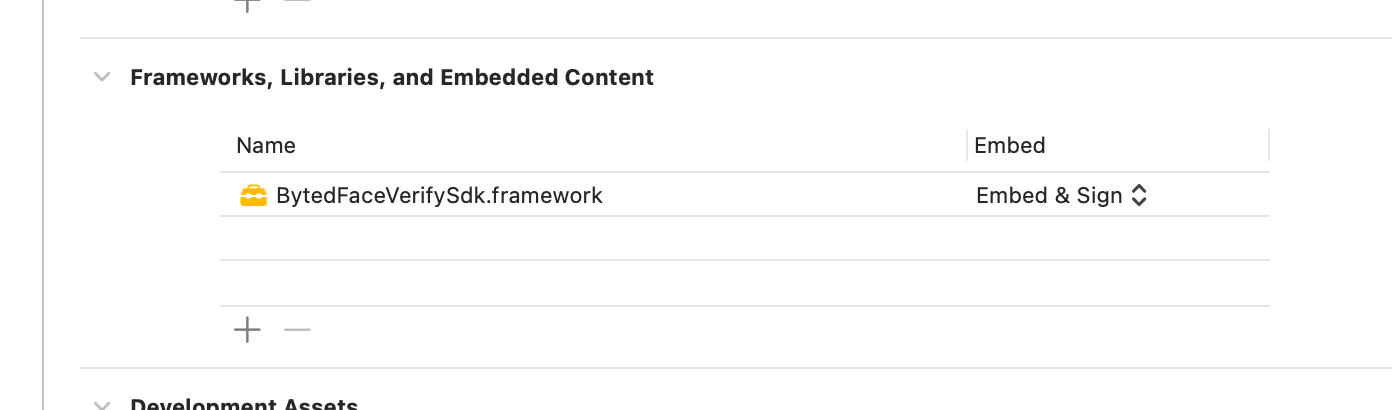
- 将BytedFaceVerifySdk.framework导入工程
- 在Xcode工具中点击TARGETS->Build Phases-> Link Binary With Libaries中点击“+”按钮,在弹出的窗口中点击“Add Other”按钮,选择BytedFaceVerifySdk.framework
完成上述步骤后,可以在Build Phases > Link Binary With Libraries看到导入的依赖包
- 添加系统权限
因SDK需要使用相册的权限权限,请在 info.plist 中添加 :
Privacy - Camera Usage Description
Privacy - Photo Library Usage Description
调用流程
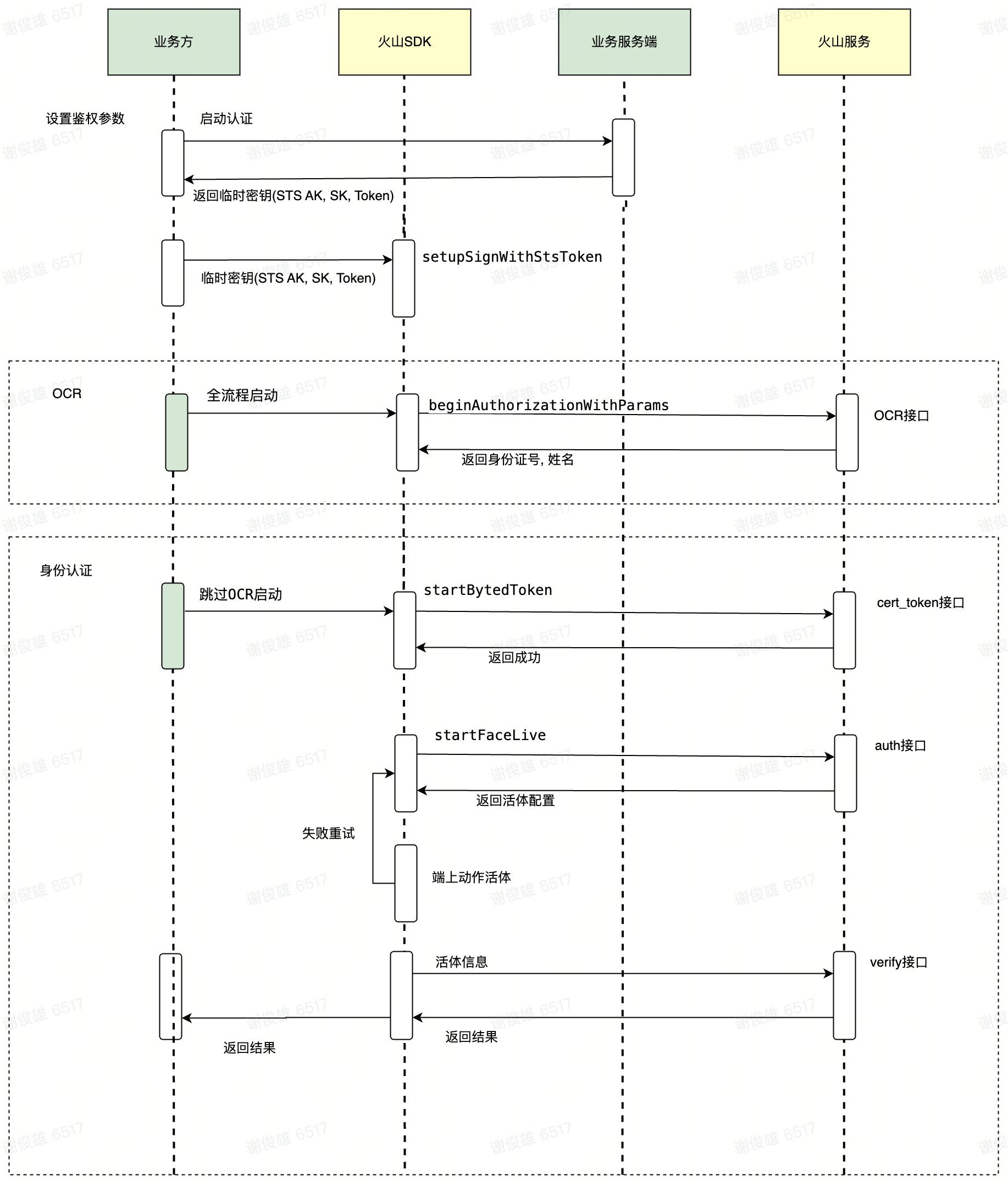
- 鉴权参数设置,启动风控数据上报:
- - (void)setupSignWithStsToken:accessKey:secretAccessKey:callback:
- 进行身份认证
- 根据需求选择是否需要进行OCR
- 2. 全流程: OCR+活体认证+身份比对
- -(void)beginAuthorizationWithParams:options:completion:
- 4. 跳过OCR启动身份认证
- 通过SDK的接口-(void)startBytedToken:params:callback:获取bytedToken, clientConfig (或者业务自行通过服务获取)
- -(void)startFaceLive:clientConfig:options:callback: // 启动活体+身份认证
- 拿到结果
全流程调用示例
[[BytedCertWrapper sharedInstance] setupSignWithAccessKey:@"" accessKey:@"" SecretAccessKey:@"" callback:^(NSDictionary *) {
NSMutableDictionary *reqtDict = [[NSMutableDictionary alloc] init];
[reqtDict setObject:@"1" forKey:BytedCertParamRefSource];
reqtDict[BytedCertParamLivenessTimeout] = @(10);
reqtDict[BytedCertParamMaxLivenessTrial] = @(10);
[[BytedCertWrapper sharedInstance] beginAuthorizationWithParams:reqtDict completion:^(NSDictionary * _Nullable data, BytedCertError * _Nullable error) {
// 认证结果
}];
}];
接口说明
- 入口类BytedCertWrapper
1.1 获取BytedCertWrapper单例
[BytedCertWrapper sharedInstance];
1.2 设置鉴权参数
函数原型:
/// 设置鉴权参数
/// - Parameters:
/// - stsToken: 使用临时密钥需要传入ststoken, 使用长期密钥可以直接传null
/// - accessKey: 密钥ak
/// - secretAccessKey: 密钥sk
/// - callback: 初始化回调信息, 包含风控Token - "riskToken"
/// -note 此方法包含以下两个步骤
/// 1. 使用setupSignWithStsToken:accessKey:secretAccessKey: 设置STSTOKEN/AK/SK
/// 2. 调用setupTrackerWithMode:completion: 启动数据上报
- (void)setupSignWithStsToken:(NSString *)stsToken accessKey:(NSString *)accessKey secretAccessKey:(NSString *)secretAccessKey callback:(void(^)(NSDictionary *))callback;
ex:
[BytedCertWrapper.sharedInstance setupSignWithStsToken:stsToken accessKey:accessKey secretAccessKey:sercetAccessKey callback:^(NSDictionary * _Nonnull dict) {
}];
1.2.1 启动数据上报(设置鉴权参数默认调用了此接口)
函数原型:
/// 启动数据上报
/// - Parameters:
/// - collectMode: 数据权限模式
/// MODE_DEFAULT:正常模式, MODE_MINIMIZE:基础模式。基础模式在一些低端机型版本风控检测耗时较短,但抗风险能力较弱,建议使用DEFAULT模式。
/// - completion: 回调风控riskToken; 基础版没有此回调
- (void)setupTrackerWithMode:(BCCollectMode)collectMode completion:(nullable void(^)(NSString *))completion;
ex:
略
1.3 配置视频录制参数
函数原型:
/// 配置视频上传参数
/// - Parameters:
/// - tosInfo: tos配置
/// - callback: 上传视频结果callback, 注意:返回非主线程
/// - bytedToken: 视频对应bytedToken
/// - filePath: 录制的视频文件路径, 失败的话为nil
/// - error: 错误信息,为nil表示成功
- (void)configRecordeAndUploadParams:(BytedCertTosInfo *)tosInfo
callback:(BytedCertUploadVideoFinishBlock)callback;
ex :
BytedCertTosInfo* tosInfo = [[BytedCertTosInfo alloc] initWithAccessKey:@"***" secretKey:@"***" stsToken:@"***" bucket:@"***" endpoint:@"tos-cn-beijing.volces.com" region:@"cjq-test.tos-cn-beijing.volces.com"];
[self.bytedCertWrapper configRecordeAndUploadParams:tosInfo callback:^(NSString* bytedToken, NSString * _Nonnull filePath, BytedCertError * _Nullable error) {
dispatch_async(dispatch_get_main_queue(), ^{
NSMutableString* message = [[NSMutableString alloc] init];
if (error) {
[message appendFormat:@"上传失败(%@): %@", @(error.errorCode), error.errorMessage];
} else {
[message appendFormat:@"上传成功:%@", filePath];
NSFileManager *fileManager = [NSFileManager defaultManager];
[fileManager removeItemAtPath:filePath error:nil];
}
});
}];
1.4 ocr识别接口
函数原型:
/// 身份证件ocr识别H5
/// - Parameter callback: OCR结果
/// name 身份证名称
/// identityCode 身份证号
/// identityFrontImg 身份证正面照片
/// identityBackImg 身份证背面照片
///
/// error 错误信息,为nil表示成功
- (void)doOCRH5:(BytedCertOCRResultBlock)callback;
ex :
[[BytedCertWrapper sharedInstance] doOCRH5:^(NSString * _Nonnull name, NSString * _Nonnull identityCode, NSString* _Nonnull identityFrontImg, NSString*_Nonnull identityBackImg, NSDictionary *_Nullable ocrData, BytedCertError * _Nullable error){
//成功
if (error.errorCode == 0){
_codeField.text = identityCode;
_nameField.text = name;
}
else {
//失败
UIAlertController *alertViewController = [UIAlertController alertControllerWithTitle:@"ocr结果"
message:error.errorMessage
preferredStyle:UIAlertControllerStyleAlert];
UIAlertAction *okAction = [UIAlertAction actionWithTitle:@"知道了" style:UIAlertActionStyleDefault handler:^(UIAlertAction *_Nonnull action){
}];
[alertViewController addAction:okAction];
[self presentViewController:alertViewController animated:YES completion:nil];
}
}];
1.5 获取token接口
函数原型:
/// 获取token
/// - Parameters:
/// - isRefSource: true为有源比对,false为无源比对
/// - params: 活体参数,具体参数如下:
/// - BytedCertParamIdentityName: 身份证名称, 有源比对为必传
/// - BytedCertParamIdentityCode: 身份证id,有源比对为必传
/// - BytedCertParamBinaryDataBase64: 无源比对的基准图base64
/// - BytedCertParamRiskMotionList:不同风险等级活体动作列表, Dictionary. 选填, 例: {"free":["0", "1", "2", "3"],"low":["0", "1", "2", "3"],"medium":["0", "1", "2", "3"],"high":["0", "1", "2", "3"]} //0:"眨眼",1:"张嘴",2:"点头",3:"摇头"
/// - BytedCertParamRiskMotionCount:不同风险等级需要的活体动作个数, Dictionary. 选填, 例: {"free":2,"low":2,"medium":3,"high":4}
/// - BytedCertParamRiskFixedMotionList: 不同风险等级固定一定需要下发的动作列表, Dictionary. 选填, 例: {"free":["0", "1", "2", "3"],"low":["0", "1", "2", "3"],"medium":["0", "1", "2", "3"],"high":["0", "1", "2", "3"]}
/// - BytedCertParamRiskLivenessType: 不同风险等级活体动作类型配置, Dictionary. 选填, 例: {"free":"motion","low":"motion","medium":"reflection","high":"reflection"}
/// - BytedCertParamMaxLivenessTrial: 端上动作活体最大尝试次数, 可选范围:[1, 100],默认:10
/// - BytedCertParamLivenessTimeout: 端上活体超时时长,可选范围: [5, 60],默认:10
/// - BytedCertParamReflectionModel: 炫彩校验模式,当RiskLivenessType命中reflection动作类型时生效,可选参数:(0、1),默认:0
/// - callback: 返回token结果的callback
/// - bytedToken: 返回的BytedToken值
/// - clientConfig: 客户端配置,需要原样传入到startFaceLive接口中
/// - error: 错误信息,为nil表示成功
- (void)startBytedToken:(BOOL)isRefSource
params:(NSDictionary<BytedCertParamKey, id> *) params
callback:(BytedCertBytedTokenResultBlock)callback;
ex:
//有源认证
NSMutableDictionary *reqtDict = [[NSMutableDictionary alloc] init];
reqtDict[BytedCertParamRiskMotionList] = [NSDictionary bc_fromJsonString:motinList];
reqtDict[BytedCertParamRiskMotionCount] = [NSDictionary bc_fromJsonString:motinCount];
reqtDict[BytedCertParamRiskFixedMotionList] = [NSDictionary bc_fromJsonString:fixMotinList];
reqtDict[BytedCertParamLivenessTimeout] = @(10);
reqtDict[BytedCertParamMaxLivenessTrial] = @(10);
reqtDict[BytedCertParamRiskLivenessType] = [NSDictionary bc_fromJsonString:motionType];
[[BytedCertWrapper sharedInstance] startBytedToken:YES params:reqtDict callback:^(NSString * _Nullable bytedToken, BytedCertError * _Nullable error){
//bytedToken为token
//error 错误信息,成功的话error为nil
}];
1.6 启动活体
函数原型:
/// 启动活体+回调活体信息
/// - Parameters:
/// - bytedToken: 从startBytedToken获取,也可以使用服务端中bytedToken中返回的
/// - clientConfig: 从startBytedToken中获取,也可使用服务端中的bytedToken中返回的
/// - options: 活体认证选项
/// - BytedCertParamVerifyNeeded: 是否需要进行比对
/// - BytedCertParamRefSource: 如需比对: "1"为有源,"0"为无源
/// - BytedCertParamTextSpeech: 是否开启语音播报, @(YES)/@(NO), 默认关闭
/// - callback: 活体结果
/// - data 结果信息 返回数据data格式参考身份认证sdk返回内容说明 中"服务端认证返回数据"章节的'jsonData'字段。注意:这里已把jsonData字符串解析成了NSDictionary格式
/// - facelive_info: 活体结果信息
/// - info: {data:xxx}
/// - error 错误信息,为nil表示成功
- (void)startFaceLive:(NSString *)bytedToken
clientConfig:(NSString *)clientConfig
options:(NSDictionary<BytedCertParamKey, id> *)options
callback:(BytedCertFaceLivenessResultBlock)callback;
ex:
//有源认证
NSDictionary *options = @{
BytedCertParamRefSource: @(1),
BytedCertParamVerifyNeeded: @(YES)
};
[BytedCertWrapper.sharedInstance startFaceLive:bytedToken
clientConfig:clientConfig
options:@{BytedCertParamRefSource: @(BCRefSourceExist), BytedCertParamTextSpeech: @(self.speechText)}
callback:^(NSDictionary * _Nullable data, BytedCertError * _Nullable error) {
if (error.errorCode == -1006 && data == nil) {
//- 1006 为用户主动取消认证过程
// 处理用户取消认证的逻辑
return;
}
//在3.2.5以后的版本中,无论成功还是失败,只要正常的认证请求,认证的Callback中都会携带图片信息
NSString *image_best = data[@"images"][@"image_best"];
NSData * image_best_data = [[NSData alloc] initWithBase64EncodedString:image_best options:0];
UIImage *faceImage = [UIImage imageWithData:image_best_data];
NSString *image_env = data[@"images"][@"image_env"];
NSData * image_best_env = [[NSData alloc] initWithBase64EncodedString:image_env options:0];
UIImage *envImage = [UIImage imageWithData:image_best_env];
if (error.errorCode == 0) {
//此处可以添加认证成功的逻辑
//show success page
}else{
//此处可以添加失败逻辑
NSInteger errorCode = error.errorCode;
NSString * errorMsg = error.errorMessage;
//errorCode和errorMsg范围较广,建议使用下面的子错误码和子错误信息
//一般情况下 detailErrorCode 和 DetailErrorImage 更容易定位到错误原因
NSInteger detailErrorCode = error.detailErrorCode;
NSString * detailErrorMsg = error.detailErrorMessage;
}
//以下为本地临时缓存的对象,可以忽略
self.lastResult = data;
self.lastError = error.errorMessage;
if (completion) completion();
}];
注:如果需要使用单活体
1.7 启动认证接口
身份认证全流程启动
函数原型:
/// 启动全流程认证+回调活体信息
/// 流程包括OCR+活体检测+身份比对
/// - Parameters:
/// - params: 认证参数
/// - BytedCertParamRiskMotionList:不同风险等级活体动作列表, Dictionary. 选填, 例: {"free":["0", "1", "2", "3"],"low":["0", "1", "2", "3"],"medium":["0", "1", "2", "3"],"high":["0", "1", "2", "3"]} //0:"眨眼",1:"张嘴",2:"点头",3:"摇头"
/// - BytedCertParamRiskMotionCount:不同风险等级需要的活体动作个数, Dictionary. 选填, 例: {"free":2,"low":2,"medium":3,"high":4}
/// - BytedCertParamRiskFixedMotionList: 不同风险等级固定一定需要下发的动作列表, Dictionary. 选填, 例: {"free":["0", "1", "2", "3"],"low":["0", "1", "2", "3"],"medium":["0", "1", "2", "3"],"high":["0", "1", "2", "3"]}
/// - BytedCertParamRiskLivenessType: 不同风险等级活体动作类型配置, Dictionary. 选填, 例: {"free":"motion","low":"motion","medium":"reflection","high":"reflection"}
/// - BytedCertParamLivenessTimeout: 端上活体超时时长,可选范围: [5, 60],默认:10
/// - BytedCertParamMaxLivenessTrial: 端上动作活体最大尝试次数, 可选范围:[1, 100],默认:10
/// - BytedCertParamReflectionModel: 炫彩校验模式,当RiskLivenessType命中reflection动作类型时生效;1为严格模式,0为默认模式,默认:0
/// - options: 活体认证选项
/// - BytedCertParamVerifyNeeded: 是否需要进行比对
/// - BytedCertParamRefSource: 如需比对: "1"为有源,"0"为无源,必传,目前只支持有源
/// - BytedCertParamTextSpeech: 是否开启语音播报, @(YES)/@(NO), 默认关闭
/// - completion: 认证结果
/// - data 返回数据 返回数据data格式参考身份认证sdk返回内容说明 中"服务端认证返回数据"章节的'jsonData'字段。注意:这里已把jsonData字符串解析成了NSDictionary格式
/// - error 错误信息,为nil表示成功
- (void)beginAuthorizationWithParams:(NSDictionary<BytedCertParamKey, id> *)params
options:(NSDictionary<BytedCertParamKey, id> *)options
completion:(BytedCertFaceLivenessResultBlock)completion;
ex:
NSMutableDictionary *reqtDict = [[NSMutableDictionary alloc] init];
reqtDict[BytedCertParamRiskMotionList] = [NSDictionary bc_fromJsonString:motinList];
reqtDict[BytedCertParamRiskMotionCount] = [NSDictionary bc_fromJsonString:motinCount];
reqtDict[BytedCertParamRiskFixedMotionList] = [NSDictionary bc_fromJsonString:fixMotinList];
reqtDict[BytedCertParamLivenessTimeout] = @(10);
reqtDict[BytedCertParamMaxLivenessTrial] = @(10);
reqtDict[BytedCertParamRiskLivenessType] = [NSDictionary bc_fromJsonString:motionType];
//有源比对
NSDictionary *options = @{
BytedCertParamRefSource: @(1),
BytedCertParamVerifyNeeded: @(YES)
};
[[BytedCertWrapper sharedInstance] beginAuthorizationWithParams:reqtDict
options:options
completion:^(NSDictionary * _Nullable data, BytedCertError * _Nullable error) {
if (error.errorCode == -1006 && data == nil) {
//- 1006 为用户主动取消认证过程
// 处理用户取消认证的逻辑
return;
}
//在3.2.5以后的版本中,无论成功还是失败,只要正常的认证请求,认证的Callback中都会携带图片信息
NSString *image_best = data[@"images"][@"image_best"];
NSData * image_best_data = [[NSData alloc] initWithBase64EncodedString:image_best options:0];
UIImage *faceImage = [UIImage imageWithData:image_best_data];
NSString *image_env = data[@"images"][@"image_env"];
NSData * image_best_env = [[NSData alloc] initWithBase64EncodedString:image_env options:0];
UIImage *envImage = [UIImage imageWithData:image_best_env];
if (error.errorCode == 0) {
//此处可以添加认证成功的逻辑
//show success page
}else{
//此处可以添加失败逻辑
NSInteger errorCode = error.errorCode;
NSString * errorMsg = error.errorMessage;
//errorCode和errorMsg范围较广,建议使用下面的子错误码和子错误信息
//一般情况下 detailErrorCode 和 DetailErrorImage 更容易定位到错误原因
NSInteger detailErrorCode = error.detailErrorCode;
NSString * detailErrorMsg = error.detailErrorMessage;
}
//以下为本地临时缓存的对象,可以忽略
self.lastResult = data;
self.lastError = error.errorMessage;
if (completion) completion();
}];
1.8 日志接口
建议设置BytedCertWrapper.sharedInstance.logger属性, 用于收集日志信息便于问题排查.
日志实例须实现BytedCertLoggerProtocol协议
示例
@interface BCLogger : NSObject <BytedCertLoggerProtocol>
@end
@implementation BCLogger
- (void)logType:(BytedCertLogType)type message:(NSString *)message {
NSLog(@"byted cert sdk message: %@", message);
// log to file
// ...
}
@end
BytedCertWrapper.sharedInstance.logger = [[BCLogger alloc] init];
1.9 获取SDK信息
用于获取身份认证SDK相关信息
函数原型
/// 获取SDK信息
/// - sdk_version: sdk版本号
/// - provider: sdk提供方
/// - algo_action_version: 动作识别版本号
/// - did: 用户设备ID
- (NSDictionary *)getSDKVersionInfo;
ex:
略
2. callback
2.1 BytedCertUploadVideoFinishBlock
//bytedToken: 视频对应bytedToken
//filePath: 录制的视频文件路径, 失败的话为nil
//error: 错误信息,为nil表示成功
typedef void (^BytedCertUploadVideoFinishBlock)(NSString* bytedToken, NSString* filePath, BytedCertError *_Nullable error);
2.2 BytedCertOCRResultBlock
//name 身份证名称
//identityCode 身份证号
//identityFrontImg 身份证正面照片
//identityBackImg 身份证背面照片
//error 错误信息,为nil表示成功
typedef void (^BytedCertOCRResultBlock)(NSString* name, NSString* identityCode, NSString* _Nonnull identityFrontImg, NSString*_Nonnull identityBackImg, NSDictionary *_Nullable ocrData, BytedCertError *_Nullable error);
2.3 BytedCertBytedTokenResultBlock
注意:这里已把jsonData字符串解析成了NSDictionary格式
//bytedToken 返回的BytedToken值
//clientConfig 客户端配置,需要原样传入到startFaceLive接口中
//error 错误信息,为nil表示成功
typedef void (^BytedCertBytedTokenResultBlock)(NSString *_Nullable bytedToken, NSString *_Nullable clientConfig, BytedCertError *_Nullable error);
2.4 BytedCertFaceLivenessResultBlock
注意:这里已把jsonData字符串解析成了NSDictionary格式
//data 返回数据
//error 错误信息,为nil表示成功
typedef void (^BytedCertFaceLivenessResultBlock)(NSDictionary *_Nullable data, BytedCertError *_Nullable error);
3. 活体认证信息回调说明
3.1 facelive_info数据结构
身份认证包含活体认证和身份比对两个步骤, 如活体认证成功, 在启动活体接口的回调里会把活体认证相关的结果回调到BytedCertFaceLivenessResultBlock的data信息中, 具体字段结构如下
data = {
"facelive_info": {
"info": 认证信息
}
}
info 为json字符串结构如下
info: {
image: 经过base64的图片,
video: 经过base64的视频
}
最近更新时间:2026.10.19 14:42:29
这个页面对您有帮助吗?
有用
有用
无用
无用