全站加速
全站加速


- 文档首页
 全站加速最佳实践AI 场景加速加速 AIGC 素材资产上传
 复制全文
复制全文 下载 pdf
 文档反馈
文档反馈 问问助手
问问助手注意
为更好地优化 AI 场景加速体验,全站加速于2026年03月26日对不同 AI 场景的服务和计费方式进行统一。
- 所有新增的 AI 加速场景将统一由 AI 加速网关提供服务,并采用 AI 加速网关的计费模型进行计费。
- 详情请参见什么是 AI 加速网关、AI 加速网关计费说明、 快速上手 MaaS API 加速。
本文介绍如何为火山方舟素材资产库的 OpenAPI 配置全站加速,即通过系统生成的加速域名调用素材资产库接口,省去自购域名和配置证书;同时说明切换到加速域名后,为什么必须由您自行对请求签名,以及如何改造调用代码。
方案概述
火山方舟素材资产库通过 OpenAPI 对外提供素材的上传、查询、管理能力。当调用方与素材资产库所在区域跨地域时,接口调用的建连耗时和传输时延会明显增加。火山引擎全站加速(DCDN)针对火山方舟素材资产库源站,提供“AIGC 素材资产上传”加速方案。您可以通过全站加速控制台,为素材资产库 OpenAPI 快速配置加速域名,降低跨区域调用时的时延。
该解决方案具有以下优势:
- 您无需专门购买和配置域名。系统提供默认根域名
speedifyvolcai.com,您只需设置自定义前缀即可生成加速域名。 - 您无需单独为 HTTPS 服务配置 SSL 证书。系统会自动配置与加速域名兼容的证书。
- 系统预置与素材资产库访问相关的推荐配置,方便您快速完成接入。
注意
火山方舟素材资产库 OpenAPI 仅支持 Access Key(HMAC-SHA256)签名,不支持 API Key。这一点决定了接入加速域名后您必须改造调用方式,详见步骤二:改造客户端调用方式。
支持的源站类型
| 源站类型 | 说明 | 源站域名 |
|---|---|---|
| 火山方舟素材资产库 | 火山方舟素材资产库提供的素材上传与管理 OpenAPI。 | ark.cn-beijing.volcengineapi.com |
前置条件
- 您已开通火山引擎全站加速服务。
- 您已开通火山方舟素材资产库,并已获取用于签名的 Access Key(Access Key ID 与 Secret Access Key)。
- 您已明确调用方当前的接入方式:是通过火山 OpenAPI SDK 调用,还是自行构造 HTTP 请求调用。这决定了步骤二的改造量。
操作步骤
步骤一:添加加速域名
登录全站加速控制台,在左侧导航栏中点击 域名管理,然后点击 添加域名。
在 添加域名 页面,从 AI 场景 下选择 AIGC 素材资产上传,然后完成基础配置:
- 设置 加速区域。可选项:中国大陆、全球、全球(除中国大陆)。
- 设置 加速域名 的自定义前缀。系统会将此前缀与随机字符串和默认根域名
speedifyvolcai.com组合,生成最终的加速域名。 - 选择 项目组,用于分组管理火山引擎资源。如无特殊需求,可选择 default(默认项目)。
- 在 源站地址 中选择 火山方舟素材资产库。
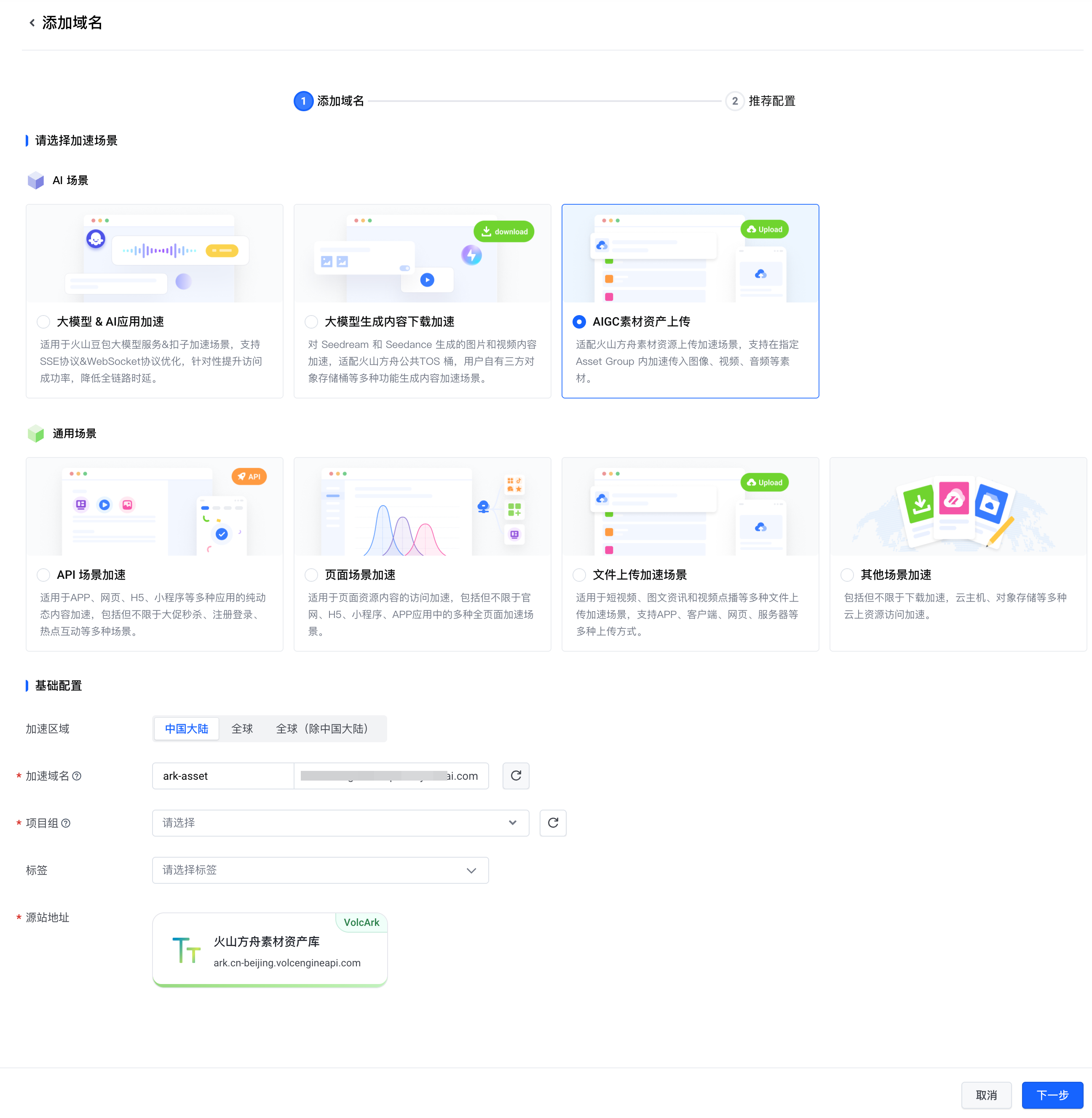
点击 下一步 进入 推荐配置 页面。
系统会根据所选场景预置与素材资产库访问相关的推荐配置,例如 HTTPS 服务及相关协议支持。确认配置后,点击 完成配置。
回到域名列表,等待加速域名状态从 部署中 变为 运行中 后,记下系统生成的加速域名(形如
xxxxx.speedifyvolcai.com),下一步会用到它。
步骤二:改造客户端调用方式
这一步是本场景与其他 AI 加速场景最大的不同,请务必按本节改造后再发起调用。
为什么直接换域名会失败
素材资产库 OpenAPI 仅支持 Access Key(HMAC-SHA256)签名。火山 OpenAPI SDK 在计算签名和发送请求时,都使用它内置的原始服务域名 ark.cn-beijing.volcengineapi.com。如果您把域名替换成加速域名后仍用 SDK 直接调用,SDK 会以加速域名参与签名,导致服务端鉴权源校验不通过,请求报错。因此您不能简单地在 SDK 中替换域名,而需要自行完成签名并发送原始 HTTP 请求。
说明
如果您调用的接口已支持 API Key(例如即梦近期提供的部分接口),则不受本节限制,可直接使用 API Key 通过加速域名访问,无需自行签名。
改造原则
您需要让“签名”和“发送”使用不同的域名:
- 计算签名时,请求的
Host字段仍使用原始域名ark.cn-beijing.volcengineapi.com,保证签名与服务端校验一致。 - 实际发送时,把请求发往步骤一生成的加速域名
https://xxxxx.speedifyvolcai.com,由加速链路转发到源站。
换言之,签名认的是原始域名,流量走的是加速域名。
签名示例(Golang,以 ListAssets 为例)
以下示例演示如何对素材资产库的 ListAssets 接口自行签名并通过加速域名发送请求。示例中的关键参数含义如下:
| 参数 | 取值 | 说明 |
|---|---|---|
Service | ark | 素材资产库 OpenAPI 所属服务,固定值。 |
Region | cn-beijing | 素材资产库所在区域,固定值。 |
Action | ListAssets | 本示例调用的接口,请按实际调用的接口替换。 |
Version | 2024-01-01 | 接口版本,固定值。 |
SignHost | ark.cn-beijing.volcengineapi.com | 参与签名的原始域名,请勿改为加速域名。 |
Addr | https://xxxxx.speedifyvolcai.com | 请替换为步骤一生成的加速域名,请求实际发往此域名。 |
注意
示例代码中的 AK******、SK******、https://xxxxx.speedifyvolcai.com 均为需要您替换的占位值,不是可直接使用的默认值。请替换为您自己的 Access Key 和步骤一生成的加速域名。
/*
Copyright (year) Beijing Volcano Engine Technology Ltd.

Licensed under the Apache License, Version 2.0 (the "License");
you may not use this file except in compliance with the License.
You may obtain a copy of the License at

    http://www.apache.org/licenses/LICENSE-2.0

Unless required by applicable law or agreed to in writing, software
distributed under the License is distributed on an "AS IS" BASIS,
WITHOUT WARRANTIES OR CONDITIONS OF ANY KIND, either express or implied.
See the License for the specific language governing permissions and
limitations under the License.
*/
package main

import (
    "bytes"
    "crypto/hmac"
    "crypto/sha256"
    "encoding/hex"
    "fmt"
    "log"
    "net/http"
    "net/http/httputil"
    "net/url"
    "strings"
    "time"
)

const (
    // 请求凭证,从访问控制申请
    AccessKeyID     = "AK******"
    SecretAccessKey = "SK******"

    // 请求地址
    Addr     = "https://xxxxx.speedifyvolcai.com" // 真实请求的 AI 加速域名
    Path     = "/"                                // 路径,不包含 Query
    SignHost = "ark.cn-beijing.volcengineapi.com" // 原始域名,用于鉴权签算

    // 请求接口信息
    Service = "ark"
    Region  = "cn-beijing"
    Action  = "ListAssets"
    Version = "2024-01-01"
)

func hmacSHA256(key []byte, content string) []byte {
    mac := hmac.New(sha256.New, key)
    mac.Write([]byte(content))
    return mac.Sum(nil)
}

func getSignedKey(secretKey, date, region, service string) []byte {
    kDate := hmacSHA256([]byte(secretKey), date)
    kRegion := hmacSHA256(kDate, region)
    kService := hmacSHA256(kRegion, service)
    kSigning := hmacSHA256(kService, "request")

    return kSigning
}

func hashSHA256(data []byte) []byte {
    hash := sha256.New()
    if _, err := hash.Write(data); err != nil {
        log.Printf("input hash err:%s", err.Error())
    }

    return hash.Sum(nil)
}

func doRequest(method string, queries url.Values, body []byte) error {
    // 1. 构建请求
    queries.Set("Action", Action)
    queries.Set("Version", Version)
    requestAddr := fmt.Sprintf("%s%s?%s", Addr, Path, queries.Encode())
    log.Printf("request addr: %s\n", requestAddr)

    request, err := http.NewRequest(method, requestAddr, bytes.NewBuffer(body))
    if err != nil {
        return fmt.Errorf("bad request: %w", err)
    }

    // 2. 构建签名材料
    now := time.Now()
    date := now.UTC().Format("20060102T150405Z")
    authDate := date[:8]
    request.Header.Set("X-Date", date)

    payload := hex.EncodeToString(hashSHA256(body))
    request.Header.Set("X-Content-Sha256", payload)
    request.Header.Set("Content-Type", "application/json")

    queryString := strings.Replace(queries.Encode(), "+", "%20", -1)
    signedHeaders := []string{"host", "x-date", "x-content-sha256", "content-type"}
    var headerList []string
    for _, header := range signedHeaders {
        if header == "host" {
            headerList = append(headerList, header+":"+SignHost) // 签算的Host替换为原始域名
        } else {
            v := request.Header.Get(header)
            headerList = append(headerList, header+":"+strings.TrimSpace(v))
        }
    }
    headerString := strings.Join(headerList, "\n")

    canonicalString := strings.Join([]string{
        method,
        Path,
        queryString,
        headerString + "\n",
        strings.Join(signedHeaders, ";"),
        payload,
    }, "\n")
    log.Printf("canonical string:\n%s\n", canonicalString)

    hashedCanonicalString := hex.EncodeToString(hashSHA256([]byte(canonicalString)))
    log.Printf("hashed canonical string: %s\n", hashedCanonicalString)

    credentialScope := authDate + "/" + Region + "/" + Service + "/request"
    signString := strings.Join([]string{
        "HMAC-SHA256",
        date,
        credentialScope,
        hashedCanonicalString,
    }, "\n")
    log.Printf("sign string:\n%s\n", signString)

    // 3. 构建认证请求头
    signedKey := getSignedKey(SecretAccessKey, authDate, Region, Service)
    signature := hex.EncodeToString(hmacSHA256(signedKey, signString))
    log.Printf("signature: %s\n", signature)

    authorization := "HMAC-SHA256" +
        " Credential=" + AccessKeyID + "/" + credentialScope +
        ", SignedHeaders=" + strings.Join(signedHeaders, ";") +
        ", Signature=" + signature
    request.Header.Set("Authorization", authorization)
    log.Printf("authorization: %s\n", authorization)

    // 4. 打印请求,发起请求
    requestRaw, err := httputil.DumpRequest(request, true)
    if err != nil {
        return fmt.Errorf("dump request err: %w", err)
    }

    log.Printf("request:\n%s\n", string(requestRaw))

    response, err := http.DefaultClient.Do(request)
    if err != nil {
        return fmt.Errorf("do request err: %w", err)
    }

    // 5. 打印响应
    responseRaw, err := httputil.DumpResponse(response, true)
    if err != nil {
        return fmt.Errorf("dump response err: %w", err)
    }

    log.Printf("response:\n%s\n", string(responseRaw))

    if response.StatusCode == 200 {
        log.Printf("请求成功")
    } else {
        log.Printf("请求失败")
    }

    return nil
}

func main() {
    // GET 请求例子
    query1 := make(url.Values)
    reqBodyStr := `
{
  "Filter": {
    "GroupIds": [
      "group-2026**********-*****"
    ],
    "GroupType": "AIGC",
    "Statuses": [
      "Active"
    ],
    "Name": "test"
  },
  "PageNumber": 1,
  "PageSize": 10,
  "SortBy": "CreateTime",
  "SortOrder": "Desc",
  "ProjectName": "default"
}`
    reqBody := []byte(reqBodyStr)
    doRequest(http.MethodPost, query1, reqBody)
}
签名示例(Python,以 ListAssets 为例)
以下为等价的 Python 实现,签名逻辑与上述 Golang 示例一致:仍以原始域名 ark.cn-beijing.volcengineapi.com 参与签名,请求实际发往加速域名。示例依赖 requests 库,可通过 pip install requests 安装。
注意
示例代码中的 AK******、SK******、https://xxxxx.speedifyvolcai.com 均为需要您替换的占位值,不是可直接使用的默认值。请替换为您自己的 Access Key 和步骤一生成的加速域名。
# coding:utf-8
"""
Copyright (year) Beijing Volcano Engine Technology Ltd.

Licensed under the Apache License, Version 2.0 (the "License");
you may not use this file except in compliance with the License.
You may obtain a copy of the License at

    http://www.apache.org/licenses/LICENSE-2.0

Unless required by applicable law or agreed to in writing, software
distributed under the License is distributed on an "AS IS" BASIS,
WITHOUT WARRANTIES OR CONDITIONS OF ANY KIND, either express or implied.
See the License for the specific language governing permissions and
limitations under the License.
"""
import datetime
import hashlib
import hmac
from urllib.parse import urlencode, quote

import requests

# 请求凭证,从访问控制申请
AccessKeyID = "AK******"
SecretAccessKey = "SK******"

# 请求地址
Addr = "https://xxxxx.speedifyvolcai.com"      # 真实请求的 AI 加速域名
Path = "/"                                     # 路径,不包含 Query
SignHost = "ark.cn-beijing.volcengineapi.com"  # 原始域名,用于鉴权签算

# 请求接口信息
Service = "ark"
Region = "cn-beijing"
Action = "ListAssets"
Version = "2024-01-01"


def hmac_sha256(key: bytes, content: str) -> bytes:
    return hmac.new(key, content.encode("utf-8"), hashlib.sha256).digest()


def get_signed_key(secret_key: str, date: str, region: str, service: str) -> bytes:
    k_date = hmac_sha256(secret_key.encode("utf-8"), date)
    k_region = hmac_sha256(k_date, region)
    k_service = hmac_sha256(k_region, service)
    k_signing = hmac_sha256(k_service, "request")
    return k_signing


def hash_sha256(data: bytes) -> str:
    return hashlib.sha256(data).hexdigest()


def do_request(method: str, queries: dict, body: bytes):
    # 1. 构建请求
    queries["Action"] = Action
    queries["Version"] = Version
    # 与 Golang 的 url.Values.Encode 对齐:按 key 排序,空格转义为 %20
    query_string = urlencode(sorted(queries.items()), quote_via=quote)
    request_addr = f"{Addr}{Path}?{query_string}"
    print(f"request addr: {request_addr}")

    # 2. 构建签名材料
    now = datetime.datetime.now(datetime.timezone.utc)
    date = now.strftime("%Y%m%dT%H%M%SZ")
    auth_date = date[:8]

    payload = hash_sha256(body)
    headers = {
        "X-Date": date,
        "X-Content-Sha256": payload,
        "Content-Type": "application/json",
    }

    signed_headers = ["host", "x-date", "x-content-sha256", "content-type"]
    header_list = []
    for header in signed_headers:
        if header == "host":
            header_list.append("host:" + SignHost)  # 签算的 Host 替换为原始域名
        elif header == "x-date":
            header_list.append("x-date:" + headers["X-Date"].strip())
        elif header == "x-content-sha256":
            header_list.append("x-content-sha256:" + headers["X-Content-Sha256"].strip())
        elif header == "content-type":
            header_list.append("content-type:" + headers["Content-Type"].strip())
    header_string = "\n".join(header_list)

    canonical_string = "\n".join([
        method,
        Path,
        query_string,
        header_string + "\n",
        ";".join(signed_headers),
        payload,
    ])
    print(f"canonical string:\n{canonical_string}")

    hashed_canonical_string = hash_sha256(canonical_string.encode("utf-8"))
    print(f"hashed canonical string: {hashed_canonical_string}")

    credential_scope = f"{auth_date}/{Region}/{Service}/request"
    sign_string = "\n".join([
        "HMAC-SHA256",
        date,
        credential_scope,
        hashed_canonical_string,
    ])
    print(f"sign string:\n{sign_string}")

    # 3. 构建认证请求头
    signed_key = get_signed_key(SecretAccessKey, auth_date, Region, Service)
    signature = hmac.new(signed_key, sign_string.encode("utf-8"), hashlib.sha256).hexdigest()
    print(f"signature: {signature}")

    authorization = (
        "HMAC-SHA256"
        f" Credential={AccessKeyID}/{credential_scope}"
        f", SignedHeaders={';'.join(signed_headers)}"
        f", Signature={signature}"
    )
    headers["Authorization"] = authorization
    print(f"authorization: {authorization}")

    # 4. 发起请求(请求发往加速域名,签名使用原始域名)
    response = requests.request(method, request_addr, headers=headers, data=body)
    print(f"status: {response.status_code}")
    print(f"response:\n{response.text}")
    if response.status_code == 200:
        print("请求成功")
    else:
        print("请求失败")


if __name__ == "__main__":
    # POST 请求例子
    req_body_str = """
{
  "Filter": {
    "GroupIds": [
      "group-2026**********-*****"
    ],
    "GroupType": "AIGC",
    "Statuses": [
      "Active"
    ],
    "Name": "test"
  },
  "PageNumber": 1,
  "PageSize": 10,
  "SortBy": "CreateTime",
  "SortOrder": "Desc",
  "ProjectName": "default"
}"""
    do_request("POST", {}, req_body_str.encode("utf-8"))
步骤三:验证通过加速域名调用成功
- 运行改造后的调用代码,或通过您改造后的客户端发起一次素材资产库接口调用。
- 确认返回 HTTP 200,且响应体为接口正常返回的业务数据(而非鉴权失败错误)。
- 若返回鉴权相关错误,请优先检查:签名使用的
Host是否为原始域名ark.cn-beijing.volcengineapi.com(而非加速域名),以及 Access Key 是否正确。
完成上述验证后,说明加速域名已可正常承载素材资产库的调用流量,接入完成。
相关操作
您可以在全站加速控制台的 域名管理 页面查看该加速域名的运行状态、修改配置或删除域名。