You need to enable JavaScript to run this app.
文档中心
函数服务

函数服务

复制全文
下载 pdf
Native Node.js 运行时
开发方法
复制全文
下载 pdf
开发方法
对于 Web 应用,您的程序是一个运行在 Native Node.js 运行时中的 HTTP Server 服务。本文为您介绍开发该 HTTP Server 需要遵循的规范和方法。​
服务规范​
在本地开发 HTTP Server 时需要遵循服务规范,详情请参见 服务规范。​
开发示例​
在 Native Node.js 运行时中,函数服务会将请求转发给您的 HTTP Server,您可以直接编写函数的业务逻辑。​
以 Express 框架为例,完整的代码如下:​
  • index.js:​
  • ​
    const express = require("express");​
    ​
    const port = process.env._FAAS_RUNTIME_PORT || 8000;​
    ​
    const app = express();​
    ​
    app.get("/v1/ping", (req, res) => {​
    res.send("ok");​
    });​
    ​
    app​
    .listen(port, "0.0.0.0", () => {​
    console.log("start success.");​
    })​
    .on("error", (e) => {​
    console.error(e.code, e.message);​
    });​
    ​
  • run.sh:​
  • ​
    #!/bin/bash​
    set -ex​
    cd `dirname $0`​
    ​
    exec node index.js​
    ​
请求处理​
针对 Native Node.js 运行时的 HTTP Server 而言,由于您本身已经实现了一个 HTTP Server,因此可以在 HTTP Server 的逻辑中对您的请求处理程序进行自定义处理。以下代码展示了简单的请求处理接口。​
​
# 请求处理​
app.get("/", (req, res) => {​
res.send("Hello Express");​
});​
​
配置启动命令​
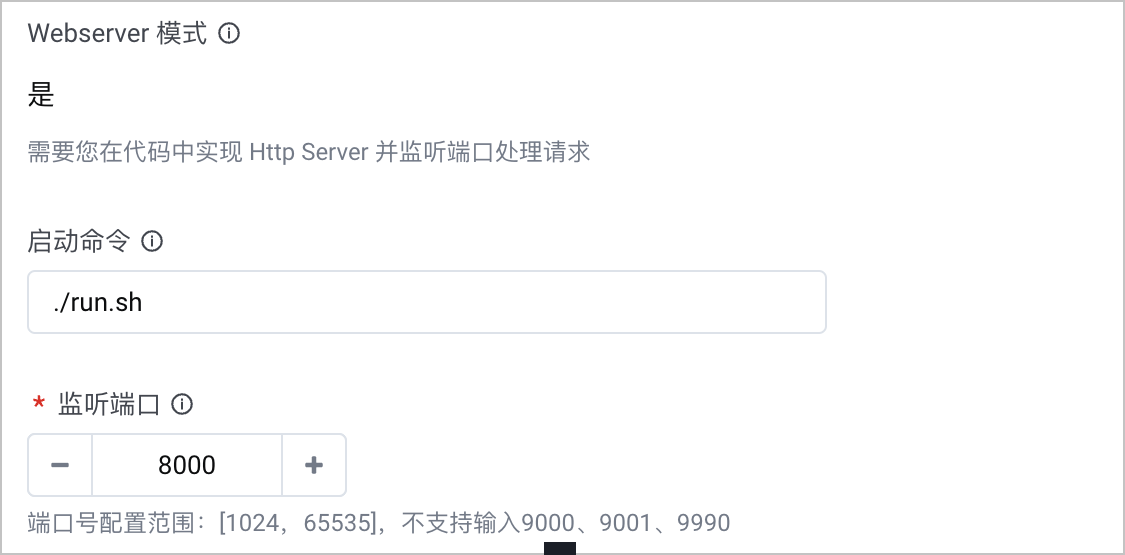
完成代码开发和编译后,您需要在控制台 创建 Serverless 应用托管 时配置启动命令与监听端口。本示例中,启动命令为./run.sh,监听端口为8000。​
​​​
使用环境变量​
对于 Native Node.js 函数,您可以在控制台配置函数运行时所需的环境变量,并在代码中读取对应的环境变量,用于函数处理逻辑。对于所配置的环境变量,veFaaS 会将其注入到函数运行所在的容器中,程序可以通过语言的内置库进行读取。 例如:您函数配置中环境变量的键(key)为envKey,运行环境读取该环境变量的代码示例如下。​
​
const envValue = process.env.envKey​
​
使用 Typescript​
  1. 本地开发代码包,在package.json中安装 Typescript 包并新增脚本文件(Script)。​
  • ​
    {​
    "name": "package-name",​
    "version": "1.0.0",​
    "description": "",​
    "main": "index.js",​
    "scripts": {​
    "build": "tsc",​
    "start": "node ./dist/index.js"​
    },​
    "author": "",​
    "dependencies": {​
    "typescript": "^4.7.3"​
    }​
    }​
    ​
  1. 在run.sh外增加build.sh,开发完成后执行build.sh。​
  • ​
    npm run build​
    ​
  1. 执行命令打包压缩文件到vefaas-native-typescript中。​
  • ​
    zip -FSr vefaas-native-typescript.zip .​
    ​
  1. 在控制台上传 ZIP 包,重新部署。​
最近更新时间:2025.04.16 11:22:07
这个页面对您有帮助吗?
有用
有用
无用
无用