VPN Connet
VPN Connet


Document

- Documentation
 VPN ConnetProduct introductionWhat is VPN Connect
 Copy page
 Download PDF
Product introduction
What is VPN Connect
Copy pageDownload PDFWhat is VPN Connect
VPN Connect is a temporary, secure, and reliable communication tunnel established over the internet by using a specified encryption method. Through VPN Connect, you can achieve communication and secure access between a Virtual Private Cloud (VPC) and an on-premises data center, between VPCs, and between an internet client and a VPC, aiding your business in seamlessly migrating to the cloud. You can also use VPN Connect to connect to a VPC and access the intranet domains of cloud databases (such as intranet RDS, intranet DNS, etc.).
Feature types
VPN Connect can be categorized based on connection capabilities into two types of network connections: the IPsec-VPN which features the Internet Protocol security (IPsec) VPN connection capability, and the SSL-VPN which features the Secure Sockets Layer (SSL) VPN connection capability. Different network connection methods for VPN Connect have different components and applicable scenarios.
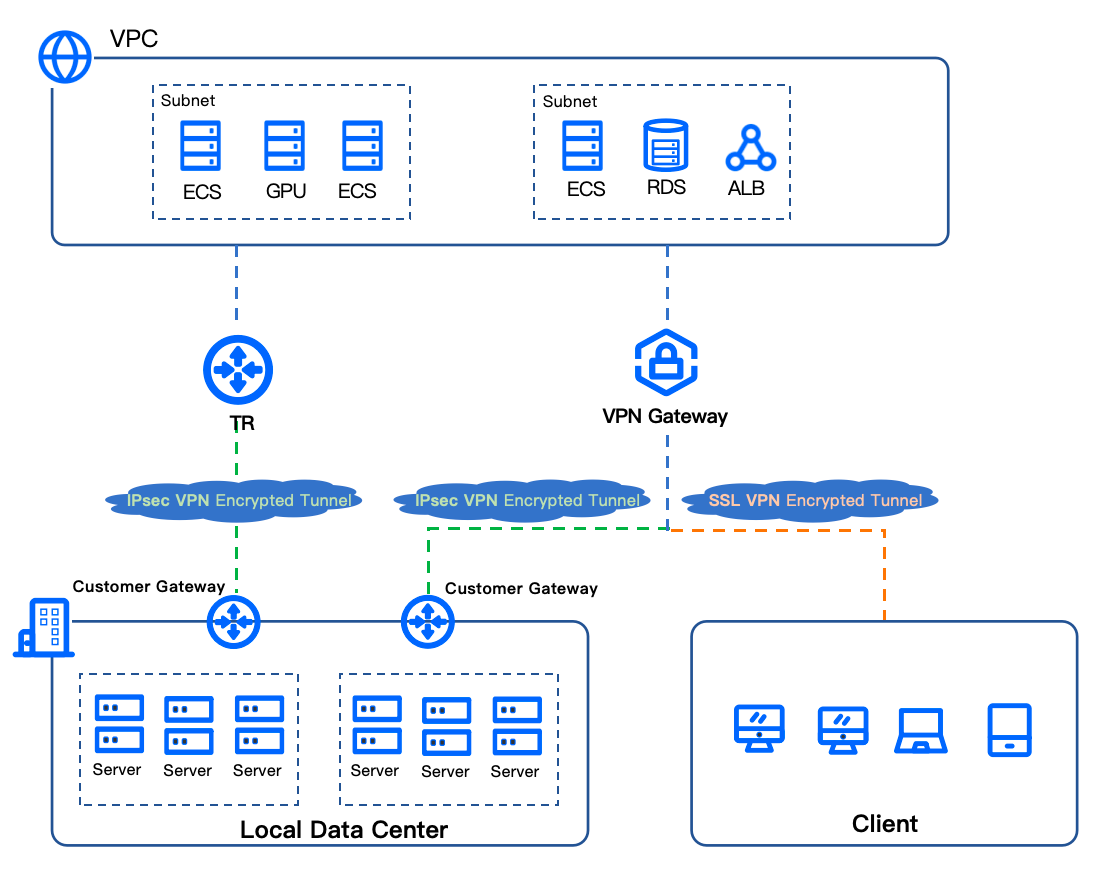
IPsec-VPN
IPsec-VPN consists of three components: the VPN gateway, the customer gateway, and the IPsec-VPN connection. After configuring an encryption protocol, you can establish an IPsec-VPN tunnel between the VPN gateway and the customer gateway, achieving secure connection between a VPC and a data center or other VPCs.
The IPsec-VPN connection can associate two types of resources: the VPN gateway and the Transit Router (TR). The method of network connectivity varies with different resource associations. For more information about TR, see What is Transit Router.
- Associate a VPN gateway
- After associating an IPsec-VPN connection to a VPN gateway, you can connect a data center with a VPC.
- Attach a TR
- After attaching an IPsec-VPN connection to a TR, you can configure flexible routing policies to connect or isolate data centers and VPCs.
Compositions
- VPN gateway
- A VPN gateway is created based on a VPC and serves as an egress gateway for the VPC. Through the VPN gateway, secure communication between a VPC and a data center or another VPC can be established. A VPN gateway can connect a single customer gateway or multiple customer gateways, forming a one-to-one or one-to-many relationship between the VPN gateway and customer gateways. IPsec-VPN can be used on VPN gateways with IPsec-VPN enabled or VPN gateways with both IPsec-VPN and SSL-VPN enabled.
- Transit Router
- TR can connect VPCs and IPsec-VPN Connect. Through the flexibly defined interconnectivity and isolation route policies, it can achieve private network interconnection and isolation between different VPCs and between a VPC and a data center under complex networking scenarios.
- Customer gateway
- Customer gateway is an abstraction of the gateway information collection on the data center or peer VPC side, establishing a communication tunnel with the VPN gateway.
- IPsec-VPN connection
- The IPsec-VPN connection establishes an IPsec-VPN communication tunnel between the VPN gateway and the customer gateway based on the Internet, and encrypts the transmitted data based on IKE and IPsec protocols, ensuring secure data transmission through the tunnel.
SSL-VPN
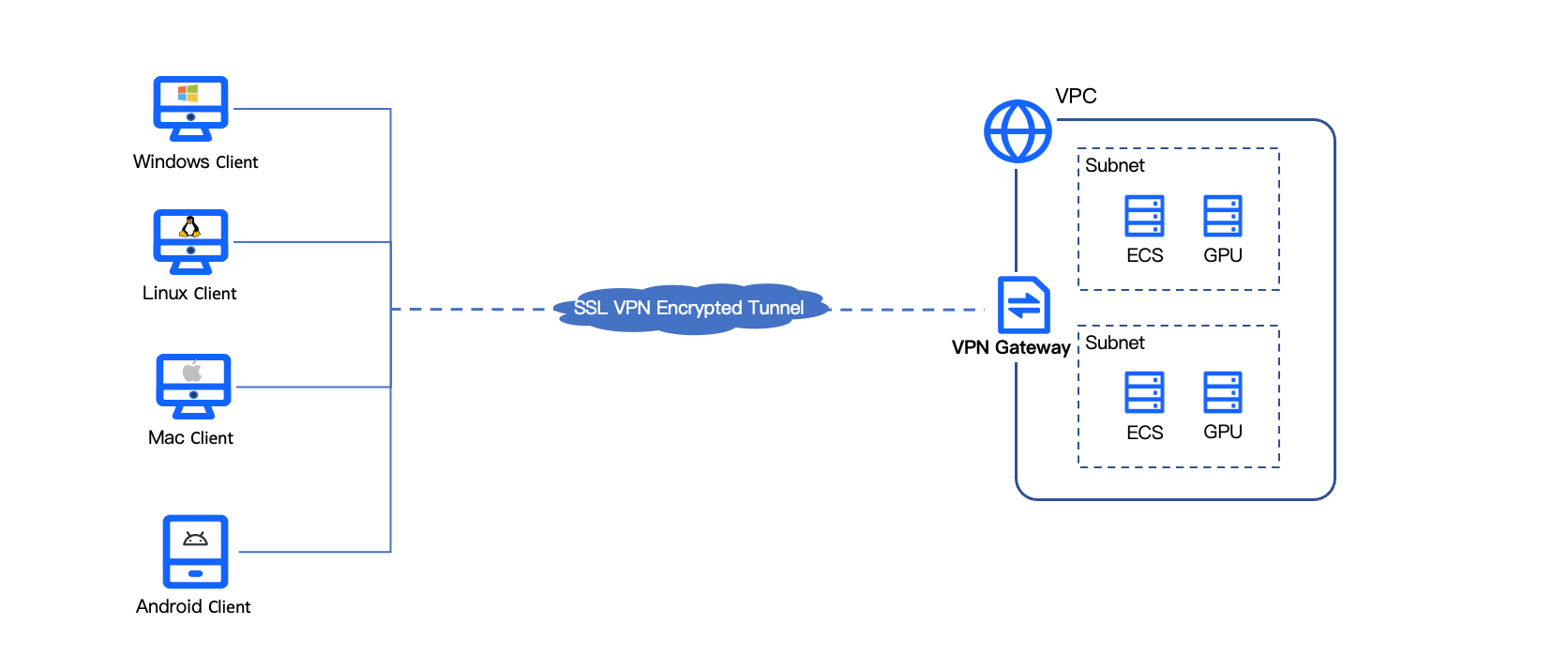
SSL-VPN is a VPN Connect type that is different from IPsec-VPN. Based on the OpenVPN architecture network connectivity technology, SSL-VPN can achieve network interconnection between the VPC and the SSL client. The use of SSL-VPN is simple; you only need to load a certificate in the SSL client and initiate the connection to achieve interconnection between the SSL client and the VPC.
Compositions
- VPN gateway
- The VPN gateway is created based on a VPC and serves as the egress gateway for establishing an SSL-VPN connection within the VPC. The SSL-VPN can be used on VPN gateways with SSL-VPN enabled or VPN gateways with both SSL-VPN and IPsec-VPN enabled.
- SSL server
- SSL server is a service module of SSL-VPN for encapsulating and decapsulating data packets.
- SSL client
- An SSL client is used to initiate SSL-VPN Connect. To achieve this, you need to generate a client certificate based on the configurations of the SSL server, then install the VPN software and load the certificate on the client.
Comparison with Direct Connect
Access methods
- Console access
- You can log in to the VPN Gateway console and manage it directly through the web page.
- API access
- You can use either HTTP or HTTPS to request online API calls or custom development. For details, see API reference.
- SDK access
- You can use the SDK to call APIs more conveniently for creating and managing resources. For details, see SDK overview.
Last updated: 2026.07.15 18:14:14
All rights reserved © Beijing Volcano Engine Technology Co., Ltd2024
