VPN Connet
VPN Connet


Document

- Documentation
 VPN ConnetProduct billingExpiration
 Copy page
 Download PDF
Product billing
Expiration
Copy pageDownload PDFExpiration
Before a Subscription VPN gateway expires, the platform sends reminders via SMS, email, or internal messages based on the specified notification method. You will receive reminders on four different dates: 7 days before expiration, 3 days before expiration, 1 day before expiration, and on the expiration date. To avoid disruption to your business, renew your bandwidth package promptly when receiving the notification.
tip
You can set message subscription and notification methods. Before the Subscription resources expire, the platform will send reminders according to your settings. For specific actions, see Message Subscription and Notification Methods.
Expiration
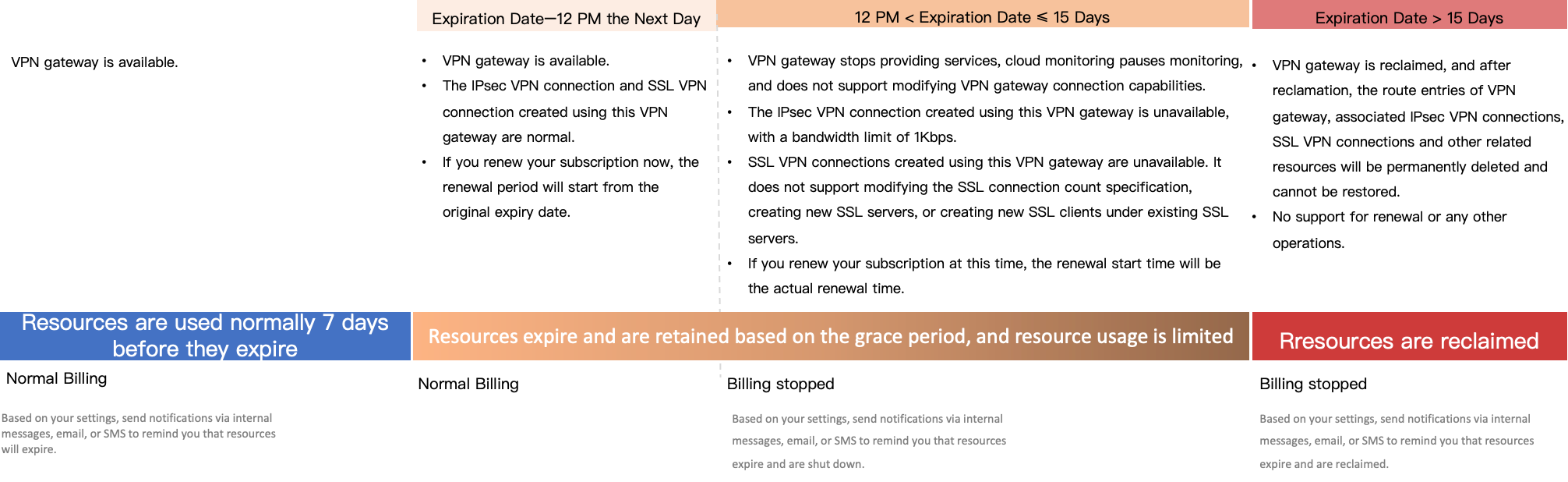
The platform reserves a resource retention period for you, which is 15 days after the expiration. During this period, you can renew the subscription to continue to use the VPN gateway, or unsubscribe to release the VPN gateway immediately. If no action is performed during the retention period, the VPN gateway and related resources will be forcibly withdrawn after this period. The withdrawn resources cannot be recovered.
See the diagram below for the status of resources related to the expired VPN gateway.
Unsubscription
Subscription VPN gateways support unsubscripition. Before the resource expires, you can apply for unsubscribing the resource on the Billing center > Unsubscription management page in the console and then release it. After the resource expires, you can directly delete the resource in the product console to release it.
warning
The platform reserves the right to reject unsubscription requests that appear to be suspicious or malicious.
Renewal
Before a Subscription VPN gateway expires, the platform sends reminders via SMS, email, or internal messages based on the specified notification method. You will receive reminders on four different dates: 7 days before expiration, 3 days before expiration, 1 day before expiration, and on the expiration date. To avoid affecting your business, please renew in a timely manner after receiving the reminder.
- Modifying the Bandwidth of VPN gateway during the renewal is not supported. If necessary, you can modify it after renewal.
- For a yearly Subscription VPN gateway, if its usage duration is less than one year, no annual discount is offered for new billing items incurred by configuration modifications.
- The renewal start time is the original expiration time if you renew within 12 hours (exclusive) after the expiration. If you renew from 12 hours (inclusive) up to 15 days (exclusive) after the expiration, the renewal start time is the actual renewal time.
Manual renewal
Manual renewal is available for a resource at any point between its successful purchase and its scheduled release.
- Log in to the VPN gateway console.
- In the top menu bar, select a target region and project.
- In the VPN gateway list, click Renewal in Actions column of the VPN gateway to be renewed. The page then navigates to the Billing center > Renewal page.
- In the lower-left section of the Renew page, specify the renewal period and then click Pay in the lower-right corner.
- After confirming the order information is correct, complete the payment according to the interface prompts.
- After submitting the payment information, complete the payment within the specified time. Otherwise, the order will be canceled.
Automatic renewal
The platform supports automatic renewal. After enabling automatic renewal, the system automatically deducts the renewal fee from your balance 7 days before the expiration. When purchasing a Subscription VPN gateway, you can check the Automatic renewal option or change manual renewal to automatic renewal.
You can actively enable automatic renewal before the resource expiration. After enabling automatic renewal, the system will prioritize using available vouchers during renewal.
- Log in to the Billing center console.
- In the left navigation pane, click Renewal Management.
- On the Manual renewal tab of the Renewal Management page, click ··· > Enable auto-renewal in Actions column of the resource to be renewed.
You can change manual renewal to automatic renewal only before the VPN gateway instance expires.
- On the Auto-renewal page, specify the interval for auto-renewal in the lower-left section, set the auto-renewal time, and then click Enable to enable automatic renewal.
If you do not select Custom for auto-renewal times, automatic renewal is permanently effective. The system performs automatic renewal each time the resource expires based on the interval for auto-renewal set for the single automatic renewal.
Last updated: 2026.07.15 18:14:16
All rights reserved © Beijing Volcano Engine Technology Co., Ltd2024
