Application Performance Management Plus
Application Performance Management Plus


Document

- Documentation
 Application Performance Management PlusUser guideClient monitoringApp monitoringFAQAndroid-side monitoringCrashes are not reported
 Copy page
 Download PDF
Android-side monitoring
Crashes are not reported
Copy pageDownload PDFCrashes are not reported
If the crash on the app side is not reported, first confirm that the service has been activated and the event quota has not been exhausted. After ruling out these two situations, you can troubleshoot the issue through the following methods.
Method 1: Troubleshoot via logs
- Before initializing MonitorCrash, turn on the log switch, call Npth.getConfigManager().setDebugMode(true), and filter the npth logs.
- After turning on the log switch, the following configuration update logs will appear.
-
- If the configuration update logs are not printed, check the following possible causes:
- If there are no logs corresponding to the aid, check whether the initialization code and configuration items are correct.
- Whether the network is working properly.
- When a Java crash occurs, the following capture logs will be printed.
-
- If the capture logs are not printed, check the following possible causes:
- Use Logcat logs to determine whether a crash actually occurred.
- If there is an error log with the FATAL keyword, then a crash did occur.
- If there is no error log with the FATAL keyword, check whether there is a global catch mechanism.
- Check whether UncaughtExceptionHandler is registered properly.
- Use the following sample code to iterate through and print the UncaughtExceptionHandler within the application. The APM package name is com.apm.insight.handler.
- If there are many handlers but no handler with the package name com.apm.insight appears in the log output, it means the handler was not registered properly. Initializing after the APM is recommended.
- Even when the handler is registered properly, some monitoring SDKs may not forward crashes. Initializing after the APM is recommended. When troubleshooting an unreported crash, you can comment out the corresponding SDK to verify.
-
- When a Native crash occurs, the following capture logs will be printed.
-
- If the capture logs are not printed, check the following possible causes:
- Check whether the APK packaging of the .so files is normal, including libapminsighta.so and libapminsightb.so. If there is an anomaly, you need to repackage.
- ANR currently has no capture logs. Once captured, the log will be reported directly.
-
- The uploaded logs for Java crashes and Native crashes are consistent. Check the following possible causes:
- Check whether allData contains aid. If not, analyze whether the stack matches the package name passed in during initialization.
- Check the network.
Method 2: Troubleshoot via crash artifacts
After a crash is successfully reported, the crash-related artifacts will be deleted. You need to obtain the crash artifacts after the crash occurs but before the report succeeds, and then check them.
- Under data/data//files/apminsight on the device, obtain the related artifacts collected for the crash.
- CrashLogJava stores exceptions such as Java crashes, Java startup crashes, and ANR, while CrashLogNative stores Native crashes.
-
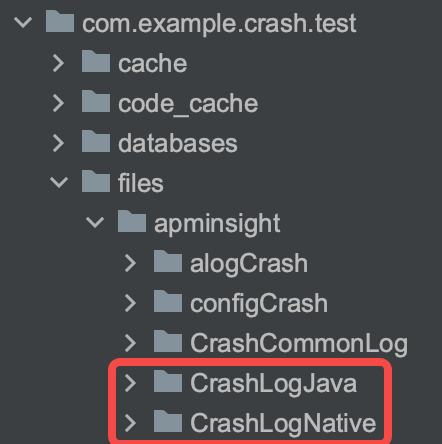
- If CrashLogNative is not generated, check whether initialization succeeded.
- If the crash path is empty, check whether initialization succeeded. Among them, ANR can be tested with the network disconnected.
- If all_data.json does not exist, check whether the crash stack does not match or there are issues with the configuration file.
-
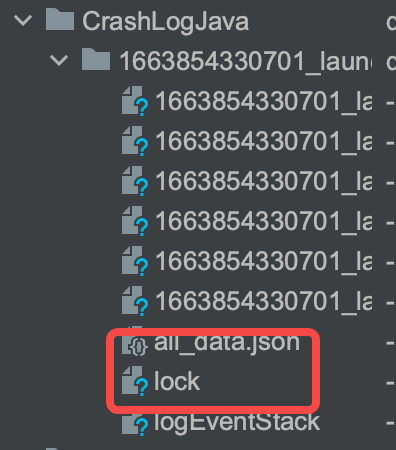
- The restart file was not deleted.
- Check the network.
- Check whether the APK packaging of the .so files is normal, including libapminsighta.so and libapminsightb.so.
Method 3: Troubleshoot via captured packets
- HTTPS domain configuration (or simply set an HTTP domain).
-
- Upload API.
- APIMeaning/monitor/collect/c/crashJava crash reporting, ANR, Dart exception/monitor/collect/c/exceptionCustom exception data reporting/monitor/collect/c/native_bin_crashNative crash reportingmonitor/collect/c/cloudcontrol/fileAlog reporting file/settings/getsettings: Configuration fetch/monitor/collect/c/exception/dump_collectionStartup crash reporting
- The corresponding packets are captured, but they are still not displayed on the platform.
- Check whether the initialization token is correct. For more information, see Integrating Android SDK.
- Check whether the domain configuration is correct.
Method 4: Troubleshoot using test tools
- After decompression, import it locally. You can copy the aar to the libs directory of the app's module, and then add it to the dependencies in the app's build.gradle.
-
- Compiling the apk will add a test entry. Click Test entry.
- Enter the test page and select the test item.
Last updated: 2026.10.23 11:17:26
All rights reserved © Beijing Volcano Engine Technology Co., Ltd2024
