Application Performance Management Plus
Application Performance Management Plus
Application Performance Management Plus


Document
What's new
product announcement
Product overview
Product billing
Getting Started
User guide
Server monitoring
Permission management
Component management
Integration guide
User guide
Best practices
FAQ
Client monitoring
App monitoring
FAQ
General app monitoring
Android-side monitoring
iOS-side monitoring
API references
Server monitoring API interface
Alert management
Query metrics
Trace analysis
Session analysis
Console API interfaces
Applications
Resource usage
Services
App API interface
Event
Log
Alert
Exceptions and crashes
Startup analytic
CPU monitoring
Network monitoring
Battery monitoring
WebPro API interface
General
Actions list
Alert
Blank screen monitoring
Custom monitor
Data explore
JavaScript error monitoring
Performance monitor
Version management
Request monitor
Resources monitor
Page list
Mini Pro API interface
JS error
Alert
Performance monitoring
Page list
PC APIs
Raw logs
Crashes
Alerts
FAQ
Product inquiries
- Documentation
 Application Performance Management PlusUser guideClient monitoringApp monitoringFAQAndroid-side monitoringFailed to resolve the crash stack trace correctly
 Copy page
 Download PDF
Android-side monitoring
Failed to resolve the crash stack trace correctly
Copy pageDownload PDFFailed to resolve the crash stack trace correctly
Issue description The stack trace was resolved to the wrong line numbers and did not map to the correct file information.
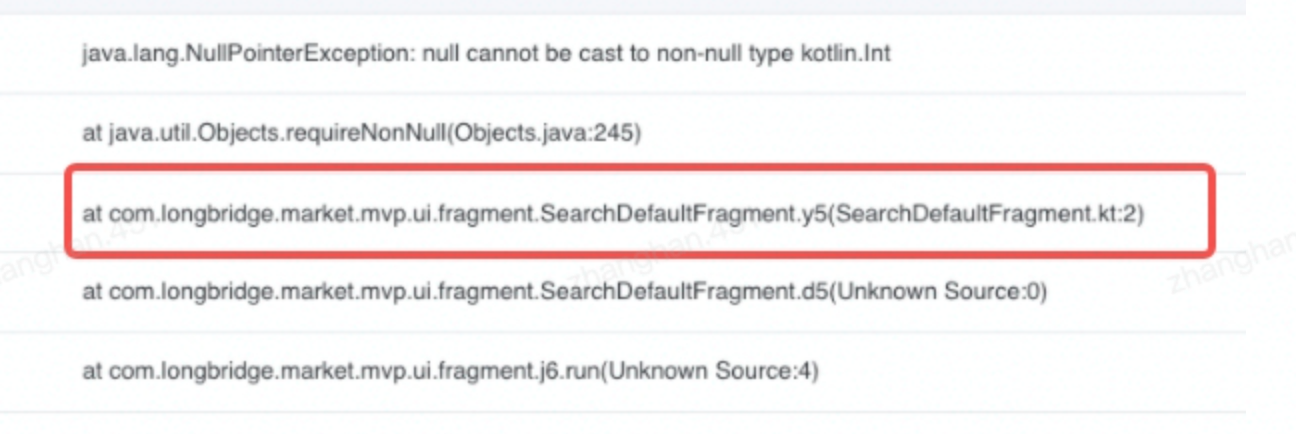
Solution The symbol table was not uploaded. Upload the corresponding symbol table and then retrace.
- Symbol table extension
- There are two ways to upload. After uploading, you can view the symbol tables in Symbol table management.
- Upload automatically via a script. Configure this when integrating the SDK.
- Upload the symbol table on the crash details page. The symbol table is associated with the version for stack retrace. If you upload it for one crash, different stack traces of the same version theoretically share one symbol table for resolution.
- A newly uploaded symbol table automatically resolves newly reported crashes. By default, stack traces from before the upload are not processed. To resolve old stack traces, you can retrace manually.
- Retrace extension
- Android Studio provides a command-line tool called retrace. If an old stack trace is not resolved successfully after retracing in the console, you can use this tool to try again locally.
Last updated: 2026.10.23 11:17:26
All rights reserved © Beijing Volcano Engine Technology Co., Ltd2024
