Cache for Redis
Cache for Redis


Document

- Documentation
 Cache for RedisFAQNetwork connection
 Copy page
 Download PDF
FAQ
Network connection
Copy pageDownload PDFNetwork connection
This topic summarizes the FAQs related to the network connection of Cache for Redis.
What is the difference between private network address and direct connection address?
The similarities and differences between private network addresses and direct connection addresses are shown in the table below.
How to download Redis client?
tip
Some clients support the integration of the DNS high availability plugin dns-stale-cache, which caches DNS query results locally and returns cached results when the DNS service is unavailable, preventing client access issues due to DNS service unavailability. For specific procedures, refer to Integrate DNS high availability plugin for Cache for Redis.
Why does it prompt for no authentication when creating a key after connecting to the Redis instance?
Cache for Redis uses account and password verification by default. You need to execute the AUTH <account> <password> command to complete the verification. For specific procedures, refer to Connecting to instance via private network address, Connecting to instance via direct connection address, and Connecting to instance via public network address.
tip
Cache for Redis supports password-free access within VPC. After enabling password-free access, you can directly access the Redis instance without entering a password when connecting via private address or direct connection address. For more details, refer to Password-free access.
Is it supported to modify the domain name of Redis connection address?
Yes. You can modify the domain name of Redis instance connection address (including public network connection address, private network connection address, and direct connection address). For specific procedures, refer to Modifying address.
What is the default bandwidth limit for public network access?
The default bandwidth limit for public network access varies depending on the instance creation time:
- For instance created on or after May 17, 2022, the bandwidth limit for public network access will be affected by the bandwidth limit of the public IP (that is, EIP) and the shard bandwidth limit of the Redis instance. The specific rules are as follows:
- If the EIP bandwidth limit is greater than the shard bandwidth limit of the Redis instance, the bandwidth limit for public network access will be the shard bandwidth limit of the Redis instance.
- If the EIP bandwidth limit is less than the shard bandwidth limit of the Redis instance, the bandwidth limit for public network access will be the EIP bandwidth limit.
tip
- If you are using a Redis instance with a sharding cluster enabled, the overall bandwidth limit of the instance = number of shards x single shard bandwidth limit. For more details about the single shard bandwidth limit of Redis instances, see Instance specifications.
- For more details about the EIP bandwidth limit, see EIP performance limits.
- For instance created before May 17, 2022, EIP association is not supported when enabling public network access, so the default bandwidth limit for public network access is 1Mbps.
- If you need to increase the bandwidth limit, you can choose to bind an EIP with a higher bandwidth limit when enabling public network access. Before associating an EIP, you must first associate a subnet. For more information on how to associate a subnet, refer to Upgrading network security.
How to view the IP address corresponding to the Redis connection address?
You can select any of the following methods to view the IP address corresponding to the Redis connection address:
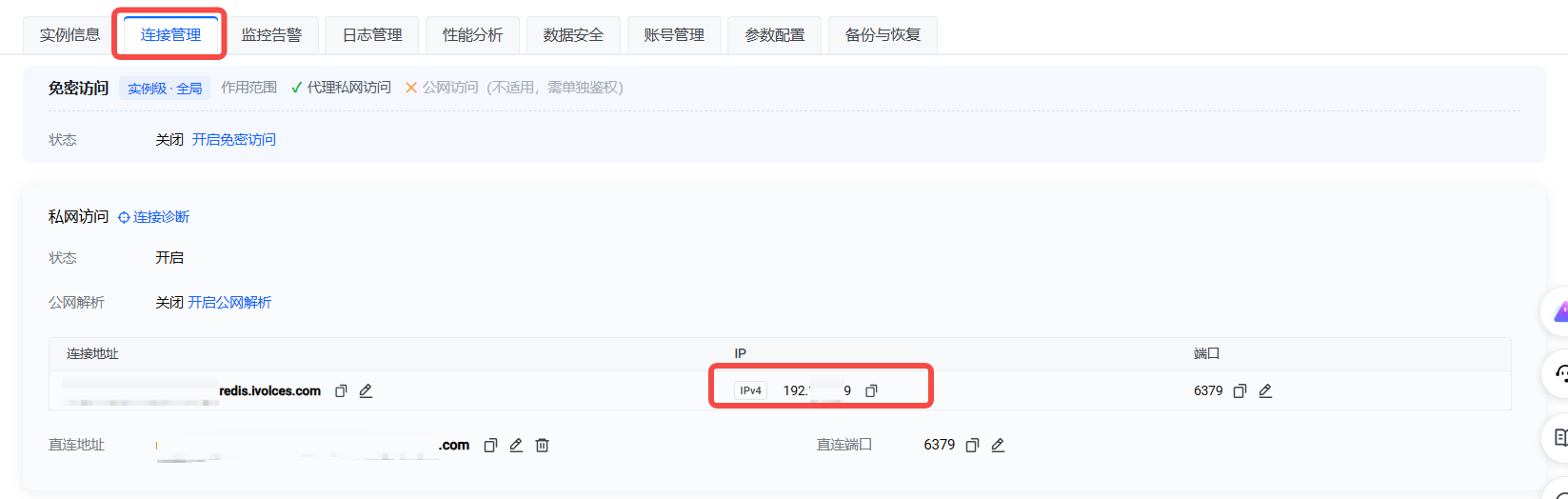
You can view the IP information of the instance's corresponding address on the Instances page or Connection Management tab of the Redis console (displayed by grouping Private network access > Proxy private network access/Direct private network access, Public network access > Proxy public network access).
- Instances
-

- Connectivity tab
-
tip
Currently, only the private network access connection address can be viewed on the Redis console. To view the corresponding IP address of a direct connection or public network address, refer to the instructions in Method 2 or Method 3.
You can call the DescribeDBInstanceDetail interface to query the detailed information of a specified Redis instance, including the IP address information corresponding to different connection addresses of the instance, which is the VIP information in the VisitAddrs structure of the response result.
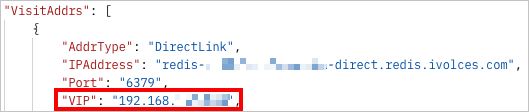
You can refer to the following steps to view the IP address corresponding to the Redis connection address:
- Get the connection address of the Redis instance. For specific procedures, refer to Viewing address.
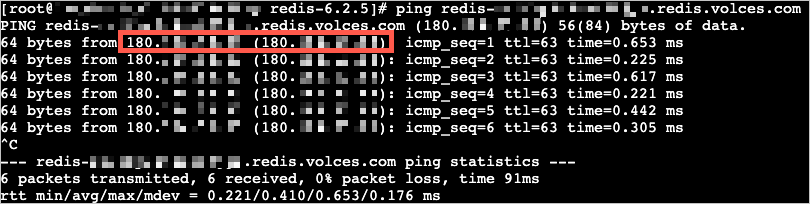
- Log in to the ECS instance where the client is located and execute the PING command in the command line.
tip
- This topic uses the redis-cli client as an example. For redis-cli client installation and usage, refer to Install redis-cli.
- The PING command can be used in both Windows and Linux systems.
- Example is as follows.
- PING redis-cnlfhy3d4def5****.redis.volces.com
- Example of return results is as follows.
-
Will the domain name or corresponding IP address of the Redis connection address change?
Cache for Redis currently supports connecting to instances through private network addresses, direct connection addresses, or public network addresses. In some scenarios, the domain name or corresponding IP address of the instance connection address may change. Specific scenarios are shown in the table below.
Is it supported to set the same domain name or IP address for multiple Redis instances?
No. The domain names of different types of Redis connection addresses and the associated IP address information are explained in the table below.
tip
Why does the network peak input/output rate of Redis instances sometimes exceed the current default bandwidth?
When your business involves writing or reading big keys, the network peak input/output rate of the instance may exceed the default bandwidth.
Assume your instance's default bandwidth is 24MB/s. If a client needs to read a 48MB key, the instance will immediately return 48MB of data (instead of splitting it into 2 seconds). The network peak output rate on the Redis monitoring alerts page will show the actual bandwidth at that moment (i.e., 48MB/s).
In the above scenario (where some requests exceed the bandwidth limit), Redis will not restrict the current big key read request but will trigger bandwidth throttling, affecting subsequent read/write requests. To help you fully understand bandwidth usage by instance, quickly locate issues related to bandwidth utilization, and avoid performance issues caused by bandwidth throttling, we recommend that you pay close attention to two performance metrics Inbound bandwidth utilization and Outbound bandwidth utilization. For more details, refer to Efficient bandwidth usage guide.
How to troubleshoot Redis instance connection failures?
When encountering issues like inability to connect to Redis instance or temporary disconnection after connection, you can refer to the handling suggestions in What should I do if Redis connection fails to try to resolve the issues.
Last updated: 2026.07.31 11:59:29
All rights reserved © Beijing Volcano Engine Technology Co., Ltd2024
