Cache for Redis
Cache for Redis


Document

- Documentation
 Cache for RedisUser guideHigh availabilityMulti-availability-zone disaster recovery solutionViewing availability zone of instance
 Copy page
 Download PDF
Multi-availability-zone disaster recovery solution
Viewing availability zone of instance
Copy pageDownload PDFViewing availability zone of instance
Cache for Redis supports single availability zone deployment and multi-availability zone deployment. After the instance is created, you can view the availability zone information of the instance on the Redis console.
Prerequisite
A multi-availability zone deployment solution has been set for the target instance. For specific procedures, refer to Deploying in multiple availability zones.
Procedure
You can use either of the methods below to view the availability zone information of the instance.
Method 1: View on the Instances page
- Log in to the Redis console.
- In the upper-left corner of the top menu bar, select the project and region to which the instance belongs.
- In the Availability zone column of the Instances page, you can view information of the availability zone in which the target instance is located.
- The information of availability zones displayed may vary according to the deployment solution, where:
- Multi-availability zone deployment
-

- Single availability zone deployment
-

Method 2: View on the instance's Summary page
- Log in to the Redis console.
- In the upper-left corner of the top menu bar, select the project and region to which the instance belongs.
- On the Instances page, click the target instance.
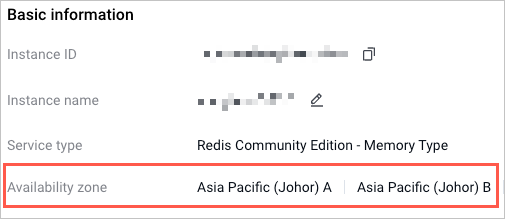
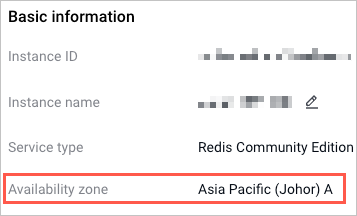
- In the Basic information pane of the Summary page, you can view information of the availability zone in which the target instance is located.
tip
You can also view the role and the availability zone information of the server node in each shard's Topology area of the Summary page. For more details, refer to Viewing instance information.
- The information of availability zones displayed may vary according to the deployment solution, where:
- Multi-availability zone deployment
-
- Single availability zone deployment
-
Last updated: 2025.11.06 17:28:04
All rights reserved © Beijing Volcano Engine Technology Co., Ltd2024
