Virtual Private Cloud
Virtual Private Cloud


Document

- Documentation
 Virtual Private CloudGetting StartedBuilding an IPv4 VPC
 Copy page
 Download PDF
Getting Started
Building an IPv4 VPC
Copy pageDownload PDFBuilding an IPv4 VPC
Scenarios
This topic describes how to quickly configure and use an IPv4 network.
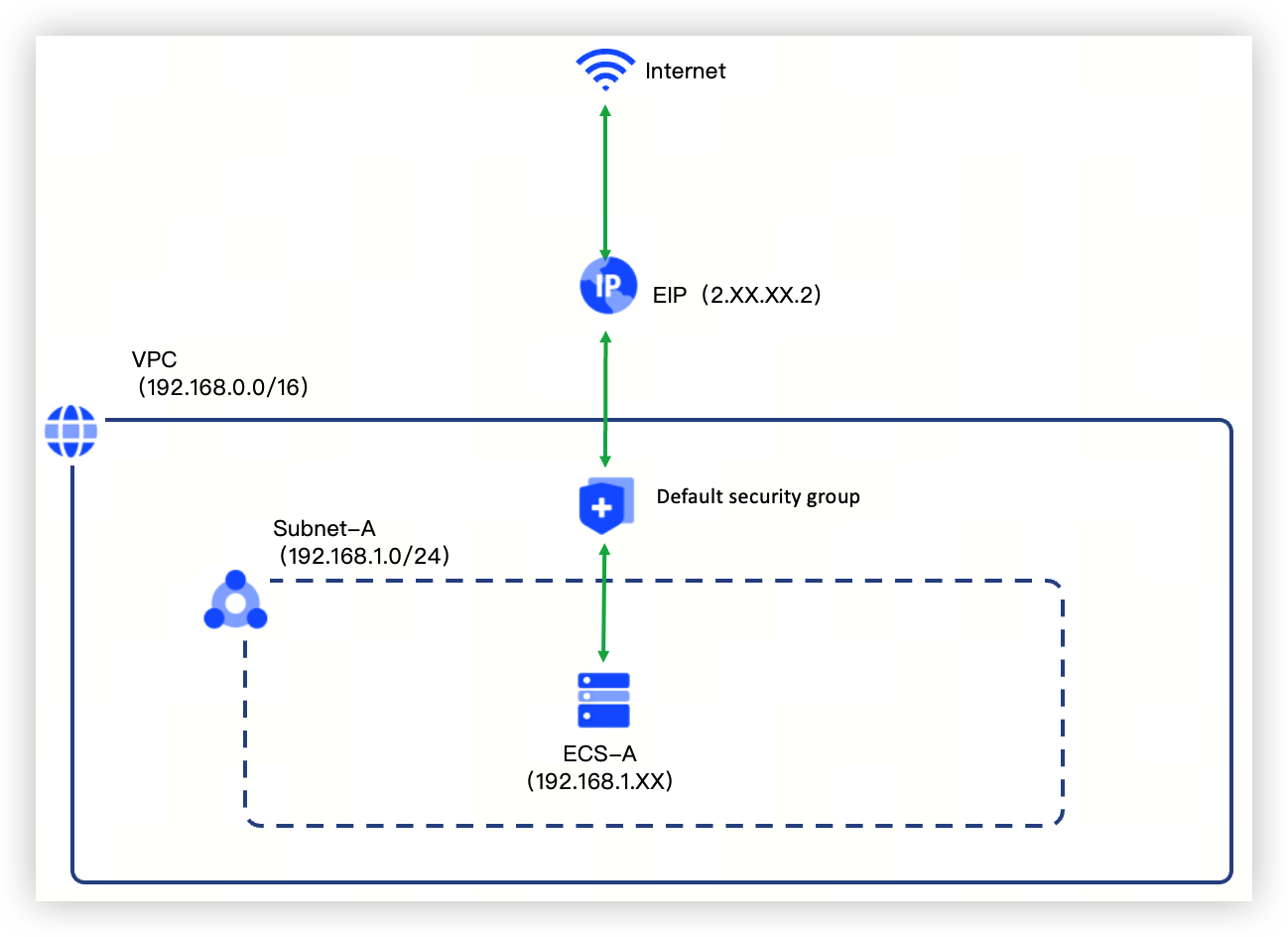
Configuration procedures
tip
The following section only covers essential parameters and their recommended values. For all parameters not explicitly discussed, retain the default settings unless otherwise required by your specific use case.
Step 1: Create the VPC and subnet
You can refer to the following operations to create one VPC and two subnets.
- Log in to the VPC console.
- In the top menu bar, select your target region.
- Click Create VPC.
- Configure parameters based on the table below.
- ParametersNotesSample valueBasic informationRegionSelect the region of the VPC.China (Beijing)CIDR blockIPv4 CIDRSet the VPC's IPv4 CIDR block.warningAfter creation, the CIDR block of the VPC cannot be modified.192.168.0.0/16SubnetZoneSelect an Availability Zone.AZ-ANameType in the name of the subnet.Subnet-AIPv4 CIDRConfigure the subnet CIDR block, which must fall within the VPC’s address range.Be cautious:After creation, the CIDR block of the subnet cannot be modified.192.168.1.0/24
- Click Create to complete the action.
Step 2: Create ECS and associate an EIP
You can follow these steps to create ECS-A.
- In the left-side navigation pane, click Quick Links > ECS.
- Click Create instance to begin configuring your ECS instance.
- Follow the interface prompts to complete ECS configuration step-by-step, including base configuration, network & security, and advanced settings. Specific configurations are detailed in the table below.
- ParametersNotesSample valueBilling methodECS billing method.Pay-as-you-goRegion and AZSelect the region and availability zone for the ECS. The region must match the VPC region, and the availability zone must match the subnet's availability zone.China (Beijing) Availability Zone AImageImages provide ECSs with pre-configured operating systems and essential application data.CentOS 7.9VPCSelect the created VPC.vpc-01|192.168.0.0/16SubnetChoose a subnet under the selected VPC.Subnet-A | 192.168.1.0/24EIPEnable this option to automatically assign an EIP during ECS creation, providing Internet access capabilities.
- ISP: Supports BGP (Multi-ISP).
- Metering method: The EIP Metering method is the same as that of the ECS instance. In this example, it is Pay-as-you-go. Pay-as-you-go EIP addresses support billing by bandwidth cap and pay-by-data-transfer.
- Bandwidth cap: The maximum bandwidth for EIP, measured in Mbps.
- ISP: BGP (Multi-ISP)
- Billing method: Pay-by-data-transfer
- Bandwidth cap: 5Mbps
Security groupThis topic selects the default security group "Default" in vpc-01 to control inbound and outbound traffic for the primary network interface of ECSs.Default
- Click Next: Confirm.
- Follow the console guidance to review and accept the legal terms.
- Click Buy now to redirect to the purchase submitted page.
- Click Go to console to redirect to the Instances page and view the new instance.
ECS is now successfully created with an EIP assigned by default, enabling bidirectional internet access.
Step 3: View/Allow security group
View the ECS's security group and allow required traffic.
tip
The default security group automatically allows private network communication between ECSs within the same group and outbound internet access. For demonstration purposes, this topic uses inbound port 80 access as an example. Please adjust configurations according to your actual requirements.
- Log in to the ECS console.
- In the top menu bar, select your target region.
- In the left-side navigation pane, click Instances.
- Click the name of ECS-A.
- On the Security Group tab, you can view the current rule status.
- Click Configure on the right side of the target security group.
- On the Inbound rule tab, click Add rule. Configure the relevant parameters according to the table below.
- ParametersNotesSample valuePrioritySet the priority of security group rules.1PolicySelect the Security Group policy.AllowProtocol typeSelect the protocol for the security group.TCPPort rangeLimit the port range based on different protocol types.80SourceType in the IP address or CIDR block allowed to access ECSs within the security group.0.0.0.0/0
- Click Confirm to complete the action.
Verify
- Remotely log in to ECS-A.
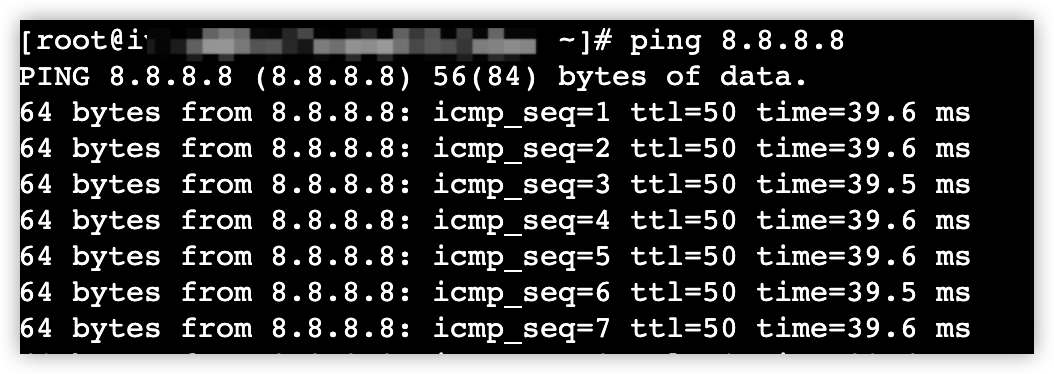
- Execute the ping 8.8.8.8 command in the command line.
-
Last updated: 2026.07.01 10:08:52
All rights reserved © Beijing Volcano Engine Technology Co., Ltd2024
