Virtual Private Cloud
Virtual Private Cloud
Virtual Private Cloud


Document
Updates and announcements
Overview
Billing
User Guide
VPC
Route Table
Network interface
IP address
Security group
Security group rule
Network Access Control List
Prefix List
HAVIP
Flow log
Traffic Mirror
IPv4 gateway
Project and Tag
Best Practices
API
VPC
Subnet
Route Table
Network interface
Security Group
Prefix list
HAVIP
Flow log
Network ACL
Traffic mirror target
IPv4 Gateway
SDK reference
- Documentation
 Virtual Private CloudOverviewWhat is Virtual Private Cloud
 Copy page
 Download PDF
Overview
What is Virtual Private Cloud
Copy pageDownload PDFWhat is Virtual Private Cloud
Introduction
A Virtual Private Cloud (VPC) provides an isolated, self-configured virtual network environment for cloud resources. Within your VPC, you can customize network features including IP address ranges, security groups, and routing policies, enabling simple, efficient, and secure management of cloud resources.
Product architecture
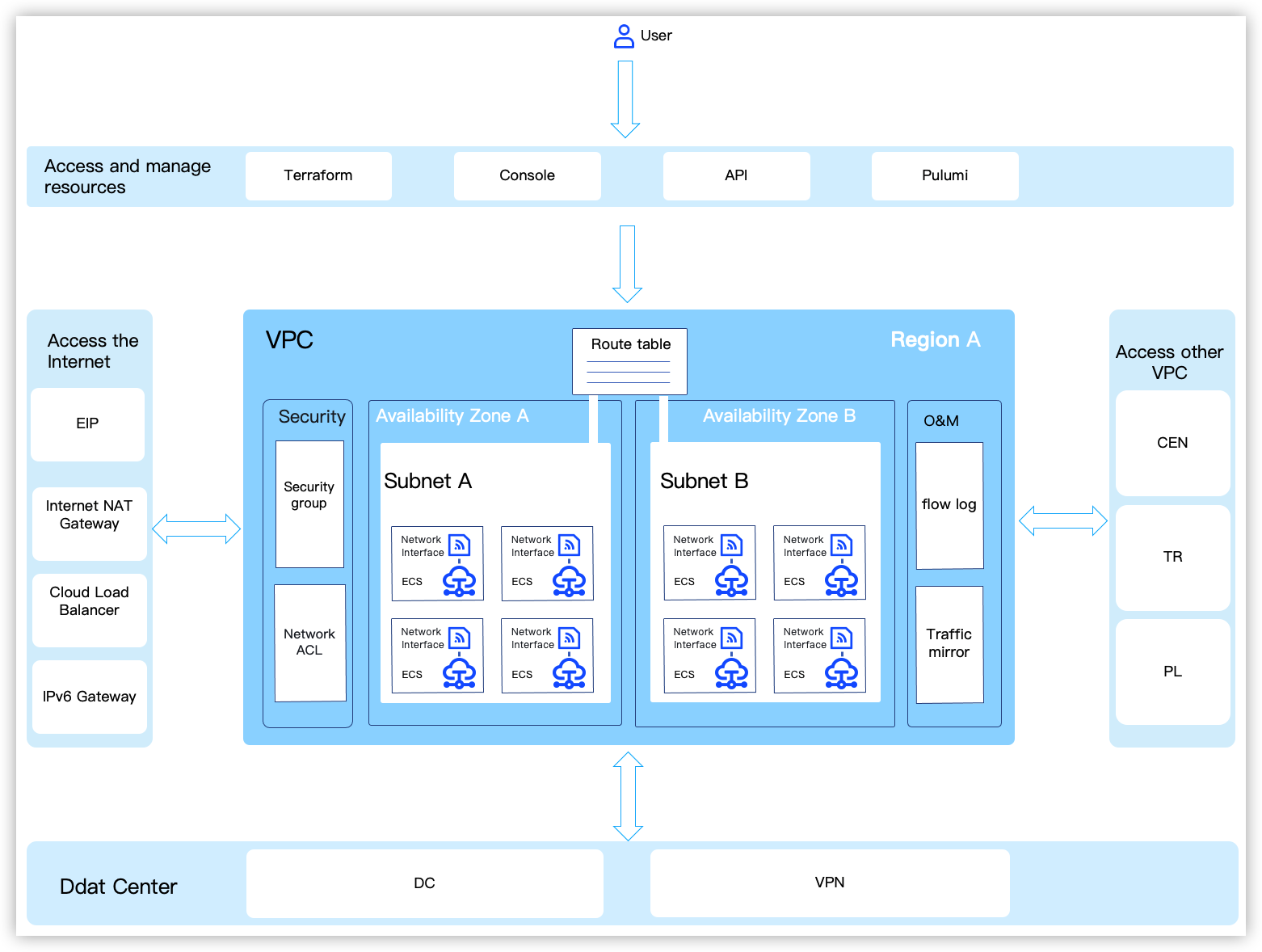
Feature | | Explanation |
Feature | | Explanation |
Important components of VPC | VPC CIDR block | The VPC CIDR block defines the IP addresses that can be used by resources within the VPC.
Explanation Dual-Stack VPC is currently in beta stage, available exclusively for completing Enterprise certification accounts for trial use. If you need a trial, please contact the account manager. |
| Subnet | A subnet is a segment of a VPC CIDR block allocated within a specific Availability Zone, providing private IP addresses for cloud resources (e.g., ECS instances and Cassic Load Balancers.). |
| A subnet route table consists of a series of route entries that specify the next-hop cloud resource for traffic within the VPC. Each subnet must be associated with one and only one subnet route table, enabling resources within the subnet to forward traffic according to the route table. A single subnet route table can be associated with multiple subnets, and resources within these subnets forward traffic through the associated subnet route table. | |
| A network interface is also called a virtual network interface (vENI). In the Virtual Private Cloud (VPC), a network interface is a network interface mounted on cloud resources like Elastic Compute Service (ECS) or Classic Load Balancer. It serves as an essential component for enabling network communication. | |
VPC Security | Security groups control inbound and outbound traffic for ECSs' network interfaces, operating on an allowlist basis. Users can add security group rules according to their requirements to allow specific traffic through the network interface. For example, when an ECS instance provides services externally through port 80, its associated security group must include an inbound rule allowing traffic on port 80. This ensures external clients can properly access the services on that ECS. | |
| Network ACLs (Access Control Lists) control inbound and outbound traffic at the subnet level. Each subnet can be associated with only one Network ACL. As Network ACLs operate on an allow-list principle, traffic must be explicitly permitted to flow through. | |
VPC operations | After the flow log aggregates and processes the log data of outbound and inbound traffic for network interfaces as needed, it delivers the data to the TLS for storage and search analysis. You can analyze flow logs to monitor network traffic, troubleshoot network issues, and optimize network architecture. | |
| Through traffic mirroring, you can replicate the traffic of a network interface based on custom Mirror Filters and privately forward the replicated traffic to a target service for monitoring and analysis. | |
Internet Access | | To meet the internet needs of resources in a Virtual Private Cloud (VPC), you can combine the following products as needed:
|
Access other VPCs | | To meet the demand for private network communication between different VPCs, you can select the following products as needed:
|
Access data center (IDC) | | To meet the needs of building a hybrid cloud, you can select the following products as needed:
|
Access and manage resources | | |
Last updated: 2026.10.29 19:42:58
All rights reserved © Beijing Volcano Engine Technology Co., Ltd2024
