Virtual Private Cloud
Virtual Private Cloud


Document

- Documentation
 Virtual Private CloudUser GuideSecurity groupSecurity group overview
 Copy page
 Download PDF
Security group
Security group overview
Copy pageDownload PDFSecurity group overview
Overview
Security groups use an allowlist mechanism, consist of multiple rules, and are used to control inbound and outbound traffic of network interfaces. Only traffic that matches the rules is allowed; all other traffic is blocked. Every network interface must be added to a security group.
For example, if an ECS instance provides external services on port 80, the security groups associated with its ENI must have an inbound rule allowing traffic on port 80 to ensure the service is accessible.
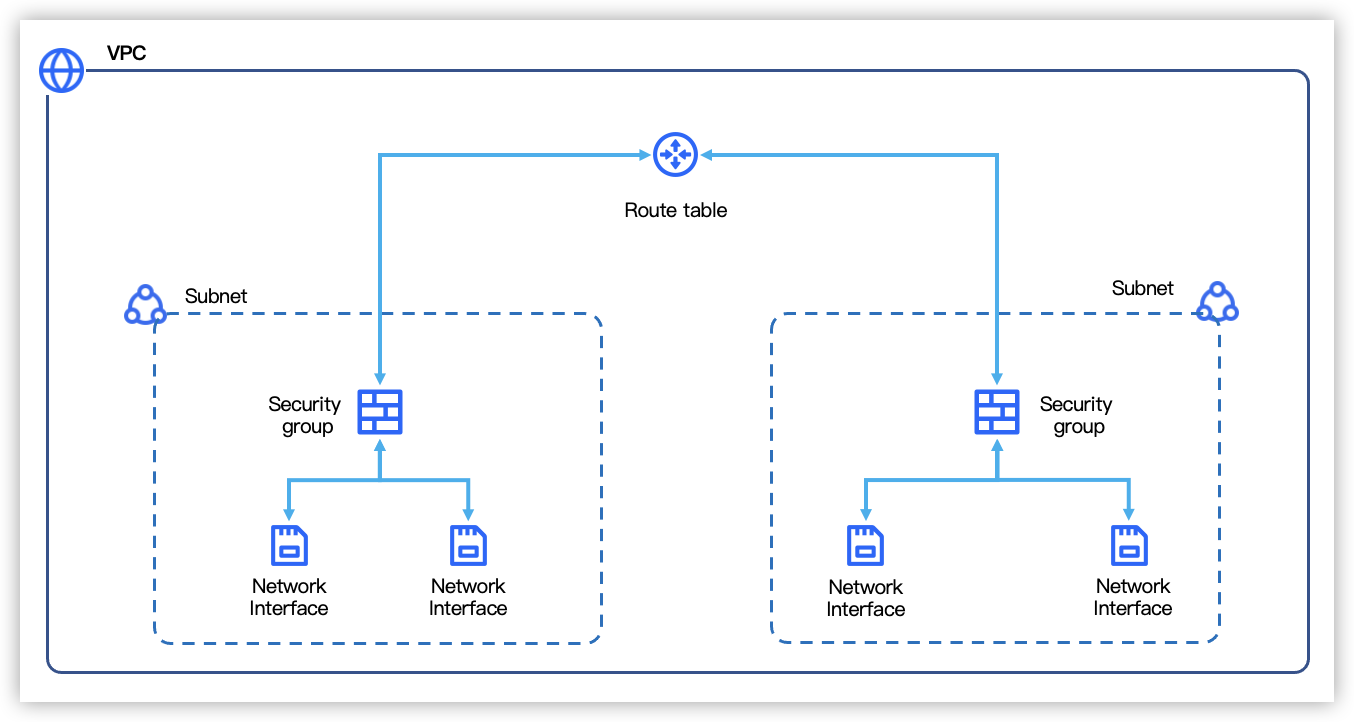
Security groups are often used in conjunction with Network ACLs, which control the inbound and outbound traffic at the subnet level. Learn more
Category
Security group rule
Precautions
- Security groups are Stateful. Return traffic is automatically allowed (with a connection aging time of 900 seconds for TCP and 30 seconds for ICMP). In other words, for outbound traffic initiated by the ENI, only the outbound rules need to permit it. For inbound traffic received by the ENI, only the inbound rules need to permit it.
- Security group rule changes take effect immediately. Both existing persistent connections and newly established connections are controlled by the updated rules.
- An inbound rule with itself as the source ensures communication between ENIs within the group. If deleted, private communication within the group is broken.
- It is recommended to exercise caution when allowing traffic on commonly used service ports such as SSH (22), Redis (6379), MemCached (11211), MySQL (3306), SMB (445), RDP (3389), and SQL Server (1433). Learn more
Rule Composition
- Parameter description
- To add rules to a security group to allow traffic, the parameters for security group rules are described below:
- ParametersNotesInbound/outboundDirection of traffic.
- Inbound: Traffic entering the network interface.
- Outbound: Traffic leaving the network interface.
PriorityPriority of Security Group rules.- Priority values can be identical.
- Priority range is 1-100, where the default value 1 represents the highest precedence.
PolicyPolicy of traffic. When priorities are equal, deny policy takes precedence over allow policy.- Allow: Permits the traffic to pass.
- Deny: Rejects the traffic to pass. Use Case: This is applicable for scenarios where you need to permit traffic from a large CIDR block but explicitly deny traffic from specific IP addresses within that block.
Protocol typeSupports ALL, TCP, UDP, ICMP, ICMPV6,GRE.Port rangeDefine the Destination port range according to different protocol types.Source/destination address- Source address: Configurable for inbound rules only.
- Destination address: Configurable for outbound rules only.
- Matching description
- After an ENI is associated with one or more security groups, when traffic passes through, the rule matching process is as follows (using inbound traffic as an example; the logic is similar for outbound traffic):
- Priority sorting: All inbound rules from all associated security groups are aggregated and sorted by priority from highest to lowest.
tip
- A lower priority value indicates a higher precedence.
- For rules with equal priority, deny policies take precedence over allow policies.
- If no rules are configured in any associated security group, all inbound and outbound traffic for the network interface is denied by default.
- Matching: Traffic matches rules sequentially from top to bottom. If matched: Allow/Deny based on the rule's policy, matching terminates. If no match: Implicitly deny the traffic.
Usage limits
For the quota items adjustable in the table below, if the default quotas are insufficient, you can go to the Quota Center to request an increase.
Configuration procedures
Best Practices
- For security group planning, see How to plan security groups.
- For application examples, see Security group use cases.
- After allowing an IP address and port in the security group rules, please verify that the ECS instance's firewall also allows traffic. If the firewall is not configured to permit it, the traffic will still be blocked. For details, see How to configure Linux instance firewall, How to configure Windows ECS firewall.
Last updated: 2026.10.29 19:43:10
All rights reserved © Beijing Volcano Engine Technology Co., Ltd2024
