You need to enable JavaScript to run this app.
文档中心
云搜索服务

云搜索服务

复制全文
下载 pdf
应用构建
云搜索混合检索 + Rerank 操作示例(使用豆包 embedding 模型)
复制全文
下载 pdf
云搜索混合检索 + Rerank 操作示例(使用豆包 embedding 模型)
本文介绍如何通过火山引擎云搜索服务使用混合检索、Rerank 等功能。​
原理介绍​
在搜索应用中,传统的 Keyword Search 一直是主要的搜索方法,它适合精确匹配查询的场景,能够提供低延迟和良好的结果可解释性,但是 Keyword Search 并没有考虑上下文信息,可能产生不相关的结果。最近几年,基于向量检索技术的搜索增强技术 Semantic Search 越来越流行,通过使用机器学习模型将数据对象(文本、图像、音视频等)转化成向量,向量距离代表对象间的相似性,如果使用的模型和问题领域相关性高,则往往能更好地理解上下文和搜索意图,进而提高搜索结果的相关性,反之,如果模型和问题领域相关性不高,则效果会大打折扣。​
Keyword Search 和 Semantic Search 都存在明显的优劣势,那么是否可以通过组合它们的优点来整体提高搜索的相关性?答案是,简单的算术组合并不能收到预期的效果,主要原因有两个:​
  • 首先是不同类型查询的评分并不在同一个可比较的维度,因此不能直接进行简单的算术计算。​
  • 其次是在分布式检索系统中,评分通常在分片级别,需要对所有分片的评分进行全局归一化处理。​
综上,我们需要寻找一种理想的查询类型来解决这些问题,它能单独执行每个查询子句,同时收集分片级别的查询结果,最后对所有查询的评分进行归一化合并后返回最终的结果,这就是混合搜索(Hybrid Search)方案。​
​​​
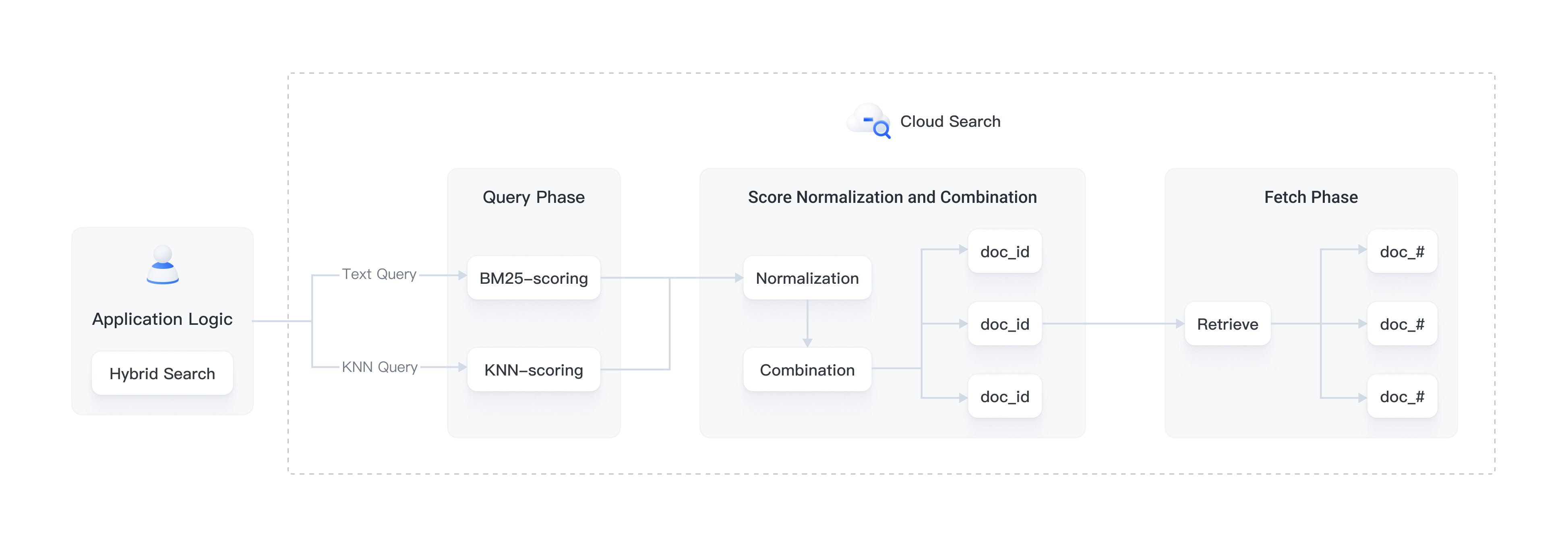
通常一次混合搜索查询可以分为以下几步:​
  1. 查询阶段:使用混合查询子句进行 Keyword Search 和 Semantic Search。​
  1. 评分归一化和合并阶段,该阶段在查询阶段之后。​
  1. 由于每种查询类型都会提供不同范围的评分,该阶段对每一个查询子句的评分结果执行归一化操作,支持的归一化方法有 min_max、l2、rrf。​
  1. 对归一化后的评分进行组合,组合方法有 arithmetic_mean、geometric_mean、harmonic_mean。​
  1. 根据组合后的评分对文档重新排序并返回给用户。​
实现思路​
从前面原理介绍可以看到要实现一个混合检索应用,至少需要用到以下基础技术设施:​
  • 全文检索引擎​
  • 向量检索引擎​
  • 用于向量 Embedding 的机器学习模型​
  • 将文本、音频、视频等数据转化成向量的数据管道​
  • 融合排序​
火山引擎云搜索构建在开源的 Elasticsearch 和 OpenSearch 项目上,从上线起就支持了完善成熟的文本检索和向量检索能力,同时针对混合搜索场景也进行了一系列的功能迭代和演进,提供了开箱即用的混合搜索解决方案。本文将以图像搜索应用为例,介绍如何借助火山引擎云搜索服务的解决方案快速开发一个混合搜索应用。​
​​​
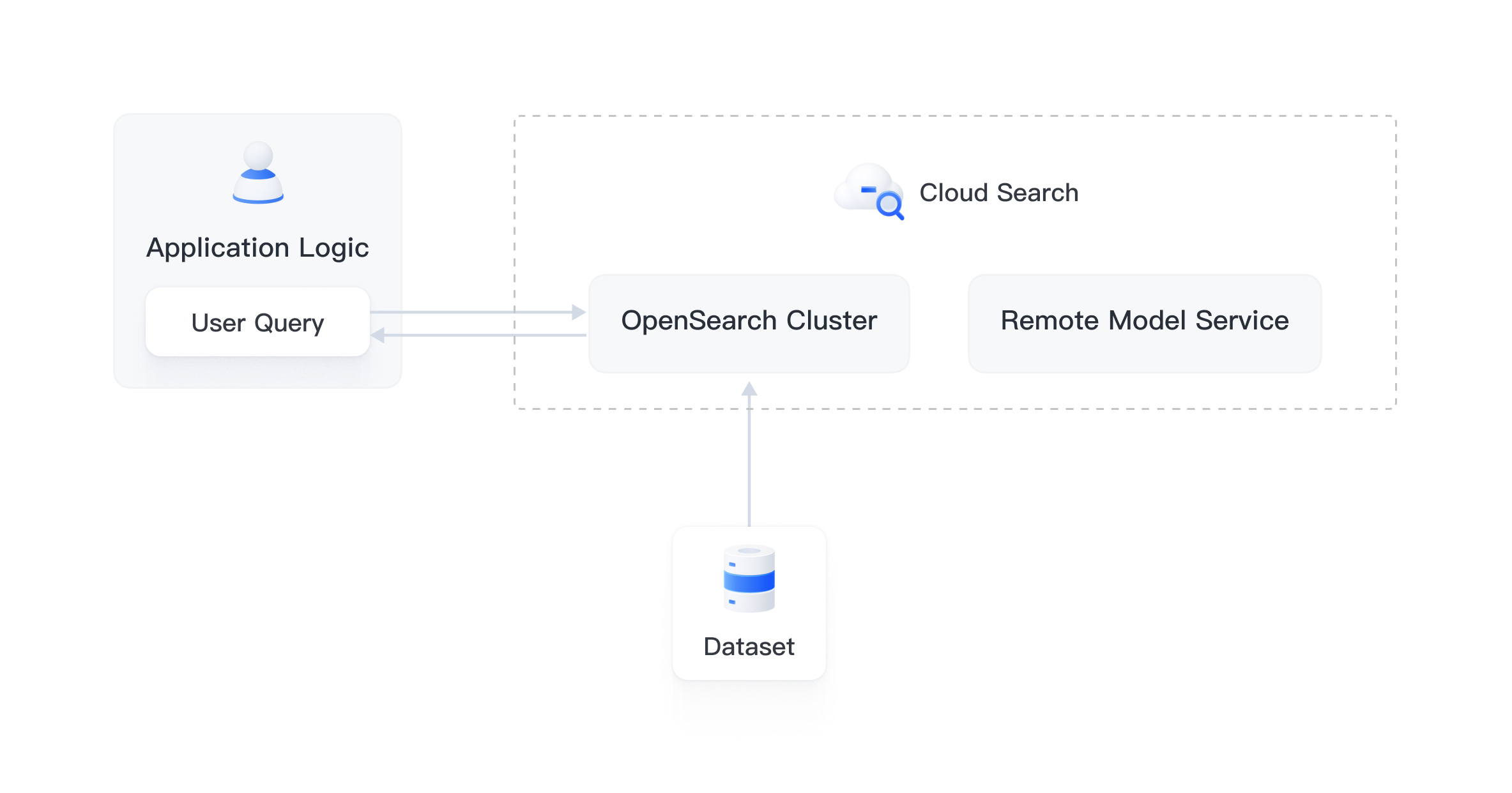
其端到端流程概括如下:​
  1. 配置创建相关对象。​
  • Ingestion Pipeline:支持自动调用模型把图片转换向量并存到索引中。​
  • Search Pipeline:支持将文本查询语句自动转换成向量以便进行相似度计算。​
  • k-NN 索引:存放向量的索引。​
  1. 将数据集数据写入 OpenSearch 实例,OpenSearch 会自动调用机器学习模型将文本转为 Embedding 向量。​
  1. Client 发起混合搜索查询时,OpenSearch 调用机器学习模型将传入的查询转为 Embedding 向量。​
  1. OpenSearch 执行混合搜索请求处理,组合 Keyword Seach 和 Semantic Seach 的评分,返回搜索结果。​
前提条件​
  • 已创建 OpenSearch 2.9.0 或更新版本实例,具体操作,请参见创建实例。​
  • 已在创建的实例中安装 opensearch-remote-inference、opensearch-intervention、opensearch-enhancements 插件。具体操作,请参见管理系统内置插件。​
  • 已创建两个推理服务,分别选择 Embedding 模型和 Rerank 模型。​
说明​
本示例中,Embedding 模型选用 Doubao-embedding-vision,Rerank 模型选用 Qwen/Qwen3-VL-Reranker-2B。请根据实际需求选择合适模型。​
在 ContextSearch 中使用 Embedding 模型和 Rerank 模型​
  1. 在 ContextSearch 服务中查看 Embedding 模型和 Rerank 模型的调用示例,并获取 model 字段的值。具体操作,请参见查看推理服务。​
说明​
本示例中,Embedding 模型选用 Doubao-embedding-vision,Rerank 模型选用 Qwen/Qwen3-VL-Reranker-2B。请根据实际需求选择合适模型。​
  • 此外,您还可以在推理服务的监控页签查看单次请求 token 输入数量。​
  1. 创建并查看用于调用模型的 API Key。具体操作,请参见创建 API Key。​
登录 OpenSearch Dashboards​
在创建的实例中,登录 Dashboards,具体操作请参见公网访问 Kibana/Dashboards。​
创建 OpenSearch 索引​
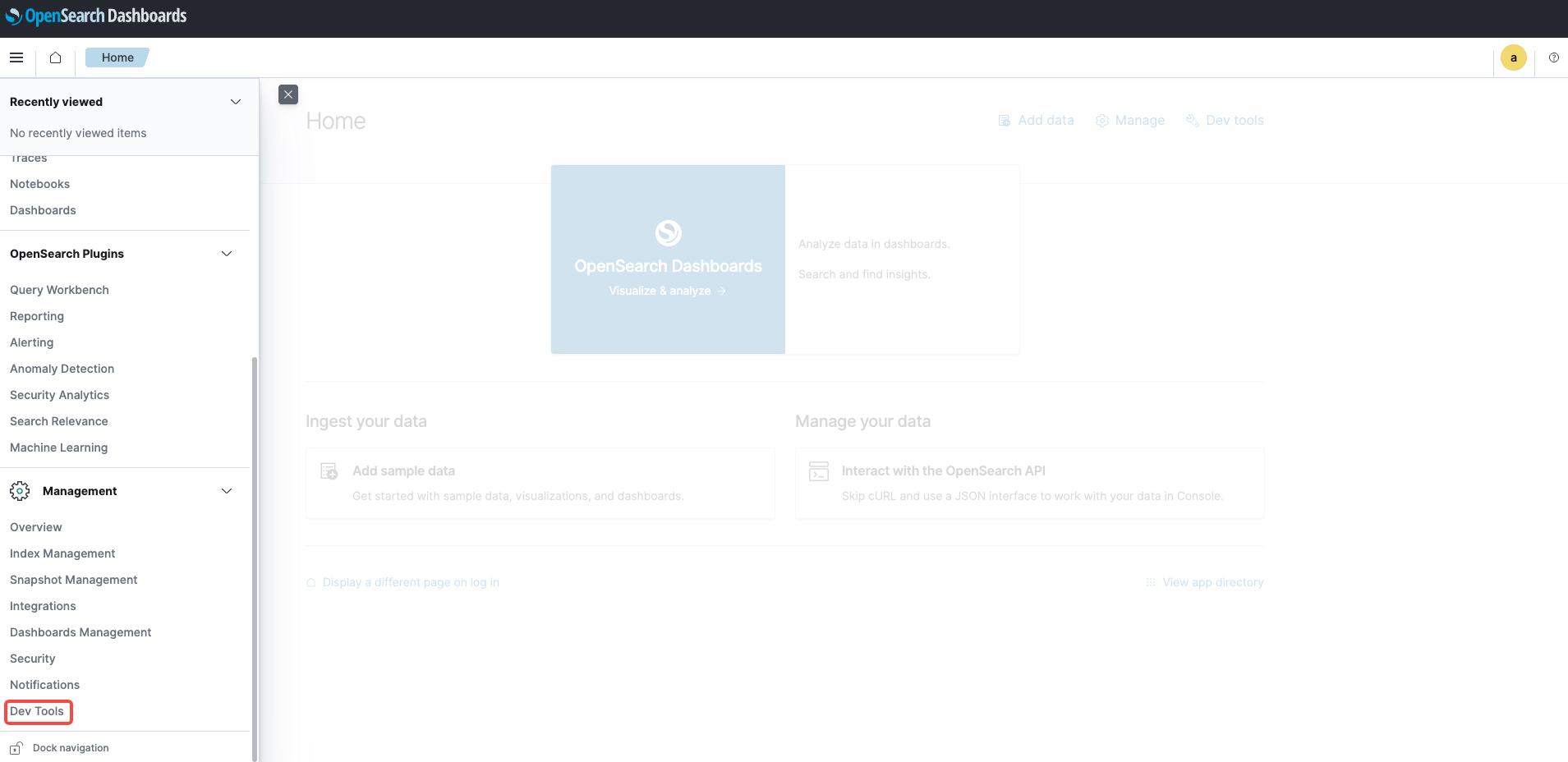
在 OpenSearch Dashboards 左侧的导航栏中选择 Dev Tools。​
​​​
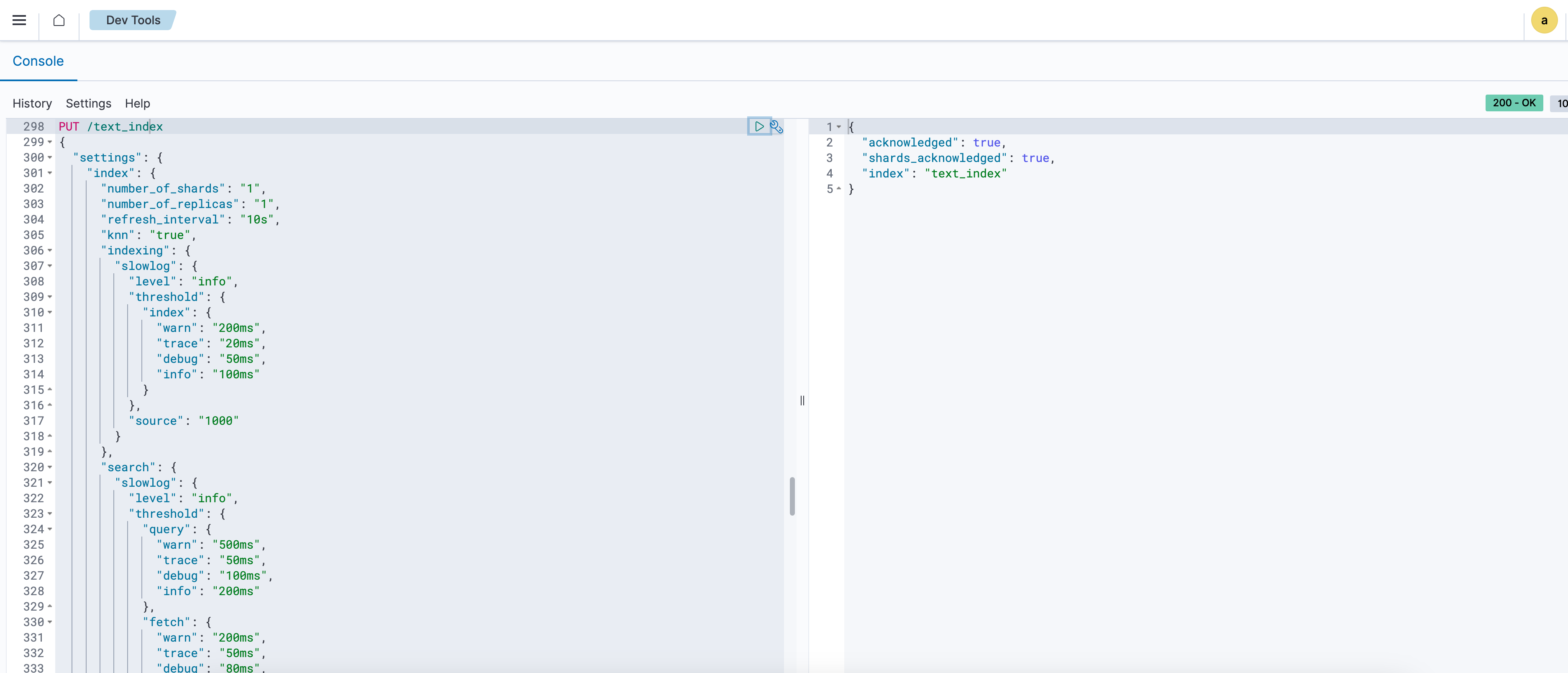
创建名为 text_index 的索引,内容如下。​
​
PUT /text_index​
{​
"settings": {​
"index": {​
"number_of_shards": "1",​
"number_of_replicas": "1",​
"refresh_interval": "10s",​
"knn": "true", # 注意使用该配置,否则可能会导致向量检索失效​
"indexing": {​
"slowlog": {​
"level": "info",​
"threshold": {​
"index": {​
"warn": "200ms",​
"trace": "20ms",​
"debug": "50ms",​
"info": "100ms"​
}​
},​
"source": "1000"​
}​
},​
"search": {​
"slowlog": {​
"level": "info",​
"threshold": {​
"query": {​
"warn": "500ms",​
"trace": "50ms",​
"debug": "100ms",​
"info": "200ms"​
},​
"fetch": {​
"warn": "200ms",​
"trace": "50ms",​
"debug": "80ms",​
"info": "100ms"​
}​
}​
}​
}​
}​
},​
"mappings": {​
"properties": {​
"text": {​
"type": "text",​
"analyzer": "ik_max_word"​
},​
"text_knn": {​
"type": "knn_vector",​
"dimension": 4096, ## 需要和推理服务中选择的 embedding 模型 dimension 一致。 ​
"method": {​
"engine": "nmslib",​
"space_type": "cosinesimil",​
"name": "hnsw",​
"parameters": {}​
}​
}​
}​
}​
}​
​
​​​
如需修改为 DiskANN 配置,可参考 使用 DiskANN 向量引擎。​
创建 OpenSearch Embedding Pipelin​
创建 OpenSearch Insert Pipeline​
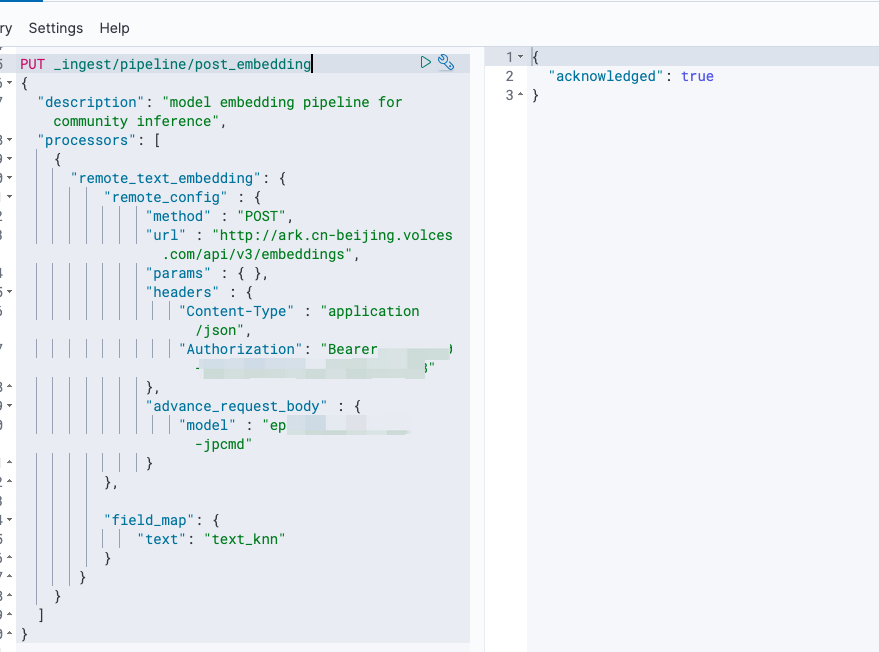
在 Dev Tools 中创建名为 post_embedding 的 Pipeline,用于向 OpenSearch 中写入数据。Pipeline 内容如下,注意根据注释替换字段值。​
​
PUT _ingest/pipeline/post_embedding​
{​
"description": "model embedding pipeline for community inference",​
"processors": [​
{​
"remote_text_embedding": {​
"remote_config" : {​
"method" : "POST",​
"url" : "http://ark.cn-beijing.volces.com/api/v3/embeddings", ## 豆包 Embedding 服务固定 URL​
"params" : { },​
"headers" : {​
"Content-Type" : "application/json",​
"Authorization": "Bearer {api—key}" ## 创建的 API Key​
},​
"advance_request_body" : {​
"model" : "ep-xxxxxxx-xxxxxx" ## 上一步 Embedding 推理服务调用信息中"model"字段的值​
}​
}, ​
​
"field_map": { ​
"text": "text_knn"​
}​
} ​
}​
]​
}​
​
​​​
创建 OpenSearch Search Pipeline​
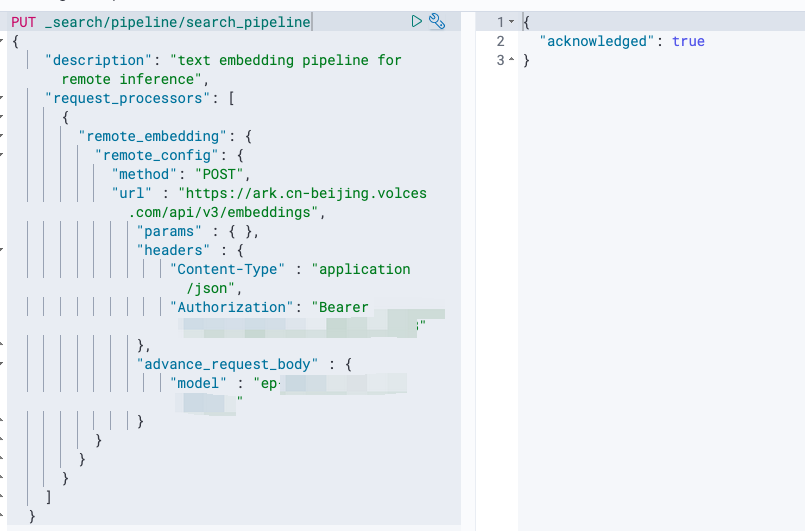
在 Dev Tools 中创建名为 search_pipeline 的 Pipeline,用于在 OpenSearch 中检索数据。Pipeline 内容如下,注意根据注释替换字段值。​
​
PUT _search/pipeline/search_pipeline​
{​
"description": "text embedding pipeline for remote inference",​
"request_processors": [​
{​
"remote_embedding": {​
"remote_config": {​
"method": "POST",​
"url" : "https://ark.cn-beijing.volces.com/api/v3/embeddings",​
"params" : { },​
"headers" : {​
"Content-Type" : "application/json",​
"Authorization": "Bearer {api—key}" ##创建的api-key​
},​
"advance_request_body" : {​
"model" : "ep-xxxxxxx-xxxxxx" ##上一步embedding推理服务调用信息中的model字段值​
}​
}​
}​
}​
],​
"phase_results_processors": [​
{​
"normalization-processor": {​
"normalization": {​
"technique": "min_max"​
},​
"combination": {​
"technique": "arithmetic_mean",​
"parameters": {}​
}​
}​
}​
]​
}​
​
​​​
写入测试数据​
在 Dev Tools 中写入 100 条测试数据。​
​
POST /text_index/_bulk?pipeline=post_embedding # 与前文创建的 insert pipeline 一致​
{ "index": { "_id": 1 } }​
{ "text": "口风琴" }​
{ "index": { "_id": 2 } }​
{ "text": "电子琴" }​
{ "index": { "_id": 3 } }​
{ "text": "吉他" }​
{ "index": { "_id": 4 } }​
{ "text": "钢琴" }​
{ "index": { "_id": 5 } }​
{ "text": "小提琴" }​
{ "index": { "_id": 6 } }​
{ "text": "鼓" }​
{ "index": { "_id": 7 } }​
{ "text": "萨克斯" }​
{ "index": { "_id": 8 } }​
{ "text": "低音提琴" }​
{ "index": { "_id": 9 } }​
{ "text": "电子合成器" }​
{ "index": { "_id": 10 } }​
{ "text": "风琴" }​
{ "index": { "_id": 11 } }​
{ "text": "竖琴" }​
{ "index": { "_id": 12 } }​
{ "text": "口琴" }​
{ "index": { "_id": 13 } }​
{ "text": "电子打击乐器" }​
{ "index": { "_id": 14 } }​
{ "text": "手风琴" }​
{ "index": { "_id": 15 } }​
{ "text": "鼓组" }​
{ "index": { "_id": 16 } }​
{ "text": "电子小号" }​
{ "index": { "_id": 17 } }​
{ "text": "铜管乐器" }​
{ "index": { "_id": 18 } }​
{ "text": "木管乐器" }​
{ "index": { "_id": 19 } }​
{ "text": "打击乐器" }​
{ "index": { "_id": 20 } }​
{ "text": "电子小号" }​
{ "index": { "_id": 21 } }​
{ "text": "牙刷" }​
{ "index": { "_id": 22 } }​
{ "text": "洗发水" }​
{ "index": { "_id": 23 } }​
{ "text": "漱口水" }​
{ "index": { "_id": 24 } }​
{ "text": "纸巾" }​
{ "index": { "_id": 25 } }​
{ "text": "洗衣粉" }​
{ "index": { "_id": 26 } }​
{ "text": "洗洁精" }​
{ "index": { "_id": 27 } }​
{ "text": "沐浴露" }​
{ "index": { "_id": 28 } }​
{ "text": "毛巾" }​
{ "index": { "_id": 29 } }​
{ "text": "垃圾袋" }​
{ "index": { "_id": 30 } }​
{ "text": "牙膏" }​
{ "index": { "_id": 31 } }​
{ "text": "香皂" }​
{ "index": { "_id": 32 } }​
{ "text": "洗面奶" }​
{ "index": { "_id": 33 } }​
{ "text": "清洁剂" }​
{ "index": { "_id": 34 } }​
{ "text": "洗手液" }​
{ "index": { "_id": 35 } }​
{ "text": "护肤霜" }​
{ "index": { "_id": 36 } }​
{ "text": "面膜" }​
{ "index": { "_id": 37 } }​
{ "text": "卫生纸" }​
{ "index": { "_id": 38 } }​
{ "text": "食品保鲜膜" }​
{ "index": { "_id": 39 } }​
{ "text": "水杯" }​
{ "index": { "_id": 40 } }​
{ "text": "器具清洗液" }​
{ "index": { "_id": 41 } }​
{ "text": "餐具消毒液" }​
{ "index": { "_id": 42 } }​
{ "text": "保鲜盒" }​
{ "index": { "_id": 43 } }​
{ "text": "便签纸" }​
{ "index": { "_id": 44 } }​
{ "text": "《活着》" }​
{ "index": { "_id": 45 } }​
{ "text": "《百年孤独》" }​
{ "index": { "_id": 46 } }​
{ "text": "《小王子》" }​
{ "index": { "_id": 47 } }​
{ "text": "《1984》" }​
{ "index": { "_id": 48 } }​
{ "text": "《骆驼祥子》" }​
{ "index": { "_id": 49 } }​
{ "text": "《红楼梦》" }​
{ "index": { "_id": 50 } }​
{ "text": "《西游记》" }​
{ "index": { "_id": 51 } }​
{ "text": "《三国演义》" }​
{ "index": { "_id": 52 } }​
{ "text": "《围城》" }​
{ "index": { "_id": 53 } }​
{ "text": "《悲惨世界》" }​
{ "index": { "_id": 54 } }​
{ "text": "《哈利·波特》" }​
{ "index": { "_id": 55 } }​
{ "text": "《无声告白》" }​
{ "index": { "_id": 56 } }​
{ "text": "《时间简史》" }​
{ "index": { "_id": 57 } }​
{ "text": "《追风筝的人》" }​
{ "index": { "_id": 58 } }​
{ "text": "《平凡的世界》" }​
{ "index": { "_id": 59 } }​
{ "text": "《三体》" }​
{ "index": { "_id": 60 } }​
{ "text": "《人类简史》" }​
{ "index": { "_id": 61 } }​
{ "text": "《安娜·卡列尼娜》" }​
{ "index": { "_id": 62 } }​
{ "text": "《月亮和六便士》" }​
{ "index": { "_id": 63 } }​
{ "text": "《未来简史》" }​
{ "index": { "_id": 64 } }​
{ "text": "北京" }​
{ "index": { "_id": 65 } }​
{ "text": "上海" }​
{ "index": { "_id": 66 } }​
{ "text": "广州" }​
{ "index": { "_id": 67 } }​
{ "text": "深圳" }​
{ "index": { "_id": 68 } }​
{ "text": "成都" }​
{ "index": { "_id": 69 } }​
{ "text": "重庆" }​
{ "index": { "_id": 70 } }​
{ "text": "杭州" }​
{ "index": { "_id": 71 } }​
{ "text": "武汉" }​
{ "index": { "_id": 72 } }​
{ "text": "西安" }​
{ "index": { "_id": 73 } }​
{ "text": "南京" }​
{ "index": { "_id": 74 } }​
{ "text": "青岛" }​
{ "index": { "_id": 75 } }​
{ "text": "郑州" }​
{ "index": { "_id": 76 } }​
{ "text": "福州" }​
{ "index": { "_id": 77 } }​
{ "text": "厦门" }​
{ "index": { "_id": 78 } }​
{ "text": "天津" }​
{ "index": { "_id": 79 } }​
{ "text": "大连" }​
{ "index": { "_id": 80 } }​
{ "text": "厦门" }​
{ "index": { "_id": 81 } }​
{ "text": "济南" }​
{ "index": { "_id": 82 } }​
{ "text": "青岛" }​
{ "index": { "_id": 83 } }​
{ "text": "昆明" }​
{ "index": { "_id": 84 } }​
{ "text": "哈尔滨" }​
{ "index": { "_id": 85 } }​
{ "text": "长沙" }​
{ "index": { "_id": 86 } }​
{ "text": "广州" }​
{ "index": { "_id": 87 } }​
{ "text": "合肥" }​
{ "index": { "_id": 88 } }​
{ "text": "南宁" }​
{ "index": { "_id": 89 } }​
{ "text": "太原" }​
{ "index": { "_id": 90 } }​
{ "text": "南昌" }​
{ "index": { "_id": 91 } }​
{ "text": "狗" }​
{ "index": { "_id": 92 } }​
{ "text": "猫" }​
{ "index": { "_id": 93 } }​
{ "text": "狐狸" }​
{ "index": { "_id": 94 } }​
{ "text": "大象" }​
{ "index": { "_id": 95 } }​
{ "text": "老虎" }​
{ "index": { "_id": 96 } }​
{ "text": "狮子" }​
{ "index": { "_id": 97 } }​
{ "text": "熊" }​
{ "index": { "_id": 98 } }​
{ "text": "长颈鹿" }​
{ "index": { "_id": 99 } }​
{ "text": "斑马" }​
{ "index": { "_id": 100 } }​
{ "text": "鳄鱼" }​
​
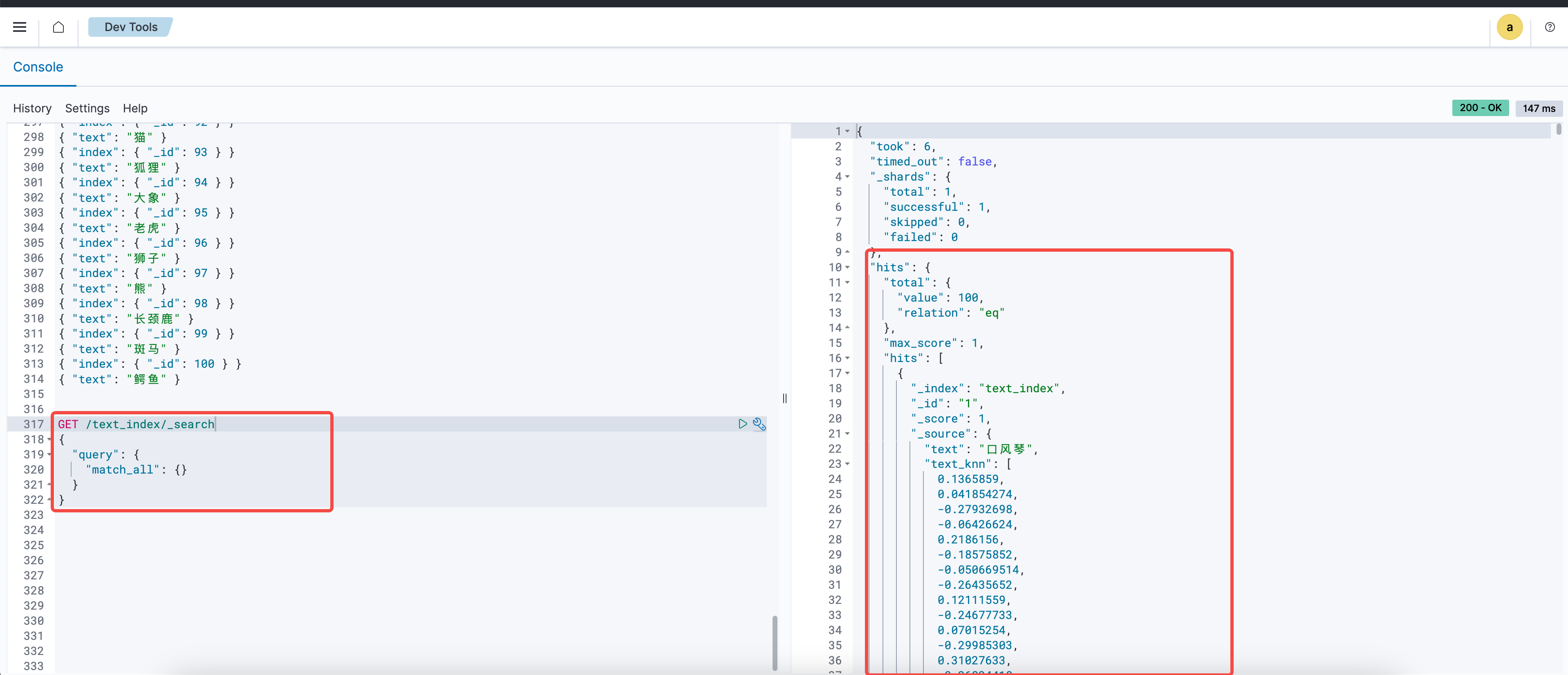
从 OpenSearch 索引中查询数据。查询到数据表示写入成功。​
​
GET /text_index/_search​
{​
"query": {​
"match_all": {}​
}​
}​
​
​​​
数据检索测试​
向量 + Keyword 混合检索​
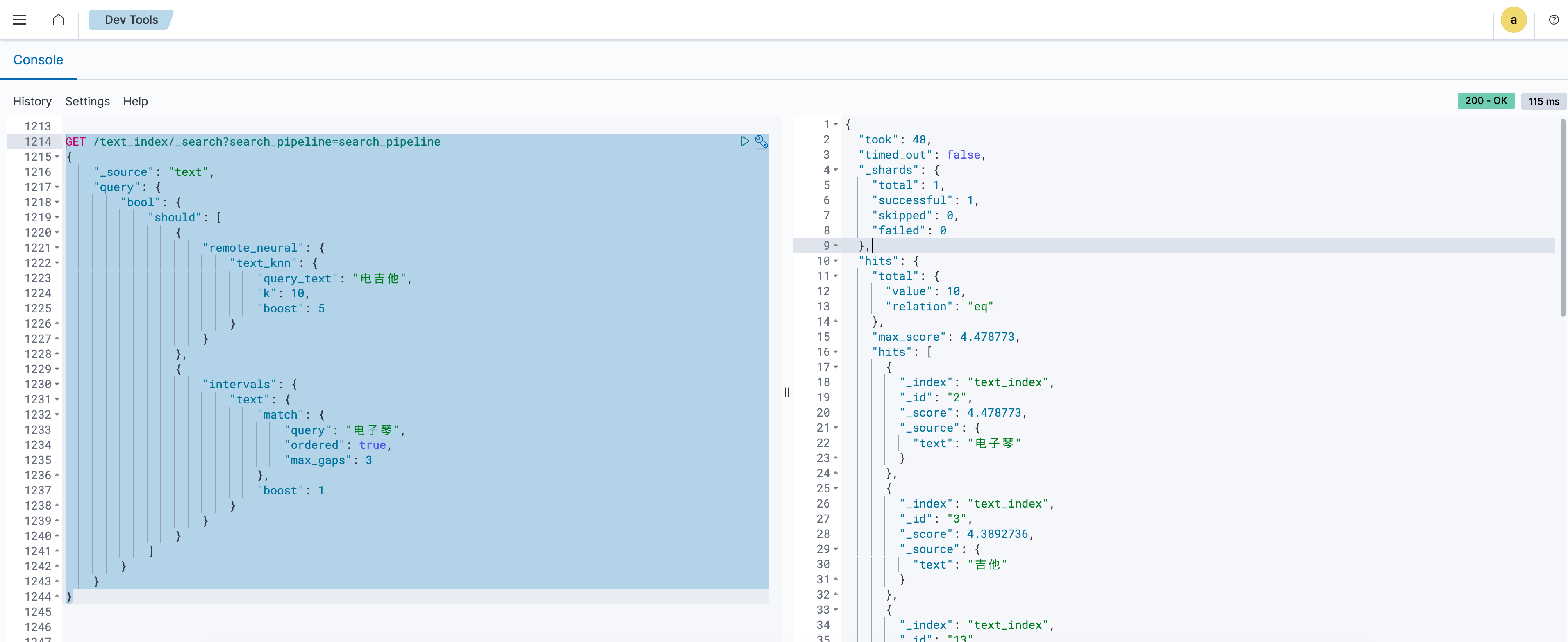
测试向量 + Keyword 混合检索效果。示例如下。​
​
GET /text_index/_search?search_pipeline=search_pipeline # 注意与创建的 Search Pipeline 保持一致​
{​
"_source": "text",​
"query": {​
"hybrid": {​
"queries": [​
{​
"remote_neural": {​
"text_knn": {​
"query_text": "电吉他",​
"k": 10​
}​
}​
},​
{​
"intervals": {​
"text": {​
"match": {​
"query": "电子琴",​
"ordered": true,​
"max_gaps": 3​
}​
}​
}​
}​
]​
}​
}​
}​
​
​​​
Rerank 测试​
导出 API Key 到本地环境变量。​
​
export API_KEY="5cad31c3-**************-e5b7d3c9294d"​
​
Rerank 接口调用​
Rerank 接口调用支持通过命令行调用和通过 OpenSearch Pipeline 调用。​
​
通过命令行调用
通过 OpenSearch Rerank Pipeline 调用
​
在命令行工具中执行公网信息调用命令调用 Rerank 接口。具体操作,请参见查看推理服务。​
​
curl http://{addr}/v1/rerank \​
-H "Content-Type: application/json" \​
-H "Authorization: Bearer $API_KEY" \​
-X POST \​
-d '{​
"model": "Qwen/Qwen3-VL-Reranker-2B",​
"query": "电子琴",​
"top_n": 7,​
"documents": [​
"口风琴",​
"吉他",​
"北京",​
"牙刷",​
"电脑",​
"显示器",​
"电子琴",​
"电子",​
"鼓"​
]​
}' | jq .​
​
​​​
​
最近更新时间:2026.10.19 11:21:46
这个页面对您有帮助吗?
有用
有用
无用
无用