云搜索服务
云搜索服务
云搜索服务


文档指南
请输入


用户指南
实例管理
可视化配置
插件管理
搜索管理
可观测
Cerebro 管理
任务中心
Logstash 用户指南
最佳实践
连接实例
数据集成
应用构建
API 参考
实例查询
实例管理
- 文档首页
 云搜索服务最佳实践应用构建基于云搜索服务的混合检索和重排序实践
 复制全文
复制全文 下载 pdf
基于云搜索服务的混合检索和重排序实践
 文档反馈
文档反馈 问问助手
问问助手云搜索服务支持结合 ContextSearch 服务进行混合检索,例如向量和关键词混合检索,同时还支持重排序(Rerank)。本文介绍如何进行混合检索和重排序。
基础环境准备
初始化云搜索实例
- 部署云搜索 OpenSearch 2.9.0 实例。操作步骤请参见创建实例。
说明
后续如果需要使用公网连接进行操作,创建时请开启实例公网访问和 Dashboards 公网访问。
- 启用云搜索相关插件 opensearch-remote-inference。操作步骤请参见安装系统内置插件。
在 ContextSearch 中使用 Doubao-embedding-vision 模型
- 在 ContextSearch 服务中查看 Doubao-embedding-vision 模型的调用示例,并获取 model 字段的值。具体操作,请参见查看推理服务。
- 此外,您还可以在推理服务的监控页签查看单次请求 token 输入数量。
- 创建并查看用于调用模型的 API Key。具体操作,请参见创建 API Key。
创建索引和 Pipeline
- 登录初始化云搜索实例中创建的 OpenSearch 2.9.0 或更新版本实例中的 Dashboards。操作步骤请参见登录 Kibana/Dashboards。
- 创建 OpenSearch 索引,索引名称为 text_index。示例命令如下。
- PUT /text_index{"settings": {"index": {"number_of_shards": "1","number_of_replicas": "1","refresh_interval": "10s","knn": "true", # 请勿遗漏该配置,否则可能会导致向量检索失效。"indexing": {"slowlog": {"level": "info","threshold": {"index": {"warn": "200ms","trace": "20ms","debug": "50ms","info": "100ms"}},"source": "1000"}},"search": {"slowlog": {"level": "info","threshold": {"query": {"warn": "500ms","trace": "50ms","debug": "100ms","info": "200ms"},"fetch": {"warn": "200ms","trace": "50ms","debug": "80ms","info": "100ms"}}}}}},"mappings": {"properties": {"text": {"type": "text","analyzer": "ik_max_word"},"text_knn": {"type": "knn_vector","dimension": 1024, # 需要和推理服务中选择的 Embedding 模型的 dimension 一致,即在推理服务查看关联模型时,描述列的 dim 值。"method": {"engine": "nmslib","space_type": "cosinesimil","name": "hnsw","parameters": {}}}}}}
说明
- 创建 Insert Pipeline 用于向 OpenSearch 写入数据。本示例创建一个名为 post_embedding 的 Pipeline。示例命令如下。
说明
- PUT _ingest/pipeline/post_embedding{"description": "model embedding pipeline for community inference","processors": [{"remote_text_embedding": {"remote_config" : {"method" : "POST","url" : "{embedding_url}","params" : { },"headers" : {"Content-Type" : "application/json"},"advance_request_body" : {"model" : "{model}"}}, # remote_config end"field_map": { "text": "text_knn"# 使用 text 字段来生成 text_knn 字段。后续步骤中写入 text 字段的具体值。}} #remote_text_embedding end}]}
- 创建 Search Pipeline 用于在 OpenSearch 中检索数据。本示例创建一个名为 search_pipeline 的 Pipeline。示例命令如下。
说明
- PUT _search/pipeline/search_pipeline{"description": "Text embedding pipeline for remote inference","request_processors": [{"remote_embedding": {"remote_config": {"method": "POST","url": "{embedding_url}","headers": {"Content-Type": "application/json"},"advance_request_body": {"model": "{model}"}}}}],"phase_results_processors": [{"normalization-processor": {"normalization": {"technique": "min_max"},"combination": {"technique": "arithmetic_mean","parameters": {}}}}]}
写入测试数据
写入 100 条测试数据。示例命令如下。
POST /text_index/_bulk?pipeline=post_embedding # 与前文创建的 Insert Pipeline 名称一致。
{ "index": { "_id": 1 } }
{ "text": "口风琴" }
{ "index": { "_id": 2 } }
{ "text": "电子琴" }
{ "index": { "_id": 3 } }
{ "text": "吉他" }
{ "index": { "_id": 4 } }
{ "text": "钢琴" }
{ "index": { "_id": 5 } }
{ "text": "小提琴" }
{ "index": { "_id": 6 } }
{ "text": "鼓" }
{ "index": { "_id": 7 } }
{ "text": "萨克斯" }
{ "index": { "_id": 8 } }
{ "text": "低音提琴" }
{ "index": { "_id": 9 } }
{ "text": "电子合成器" }
{ "index": { "_id": 10 } }
{ "text": "风琴" }
{ "index": { "_id": 11 } }
{ "text": "竖琴" }
{ "index": { "_id": 12 } }
{ "text": "口琴" }
{ "index": { "_id": 13 } }
{ "text": "电子打击乐器" }
{ "index": { "_id": 14 } }
{ "text": "手风琴" }
{ "index": { "_id": 15 } }
{ "text": "鼓组" }
{ "index": { "_id": 16 } }
{ "text": "电子小号" }
{ "index": { "_id": 17 } }
{ "text": "铜管乐器" }
{ "index": { "_id": 18 } }
{ "text": "木管乐器" }
{ "index": { "_id": 19 } }
{ "text": "打击乐器" }
{ "index": { "_id": 20 } }
{ "text": "电子小号" }
{ "index": { "_id": 21 } }
{ "text": "牙刷" }
{ "index": { "_id": 22 } }
{ "text": "洗发水" }
{ "index": { "_id": 23 } }
{ "text": "漱口水" }
{ "index": { "_id": 24 } }
{ "text": "纸巾" }
{ "index": { "_id": 25 } }
{ "text": "洗衣粉" }
{ "index": { "_id": 26 } }
{ "text": "洗洁精" }
{ "index": { "_id": 27 } }
{ "text": "沐浴露" }
{ "index": { "_id": 28 } }
{ "text": "毛巾" }
{ "index": { "_id": 29 } }
{ "text": "垃圾袋" }
{ "index": { "_id": 30 } }
{ "text": "牙膏" }
{ "index": { "_id": 31 } }
{ "text": "香皂" }
{ "index": { "_id": 32 } }
{ "text": "洗面奶" }
{ "index": { "_id": 33 } }
{ "text": "清洁剂" }
{ "index": { "_id": 34 } }
{ "text": "洗手液" }
{ "index": { "_id": 35 } }
{ "text": "护肤霜" }
{ "index": { "_id": 36 } }
{ "text": "面膜" }
{ "index": { "_id": 37 } }
{ "text": "卫生纸" }
{ "index": { "_id": 38 } }
{ "text": "食品保鲜膜" }
{ "index": { "_id": 39 } }
{ "text": "水杯" }
{ "index": { "_id": 40 } }
{ "text": "器具清洗液" }
{ "index": { "_id": 41 } }
{ "text": "餐具消毒液" }
{ "index": { "_id": 42 } }
{ "text": "保鲜盒" }
{ "index": { "_id": 43 } }
{ "text": "便签纸" }
{ "index": { "_id": 44 } }
{ "text": "《活着》" }
{ "index": { "_id": 45 } }
{ "text": "《百年孤独》" }
{ "index": { "_id": 46 } }
{ "text": "《小王子》" }
{ "index": { "_id": 47 } }
{ "text": "《1984》" }
{ "index": { "_id": 48 } }
{ "text": "《骆驼祥子》" }
{ "index": { "_id": 49 } }
{ "text": "《红楼梦》" }
{ "index": { "_id": 50 } }
{ "text": "《西游记》" }
{ "index": { "_id": 51 } }
{ "text": "《三国演义》" }
{ "index": { "_id": 52 } }
{ "text": "《围城》" }
{ "index": { "_id": 53 } }
{ "text": "《悲惨世界》" }
{ "index": { "_id": 54 } }
{ "text": "《哈利·波特》" }
{ "index": { "_id": 55 } }
{ "text": "《无声告白》" }
{ "index": { "_id": 56 } }
{ "text": "《时间简史》" }
{ "index": { "_id": 57 } }
{ "text": "《追风筝的人》" }
{ "index": { "_id": 58 } }
{ "text": "《平凡的世界》" }
{ "index": { "_id": 59 } }
{ "text": "《三体》" }
{ "index": { "_id": 60 } }
{ "text": "《人类简史》" }
{ "index": { "_id": 61 } }
{ "text": "《安娜·卡列尼娜》" }
{ "index": { "_id": 62 } }
{ "text": "《月亮和六便士》" }
{ "index": { "_id": 63 } }
{ "text": "《未来简史》" }
{ "index": { "_id": 64 } }
{ "text": "北京" }
{ "index": { "_id": 65 } }
{ "text": "上海" }
{ "index": { "_id": 66 } }
{ "text": "广州" }
{ "index": { "_id": 67 } }
{ "text": "深圳" }
{ "index": { "_id": 68 } }
{ "text": "成都" }
{ "index": { "_id": 69 } }
{ "text": "重庆" }
{ "index": { "_id": 70 } }
{ "text": "杭州" }
{ "index": { "_id": 71 } }
{ "text": "武汉" }
{ "index": { "_id": 72 } }
{ "text": "西安" }
{ "index": { "_id": 73 } }
{ "text": "南京" }
{ "index": { "_id": 74 } }
{ "text": "青岛" }
{ "index": { "_id": 75 } }
{ "text": "郑州" }
{ "index": { "_id": 76 } }
{ "text": "福州" }
{ "index": { "_id": 77 } }
{ "text": "厦门" }
{ "index": { "_id": 78 } }
{ "text": "天津" }
{ "index": { "_id": 79 } }
{ "text": "大连" }
{ "index": { "_id": 80 } }
{ "text": "厦门" }
{ "index": { "_id": 81 } }
{ "text": "济南" }
{ "index": { "_id": 82 } }
{ "text": "青岛" }
{ "index": { "_id": 83 } }
{ "text": "昆明" }
{ "index": { "_id": 84 } }
{ "text": "哈尔滨" }
{ "index": { "_id": 85 } }
{ "text": "长沙" }
{ "index": { "_id": 86 } }
{ "text": "广州" }
{ "index": { "_id": 87 } }
{ "text": "合肥" }
{ "index": { "_id": 88 } }
{ "text": "南宁" }
{ "index": { "_id": 89 } }
{ "text": "太原" }
{ "index": { "_id": 90 } }
{ "text": "南昌" }
{ "index": { "_id": 91 } }
{ "text": "狗" }
{ "index": { "_id": 92 } }
{ "text": "猫" }
{ "index": { "_id": 93 } }
{ "text": "狐狸" }
{ "index": { "_id": 94 } }
{ "text": "大象" }
{ "index": { "_id": 95 } }
{ "text": "老虎" }
{ "index": { "_id": 96 } }
{ "text": "狮子" }
{ "index": { "_id": 97 } }
{ "text": "熊" }
{ "index": { "_id": 98 } }
{ "text": "长颈鹿" }
{ "index": { "_id": 99 } }
{ "text": "斑马" }
{ "index": { "_id": 100 } }
{ "text": "鳄鱼" }
验证写入的数据
执行如下命令,如果能够从 OpenSearch 索引中查询出数据,表示写入成功。
GET /text_index/_search
{
"query": {
"match_all": {}
}
}
检索数据
向量和关键词混合检索
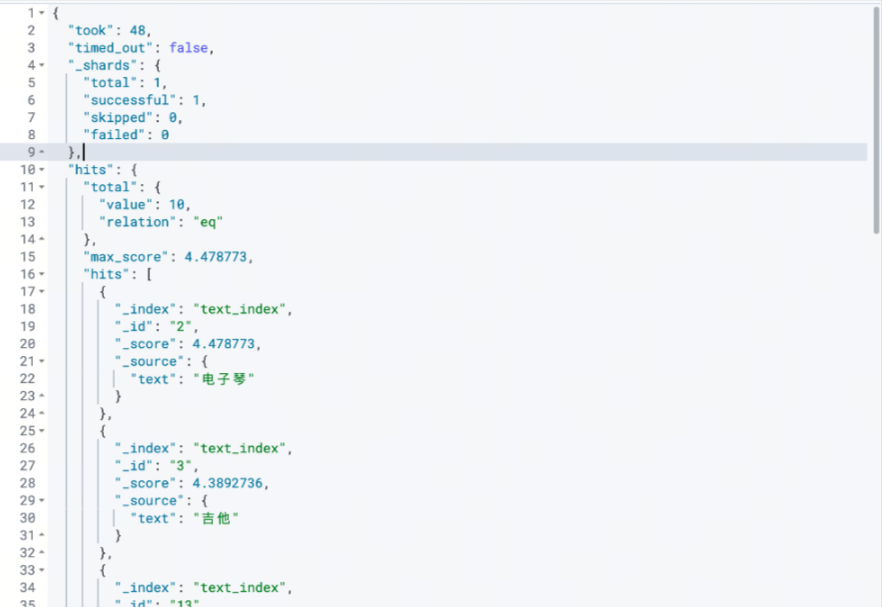
进行向量和关键词的混合检索。示例命令如下。
GET /text_index/_search?search_pipeline=search_pipeline # 与前文创建的 Search Pipeline 名称一致
{
"_source": "text",
"query": {
"hybrid": {
"queries": [
{
"remote_neural": {
"text_knn": {
"query_text": "电吉他",
"k": 10
}
}
},
{
"intervals": {
"text": {
"match": {
"query": "电子琴",
"ordered": true,
"max_gaps": 3
}
}
}
}
]
}
}
}
返回结果如下图。
Rerank 测试
- 部署 Rerank 模型。操作步骤与在 ContextSearch 中使用 Doubao-embedding-vision 模型相似。
说明
本示例选择的推理模型为 Qwen/Qwen3-VL-Reranker-2B,实际业务中请根据业务需求选择合适的模型。
- 创建 API Key。
说明
API Key 是调用推理服务接口时进行身份认证的关键信息,需要在正式调用推理服务之前创建 API Key。请注意妥善保管 API Key。
- 查看 API Key。
- 在本地环境中设置 API Key 的环境变量。示例命令如下。
- export API_KEY="5cad31c3-**************-e5b7d3c9294d"
- 使用命令行或 Pipeline 调用 Rerank 接口。
- 命令行调用 Rerank 接口Pipeline 调用 Rerank 接口查看 Rerank 服务的公网调用信息或私网调用信息,复制到命令行中,修改参数。示例命令如下。curl http://{addr}/v1/rerank \-H "Content-Type: application/json" \-H "Authorization: Bearer $API_KEY" \-X POST \-d '{"model": "Qwen/Qwen3-VL-Reranker-2B","query": "电子琴","top_n": 7,"documents": ["口风琴","吉他","北京","牙刷","电脑","显示器","电子琴","电子","鼓"]}' | jq .返回结果如下图。
- 创建 Rerank Pipeline 用于在 OpenSearch 中检索数据。本示例创建一个名为 search_pipeline_with_rerank 的 Pipeline。示例命令如下。
说明命令中需要替换 Embedding 服务和 Rerank 服务的调用信息中的变量。- PUT _search/pipeline/search_pipeline_with_rerank{"description": "text embedding pipeline for remote inference","request_processors": [{"remote_embedding": {"remote_config": {"method": "POST","url": "{embedding_url}","headers": {"Content-Type": "application/json"},"advance_request_body": {"model": "{embedding_model}"}}}}],"phase_results_processors": [{"normalization-processor": {"normalization": {"technique": "min_max"},"combination": {"technique": "arithmetic_mean","parameters": {"weights": [0.3,0.7]}}}}],"response_processors": [{"remote_rerank": {"ml_opensearch": {"remote_config": {"method": "POST","url": "{rerank_url}","params": {"token": "{API_KEY}"},"headers": {"Content-Type": "application/json"},"advance_request_body": {"model": "{rerank_model}"}}},"context": {"document_fields": ["text"]}}}]}
- 使用 Rerank Pipeline。示例命令如下。
说明使用时需要在 Query 中添加 ext 信息。其中 ext.remote_rerank.query_context.query_text 需要设置相应提问内容。- GET /text_index/_search?search_pipeline=search_pipeline_with_rerank{"_source": "text","query": {"hybrid": {"queries": [{"remote_neural": {"text_knn": {"query_text": "电吉他","k": 10}}},{"intervals": {"text": {"match": {"query": "电子琴","ordered": true,"max_gaps": 3}}}}]}},"ext": {"remote_rerank": {"query_context": {"query_text": "哪个答案和电吉他、电子琴最匹配?"}}}}
返回结果如下图。
最近更新时间:2026.10.19 11:21:46
这个页面对您有帮助吗?
有用
有用
无用
无用