火山方舟
火山方舟


文档指南
请输入


调用
视频生成
工具调用
使用 Responses API
推理
训练
模型精调
Managed Agents
配置 Agent 环境
管理 Agent 上下文
高级能力
- 文档首页
 火山方舟调用使用 Responses API文本生成
 复制全文
 下载 pdf
文本生成
 文档反馈
 问问助手
文本生成模型能够基于输入的提示词生成连贯且有意义的文本内容。
Responses API 支持更简洁的输入输出格式,能够更加高效地进行上下文管理,推荐在项目中使用。
说明
支持模型
快速开始
Curl
Python
Go
Java
OpenAI SDK
# Get API Key: https://ark.volcengine.com/region:cn-beijing/apikey
curl https://ark.cn-beijing.volces.com/api/v3/responses \
-H "Authorization: Bearer $ARK_API_KEY" \
-H "Content-Type: application/json" \
-d '{
"model": "doubao-seed-2-1-pro-260915",
"input": "hello"
}'
import os
from arkruntime import Ark
client = Ark(
base_url='https://ark.cn-beijing.volces.com/api/v3',
api_key=os.getenv('ARK_API_KEY'),
)
response = client.responses.create(
model="doubao-seed-2-1-pro-260915",
input="hello"
)
for item in response.output:
if item.type == "message":
for content in item.content:
if content.type == "output_text":
print(content.text)
package main
import (
"context"
"fmt"
"os"
"github.com/volcengine/ark-runtime-go/arkruntime"
"github.com/volcengine/ark-runtime-go/arkruntime/model/responses"
)
func main() {
client := arkruntime.NewClientWithApiKey(
// Get API Key: https://ark.volcengine.com/region:cn-beijing/apikey
os.Getenv("ARK_API_KEY"),
arkruntime.WithBaseUrl("https://ark.cn-beijing.volces.com/api/v3"),
)
ctx := context.Background()
resp, err := client.CreateResponses(ctx, &responses.ResponsesRequest{
Model: "doubao-seed-2-1-pro-260915",
Input: responses.NewStringResponsesInput("hello"),
})
if err != nil {
fmt.Printf("response error: %v\n", err)
return
}
fmt.Println(resp)
}
package com.ark.example;
import com.volcengine.ark.runtime.service.ArkService;
import com.volcengine.ark.runtime.models.responses.*;
public class demo {
public static void main(String[] args) {
String apiKey = System.getenv("ARK_API_KEY");
// The base URL for model invocation
ArkService arkService = ArkService.builder().apiKey(apiKey)
.baseUrl("https://ark.cn-beijing.volces.com/api/v3")
.build();
ResponsesRequest request = ResponsesRequest.builder()
.model("doubao-seed-2-1-pro-260915")
.input(ResponsesInput.ofString("hello"))
.build();
Response resp = arkService.createResponse(request);
System.out.println(resp);
arkService.shutdownExecutor();
}
}
import os
from openai import OpenAI
client = OpenAI(
base_url='https://ark.cn-beijing.volces.com/api/v3',
api_key=os.getenv('ARK_API_KEY'),
)
response = client.responses.create(
model="doubao-seed-2-1-pro-260915",
input="hello"
)
for item in response.output:
if item.type == "message":
for content in item.content:
if content.type == "output_text":
print(content.text)
API 文档
上下文管理
上下文状态管理简单,默认情况下每个请求的输入和回复(不包括思维链内容) 都会持久化存储,后续请求只需传入 id 就可以引入对应请求的输入和回复,无需像 Chat API 每次请求,传入历史对话。详细信息,参见工作原理及使用说明。
多轮对话
在多轮调用模式下,系统能够自动管理上下文,持续追踪和记忆之前的对话内容,使对话更加连贯自然,提升智能交互体验。
Curl
Python
Go
Java
OpenAI SDK
curl https://ark.cn-beijing.volces.com/api/v3/responses \
-H "Authorization: Bearer $ARK_API_KEY" \
-H "Content-Type: application/json" \
-d '{
"model": "doubao-seed-2-1-pro-260915",
"input": "Hi,讲个笑话。"
}'
curl https://ark.cn-beijing.volces.com/api/v3/responses \
-H "Authorization: Bearer $ARK_API_KEY" \
-H "Content-Type: application/json" \
-d '{
"model": "doubao-seed-2-1-pro-260915",
"previous_response_id":"<id>",
"input": "这个笑话的笑点在哪?"
}'
第二次请求需将 curl 命令中的 <id> 替换为上一次请求返回的 Response id。
import os
from arkruntime import Ark
# Get API Key: https://ark.volcengine.com/region:cn-beijing/apikey
api_key = os.getenv('ARK_API_KEY')
client = Ark(
base_url='https://ark.cn-beijing.volces.com/api/v3',
api_key=api_key,
)
# Create the first-round conversation request
response = client.responses.create(
model="doubao-seed-2-1-pro-260915",
input="Hi,帮我讲个笑话。"
)
print(response)
# Create the second-round conversation request
second_response = client.responses.create(
model="doubao-seed-2-1-pro-260915",
previous_response_id=response.id,
input=[{"role": "user", "content": "这个笑话的笑点在哪?"}],
)
print(second_response)
package main
import (
"context"
"fmt"
"os"
"github.com/volcengine/ark-runtime-go/arkruntime"
"github.com/volcengine/ark-runtime-go/arkruntime/model/responses"
)
func main() {
client := arkruntime.NewClientWithApiKey(
// Get API Key: https://ark.volcengine.com/region:cn-beijing/apikey
os.Getenv("ARK_API_KEY"),
arkruntime.WithBaseUrl("https://ark.cn-beijing.volces.com/api/v3"),
)
ctx := context.Background()
// Create the first-round conversation request
resp, err := client.CreateResponses(ctx, &responses.ResponsesRequest{
Model: "doubao-seed-2-1-pro-260915",
Input: responses.NewStringResponsesInput("Hi,讲个笑话。"),
Store: responses.NewOptBool(true),
})
if err != nil {
fmt.Printf("response error: %v\n", err)
return
}
fmt.Println(resp)
id := resp.ID
inputMessage := easyMessage(responses.MessageRoleUser, "这个笑话的笑点在哪?")
fmt.Println("-----------------")
// Create the second-round conversation request
second_resp, second_err := client.CreateResponses(ctx, &responses.ResponsesRequest{
Model: "doubao-seed-2-1-pro-260915",
PreviousResponseID: responses.NewOptString(id),
Input: responses.NewInputItemArrayResponsesInput([]responses.InputItem{
inputMessage,
}),
})
if second_err != nil {
fmt.Printf("second response error: %v\n", second_err)
return
}
fmt.Println(second_resp)
}
func easyMessage(role responses.MessageRole, content string) responses.InputItem {
return responses.InputItem{
OneOf: responses.NewItemEasyMessageInputItemSum(
responses.ItemEasyMessage{
Role: responses.NewOptMessageRole(role),
Content: responses.NewStringMessageContent(content),
},
),
}
}
package com.ark.example;
import com.volcengine.ark.runtime.service.ArkService;
import com.volcengine.ark.runtime.models.responses.*;
public class demo {
public static void main(String[] args) {
String apiKey = System.getenv("ARK_API_KEY");
// The base URL for model invocation
ArkService arkService = ArkService.builder().apiKey(apiKey)
.baseUrl("https://ark.cn-beijing.volces.com/api/v3")
.build();
// Create the first-round conversation request
ResponsesRequest request = ResponsesRequest.builder()
.model("doubao-seed-2-1-pro-260915")
.input(ResponsesInput.ofString("Hi,帮我讲个笑话。"))
.build();
Response resp = arkService.createResponse(request);
System.out.println(resp);
// Create the second-round conversation request
ResponsesRequest request2 = ResponsesRequest.builder()
.model("doubao-seed-2-1-pro-260915")
.previousResponseId(resp.getId())
.input(ResponsesInput.ofList(java.util.Arrays.asList(ItemEasyMessage.builder().role(MessageRole.USER).content(
MessageContent.ofString("这个笑话的笑点在哪?")
).build())))
.build();
Response resp2 = arkService.createResponse(request2);
System.out.println(resp2);
arkService.shutdownExecutor();
}
}
from openai import OpenAI
import os
# Get API Key: https://ark.volcengine.com/region:cn-beijing/apikey
api_key = os.getenv('ARK_API_KEY')
client = OpenAI(
base_url='https://ark.cn-beijing.volces.com/api/v3',
api_key=api_key,
)
# Create the first-round conversation request
response = client.responses.create(
model="doubao-seed-2-1-pro-260915",
input="Hi,帮我讲个笑话。"
)
print(response)
# Create the second-round conversation request
second_response = client.responses.create(
model="doubao-seed-2-1-pro-260915",
previous_response_id=response.id,
input=[{"role": "user", "content": "这个笑话的笑点在哪?"}],
)
print(second_response)
重新生成对话
这段代码展示了 Responses API 中通过灵活调用 previous_response_id 重新生成对话的树状分叉结构,并展示了如何在不同的分支中进行不同的操作。在重新生成对话的场景中,系统能够根据不同的分支条件,灵活地执行多种的操作,从而实现更复杂的对话逻辑。
Python
Go
Java
OpenAI SDK
import os
from arkruntime import Ark
# Get API Key: https://ark.volcengine.com/region:cn-beijing/apikey
api_key = os.getenv('ARK_API_KEY')
client = Ark(
base_url='https://ark.cn-beijing.volces.com/api/v3',
api_key=api_key,
)
# Create the first-round conversation request
response = client.responses.create(
model="doubao-seed-2-1-pro-260915",
input=[{"role": "user", "content": "你知道余弦相似度的原理吗?"}],
store=True, # store the conversation
)
print(response)
# Create the second-round conversation request
second_response = client.responses.create(
model="doubao-seed-2-1-pro-260915",
previous_response_id=response.id,
input=[{"role": "user", "content": "我希望你可以用小学生都能听懂的方式来解释这个问题"}],
store=True,
)
print(second_response)
# Recreate the second-round conversation request
re_second_response = client.responses.create(
model="doubao-seed-2-1-pro-260915",
previous_response_id=response.id,
input=[{"role": "user", "content": "我希望你可以用教授的思考逻辑来解释这个问题"}],
store=True,
)
print(re_second_response)
package main
import (
"context"
"fmt"
"os"
"github.com/volcengine/ark-runtime-go/arkruntime"
"github.com/volcengine/ark-runtime-go/arkruntime/model/responses"
)
func main() {
client := arkruntime.NewClientWithApiKey(
// Get API Key: https://ark.volcengine.com/region:cn-beijing/apikey
os.Getenv("ARK_API_KEY"),
arkruntime.WithBaseUrl("https://ark.cn-beijing.volces.com/api/v3"),
)
ctx := context.Background()
// Create the first-round conversation request
resp, err := client.CreateResponses(ctx, &responses.ResponsesRequest{
Model: "doubao-seed-2-1-pro-260915",
Input: responses.NewStringResponsesInput("你知道余弦相似度的原理吗?"),
Store: responses.NewOptBool(true),
})
if err != nil {
fmt.Printf("response error: %v\n", err)
return
}
fmt.Println(resp)
fmt.Println("-----------------")
// Create the second-round conversation request
second_resp, second_err := client.CreateResponses(ctx, &responses.ResponsesRequest{
Model: "doubao-seed-2-1-pro-260915",
PreviousResponseID: responses.NewOptString(resp.ID),
Input: responses.NewStringResponsesInput("请用小学生都能听懂的方式解释这个问题。"),
Store: responses.NewOptBool(true),
})
if second_err != nil {
fmt.Printf("second response error: %v\n", second_err)
return
}
fmt.Println(second_resp)
fmt.Println("-----------------")
// Recreate the second-round conversation request
re_second_resp, re_second_err := client.CreateResponses(ctx, &responses.ResponsesRequest{
Model: "doubao-seed-2-1-pro-260915",
PreviousResponseID: responses.NewOptString(resp.ID),
Input: responses.NewStringResponsesInput("请用教授的思考逻辑解释这个问题。"),
Store: responses.NewOptBool(true),
})
if re_second_err != nil {
fmt.Printf("reSecond response error: %v\n", re_second_err)
return
}
fmt.Println(re_second_resp)
}
package com.ark.example;
import com.volcengine.ark.runtime.service.ArkService;
import com.volcengine.ark.runtime.models.responses.*;
public class demo {
public static void main(String[] args) {
String apiKey = System.getenv("ARK_API_KEY");
// The base URL for model invocation
ArkService arkService = ArkService.builder().apiKey(apiKey)
.baseUrl("https://ark.cn-beijing.volces.com/api/v3")
.build();
// Create the first-round conversation request
ResponsesRequest request = ResponsesRequest.builder()
.model("doubao-seed-2-1-pro-260915")
.input(ResponsesInput.ofList(java.util.Arrays.asList(ItemEasyMessage.builder().role(MessageRole.USER).content(
MessageContent.ofString("你知道余弦相似度的原理吗?")
).build())))
.store(true)
.build();
Response resp = arkService.createResponse(request);
System.out.println(resp);
// Create the second-round conversation request
ResponsesRequest request2 = ResponsesRequest.builder()
.model("doubao-seed-2-1-pro-260915")
.previousResponseId(resp.getId())
.input(ResponsesInput.ofList(java.util.Arrays.asList(ItemEasyMessage.builder().role(MessageRole.USER).content(
MessageContent.ofString("我希望你可以用小学生都能听懂的方式来解释这个问题")
).build())))
.build();
Response resp2 = arkService.createResponse(request2);
System.out.println(resp2);
// Recreate the second-round conversation request
ResponsesRequest reRequest2 = ResponsesRequest.builder()
.model("doubao-seed-2-1-pro-260915")
.previousResponseId(resp.getId())
.input(ResponsesInput.ofList(java.util.Arrays.asList(ItemEasyMessage.builder().role(MessageRole.USER).content(
MessageContent.ofString("我希望你可以用教授的思考逻辑来解释这个问题")
).build())))
.build();
Response reResp2 = arkService.createResponse(reRequest2);
System.out.println(reResp2);
arkService.shutdownExecutor();
}
}
from openai import OpenAI
import os
# Get API Key: https://ark.volcengine.com/region:cn-beijing/apikey
api_key = os.getenv('ARK_API_KEY')
client = OpenAI(
base_url='https://ark.cn-beijing.volces.com/api/v3',
api_key=api_key,
)
# Create the first-round conversation request
response = client.responses.create(
model="doubao-seed-2-1-pro-260915",
input=[{"role": "user", "content": "你知道余弦相似度的原理吗?"}],
store=True, # 设置为True以存储对话
)
print(response)
# Create the second-round conversation request
second_response = client.responses.create(
model="doubao-seed-2-1-pro-260915",
previous_response_id=response.id,
input=[{"role": "user", "content": "我希望你可以用小学生都能听懂的方式来解释这个问题"}],
store=True,
)
print(second_response)
# Recreate the second-round conversation request
re_second_response = client.responses.create(
model="doubao-seed-2-1-pro-260915",
previous_response_id=response.id,
input=[{"role": "user", "content": "我希望你可以用教授的思考逻辑来解释这个问题"}],
store=True,
)
print(re_second_response)
窗口截断
这段代码展示了如何利用 delete 接口实现 Responses API 的窗口截断的功能,使得程序可以在 response 粒度上管理历史记忆,便于后续进行更复杂的对话。
Python
Go
Java
OpenAI SDK
import os
from arkruntime import Ark
# Get API Key: https://ark.volcengine.com/region:cn-beijing/apikey
api_key = os.getenv('ARK_API_KEY')
client = Ark(
base_url='https://ark.cn-beijing.volces.com/api/v3',
api_key=api_key,
)
response = client.responses.create(
model="doubao-seed-2-1-pro-260915",
input="讲个谐音梗笑话",
)
print(response)
second_response = client.responses.create(
model="doubao-seed-2-1-pro-260915",
previous_response_id=response.id,
input=[{"role": "user", "content": "讲个有哲理的笑话"}],
)
print(second_response)
third_response = client.responses.create(
model="doubao-seed-2-1-pro-260915",
previous_response_id=second_response.id,
input=[{"role": "user", "content": "讲个冷笑话"}],
)
print(third_response)
deleting_response = client.responses.delete(second_response.id)
print(deleting_response)
fourth_response = client.responses.create(
model="doubao-seed-2-1-pro-260915",
previous_response_id=third_response.id,
input=[{"role": "user", "content": "你刚刚讲了几个笑话?都是关于什么主题的?"}],
)
print(fourth_response)
package main
import (
"context"
"fmt"
"os"
"github.com/volcengine/ark-runtime-go/arkruntime"
"github.com/volcengine/ark-runtime-go/arkruntime/model/responses"
)
func main() {
client := arkruntime.NewClientWithApiKey(
// Get API Key: https://ark.volcengine.com/region:cn-beijing/apikey
os.Getenv("ARK_API_KEY"),
arkruntime.WithBaseUrl("https://ark.cn-beijing.volces.com/api/v3"),
)
ctx := context.Background()
resp, err := client.CreateResponses(ctx, &responses.ResponsesRequest{
Model: "doubao-seed-2-1-pro-260915",
Input: responses.NewStringResponsesInput("讲个谐音梗笑话"),
})
if err != nil {
fmt.Printf("response error: %v\n", err)
return
}
fmt.Println(resp)
second_resp, second_err := client.CreateResponses(ctx, &responses.ResponsesRequest{
Model: "doubao-seed-2-1-pro-260915",
PreviousResponseID: responses.NewOptString(resp.ID),
Input: responses.NewInputItemArrayResponsesInput([]responses.InputItem{
easyMessage(responses.MessageRoleUser, "讲个有哲理的笑话"),
}),
})
if second_err != nil {
fmt.Printf("second response error: %v\n", second_err)
return
}
fmt.Println(second_resp)
third_resp, third_err := client.CreateResponses(ctx, &responses.ResponsesRequest{
Model: "doubao-seed-2-1-pro-260915",
PreviousResponseID: responses.NewOptString(second_resp.ID),
Input: responses.NewInputItemArrayResponsesInput([]responses.InputItem{
easyMessage(responses.MessageRoleUser, "讲个冷笑话"),
}),
})
if third_err != nil {
fmt.Printf("second response error: %v\n", third_err)
return
}
fmt.Println(third_resp)
deleting_resp := client.DeleteResponse(ctx, &responses.ResponsesRemoveParams{ResponseId: second_resp.ID})
fmt.Println(deleting_resp)
forth_resp, forth_err := client.CreateResponses(ctx, &responses.ResponsesRequest{
Model: "doubao-seed-2-1-pro-260915",
PreviousResponseID: responses.NewOptString(third_resp.ID),
Input: responses.NewInputItemArrayResponsesInput([]responses.InputItem{
easyMessage(responses.MessageRoleUser, "你刚刚讲了几个笑话?都是关于什么主题的?"),
}),
})
if forth_err != nil {
fmt.Printf("second response error: %v\n", forth_err)
return
}
fmt.Println(forth_resp)
}
func easyMessage(role responses.MessageRole, content string) responses.InputItem {
return responses.InputItem{
OneOf: responses.NewItemEasyMessageInputItemSum(
responses.ItemEasyMessage{
Role: responses.NewOptMessageRole(role),
Content: responses.NewStringMessageContent(content),
},
),
}
}
package com.ark.example;
import com.volcengine.ark.runtime.service.ArkService;
import com.volcengine.ark.runtime.models.responses.*;
public class demo {
public static void main(String[] args) {
String apiKey = System.getenv("ARK_API_KEY");
// The base URL for model invocation
ArkService arkService = ArkService.builder().apiKey(apiKey)
.baseUrl("https://ark.cn-beijing.volces.com/api/v3")
.build();
ResponsesRequest request = ResponsesRequest.builder()
.model("doubao-seed-2-1-pro-260915")
.input(ResponsesInput.ofString("讲个谐音梗笑话"))
.build();
Response resp = arkService.createResponse(request);
System.out.println(resp);
System.out.println("---------------------");
ResponsesRequest request2 = ResponsesRequest.builder()
.model("doubao-seed-2-1-pro-260915")
.previousResponseId(resp.getId())
.input(ResponsesInput.ofList(java.util.Arrays.asList(ItemEasyMessage.builder().role(MessageRole.USER).content(
MessageContent.ofString("讲个有哲理的笑话")
).build())))
.build();
Response resp2 = arkService.createResponse(request2);
System.out.println(resp2);
System.out.println("---------------------");
ResponsesRequest request3 = ResponsesRequest.builder()
.model("doubao-seed-2-1-pro-260915")
.previousResponseId(resp2.getId())
.input(ResponsesInput.ofList(java.util.Arrays.asList(ItemEasyMessage.builder().role(MessageRole.USER).content(
MessageContent.ofString("讲个冷笑话")
).build())))
.build();
Response resp3 = arkService.createResponse(request3);
System.out.println(resp3);
System.out.println("---------------------");
DeleteResponseResponse deleteResp = arkService.deleteResponse(
DeleteResponseRequest.builder().responseId(resp2.getId()).build()
);
System.out.println(deleteResp);
System.out.println("---------------------");
ResponsesRequest request4 = ResponsesRequest.builder()
.model("doubao-seed-2-1-pro-260915")
.previousResponseId(resp3.getId())
.input(ResponsesInput.ofList(java.util.Arrays.asList(ItemEasyMessage.builder().role(MessageRole.USER).content(
MessageContent.ofString("你刚刚讲了几个笑话?都是关于什么主题的?")
).build())))
.build();
Response resp4 = arkService.createResponse(request4);
System.out.println(resp4);
arkService.shutdownExecutor();
}
}
import os
from openai import OpenAI
# Get API Key: https://ark.volcengine.com/region:cn-beijing/apikey
api_key = os.getenv('ARK_API_KEY')
client = OpenAI(
base_url='https://ark.cn-beijing.volces.com/api/v3',
api_key=api_key,
)
response = client.responses.create(
model="doubao-seed-2-1-pro-260915",
input="讲个谐音梗笑话",
)
print(response)
second_response = client.responses.create(
model="doubao-seed-2-1-pro-260915",
previous_response_id=response.id,
input=[{"role": "user", "content": "讲个有哲理的笑话"}],
)
print(second_response)
third_response = client.responses.create(
model="doubao-seed-2-1-pro-260915",
previous_response_id=second_response.id,
input=[{"role": "user", "content": "讲个冷笑话"}],
)
print(third_response)
deleting_response = client.responses.delete(second_response.id)
print(deleting_response)
fourth_response = client.responses.create(
model="doubao-seed-2-1-pro-260915",
previous_response_id=third_response.id,
input=[{"role": "user", "content": "你刚刚讲了几个笑话?都是关于什么主题的?"}],
)
print(fourth_response)
流式输出
流式输出支持内容动态实时呈现,既能够缓解用户等待焦虑,又可以规避复杂任务因长时间推理引发的客户端超时失败问题,保障请求流程顺畅。
Curl
Python
Go
Java
OpenAI SDK
curl https://ark.cn-beijing.volces.com/api/v3/responses \
-H "Authorization: Bearer $ARK_API_KEY" \
-H "Content-Type: application/json" \
-d '{
"model": "doubao-seed-2-1-pro-260915",
"input": "常见的十字花科植物有哪些?",
"thinking":{"type": "enabled"},
"stream": true
}'
输出示例:
event: response.created
data: {"type":"response.created","response":{"created_at":1764229579,"id":"resp_021764229578658fe9a0f6cb2cc6c828e7a59adbdb971872aee70","max_output_tokens":32768,"model":"doubao-seed-2-1-pro-260628","object":"response","thinking":{"type":"enabled"},"service_tier":"default","caching":{"type":"disabled"},"store":true,"expire_at":1764488778},"sequence_number":0}
event: response.in_progress
data: {"type":"response.in_progress","response":{"created_at":1764229579,"id":"resp_021764229578658fe9a0f6cb2cc6c828e7a59adbdb971872aee70","max_output_tokens":32768,"model":"doubao-seed-2-1-pro-260628","object":"response","thinking":{"type":"enabled"},"service_tier":"default","caching":{"type":"disabled"},"store":true,"expire_at":1764488778},"sequence_number":1}
event: response.output_item.added
data: {"type":"response.output_item.added","output_index":0,"item":{"id":"rs_02176422957963700000000000000000000ffffac15dd335c9c43","type":"reasoning","status":"in_progress"},"sequence_number":2}
event: response.reasoning_summary_part.added
data: {"type":"response.reasoning_summary_part.added","item_id":"rs_02176422957963700000000000000000000ffffac15dd335c9c43","output_index":0,"summary_index":0,"part":{"type":"summary_text"},"sequence_number":3}
event: response.reasoning_summary_text.delta
data: {"type":"response.reasoning_summary_text.delta","summary_index":0,"delta":"\n","item_id":"rs_02176422957963700000000000000000000ffffac15dd335c9c43","output_index":0,"sequence_number":4}
event: response.reasoning_summary_text.delta
data: {"type":"response.reasoning_summary_text.delta","summary_index":0,"delta":"用户","item_id":"rs_02176422957963700000000000000000000ffffac15dd335c9c43","output_index":0,"sequence_number":5}
event: response.reasoning_summary_text.delta
data: {"type":"response.reasoning_summary_text.delta","summary_index":0,"delta":"问","item_id":"rs_02176422957963700000000000000000000ffffac15dd335c9c43","output_index":0,"sequence_number":6}
...
import os
from arkruntime import Ark
from arkruntime.types.responses.response_completed_event import ResponseCompletedEvent
from arkruntime.types.responses.response_reasoning_summary_text_delta_event import ResponseReasoningSummaryTextDeltaEvent
from arkruntime.types.responses.response_output_item_added_event import ResponseOutputItemAddedEvent
from arkruntime.types.responses.response_text_delta_event import ResponseTextDeltaEvent
from arkruntime.types.responses.response_text_done_event import ResponseTextDoneEvent
# Get API Key: https://ark.volcengine.com/region:cn-beijing/apikey
api_key = os.getenv('ARK_API_KEY')
client = Ark(
base_url='https://ark.cn-beijing.volces.com/api/v3',
api_key=api_key,
)
# Create a request
response = client.responses.create(
model="doubao-seed-2-1-pro-260915",
input="常见的十字花科植物有哪些?",
thinking={"type": "enabled"},
stream=True
)
for event in response:
if isinstance(event, ResponseReasoningSummaryTextDeltaEvent):
print(event.delta, end="")
if isinstance(event, ResponseOutputItemAddedEvent):
print("\noutPutItem " + event.type + " start:")
if isinstance(event, ResponseTextDeltaEvent):
print(event.delta,end="")
if isinstance(event, ResponseTextDoneEvent):
print("\noutPutTextDone.")
if isinstance(event, ResponseCompletedEvent):
print("Response Completed. Usage = " + event.response.usage.model_dump_json())
输出示例:
outPutItem response.output_item.added start:
用户问常见的十字花科植物有哪些,首先我得回忆一下十字花科的主要特征,比如花是十字形花冠,四强雄蕊(四长两短),果实多为角果(长角果或短角果)。然后要列举常见的种类,分几个类别可能更清楚,比如蔬菜类、观赏类、野生类这些。
....
现在组织语言,先总述十字花科的特征,然后分蔬菜、观赏、野生杂草三类列举常见例子,每个例子简要说明。这样结构清晰,用户容易理解。
outPutItem response.output_item.added start:
十字花科植物是被子植物中常见的一科,其核心特征为**十字形花冠(4片花瓣呈十字排列)、四强雄蕊(4长2短)、果实多为角果**(分长角果如油菜,短角果如荠菜)。以下是几类常见的十字花科植物:
### **一、常见蔬菜类**
这是十字花科最广为人知的类别,很多日常食材都属于此类:
1. **白菜类**:大白菜、小白菜、娃娃菜(均为芸薹属变种,叶用为主);
2. ...
...
### **总结**
十字花科植物与人类生活密切相关——从日常蔬菜到观赏花卉,再到田间杂草,其多样性和实用性都很强。记住“十字花、四强雄蕊、角果”这三个特征,就能轻松识别大部分十字花科植物啦!
outPutTextDone.
Response Completed. Usage = {"input_tokens":42,"input_tokens_details":{"cached_tokens":0},"output_tokens":1089,"output_tokens_details":{"reasoning_tokens":431},"total_tokens":1131,"tool_usage":null,"tool_usage_details":null}
package main
import (
"io"
"context"
"fmt"
"os"
"github.com/volcengine/ark-runtime-go/arkruntime"
"github.com/volcengine/ark-runtime-go/arkruntime/model/responses"
)
func main() {
client := arkruntime.NewClientWithApiKey(
// Get API Key: https://ark.volcengine.com/region:cn-beijing/apikey
os.Getenv("ARK_API_KEY"),
arkruntime.WithBaseUrl("https://ark.cn-beijing.volces.com/api/v3"),
)
ctx := context.Background()
resp, err := client.CreateResponsesStream(ctx, &responses.ResponsesRequest{
Model: "doubao-seed-2-1-pro-260915",
Input: responses.NewStringResponsesInput("常见的十字花科植物有哪些?"),
Thinking: responses.NewOptThinking(responses.Thinking{Type: responses.NewOptThinkingMode(responses.ThinkingModeEnabled)}),
})
if err != nil {
fmt.Printf("stream error: %v", err)
return
}
for {
event, err := resp.Recv()
if err == io.EOF {
break
}
if err != nil {
fmt.Printf("stream error: %v", err)
return
}
handleEvent(event)
}
}
func handleEvent(event *responses.ResponseStreamEvent) {
switch event.OneOf.Type {
case responses.ResponseReasoningSummaryTextDeltaEventResponseStreamEventSum:
print(event.OneOf.ResponseReasoningSummaryTextDeltaEvent.Delta.Or(""))
case responses.ResponseReasoningSummaryTextDoneEventResponseStreamEventSum:
fmt.Printf("\nAggregated reasoning text: %s\n", event.OneOf.ResponseReasoningSummaryTextDoneEvent.Text.Or(""))
case responses.ResponseTextDeltaEventResponseStreamEventSum:
print(event.OneOf.ResponseTextDeltaEvent.Delta.Or(""))
case responses.ResponseTextDoneEventResponseStreamEventSum:
fmt.Printf("\nAggregated output text: %s\n", event.OneOf.ResponseTextDoneEvent.Text.Or(""))
}
}
输出示例:
用户问常见的十字花科植物有哪些,我需要先回忆一下十字花科的主要特征,然后列举常见的例子,最好分分类,比如蔬菜类、花卉类、野生类之类的,这样用户看起来清楚。首先,十字花科的特征是十字形花冠,四强雄蕊(四长两短),角果(长角果或短角果)。
...
Aggregated reasoning text:
十字花科植物因**十字形花冠**(四片花瓣呈十字排列)、**四强雄蕊**(四长两短)和**角果**(果实类型)为主要特征,在蔬菜、观赏花卉中十分常见。以下是几类典型代表:
...
**答案总结:**
常见十字花科植物包括白菜、萝卜、卷心菜、西兰花、油菜、荠菜、紫罗兰、二月兰等(按蔬菜/花卉分类列举即可)。
(注:若需更简洁,可直接列出核心例子:如白菜、萝卜、西兰花、荠菜、紫罗兰、二月兰等)。
Aggregated output text: 十字花科植物因**十字形花冠**(四片花瓣呈十字排列)、**四强雄蕊**(四长两短)和**角果**(果实类型)为主要特征,在蔬菜、观赏花卉中十分常见。以下是几类典型代表:
...
**答案总结:**
常见十字花科植物包括白菜、萝卜、卷心菜、西兰花、油菜、荠菜、紫罗兰、二月兰等(按蔬菜/花卉分类列举即可)。
(注:若需更简洁,可直接列出核心例子:如白菜、萝卜、西兰花、荠菜、紫罗兰、二月兰等)。
package com.ark.example;
import com.volcengine.ark.runtime.service.ArkService;
import com.volcengine.ark.runtime.models.responses.*;
public class demo {
public static void main(String[] args) {
String apiKey = System.getenv("ARK_API_KEY");
// The base URL for model invocation
ArkService arkService = ArkService.builder().apiKey(apiKey)
.baseUrl("https://ark.cn-beijing.volces.com/api/v3")
.build();
ResponsesRequest request = ResponsesRequest.builder()
.model("doubao-seed-2-1-pro-260915")
.stream(true)
.input(ResponsesInput.ofString("常见的十字花科植物有哪些?"))
.thinking(Thinking.builder().type(ThinkingMode.ENABLED).build())
.build();
arkService.streamResponse(request)
.doOnError(Throwable::printStackTrace)
.blockingForEach(event -> {
if (event instanceof ResponseReasoningSummaryTextDeltaEvent) {
System.out.print(((ResponseReasoningSummaryTextDeltaEvent) event).getDelta());
}
if (event instanceof ResponseOutputItemAddedEvent) {
System.out.println("OutputItem " + (((ResponseOutputItemAddedEvent) event).getItem().getType()) + " Start: ");
}
if (event instanceof ResponseTextDeltaEvent) {
System.out.print(((ResponseTextDeltaEvent) event).getDelta());
}
if (event instanceof ResponseTextDoneEvent) {
System.out.println("OutputText End.");
}
if (event instanceof ResponseOutputItemDoneEvent) {
System.out.println("OutputItem " + ((ResponseOutputItemDoneEvent) event).getItem().getType() + " End.");
}
if (event instanceof ResponseFunctionCallArgumentsDoneEvent) {
System.out.println("FunctionCall Arguments: " + ((ResponseFunctionCallArgumentsDoneEvent) event).getArguments());
}
if (event instanceof ResponseCompletedEvent) {
System.out.println("Response Completed. Usage = " + ((ResponseCompletedEvent) event).getResponse().getUsage());
}
});
arkService.shutdownExecutor();
}
}
输出示例:
OutputItem reasoning Start:
用户问常见的十字花科植物有哪些,首先我得回忆一下十字花科的主要特征,比如十字形花冠、四强雄蕊这些,但用户可能不需要特征,直接要例子。首先想到的是蔬菜类,因为很多日常吃的蔬菜都是十字花科的。
...
OutputItem message Start:
十字花科植物种类丰富,其中很多是日常常见的蔬菜、观赏植物或野菜,以下是一些典型例子:
...
这些植物在饮食、农业或景观中都很常见,你平时吃的蔬菜里大概率就有它们的身影! 🌱🥦🥬OutputText End.
OutputItem message End.
Response Completed. Usage = Usage{inputTokens=42, outputTokens=759, totalTokens=801, inputTokensDetails=InputTokensDetails{cachedTokens=0}, outputTokensDetails=com.volcengine.ark.runtime.model.responses.usage.OutputTokensDetails@73d983ea, toolUsage=null, toolUsageDetails=null}
import os
from openai import OpenAI
# Get API Key: https://ark.volcengine.com/region:cn-beijing/apikey
api_key = os.getenv('ARK_API_KEY')
client = OpenAI(
base_url='https://ark.cn-beijing.volces.com/api/v3',
api_key=api_key,
)
# Create a request
response = client.responses.create(
model="doubao-seed-2-1-pro-260915",
input="常见的十字花科植物有哪些?",
stream=True,
extra_body={
"thinking": {"type": "enabled"},
}
)
for event in response:
if event.type == "response.reasoning_summary_text.delta":
print(event.delta, end="")
if event.type == "response.output_item.added":
print("\noutPutItem " + event.type + " start:")
if event.type == "response.output_text.delta":
print(event.delta,end="")
if event.type == "response.output_item.done":
print("\noutPutTextDone.")
if event.type == "response.completed":
print("\nResponse Completed. Usage = " + event.response.usage.model_dump_json())
输出示例:
outPutItem response.output_item.added start:
用户问常见的十字花科植物有哪些,首先我得回忆一下十字花科的主要特征,比如十字形花冠、四强雄蕊这些,但用户可能不需要特征,直接要例子。然后要分常见的类别,比如蔬菜类的,这个应该最多,还有观赏类的,可能还有野生的杂草类?
...
outPutTextDone.
outPutItem response.output_item.added start:
十字花科植物是被子植物中较大的一科,特征为**十字形花冠**(4瓣呈十字排列)、**四强雄蕊**(6枚雄蕊,4长2短),很多种类是常见的蔬菜、观赏植物或野菜。以下是几类典型的常见十字花科植物:
...
**答案总结:**
常见的十字花科植物包括白菜、萝卜、甘蓝(圆白菜/西兰花/花椰菜)、油菜、芥菜、荠菜、二月兰、紫罗兰等,涵盖蔬菜、观赏、野菜三大类。
...
outPutTextDone.
Response Completed. Usage = {"input_tokens":42,"input_tokens_details":{"cached_tokens":0},"output_tokens":1467,"output_tokens_details":{"reasoning_tokens":574},"total_tokens":1509}
补充系统提示词
在 Responses API 中,instructions 字段用于在特定轮次中补充系统提示词,其核心机制是在对话上下文头部新增一条系统提示信息,实现更灵活的输出。
配置 instructions 字段后无法写入缓存以及使用缓存,即无法配置 caching 字段为{"type":"enabled"},同时无法命中缓存。
Python
Go
Java
OpenAI SDK
import os
from arkruntime import Ark
# Get API Key: https://ark.volcengine.com/region:cn-beijing/apikey
api_key = os.getenv('ARK_API_KEY')
client = Ark(
base_url='https://ark.cn-beijing.volces.com/api/v3',
api_key=api_key,
)
response = client.responses.create(
model="doubao-seed-2-1-pro-260915",
input=[
{
"role": "system",
"content": "你是一位数学老师,能够讲清楚相应的数学问题。"
},
]
)
print(response)
second_response = client.responses.create(
model="doubao-seed-2-1-pro-260915",
previous_response_id=response.id,
input=[{"role": "user", "content": "请解释一下余弦相似度原理"}],
)
print(second_response)
third_response = client.responses.create(
model="doubao-seed-2-1-pro-260915",
instructions="增加一个要求:我希望你可以用小学生能听懂的方式解释这个问题。",
previous_response_id=response.id,
input=[{"role": "user", "content": "请解释一下余弦相似度原理"}],
)
print(third_response)
package main
import (
"context"
"fmt"
"os"
"github.com/volcengine/ark-runtime-go/arkruntime"
"github.com/volcengine/ark-runtime-go/arkruntime/model/responses"
)
func main() {
client := arkruntime.NewClientWithApiKey(
// Get API Key: https://ark.volcengine.com/region:cn-beijing/apikey
os.Getenv("ARK_API_KEY"),
arkruntime.WithBaseUrl("https://ark.cn-beijing.volces.com/api/v3"),
)
ctx := context.Background()
resp, err := client.CreateResponses(ctx, &responses.ResponsesRequest{
Model: "doubao-seed-2-1-pro-260915",
Input: responses.NewInputItemArrayResponsesInput([]responses.InputItem{
easyMessage(responses.MessageRoleSystem, "你是一位数学老师,能够讲清楚相应的数学问题。"),
}),
})
if err != nil {
fmt.Printf("response error: %v", err)
return
}
fmt.Println(resp)
second_resp, second_err := client.CreateResponses(ctx, &responses.ResponsesRequest{
Model: "doubao-seed-2-1-pro-260915",
PreviousResponseID: responses.NewOptString(resp.ID),
Input: responses.NewInputItemArrayResponsesInput([]responses.InputItem{
easyMessage(responses.MessageRoleUser, "请解释一下余弦相似度原理"),
}),
})
if second_err != nil {
fmt.Printf("second response error: %v", second_err)
return
}
fmt.Println(second_resp)
str := "增加一个要求:我希望你可以用小学生能听懂的方式解释这个问题。"
third_resp, third_err := client.CreateResponses(ctx, &responses.ResponsesRequest{
Model: "doubao-seed-2-1-pro-260915",
Instructions: responses.NewOptString(str),
PreviousResponseID: responses.NewOptString(resp.ID),
Input: responses.NewInputItemArrayResponsesInput([]responses.InputItem{
easyMessage(responses.MessageRoleUser, "请解释一下余弦相似度原理"),
}),
})
if third_err != nil {
fmt.Printf("second response error: %v", third_err)
return
}
fmt.Println(third_resp)
}
func easyMessage(role responses.MessageRole, content string) responses.InputItem {
return responses.InputItem{
OneOf: responses.NewItemEasyMessageInputItemSum(
responses.ItemEasyMessage{
Role: responses.NewOptMessageRole(role),
Content: responses.NewStringMessageContent(content),
},
),
}
}
package com.ark.example;
import com.volcengine.ark.runtime.service.ArkService;
import com.volcengine.ark.runtime.models.responses.*;
public class demo {
public static void main(String[] args) {
String apiKey = System.getenv("ARK_API_KEY");
// The base URL for model invocation
ArkService arkService = ArkService.builder().apiKey(apiKey)
.baseUrl("https://ark.cn-beijing.volces.com/api/v3")
.build();
ResponsesRequest request = ResponsesRequest.builder()
.model("doubao-seed-2-1-pro-260915")
.input(ResponsesInput.ofList(java.util.Arrays.asList(ItemEasyMessage.builder().role(MessageRole.SYSTEM).content(
MessageContent.ofString("你是一位数学老师,能够讲清楚相应的数学问题。")
).build())))
.build();
Response resp = arkService.createResponse(request);
System.out.println(resp);
System.out.println("---------------------");
ResponsesRequest request2 = ResponsesRequest.builder()
.model("doubao-seed-2-1-pro-260915")
.previousResponseId(resp.getId())
.input(ResponsesInput.ofList(java.util.Arrays.asList(ItemEasyMessage.builder().role(MessageRole.USER).content(
MessageContent.ofString("请解释一下余弦相似度原理")
).build())))
.build();
Response resp2 = arkService.createResponse(request2);
System.out.println(resp2);
System.out.println("---------------------");
ResponsesRequest request3 = ResponsesRequest.builder()
.model("doubao-seed-2-1-pro-260915")
.instructions("增加一个要求:我希望你可以用小学生能听懂的方式解释这个问题。")
.previousResponseId(resp.getId())
.input(ResponsesInput.ofList(java.util.Arrays.asList(ItemEasyMessage.builder().role(MessageRole.USER).content(
MessageContent.ofString("请解释一下余弦相似度原理")
).build())))
.build();
Response resp3 = arkService.createResponse(request3);
System.out.println(resp3);
arkService.shutdownExecutor();
}
}
import os
from openai import OpenAI
# Get API Key: https://ark.volcengine.com/region:cn-beijing/apikey
api_key = os.getenv('ARK_API_KEY')
client = OpenAI(
base_url='https://ark.cn-beijing.volces.com/api/v3',
api_key=api_key,
)
response = client.responses.create(
model="doubao-seed-2-1-pro-260915",
input=[
{
"role": "system",
"content": "你是一位数学老师,能够讲清楚相应的数学问题。"
},
]
)
print(response)
second_response = client.responses.create(
model="doubao-seed-2-1-pro-260915",
previous_response_id=response.id,
input=[{"role": "user", "content": "请解释一下余弦相似度原理"}],
)
print(second_response)
third_response = client.responses.create(
model="doubao-seed-2-1-pro-260915",
instructions="增加一个要求:我希望你可以用小学生能听懂的方式解释这个问题。",
previous_response_id=response.id,
input=[{"role": "user", "content": "请解释一下余弦相似度原理"}],
)
print(third_response)
续写模式
通过预填(Prefill)部分 assistant 角色的内容,引导和控制模型从已有的文本片段继续输出,以及控制模型在角色扮演场景中保持一致性。
支持模型
- doubao-seed-evolving
- doubao-seed-2-1-pro-260915
- doubao-seed-2-1-lite-260915
- doubao-seed-2-1-pro-260628
- doubao-seed-2-1-turbo-260628
- doubao-seed-2-0-lite-260428
- doubao-seed-2-0-mini-260428
- doubao-seed-2-0-pro-260215
- doubao-seed-2-0-lite-260215
- doubao-seed-2-0-mini-260215
- doubao-seed-2-0-code-preview-260215
- doubao-seed-character-260628
- doubao-seed-character-260628
- glm-5-3-flash-260828
- deepseek-v4-1-flash-261017
- deepseek-v4-1-flash-260910
- deepseek-v4-1-flash-economy-261017
- kimi-k3-1-pro-261024
核心配置
在 input 列表里设置最后一条消息的 role 为assistant,并设置 partial 为true开启续写模式,模型会基于 content 内容进行续写。
"input": [
{"role": "user", "content": "Please write bubble sort code without any additional content."},
{"role": "assistant", "content": "def bubble_sort(arr):", "partial": true}
]
注意
使用续写模式,需注意:
- 使用 deepseek-v4-1-flash-261017、deepseek-v4-1-flash-260910、deepseek-v4-1-flash-economy-261017、kimi-k3-1-pro-261024 模型时,不设置 partial 不会报错,只是不开启续写。
- 新一轮输入支持将assistant角色的 content 设置为空进行 Prefill,实现模型多轮连续回答。
- 支持使用前缀缓存和 Session 缓存。其中 Session 缓存场景下,缓存存储、下一轮的命中缓存,都按本轮输入 tokens 计算。
- 不支持结构化输出(json_object 模式和 json_schema 模式)。
- 建议不要与内置工具搭配使用。因涉及大模型调用和工具调用的循环逻辑,续写模式下的 content 无法作为最终输出的起点内容,导致续写模式失效。
使用示例
代码补全场景
下面是对冒泡排序算法的代码进行续写的示例。开启续写模式后,模型会基于 "def bubble_sort(arr):"进行续写。
Curl
Python
Go
Java
OpenAI SDK
curl https://ark.cn-beijing.volces.com/api/v3/responses \
-H "Authorization: Bearer $ARK_API_KEY" \
-H "Content-Type: application/json" \
-d '{
"model": "doubao-seed-2-1-pro-260915",
"input": [
{"role": "user", "content": "Please write bubble sort code without any additional content."},
{"role": "assistant", "content": "def bubble_sort(arr):", "partial": true}
],
"caching": {"type": "disabled"}
}'
import os
from arkruntime import Ark
client = Ark(
base_url='https://ark.cn-beijing.volces.com/api/v3',
api_key=os.getenv('ARK_API_KEY'),
)
response = client.responses.create(
model="doubao-seed-2-1-pro-260915",
input=[
{"role": "user", "content": "Please write bubble sort code without any additional content."},
{"role": "assistant", "content": "def bubble_sort(arr):", "partial": True}
],
caching={"type": "disabled"}
)
print(response)
package main
import (
"context"
"fmt"
"os"
"github.com/volcengine/ark-runtime-go/arkruntime"
"github.com/volcengine/ark-runtime-go/arkruntime/model/responses"
)
func main() {
client := arkruntime.NewClientWithApiKey(
os.Getenv("ARK_API_KEY"),
arkruntime.WithBaseUrl("https://ark.cn-beijing.volces.com/api/v3"),
)
input := responses.NewInputItemArrayResponsesInput([]responses.InputItem{
easyMessage(
responses.MessageRoleUser,
"请补全冒泡排序代码,不要输出额外内容。",
false,
),
easyMessage(responses.MessageRoleAssistant, "def bubble_sort(arr):", true),
})
response, err := client.CreateResponses(context.Background(), &responses.ResponsesRequest{
Model: "doubao-seed-2-1-pro-260915",
Input: input,
Caching: responses.NewOptResponseCaching(responses.ResponseCaching{
Type: responses.NewOptCacheMode(responses.CacheModeDisabled),
}),
})
if err != nil {
fmt.Printf("response error: %v\n", err)
return
}
fmt.Println(response)
}
func easyMessage(
role responses.MessageRole,
content string,
partial bool,
) responses.InputItem {
return responses.InputItem{
OneOf: responses.NewItemEasyMessageInputItemSum(
responses.ItemEasyMessage{
Role: responses.NewOptMessageRole(role),
Content: responses.NewStringMessageContent(content),
Partial: responses.NewOptBool(partial),
},
),
}
}
package com.ark.example;
import com.volcengine.ark.runtime.service.ArkService;
import com.volcengine.ark.runtime.models.responses.*;
public class demo {
public static void main(String[] args) {
String apiKey = System.getenv("ARK_API_KEY");
ArkService arkService = ArkService.builder().apiKey(apiKey)
.baseUrl("https://ark.cn-beijing.volces.com/api/v3")
.build();
ResponsesRequest request = ResponsesRequest.builder()
.model("doubao-seed-2-1-pro-260915")
.input(ResponsesInput.ofList(java.util.Arrays.asList(ItemEasyMessage.builder().role(MessageRole.USER).content(
MessageContent.ofString("Please write bubble sort code without any additional content.")
).build(), ItemEasyMessage.builder().role(MessageRole.ASSISTANT).content(
MessageContent.ofString("def bubble_sort(arr):")
).partial(true).build())))
.caching(ResponseCaching.builder().type(CacheMode.DISABLED).build())
.build();
Response resp = arkService.createResponse(request);
System.out.println(resp);
arkService.shutdownExecutor();
}
}
import os
from openai import OpenAI
client = OpenAI(
base_url='https://ark.cn-beijing.volces.com/api/v3',
api_key=os.getenv('ARK_API_KEY'),
)
response = client.responses.create(
model="doubao-seed-2-1-pro-260915",
input=[
{"role": "user", "content": "Please write bubble sort code without any additional content."},
{"role": "assistant", "content": "def bubble_sort(arr):", "partial": True}
],
extra_body={
"caching": {"type": "disabled"}
}
)
print(response)
返回示例:
模型根据信息 "def bubble_sort(arr):" 续写,保持对应的格式和行文风格。
n = len(arr)
for i in range(n):
swapped = False
for j in range(0, n-i-1):
if arr[j] > arr[j+1]:
arr[j], arr[j+1] = arr[j+1], arr[j]
swapped = True
if not swapped:
break
return arr
上下文缓存场景
- 创建前缀缓存,同时使用续写模式。
输入内容需要大于等于256个tokens,否则无法创建前缀缓存。
curl https://ark.cn-beijing.volces.com/api/v3/responses \
-H "Authorization: Bearer $ARK_API_KEY" \
-H "Content-Type: application/json" \
-d '{
"model": "doubao-seed-2-1-pro-260915",
"input":[
{
"role": "system",
"content": "你是豆包,<prompt_content>"
},
{
"role": "user",
"content": "你喜欢吃什么?"
},
{
"role": "assistant",
"content": "西红柿"
},
{
"role": "user",
"content": "还有呢?"
},
{
"role": "assistant",
"content": "豆腐",
"partial":true
}
],
"caching":{
"type":"enabled",
"prefix": true
},
"thinking": {
"type": "disabled"
}
}'
- 创建 Session 缓存,同时使用续写模式。通过上一轮请求返回 id 读取并使用前缀缓存。
- curl https://ark.cn-beijing.volces.com/api/v3/responses \-H "Authorization: Bearer $ARK_API_KEY" \-H "Content-Type: application/json" \-d '{"model": "doubao-seed-2-1-pro-260915","input":[{"role": "assistant","content": "包子"},{"role": "assistant","content": "","partial":true}],"previous_response_id": "<id>","caching":{"type":"enabled"},"thinking": {"type": "disabled"}}'
工作原理及使用说明
上下文管理工作原理
上下文管理流程如下:
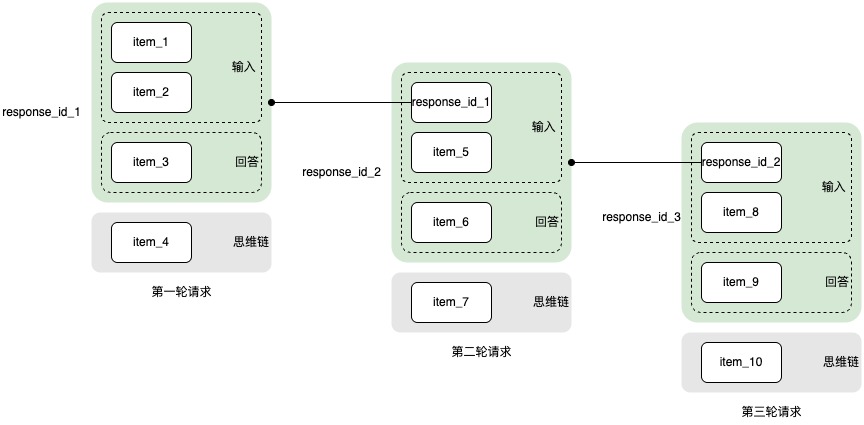
- item:任意角色的一条信息,包括系统信息、用户信息、模型信息、思维链信息、工具信息等。
- response_id:代表本轮请求输入 item + 回答 item。
- 输入 item:previous_response_id 指代的 item + 本轮新输入 item。通过链表的形式串联之前轮次的对话,形成新的输入。
使用说明
默认开启存储功能,支持通过设置"store": true 启用 / "store": false 关闭。
- 存储条件:本次请求回复完毕且成功(返回 status 字段为completed),或者回复触发了长度限制导致截断(status 字段为 incomplete)都会将本轮记录存储。当思维链内容触发了长度限制导致截断,在查询模型响应时返回 output 为空。
- 输入限制:
- store: true(开启存储)时,输入限制同时受模型上下文窗口/最大输入长度、存储 items 数约束,实际可用输入上限以先达到的限制为准。
- 模型长度限制:在模型列表查看对应模型的长度限制。
- items 上限:最多支持 1000 个 item(任意角色的一条信息为 1 个 item,如一问一答为 2 个 item)。达到此限制,无法继续对话,可通过删除 Response手动清理记录。
- store: false(关闭存储)时,输入限制仅受模型上下文窗口/最大输入长度约束。
- 存储时长:默认存储 3 天,可通过 expire_at 字段自定义设置,最长支持 7 天。
- 存储内容:存储 input 和 output 字段的信息,不存储思维链内容。
- 其他说明:store 功能当前不收取费用;数据会采用加密方式,确保信息安全和隐私合规。
QPS 限流
接口名称 | 账号维度的 QPS 限流 |
接口名称 | 账号维度的 QPS 限流 |
创建模型响应 | 无 |
查询模型响应 | 20 |
列出输入项 | 20 |
删除模型响应 | 20 |
最近更新时间:2026.10.24 19:43:58
这个页面对您有帮助吗?
有用
有用
无用
无用