Auto Scaling
Auto Scaling


Document

- Documentation
 Auto ScalingBest PracticesReducing costs by using spot instances
 Copy page
 Download PDF
Best Practices
Reducing costs by using spot instances
Copy pageDownload PDFReducing costs by using spot instances
Auto Scaling allows you to add Pay-as-you-go and spot instances to the same scaling group at the same time, helping you reduce costs while responding to business fluctuations. This topic describes how to build a low-cost, highly efficient scaling task that can respond to business surges at any time.
What is a spot instance?
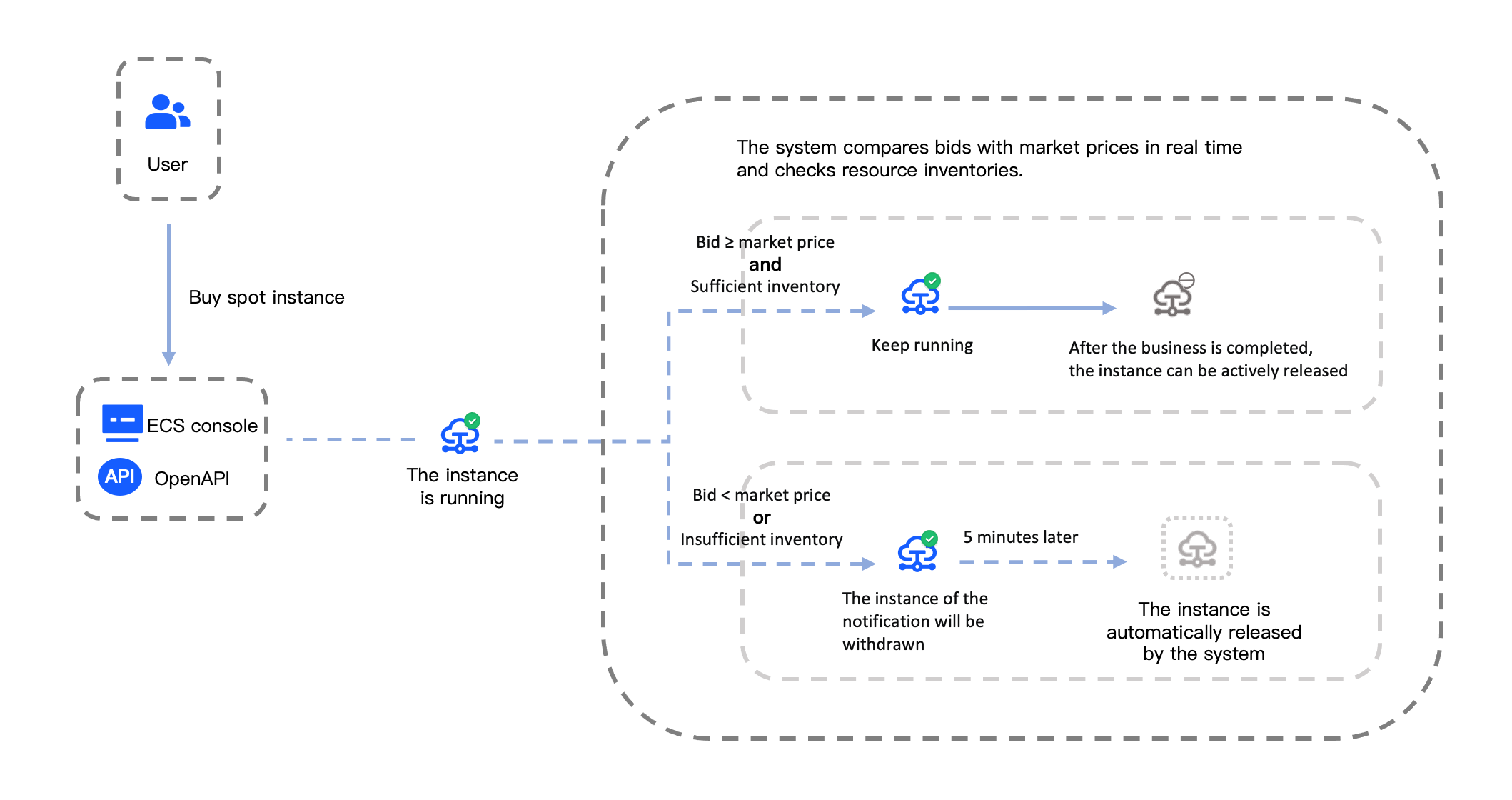
Spot Instance is a unique Pay-as-you-go method. Compared with standard Pay-as-you-go, the compute resources for spot instances can be purchased with a certain discount. The price changes in real time with market demand and supply. When you purchase a spot instance, you need to set the maximum price you are willing to pay for the instance. It only represents your purchasing intention. The settlement is still based on the market price.
ECS instances purchased with this billing method have the same performance as regular servers. However, when the inventory is insufficient, or the market price exceeds the maximum price you set, the system will automatically release instance resources and reclaim the discounted ECS instances. For the reclaim mechanism, please refer to Reclaiming spot instances. The price you set must be between the current spot market price and the Pay-as-you-go instance price. The higher your bid, the greater the chance of purchasing or retaining the spot instance.
For the operation process of spot instances, see the following figure. For more information, see Operation process.
Application scenarios for spot instances
The operation and release of spot instances are subject to resource inventory and market price fluctuations. Spot instances are more applicable to stateless application scenarios. Typical use cases include stateless web services, image rendering, big data analytics, offline analytics, and large-scale parallel computing and testing workloads. The greater an application's distributed nature, scalability, and fault tolerance, the more effectively it can use spot instances to reduce costs and boost throughput.
warning
To avoid impacts on business operations by the interrupt reclamation mechanism, do not use spot instances for long-term workloads or stateful applications with high stability requirements, such as databases. Preserving application state is challenging when a spot instance is released.
Application of spot instances in Auto Scaling
Compared with traditional Pay-as-you-go instances, spot instances integrated with Auto Scaling deliver significant cost savings. However, due to their instability, there may be cases where instance scale-out fails or instances are automatically released, which can affect business operations. Evaluate and use them appropriately based on your actual needs. The following items outline recommended solutions to help you optimize cost efficiency while maximizing business operational stability.
- Ensure stable operation of core business
- Specify the minimum Pay-as-you-go instance count or capacity or the percentage of Pay-as-you-go instances in a scaling group to fix the number of Pay-as-you-go instances in the scaling group. Scale out or in spot instances on the premise of maintaining stable operation of core business.
- Improve the scale-out success rate
- Configure multiple instance types: Select several instance types with similar performance and pricing in the launch template or scaling configuration. During scale-out activities, if the higher-priority instance type is out of stock or fails to be used to create instances, the system automatically uses lower-priority types to create instances.
- Configure multiple subnets: Select multiple subnets where instances can be deployed. During scale-out activities, spot instances can be created based on inventory availability across multiple availability zones.
- Enable Pay-as-you-go instances as a supplement for spot instances: Create Pay-as-you-go instances of the same type when spot instances are out of stock.
- Reduce the impact of instance reclaim on business
- Enable spot instance replacement upon expiration: Enable new spot instances to be automatically created to replace existing ones approximately 5 minutes before the original spot instances are reclaimed. This prevents business performance degradation caused by unexpected spot instance reclaim.
Procedure
This section describes the configuration methods for applying spot instances in Auto Scaling.
- Log in to the Scaling Group console, and click the name of a scaling group to go to the details page.
- Configure multiple subnets: In the "Basic Information" section, click the "Modify Subnet" button, select multiple subnets, and click the "Confirm" button. Learn more.
- Configure multiple instance types: In the "Basic Information" section, click the "Add scaling configuration source" or "Modify scaling configuration source" button to modify the scaling configuration or launch template already associated with the scaling group.
- Click the "Change scaling configuration" or "Modify the Launch Template" button on the right side of the scaling configuration source.
- Select "Spot" for "Billing method".
- Select "Enable multi-type selection" or "Extended Launch Template Configuration", select multiple instance types, and drag the types to sort them.
- Select the price mode for spot instances.
-
- Click the "OK" button.
- Configure the scaling policy: In the "Policy information" section, click the "Configure policy" button, turn on "Advanced settings", configure parameters as described in the following table, and then click "Save". Learn more.
-
- Example: With the above configuration, when the scaling group automatically scales out by 10 instances:
- If the spot instance bid price is greater than or equal to the market price and inventory is sufficient, 6 Pay-as-you-go instances (calculation: 2 + 8 × 50% = 6) and 4 spot instances (calculation: 8 × 50% = 4) will be created.
- If the spot instance bid price is greater than or equal to the market price and only 2 instances are left in inventory, Pay-as-you-go instances will be used to supplement spot instances. Specifically, 8 Pay-as-you-go instances and 2 spot instances will be created.
Configure spot instance scaling notification
The platform can send notifications via in-site messages, email, SMS, alert callbacks, and other channels to help you promptly track spot instance scaling changes.
- Enable scaling notification capabilities for the scaling group to monitor instance scaling activities within the group.
- Subscribe to event notifications to receive advance alerts about upcoming instance releases through in-site messages, SMS, email, or other channels 5 minutes before spot instance release.
- View spot instance events via the console, instance metadata, or API.
Last updated: 2026.06.24 17:08:56
All rights reserved © Beijing Volcano Engine Technology Co., Ltd2024
