Auto Scaling
Auto Scaling


Document

- Documentation
 Auto ScalingProduct IntroductionWhat is Auto Scaling (AS)?
 Copy page
 Download PDF
Product Introduction
What is Auto Scaling (AS)?
Copy pageDownload PDFWhat is Auto Scaling (AS)?
Auto Scaling (AS) provides an on-demand scalable pool of ECS instances, enabling you to flexibly handle short-term high-concurrency scenarios such as events, promotions, and flash sales.
When business demand increases, AS automatically scales out ECS instances or upgrades instance types to ensure business capability. When business demand decreases, AS automatically scales in ECS instances or downgrades instance types to save resource costs. Intelligent, flexible scaling services enable your business to maintain optimal resource capacity whether during periods of fluctuation or stability, thus ensuring reliable business operations.
Product architecture
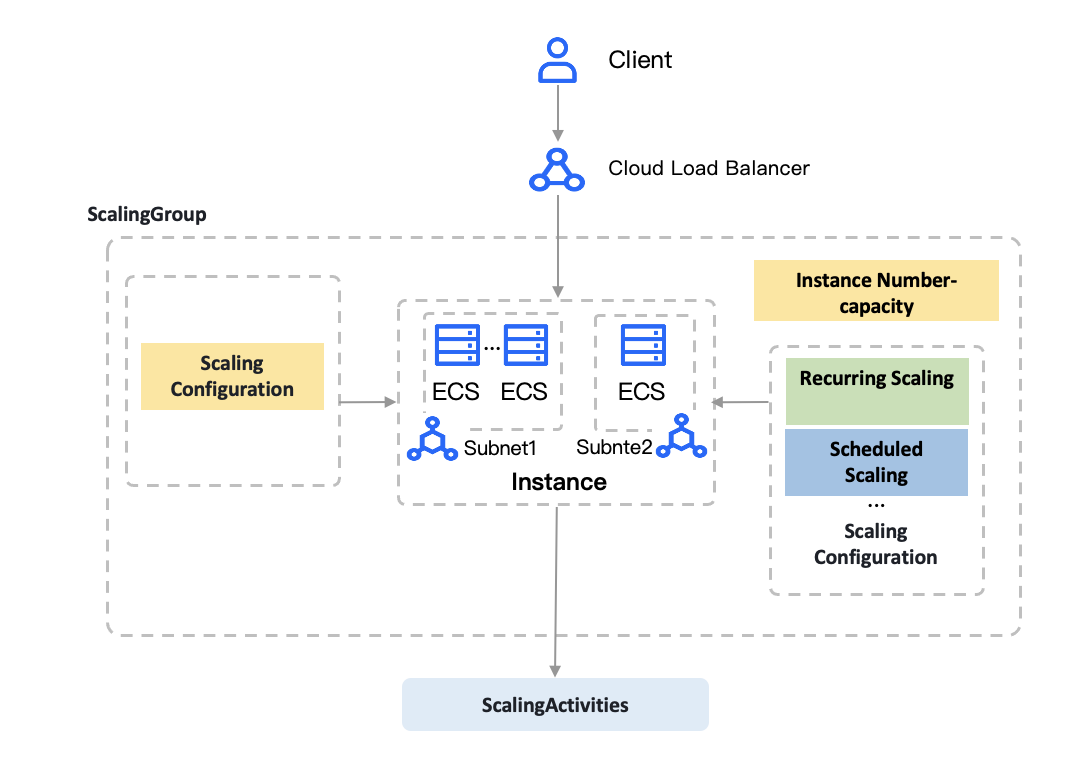
- ECS instances with deployed business workloads support automatic scale-in and scale-out based on the specific scaling configuration source and scaling rules. You can also manually add, remove, or delete instances from the scaling group.
- Manages a group of ECS instances. By configuring the scaling group, you can define configurations such as the number of instances/capacity, cooldown time, and Load Balancer in the cloud resource pool.
- Instances/capacity: You can set a fixed number of instances/capacity for the scaling group, which is suitable for long-term stable business without significant fluctuations. You can also set upper and lower limits for resource quantity to effectively control resource costs.
- Used to define the instance capacities for a scaling group, including those related to compute, network, storage, and security. When the scaling group scales out, new instances are created based on the preset instance capacities.
- Used to define AS conditions and methods, such as scheduled scaling, periodic scaling, and the number of instances for scaling. For the same scaling group, you can configure multiple scaling rules. When any rule is met, the scaling group executes adjustments.
- Scheduled task: Automatically scales in or out instances at a specified time, suitable for expected large-scale events.
- Periodic task: Executed repeatedly at fixed times on a daily, weekly, or monthly basis, suitable for scenarios with regular business fluctuations.
- Alert task: Works with Cloud Monitor to monitor instance metric data and implement dynamic scaling, suitable for scenarios with sudden or unpredictable business fluctuations.
- Target tracking: Works with Cloud Monitor. Based on your operational experience, you can select a monitoring metric and specify a target value for it. The platform automatically calculates the number of instances to add or remove during scaling, thereby keeping the specified metric close to the target value. This feature applies to scenarios with daily business traffic surges, ensuring timely automatic scaling.
- Used to record adjustment results, including the conditions that triggered scaling, adjustments, start/stop time, and execution result. It provides a channel for event recording and traceability.
- Scaling notification: Notifications about scaling operations are sent in various forms to help you learn about changes in the scaling group in a timely manner.
Last updated: 2026.06.16 15:41:45
All rights reserved © Beijing Volcano Engine Technology Co., Ltd2024
