RDS for MySQL
RDS for MySQL


Document

- Documentation
 RDS for MySQLTroubleshootingHow to solve the problem of high primary-secondary replication latency
 Copy page
 Download PDF
Troubleshooting
How to solve the problem of high primary-secondary replication latency
Copy pageDownload PDFHow to solve the problem of high primary-secondary replication latency
When using RDS for MySQL, high write traffic or table structure issues in an instance may cause increased data latency between the primary and read-only nodes. When primary-secondary latency increases, read requests routed to read-only nodes may fail to access newly written data or may retrieve outdated data. For secondary nodes[1] that use binlog replication, this may lead to failed switching between primary and secondary nodes and impact high-availability.
Confirm the problem
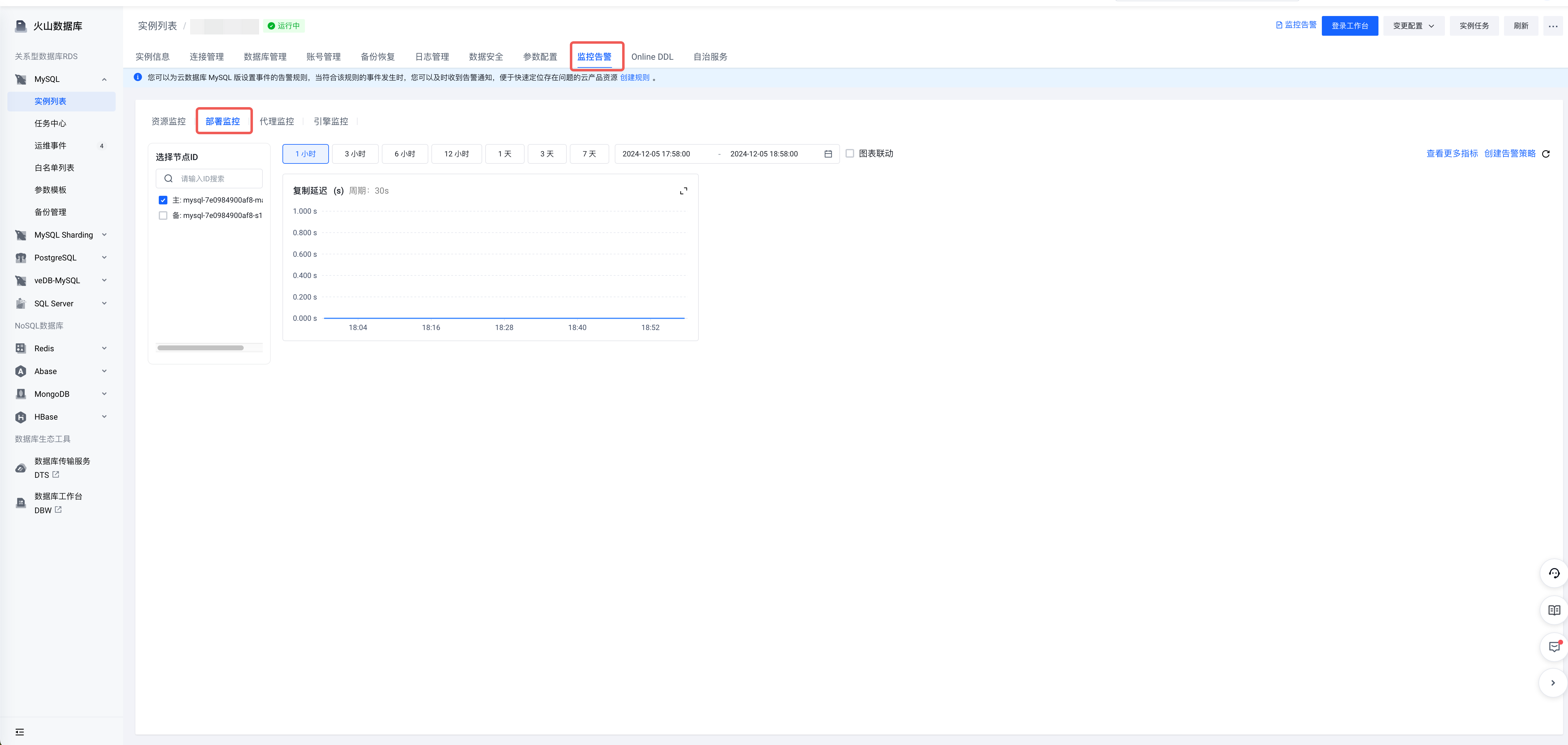
View the monitoring items for replication latency to confirm if the instance has high primary-secondary latency.
- On the Instances page, click the instance name of the target instance to enter the Instances page.
- Click the Monitoring and alarm tab at the top of the page.
- Under the Deployment Monitoring category, view Replication Latency.
tip
View the replication latency for each node of the instance.
-
Quick stop-loss
Pause writes if there is a known large write load. Resume writes after adjusting the write traffic. If you cannot determine the cause, continue to read this article for methods to locate and resolve the issue.
Cause analysis
Load reason
- Cause analysis
- The MySQL slave node uses parallel replication playback, which typically prevents significant latency. If the database executes resource-intensive loads, such as DDL for large table reconstruction, large transactions, or heavy write loads, slave node playback is delayed, which impacts the primary-slave latency.
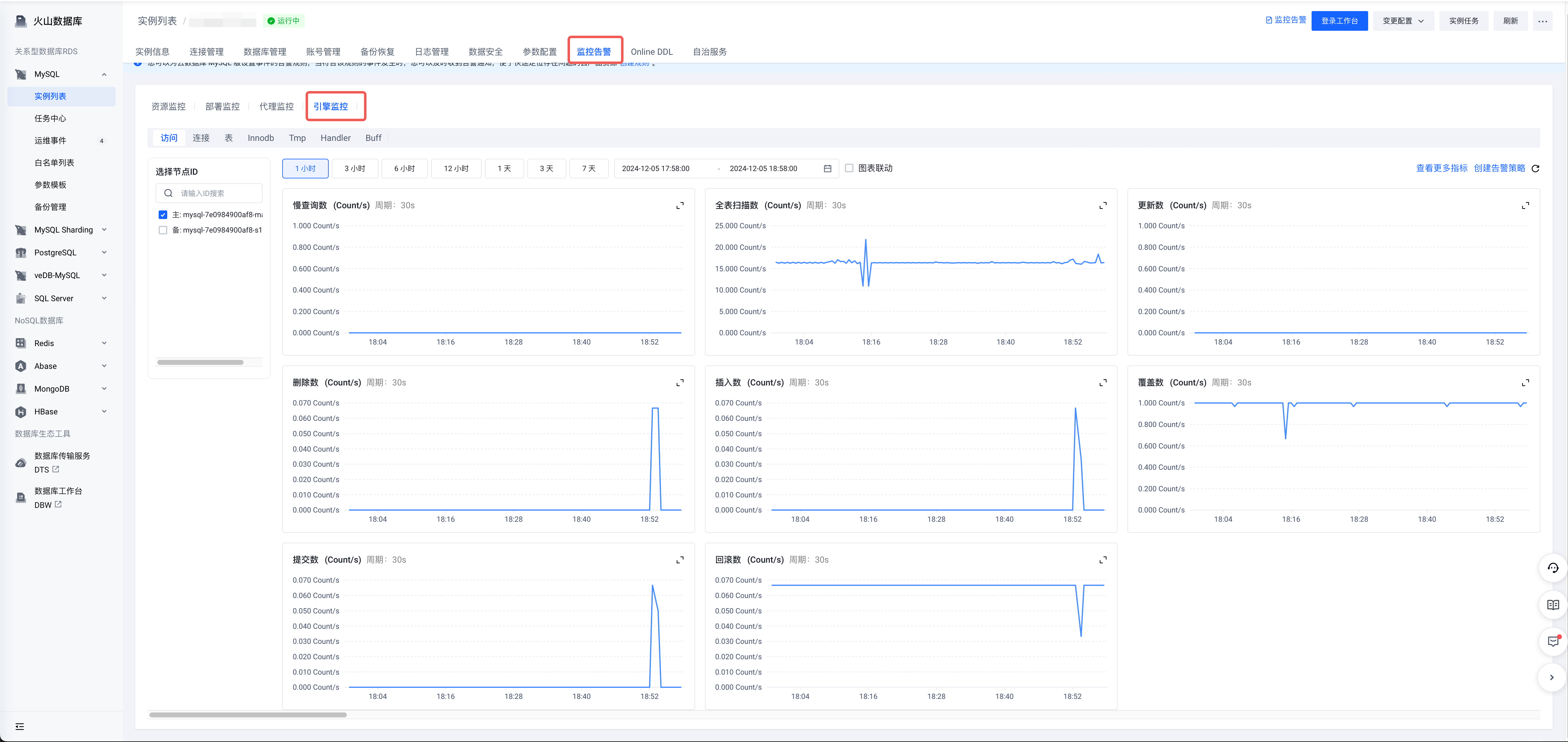
- Request-level analysis: In the Deployment monitoring category, view the monitoring items under Engine monitoring > Access to check for a high volume of write requests (updates, inserts, deletes, or overwrites).
-
- Row-level analysis
- Under the Deployment monitoring category, go to Engine monitoring > Innodb to check for a high number of row modifications. Focus on Innodb rows inserted, Innodb rows deleted, and Innodb rows updated.
-

- Solution
- Use the full SQL insight feature in Database Workshop to identify SQL statements with a high number of writes, and use SQL throttling to limit their execution frequency and prevent increases in primary-replica latency.
tip
Full SQL insight and SQL throttling are currently in the invitation test function of the database workbench.
- Locate the SQL
- SQL insight The path for SQL insight is: Log on to Database Workshop > Observation diagnosis > Full SQL insight > Write analysis. For more information, refer to Full SQL insight.
-
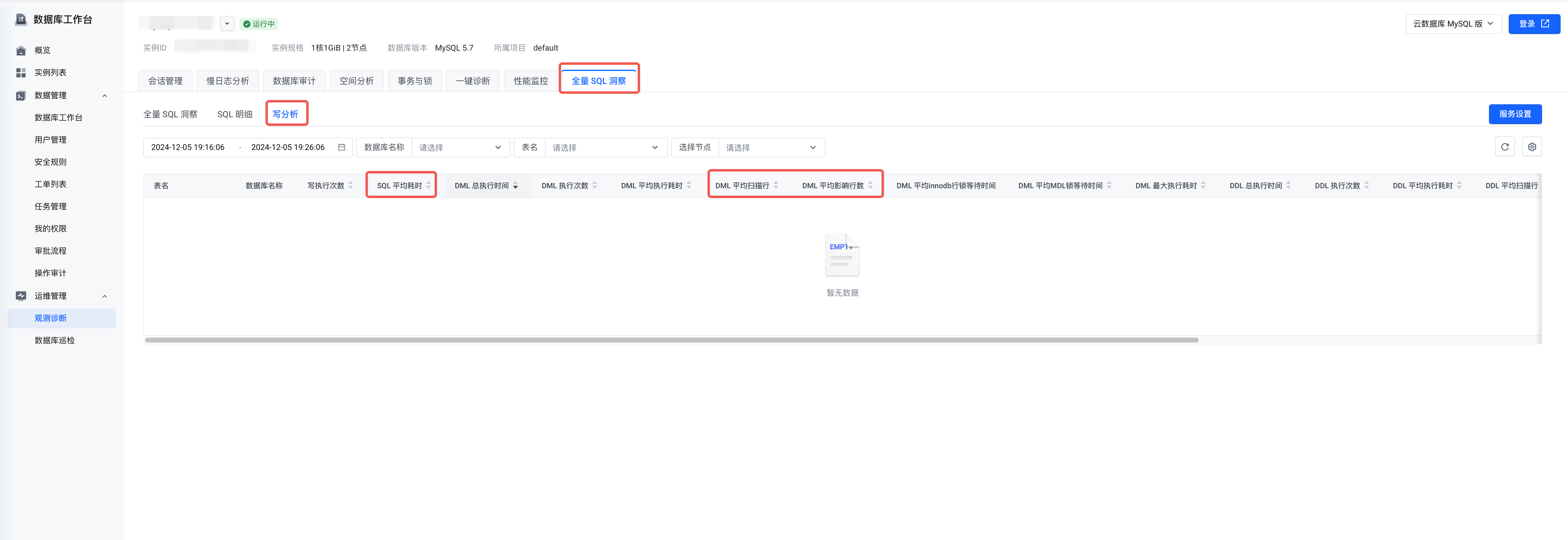
- DML statements: Focus on Average elapsed time and DML. Average scanned rows and DML Average affected rows.
- DDL statements: rebuilding large tables with DDL also causes primary-slave latency. Focus on DDL. Average scanned rows and DDL Average affected rows.
- Process SQL
- After locating the SQL, it can be processed by SQL throttling or killing the session.
- SQL throttling
- After locating the problem SQL, you can limit the execution frequency of SQL through SQL throttling. Path:
- Log on Database Workshop > Observation diagnosis > Session management > SQL throttling > Enable SQL throttling > Create a task.
-
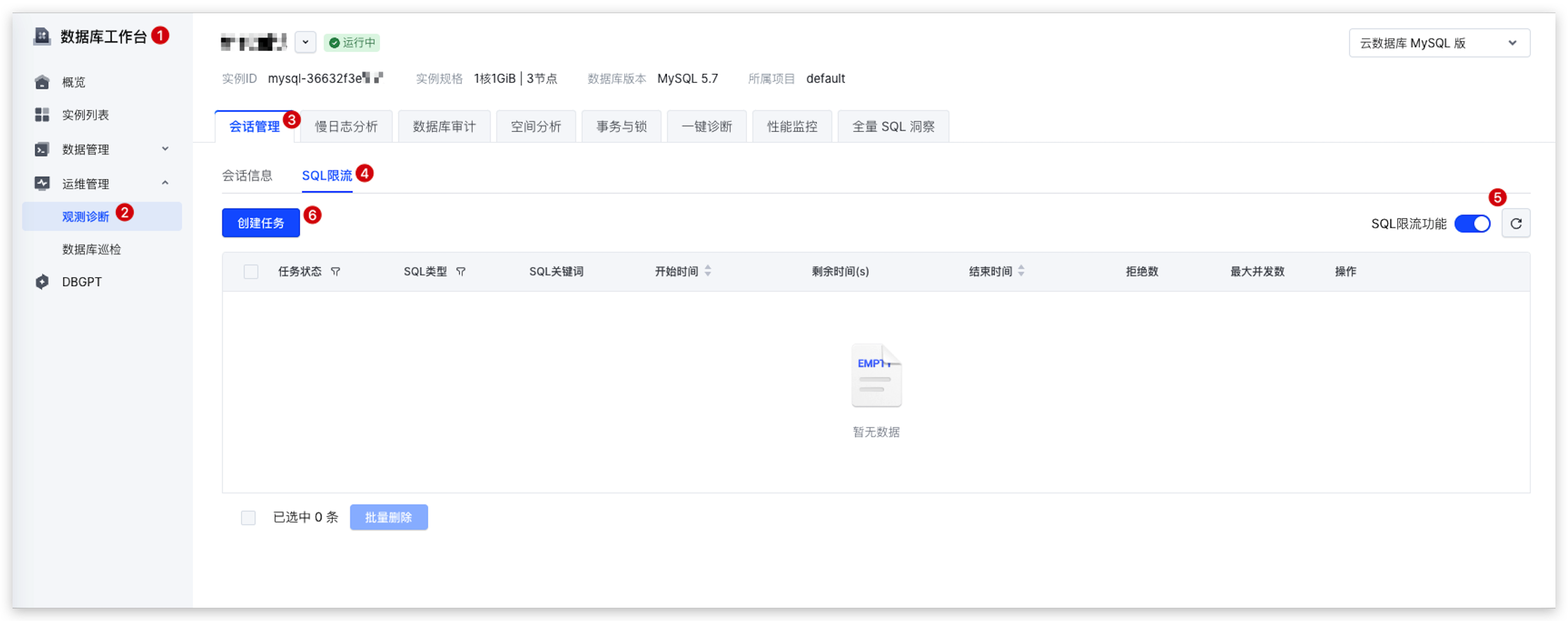
- In the Create SQL throttling task window, enter the problematic SQL and adjust the maximum concurrency. A maximum concurrency of 0 completely blocks the SQL. Click Generate and verify keywords to split the keywords. The keywords are separated by tildes (~).
-
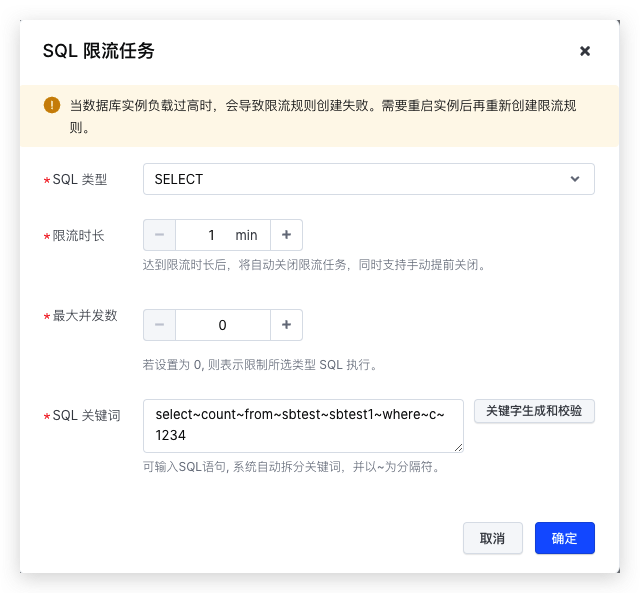
- Click OK to submit the task.
tip
- KILL session path:
- Log on Database Workshop > Observation diagnosis > Session management.
- In the Real-time sessions area, monitor the Time and State of the session. If the State of a certain session is updating, but the value of Time is already very large, it may be a large write transaction, and attention needs to be paid to processing.
-
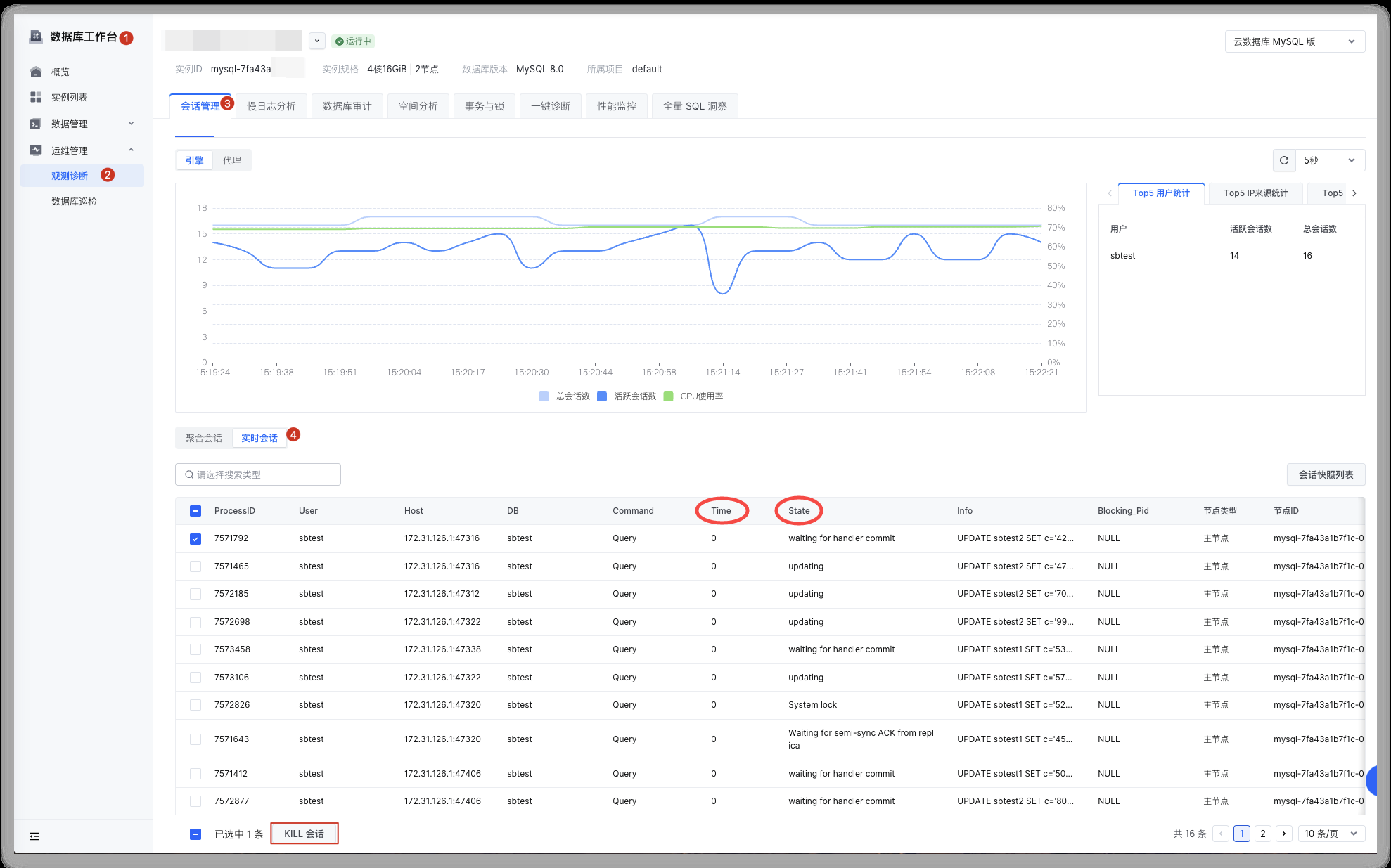
Table structure reason
- Cause analysis
- Using a primary key index in MySQL tables is recommended. If a table lacks a primary or unique key, the slave node spends more time finding data to modify during playback, which increases primary-slave latency. Tables without a primary key experience a significant increase in latency during large-volume delete and update operations.
- View the table structure for the write load
-
- Analyze the table structure. If it lacks a PRIMARY KEY or UNIQUE KEY, the system may use an index with poor filtering during playback, sometimes even requiring a full table scan. For large tables, excessive retrieval time leads to increased latency.
- Example of a table without a primary key:
-
- Solution
- If a unique column exists, modify the table structure to set it as a unique key:
- Method 1: CREATE INDEX
-
- Method 2: ALTER TABLE
-
- Add an auto-incrementing primary key: For a table without a primary key, its data order is determined by the row_id of the storage engine. The row_ids on the primary and slave nodes may be different, leading to different data orders. When adding an auto-incrementing primary key to such a table, the values are initialized based on the data order. This causes the same data to have different primary key values, and queries using the same primary key value will return different data on the primary and secondary nodes.
- When adding an auto-incrementing column to a table with existing data, firstly, create a new table with the same structure. Then, add the auto-incrementing column to the new table and import the data from the original table. (To avoid data inconsistencies between the original and new tables, do not perform write operations on the original table during data import.)
- Follow the steps below to resolve data inconsistency in queries between the primary and secondary nodes.
- On the primary node, create a new table t1_new that is identical to the original table without a primary key (t1), and add an auto-incrementing primary key to the new table.
-
- Insert all data from the original table into the new table t1_new.
-
- Delete the original table t1, and rename the new table to the name of the original table.
-
Upgrade instance specification
If the primary-slave latency remains high after troubleshooting with the methods above, the slave node may be unable to keep up due to business pressure. In this case, consider upgrading the instance specification through a regular modification of specification or a temporary upgrade. Increasing the number of CPU cores can improve the processing capacity of the slave node and reduce primary-slave latency.
For information about how to perform a regular modification of specification or a temporary upgrade for an instance, refer to the following documents:
tip
Temporary upgrade is currently an invitation-only feature for RDS for MySQL. To use it, submit a ticket to apply.
Appendix
Glossary
RDS for MySQL has two types of nodes that are replicated through binlogs:
- Read-only node: handles user read traffic.
- Secondary node: a hot standby responsible for high-availability that does not handle read traffic.
Common configurations: one primary and one secondary node; one primary, one secondary, and multiple read-only nodes.
Last updated: 2025.07.10 21:03:55
All rights reserved © Beijing Volcano Engine Technology Co., Ltd2024
