RDS for MySQL
RDS for MySQL


Document

- Documentation
 RDS for MySQLKernel functionsFeatureVector index
 Copy page
 Download PDF
Feature
Vector index
Copy pageDownload PDFVector index
This topic describes the vector index feature of RDS for MySQL.
Supported version
- MySQL 8.0, with a kernel minor version of MySQL 8.0.43_20251015 or later.
- MySQL 8.4, with a kernel minor version of MySQL 8.4.7_20260415 or later.
Background
In recent years, the database field has shifted from strict exact-match queries to a more ambiguous and context-aware model. The core of this paradigm shift is vector search technology, which enables databases to understand and query data based on its semantics (its inherent meaning) rather than its literal representation.
After data is represented as vectors, the basic task of vector retrieval is to find the k-nearest neighbors (K-Nearest Neighbor, KNN) for a given query vector. This requires calculating the distance between the query vector and all other vectors in the dataset to identify the k most similar entries. The SQL representation is as follows.
This process is conceptually simple but faces a problem known as the "Curse of dimensionality". The vector embeddings generated by models are typically high-dimensional, often containing hundreds or even thousands of dimensions. As the number of dimensions increases, the volume of the vector space grows exponentially. In such a vast and sparse space, the concept of "proximity" becomes less meaningful, as nearly all points become equidistant from one another.
For large-scale Online applications, performing a "brute-force" KNN search is computationally infeasible. The time complexity of this Search is linear, O(N), where N is the number of vectors in the dataset. For datasets containing millions or billions of vectors, this method causes unacceptably high business Latency. The "Curse of dimensionality" is a core Problem that has driven innovation and diversification in vector Search algorithms across academia and industry. Everyone is trying to answer the same problem: "How can we efficiently find the most similar vectors in a vast, sparse space while avoiding a brute-force search?"
To overcome the performance limitations of the "Curse of dimensionality", most modern vector search systems rely on Approximate Nearest Neighbor (ANN) algorithms. The core principle of ANN is to sacrifice a small, often negligible, amount of accuracy for significant improvements in search speed and scalability. ANN algorithms do not guarantee finding the absolute nearest neighbor, but instead use heuristic methods and optimized data structures to find "good enough" matches in a very short time.
Feature description
RDS for MySQL supports building and using ANN indexes to Search stored vectors by building vector indexes with the 'Hierarchical Navigable Small World', or HNSW, algorithm. This is an efficient ANN algorithm based on memory graphs.
Instructions
Parameter description
Syntax description
Create a table with a vector column and a vector index using the CREATE TABLE syntax.
Syntax
Parameter description
- Vector index keyword (Required): VECTOR INDEX(column_name) or VECTOR KEY(column_name).
- Algorithm type (Optional):
- Method 1: Use USING [ANN_ALGORITHM] to specify an ANN algorithm, such as HNSW.
- Method 2: Use the algorithm field of SECONDARY_ENGINE_ATTRIBUTE to specify the index.
- Distance calculation method (Optional): EUCLIDEAN, L2, COSINE.
- Algorithm parameters (Optional): Use SECONDARY_ENGINE_ATTRIBUTE to adjust parameters for the corresponding ANN algorithm, such as:
- HNSW: M value; ef_construction value.
Sample
- Example 1: Using the default system algorithm and parameters.
-
- Example 2: Specifying the index algorithm and using the default algorithm parameters.
-
- Example 3: Specifying the index algorithm and parameters.
-
-
Use the CREATE INDEX syntax to create a vector index for a table containing a vector type.
tip
MySQL 8.0.43_20251215 and later kernel versions support building vector indexes on existing data. You can view the kernel minor version of an instance by Viewing instance information. If the kernel minor version of your instance is not within the supported kernel minor version range, you can Manually upgrading the instance kernel minor version.
Syntax
Parameter description
- Vector index keyword (Required): VECTOR INDEX(column_name) or VECTOR KEY(column_name).
- Algorithm type (Optional):
- Method 1: Use USING [ANN_ALGORITHM] to specify an ANN algorithm, such as HNSW.
- Method 2: Use the algorithm field of SECONDARY_ENGINE_ATTRIBUTE to specify the index.
- Distance calculation method (Optional): EUCLIDEAN, L2, COSINE.
- Algorithm parameters (Optional): Use SECONDARY_ENGINE_ATTRIBUTE to adjust parameters for the corresponding ANN algorithm, such as:
- HNSW: M value; ef_construction value.
Sample
- Example 1: Using the default system algorithm and parameters.
- Example 2: Specifying an algorithm and using default parameters.
- Example 3: Specifying the index algorithm and parameters.
Create a vector index on a table that contains a vector type by using the ALTER TABLE syntax.
tip
MySQL Kernel version 8.0.43_20251215 and later supports creating vector indexes on existing data. You can view the kernel minor version of an instance by Viewing instance information. If the kernel minor version of your instance is not within the supported kernel minor version range, you can Manually upgrading the instance kernel minor version.
Syntax
Parameter description
- Vector index keyword (Required): VECTOR INDEX(column_name) or VECTOR KEY(column_name).
- Algorithm type (Optional):
- Method 1: Use USING [ANN_ALGORITHM] to specify an ANN algorithm, such as HNSW.
- Method 2: Use the algorithm field of SECONDARY_ENGINE_ATTRIBUTE to specify the index.
- Distance calculation method (Optional): EUCLIDEAN, L2, COSINE.
- Algorithm parameters (Optional): Use SECONDARY_ENGINE_ATTRIBUTE to adjust parameters for the corresponding ANN algorithm, such as:
- HNSW: M value; ef_construction value.
Sample
- Example 1: Using the default system algorithm and parameters.
- Example 2: Specifying an algorithm and using default parameters.
- Example 3: Specifying the index algorithm and parameters.
Delete the vector index through the DROP INDEX syntax.
Syntax
Sample
View specified vector index information
View vector index information, such as auxiliary table names and algorithm parameters.
Syntax
Sample
- Example 1: View information about indexes being built.
- Example 2: View the runtime information of an index.
Viewing instance vector index information
Viewing information about all vector indexes in use on an instance allows users to track the index building progress and the resource usage of vector indexes in real time.
Syntax
Example: View the index building progress and runtime information
RDS for MySQL provides vector distance functions that you can use to perform Approximate Nearest Neighbor (ANN) and K-Nearest Neighbor (KNN) vector similarity searches on an instance. When you run a query, the system compares vectors with the vectors in your dataset by using a vector index. The distance function uses similarity metrics, such as cosine, to calculate the distance between vectors. Vectors with the shortest distance have the highest similarity and are returned in the search results.
To perform an ANN search, use the distance function dist_expr in the SELECT and ORDER BY clauses. You must use the LIMIT clause in an ANN search. You can also obtain the distance value by including the distance function dist_expr in the SELECT list.
Syntax
Precautions
- dist_expr: the distance function. For HNSW vector indexes, two distance metrics are supported: L2_DISTANCE/EUCLIDEAN_DISTANCE (Euclidean distance) and COSINE_DISTANCE (cosine distance).
- Use ORDER BY ... When you use LIMIT and sort by a distance function, the system attempts to recall approximate results through the ANN vector index.
- A user can use FORCE INDEX to specify a vector index. If no index is specified, the optimizer automatically determines whether to use an index (full table scan vs. ANN)。
- If an ANN query and the index use different distance metrics, MySQL prioritizes the distance metric used when the index was created.
Distance function dist_expr example
- Example 1: Comparing the query vector [1,2,3,4] with the vectors in the vector column by using the Euclidean distance.
- Example 2: Comparing the query vector [1,2,3,4] with the normalized vectors in the vector column by using the Euclidean distance.
ANN query example
- Example 1: Searching for the primary key IDs of the 10 vectors in the tv table that are closest to the vector [1, 2, 3, 4].
- Example 2: Using FORCE INDEX to specify a vector index.
- Example 3: Combining the dist_expr distance function with a WHERE condition that uses scalar predicates to filter the query results for post-filtering.
ANN query plan
Determine whether a query used a vector index by checking if the Extra column returned by the explain statement contains Using ANN Search first.
ANN retrieval process example
- Create a base table with a 4-dimensional vector column.
- Insert some data.
- Retrieving the 10 vectors closest to the query vector [1,2,3,4] using an ANN search, sorted by dist in ascending order.
RAG framework integration
To simplify using the vector retrieval capabilities of RDS for MySQL in Python applications, we provide integration with the LangChain and LlamaIndex open-source RAG frameworks. It encapsulates the underlying SQL operations into an easy-to-use vector_store interface. You can seamlessly integrate RDS for MySQL as a vector storage backend for LangChain. It handles database connections, the creation of tables and indexes, data CRUD operations, and similarity searches, allowing you to complete common RAG (Retrieval-Augmented Generation) workflows without writing native SQL.
install
- Python ≥ 3.8。
- Install langchain-volcengine-mysql.
- Import the RDS for MySQL vector storage module in the code.
Quick steps
- Enable kernel parameters: ensure the loose_vector_index_enabled instance parameter for RDS for MySQL is set to ON.
- Configure MySQL instance information, including the database name, table name, and vectorization function, by using mysql.configure().
- Data injection and query: call methods such as add_texts or from_texts to inject text and externally computed vectors into the database. Call similarity_search or similarity_search_by_vector to perform an ANN query.
Code examples
- Perform a vector search by using similarity_search.
- Search for relevant documents with get_relevant_documents.
LangChain RAG tutorial
For a complete tutorial on building a Retrieval-Augmented Generation (RAG) application, refer to Building a RAG application with the LangChain framework and RDS for MySQL.
install
- Python ≥ 3.8。
- Import the RDS for MySQL vector storage module in the code.
Quick steps
- Enable kernel parameters: ensure the loose_vector_index_enabled instance parameter for RDS for MySQL is set to ON.
- Use VolcengineMySQLVectorStore.from_params to configure the backend database for vector queries, including database connection information, table name, index type, and distance metric.
- Use from_documents to vectorize documents and insert them into the index.
- Build a query using VectorStoreQuery and run the query using vector_store.query.
Code examples
Precautions
- External Embeddings: the database does not perform text vectorization. Vectors must be computed in advance at the application layer using external embeddings.
- Storage Engine and index limitations: only InnoDB is supported; vector indexes can only be created on empty tables; a table can only have one vector index; a table can have multiple vector columns, but an index can only be created on one column; partitioned tables and virtual columns are not supported.
- Index usage: use FORCE INDEX to ensure ANN; set force_index=False to allow the optimizer to choose; use EXPLAIN to verify whether Using ANN Search appears in the query plan.
- Distance metric: the metrics for index creation and querying should be consistent (e.g., l2); if they are inconsistent, the metric used during index creation prevails.
- Delete and recycle bin: base tables with vector indexes are not moved to the recycle bin; DROP TABLE directly deletes the base table.
- Copy and enabling: Vector data is copied to all read-only nodes. Vector indexes are automatically created only on nodes where loose_vector_index_enabled is enabled.
- Durability and transactions: Consistent with the base table and provides ACID properties. When the primary transaction is rolled back, the index data is also rolled back synchronously.
- Memory limit: The memory usage of a single HNSW is limited by the loose_hnsw_max_cache_size parameter. Set this value appropriately to avoid out-of-memory errors.
Performance data
We conduct a horizontal comparison between MySQL, MariaDB 13.1 (within the MySQL ecosystem), and pgvector 0.8.2 (the most popular vector index extension in the PostgreSQL ecosystem) from three dimensions: index construction speed, index size, and index query performance. The detailed results are shown below.
Test specifications
- Performance benchmark: VectorDBBench.
- Dataset: Performance1536D50K (1,536 dimensions and 50,000 rows of data) and Performance768D1M (768 dimensions and 1 million rows of data).
- Test CPU specifications: Intel(R) Xeon(R) Platinum 8457C CPU @ 2.60GHz, 16 cores.
- HNSW index cache parameter configuration: loose_hnsw_max_cache_size = 2GB.
The test results are as follows.
Index build speed: 4 to 6 times faster
MariaDB adopts serial construction for all vector indexes, which results in extremely long construction time when building large-scale vector indexes. RDS for MySQL leverages its self-developed high-performance parallel construction engine to break the bottleneck of vector index construction, supporting fast vector index creation even for million-scale vector datasets.
This test adopts the HNSW index configuration with parameters m=16 and ef_construction=128. Two datasets with distinct vector dimensions are selected, and the overall time consumption from vector data loading to index construction is counted.
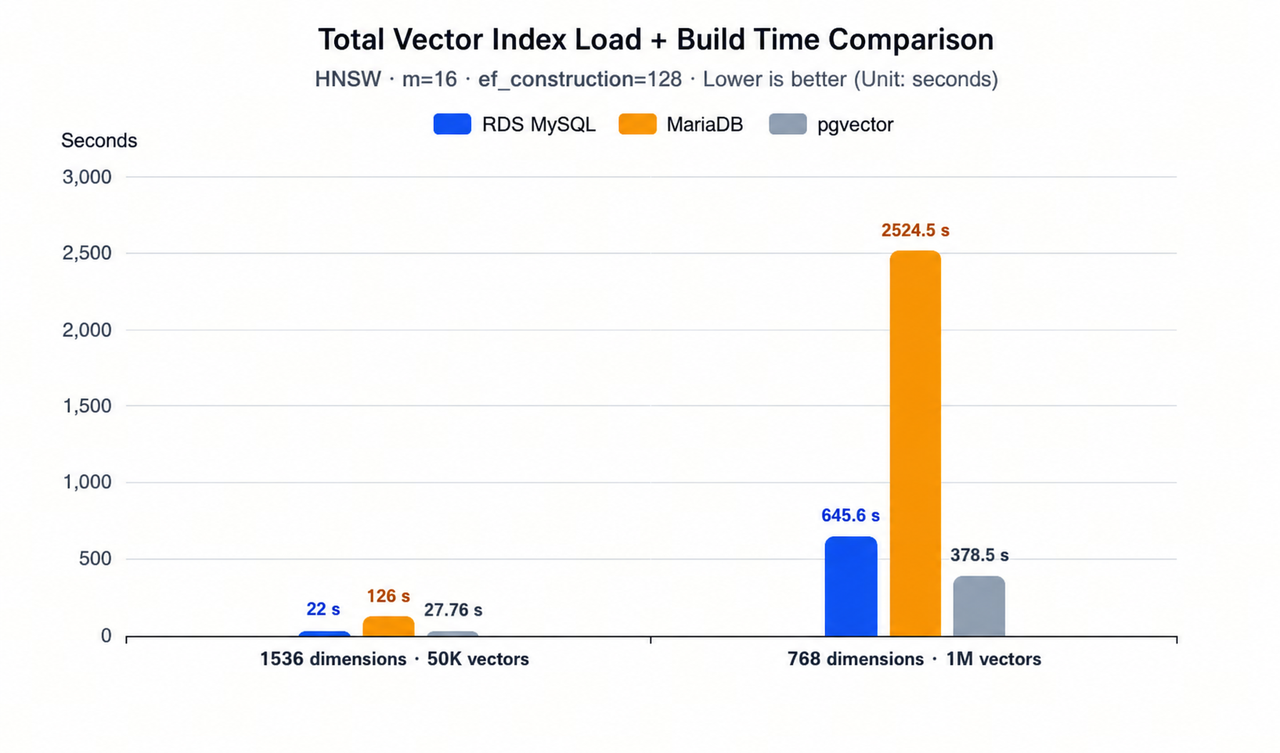
Based on the comparison data in the bar chart, the following conclusions can be drawn:
- For the dataset of 50,000 vectors of 1536 dimensions, MariaDB takes 126 seconds, pgvector takes 27.76 seconds, and RDS for MySQL takes 22 seconds for index construction. The RDS for MySQL builds indexes about 6 times faster than MariaDB.
- For the dataset of 1 million 768-dimensional vectors: MariaDB takes 2524.5 seconds, pgvector takes 378.5 seconds, and RDS for MySQL takes 645.6 seconds for index construction. The RDS for MySQL builds indexes about 4 times faster than MariaDB.
The larger the vector dataset, the more obvious the efficiency improvement brought by parallel vector index construction. For scenarios involving million-scale vector index construction, the index building time is shortened from 42 minutes to within 11 minutes.
Index size: Reduced by 2–4 times
Native pgvector only supports Float32 vector storage, resulting in large disk occupation of constructed indexes. In contrast, RDS for MySQL provides two scalar quantization modes, SQ16 and SQ8, which store vector indexes in a more compact manner.
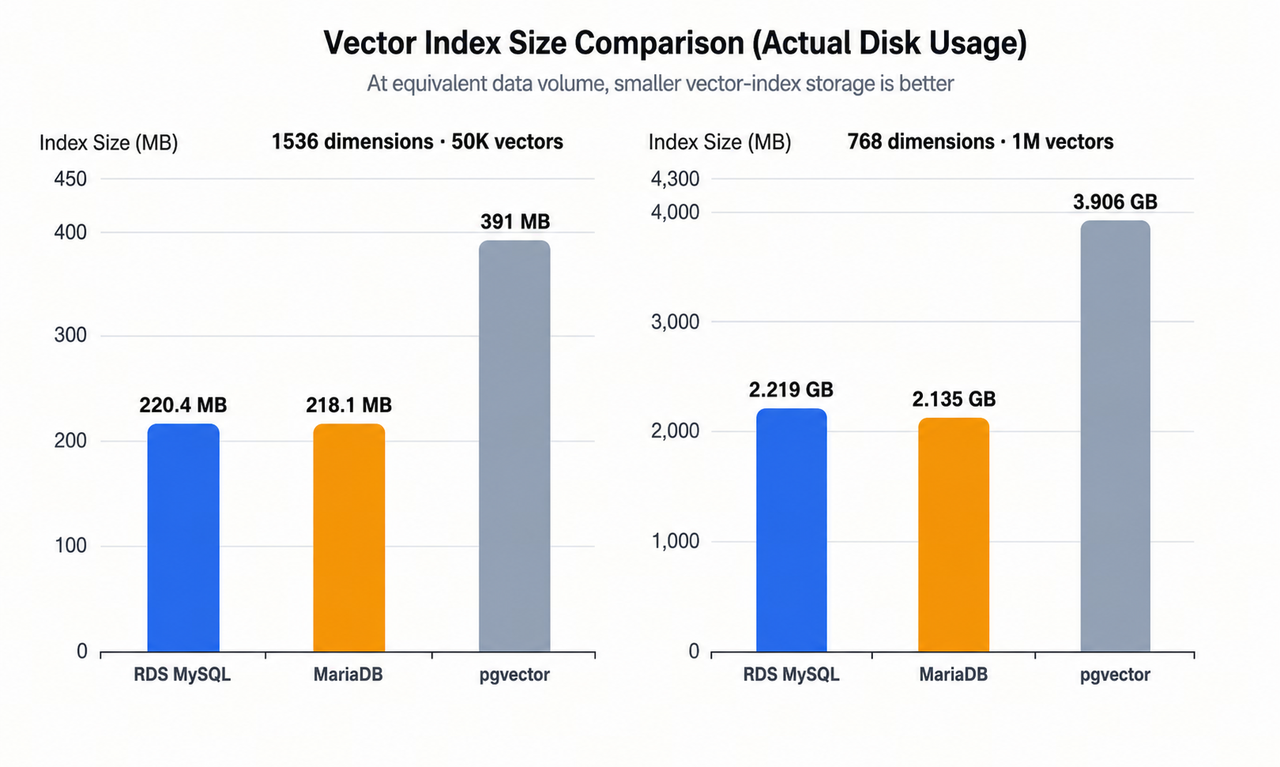
Based on the comparison data in the bar chart, the following conclusions can be drawn:
- For the dataset of 50,000 vectors of 1536 dimensions, MariaDB reaches 218.1 MB, pgvector reaches 391 MB, and VolcEngine RDS MySQL reaches 220.4 MB for index size.
- For the dataset of 1 million 768-dimensional vectors, MariaDB measures 2.135 GB, pgvector measures 3.906 GB, and RDS for MySQL measures 2.219 GB for index size.
Compared with pgvector, the index size can be reduced to half after enabling SQ16 quantization and further cut to a quarter with SQ8 quantization, which effectively lowers the disk space occupied by vector indexes and reduces storage costs.
Index Query Performance: Query Throughput Surges 2–3 Times Under High Recall
This performance test is conducted with VectorDBBench, an industry-standard benchmark tool. We count the vector retrieval throughput (QPS) metrics of each database within the practical business range with high recall rate.
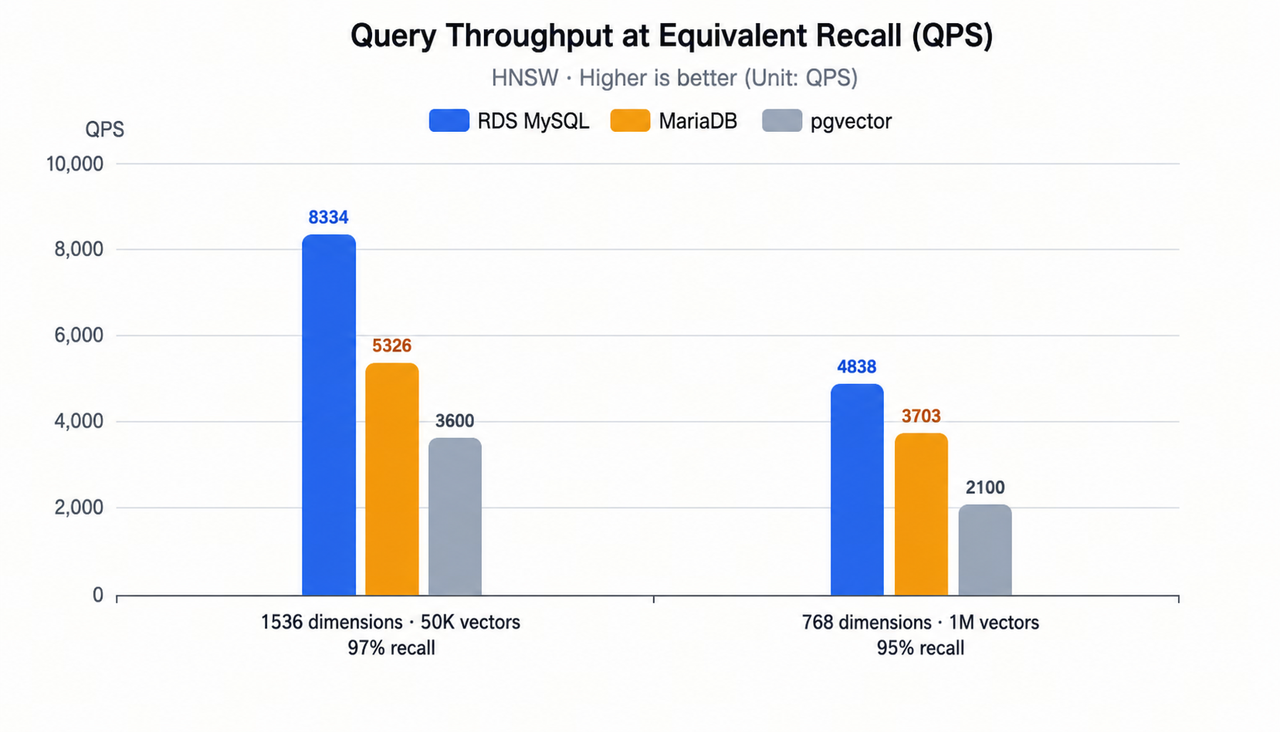
Based on the comparison data in the bar chart, the following conclusions can be drawn:
- For the dataset of 50,000 vectors of 1536 dimensions at a recall rate of 97 percent, MariaDB delivers 5326, pgvector delivers 3600, and RDS for MySQL delivers 8334 for vector retrieval throughput (QPS). In comparison, the vector retrieval throughput (QPS) of RDS for MySQL is approximately 1.6 times that of MariaDB and 2.3 times that of pgvector.
- For the dataset of 1 million 768-dimensional vectors at a recall rate of 95 percent, MariaDB delivers 3703, pgvector delivers 2100, and RDS for MySQL delivers 4838 for vector retrieval throughput (QPS). In comparison, the vector retrieval throughput (QPS) of RDS for MySQL is approximately 1.3 times that of MariaDB and 2.3 times that of pgvector.
Last updated: 2026.08.31 16:39:52
All rights reserved © Beijing Volcano Engine Technology Co., Ltd2024
