RDS for MySQL
RDS for MySQL


Document

- Documentation
 RDS for MySQLTroubleshootingHow to resolve instance disk full issues
 Copy page
 Download PDF
Troubleshooting
How to resolve instance disk full issues
Copy pageDownload PDFHow to resolve instance disk full issues
When using RDS for MySQL, if the disk usage is too high, the instance is set to read-only, preventing write and update operations. This article describes several common causes and their solutions.
Confirming the issue
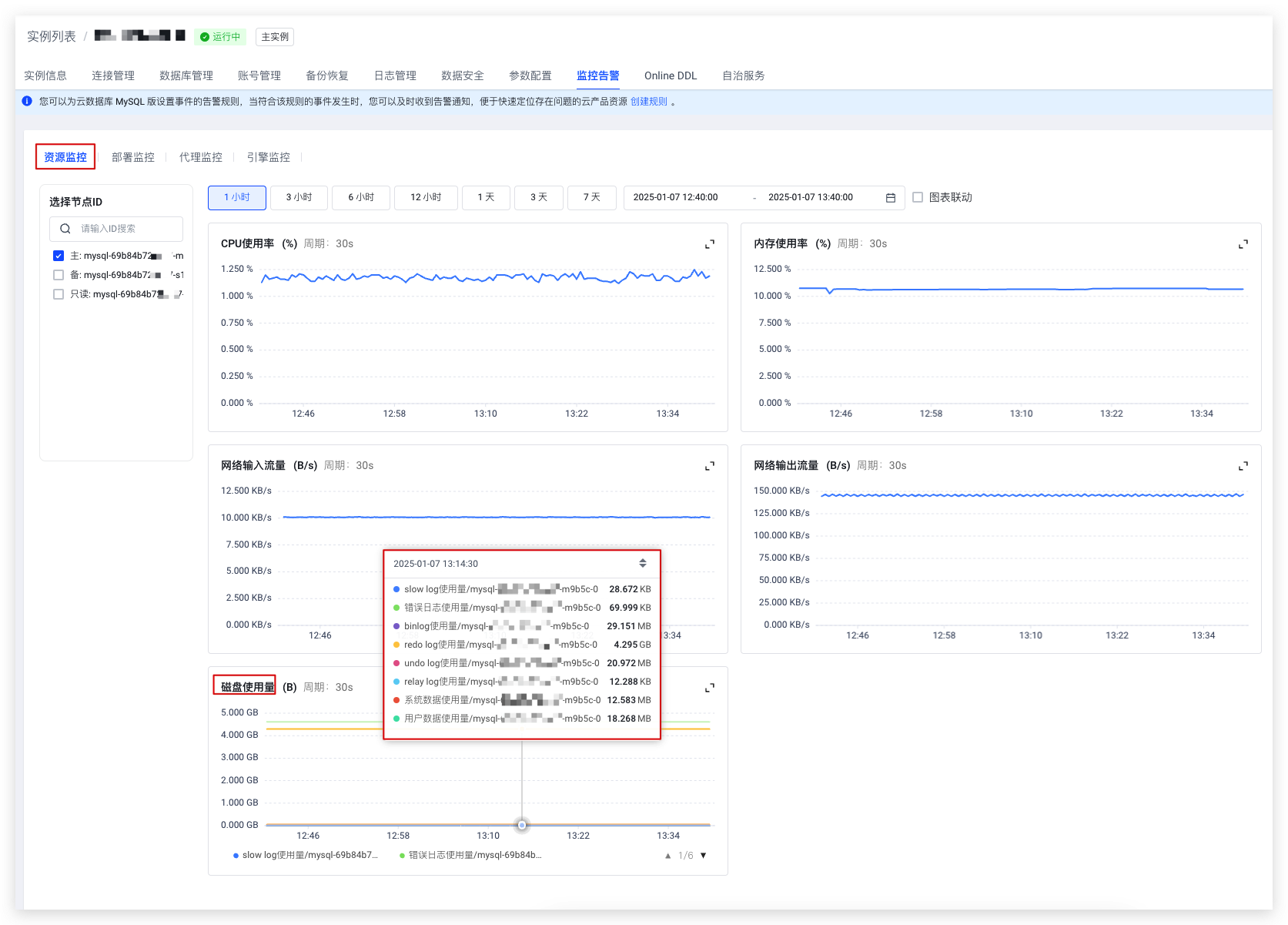
You can confirm the current disk usage of the instance by checking the disk usage monitoring item.
- On the Instances page, click the instance name of the target instance to enter the Instances page.
- Click the Monitoring and alarm tab at the top of the page.
- Under the Resource monitoring category, view Disk usage.
-
Immediate mitigation
If disk usage is near or at 100%, you can reduce it by expanding the instance storage space or enabling the binlog available storage space switch.
warning
RDS for MySQL provides the disk usage metric. You can configure an alert policy for an instance to set an alert threshold for its disk usage. When disk usage exceeds the threshold, you receive a timely alert, preventing the instance from being set to a read-only state due to a full disk. For more information, refer to Creating alert policies.
1. Expand instance storage space
Expanding the instance storage space increases the disk limit.
For instructions, refer to the following documents:
tip
Temporary upgrade is currently an invitation-only feature of RDS for MySQL. To use it, submit a ticket to apply.
2. Turn on the binlog available storage space switch
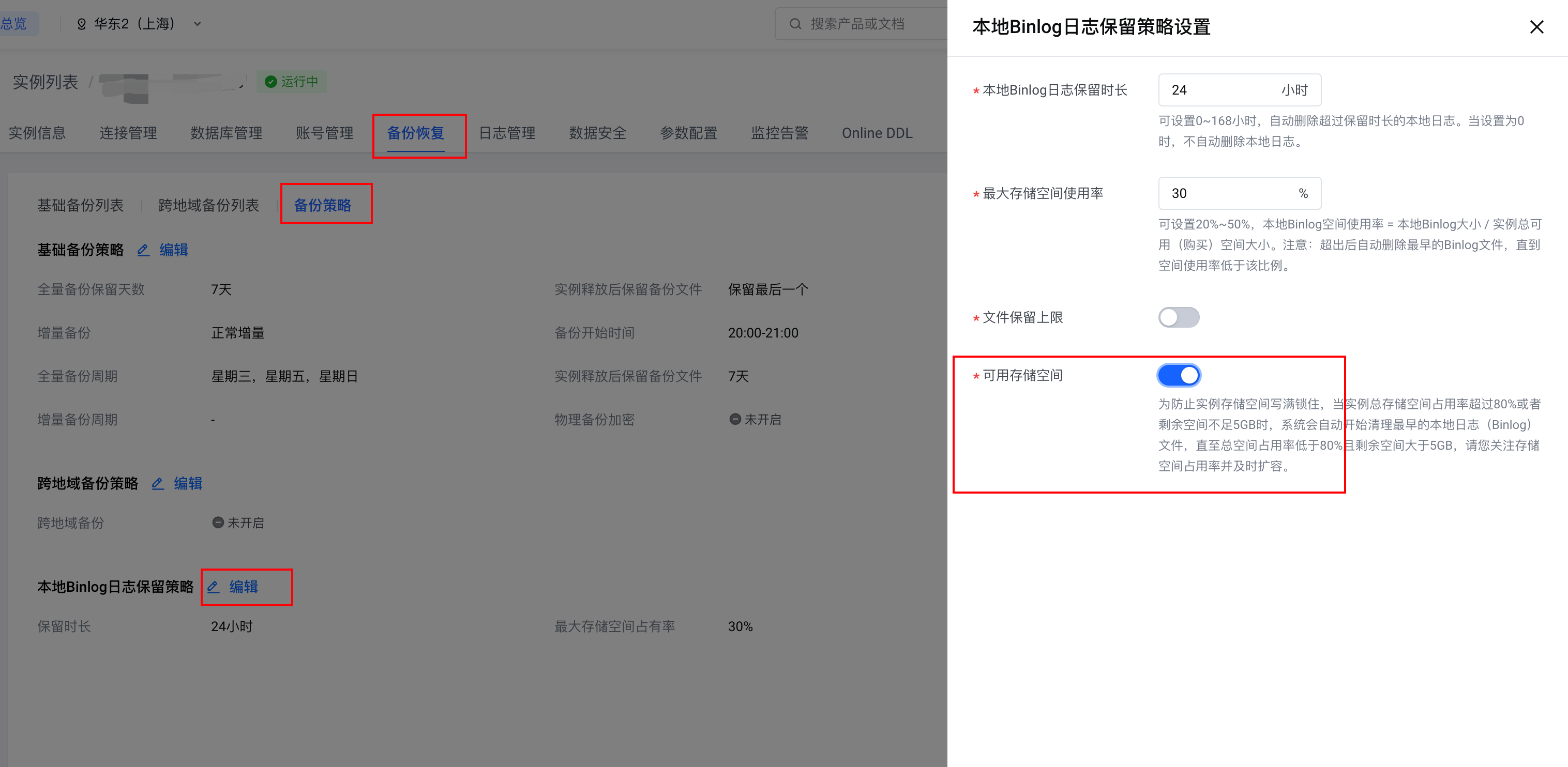
An unreasonable binlog retention policy may cause binlogs to consume a large amount of disk space. Refer to Cause analysis to check binlog usage. If you confirm that binlogs are consuming excessive disk space, modify the local binlog retention policy and enable the Available storage space switch to prevent the disk from being filled by binlogs.
tip
Primary-secondary replication in MySQL relies on binlogs. Retaining too few binlogs can interrupt the replication links for secondary and read-only nodes, impacting instance availability.
Procedure
- On the Instances page, click the instance name of the target instance to enter the Instances page.
- At the top of the page, click the Backups tab.
- On the Backups page, click the Backup policy subtab and then click Edit for Local binlog retention policy.
- In the dialog box on the right, enable the Available storage space switch and click OK. The setting for available binlog storage space will take effect.
Cause analysis
High storage space usage in a MySQL instance can be caused by data fragmentation, oversized binlogs, oversized relay logs, or oversized temporary files. Solutions for these four reasons are provided in the following sections.
1. Data holes
Cause analysis
In MySQL, especially when using the InnoDB storage engine, data files may consume more disk space because of 'holes' (free space). This typically occurs after many insert, update, and delete operations, leading to data holes and increased disk usage. Run the following command to obtain the table state:
Check the Data_free field. A large value for Data_free indicates numerous data holes.
Solution
Run the following command to perform table optimization and eliminate data holes.
warning
When executing OPTIMIZE TABLE, MySQL applies a write lock on the table until the operation is complete. This means that during the optimization process, other Read/Write operations on the table are blocked, which may cause application latency or Timeout. The optimization process may consume a large amount of System resources, especially when the table size is large, which may affect the overall performance of the Database. For large tables, the execution time of OPTIMIZE TABLE can be long, which may lead to long-term locks and potential application interruptions. Therefore, execute OPTIMIZE TABLE during off-peak hours or use an OnlineDDL task to perform this operation.
2. Binlog data is too large
This issue may be caused by two situations: an unreasonable binlog retention policy or the generation of large transactions.
Unreasonable binlog retention policy
Cause analysis
When the binlog retention policy configured for the instance is unreasonable, the binlog may not be cleaned up in time, thus consuming excessive disk space.
Solution
Adjust the binlog retention policy to manage its disk usage.
Large transactions occurred
Cause analysis
When a large transaction occurs (such as a delete operation on a table), it may generate an oversized binlog file. This type of binlog file cannot be split, resulting in a single file consuming a large amount of disk space.
Solution
- Split transactions to avoid creating large ones.
- Expand the instance storage space.
- Adjust the binlog retention policy so the binlog file can be cleared quickly.
3. Oversized relay log
Cause analysis
In MySQL, the generation of a large number of relay logs is usually related to issues in the primary-secondary replication process. Common reasons include:
- Insufficient resources on the secondary and read-only nodes slow down data synchronization, causing relay logs to accumulate.
- A high write load on the primary node generates a large volume of binlogs, requiring the secondary database to process a large number of relay logs.
Solutions
- Expand compute resources to accelerate data synchronization.
- Optimize the write policy to avoid generating a large volume of binlogs in a short period.
4. Oversized temporary files
Cause analysis
Oversized temporary files are often caused by complex queries, insufficient memory, and poor query design. Optimize queries, adjust memory configuration, and monitor temporary table usage to effectively reduce the creation of temporary files.
Solutions
- Expand memory so more temporary tables can be processed in memory.
- Optimize SQL queries by reducing complexity, avoiding unnecessary JOINs and subqueries, and using appropriate indexes to improve query performance and reduce the creation of temporary files.
Last updated: 2025.07.10 21:03:55
All rights reserved © Beijing Volcano Engine Technology Co., Ltd2024
