Billing Center
Billing Center


- Documentation
 Billing CenterBill managementBill management
 Copy page
 Download PDFCopy pageDownload PDF
Billing rules:
1. Please check your billing data after 12pm on the 2nd day of each month. If there are bills with the billing mode=contract billing, please check your complete consumption on the 4th working day of the next month.
2.After the bill details are issued, the project/tag are updated with a maximum delay of 12 hours. To obtain the split bills of CDN/TOS and other enabling products, please refer to " Split bills". The data of sub-accounts newly established in the financial management relationship can be viewed one day later.
3.Due to the delay of computing bill of products, if unsubscribed/adjustment occurs, the product bill before the operation may be generated a few hours later, and no new usage billing will be generated after the unsubscription.
4.Billing data after December 22, 2021 includes all consumption data for prepaid (excluding adjustment and unsubscription orders) and postpaid, and data for prepaid replacement and unsubscribed orders after January 20, 2022.
5.From August 1, 2021, the bill details will be supported to 6 decimal places. After being aggregated into the bill, 3 and subsequent decimal places will be erased, and the actual deduction from the account will be deducted by 2 decimal places (that is, points will be deducted). For bills issued before this, the bill details shall be subject to the value of 0.01 yuan for less than 0.01 yuan.
6.The instance bill charges for the ones with the auto-renewal set in advance will be reflected in the billing period when the renewal occurs.
7.The main account for financial management can view the bill data of the authorized financial management sub-accounts. The bill data will be updated the next day when a new financial management relationship is established or terminated.
- Filter:
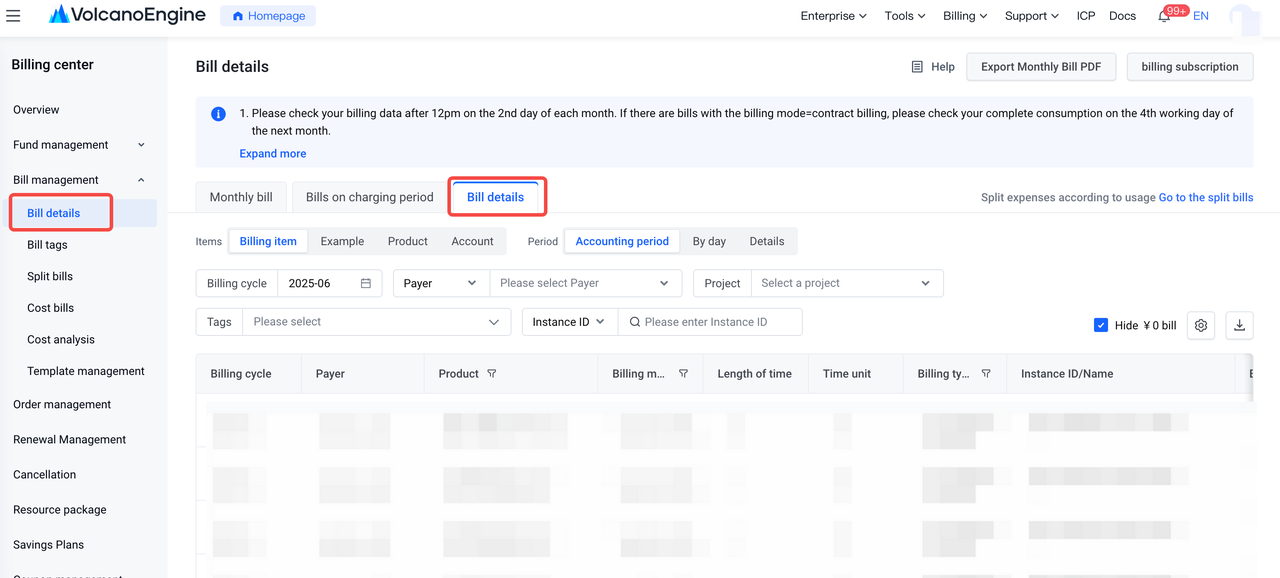
Billing cycle: The billing cycle is the current month by default. You can select one billing cycle only.
Account: View the bills in both the Payer and Owner accounts.
Order/Bill no.: Search for a bill by its order number or bill number.
Instance ID/name: Search for a bill by its instance ID or instance name.
Project:Search for bills by project。
Statistical items: includes four filtering conditions: billing items, Instances, Products, and accounts;。
Statistical period:includes three filtering conditions: billing cycle, by day, and details. The default options for statistical items and statistical period are billing items+&billing cycle, where "billing percycleiod" refers to the "financial billing period".
- Table columns:
Billing cycle: The cycle to which the bills belong.
Business cycle: The cycle in which business activities occur. It is important to note that the billing cycle and the business cycle may differ in specific scenarios, such as when adjusting billing between different months. For example, when adjusting a January bill to March, the billing cycle would be March, while the business cycle would still be January.
Payer: The account responsible for paying the bill.
Seller: The account associated with the entity that sells the service.
Owner: The account held by the individual or entity that uses the service.
Country/Region: The country or region selected when you register the account.
Product: The name of the cloud product.
Business mode: Byteplus provides common business and financially-hosted business.
Billing mode: The billing mode of the product or service, such as subscription and pay-as-you-go.
Consumption time: The payment time in the case of pre-payment, or the start and end time in the case of post-payment.
Usage duration: The duration of a subscription order or the billing duration of a pay-as-you-go order.
Usage unit: The unit of measurement for the usage duration.
Transaction time: The deduction time of a consumption record. If the billing for post-payment is delayed and the monthly bill is generated no later than the third working day of the following month, the transaction time and consumption time may belong to different months. For example, the date of bill generation and fee deduction for the previous month is on the 2nd of the current month.
Order/Bill no.: The order number of pre-payment, or the bill number of post-payment.
Billing type: The type of the bill, such as consumption-use, refund-unsubscription, and billing adjustment-manual service.
Settlement type: The settlement type of the bill, including no settlement, settlement by balance, and settlement by quota.
Instance ID/name: The instance ID or instance name of the bill.
Configuration name: The configuration information of the instance or billing item.
Billing unit: The billing unit of the instance or billing item.
Region: The region of the instance or billing item.
Availability zone: The availability zone of the instance or billing item.
Impact factor: The factor information of the instance or billing item that impacts price.
Extra specs: The additional notes of the instance or billing item.
Unit price: The unit price of the product or service, only available for publication pricing. For special pricing models, such as tiered pricing, the unit price is not provided.
Price unit: The unit of measurement for the price.
Usage: The usage of the product or service.
The billing items based on duration are not cumulative when aggregated. For example, for one cloud server, the usage in each hour's bill is 1; when aggregated by month, the usage remains 1.
The billing items based on usage are cumulative when aggregated. For instance, if text recognition was called 100 times from 1 to 2 o'clock, the usage would be 100; if it was called 100 times from 2 to 3 o'clock, the usage would also be 100; and no usage during other times; when aggregated by month, the usage is 200.
Usage unit: The unit of measurement for the usage.
Package usage: The amount deducted from resource packages.
Gross amount: The consumption amount calculated based on the list of products. Certain offline contractual bills have no discount, which means, the gross amount is equal to the amount after discount.
Saving plan deduction gross amount: The amount of the gross amount deducted through the savings plan;
Discount amount: The amount of discount generated based on contracts, activities, and other applicable factors.
Amount(truncated): The amount that is distributed among corresponding bill details based on the rounded amount of the bill. In certain cases, if a bill number corresponds to multiple bill details, the rounded amount of specific bill details may be negative.
Amount after discount: The amount is calculated by subtracting the discount amount and truncated amount from the gross amount.
Coupon used: The amount that is deducted from the total cost using coupons.
Payable amount:Payable amount=Amount after discount - Coupon used - Amount(truncated)=Amount paid + credit refund deduction + Amount due;
Amount paid: The amount paid using a credit card.
Credit refund deduction:If the credit refund deduction is > 0, it represents the amount of arrears deducted by the credit control limit refund; if the credit refund deduction is < 0, its absolute value represents the credit refund deductionl refund amount.
Amount due: The amount that has been billed but remains unpaid. In particular, the amount paid using a credit card is recorded as part of the overdue amount.
Project:The project information of the resource instance. When using metered products such as CDN/TOS, please check the resource project data in the <0>split bills</0>. When aggregating by day/billing cycle, the project is displayed as the latest project.When aggregated by day/billing cycle,the project will be the latest one.
Tag:The identity of the resource instance; when aggregating by day/billing cycle, if the tags are not exactly the same, they will be displayed as empty; the tags only support filtering the enabled bill tag keys, which can be managed and enabled in the "bill tags" menu.
Spot Price:The actual charging unit price for Spot/ESI instances; for non-Spot/ESI instances, the value is empty.
Discount type: The discount type is based on bill posting matching, including fixed unit price, over-limit progressive unit price, single discount, time-based discount reduction, etc.When aggregating by day/billing cycle, if the offer types are not exactly the same, the display is empty
Discount content: Since 2024-01, the postpaid bill details have included the contract price or discount offers;Prepaid bills from 2024-04 have included the contract price or discount offers;The general discount of the savings plan can be viewed in the "Discount information";When aggregating by day/billing cycle, if the discount content is not completely the same, it will be displayed as empty;
Effective factor: The effective factor when billing by bandwidth.Since the 2023-10 billing cycle, the effective factor has value, and when there is no effective factor in the month before billing cycle of 2023-10 , it will be displayed as 0 uniformly.
Service entity: The entity that provides services.
Custom column: You can select specific data fields that you want to display. The bill details page displays data as you selected.
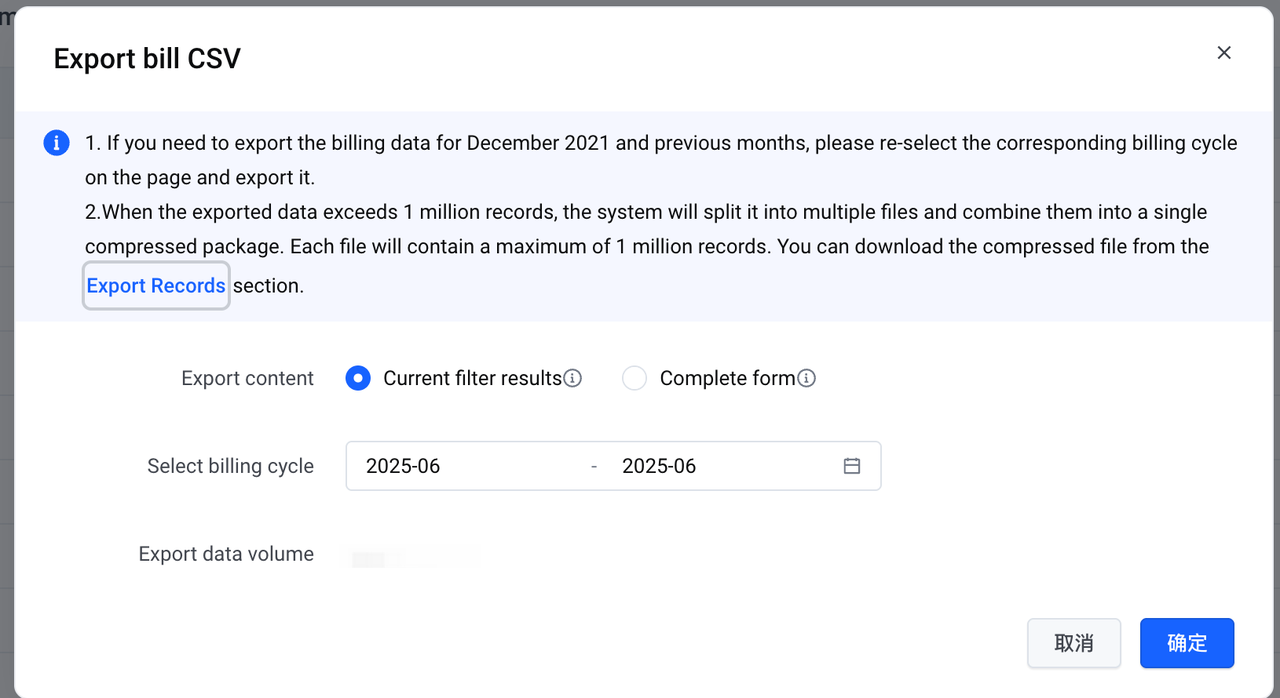
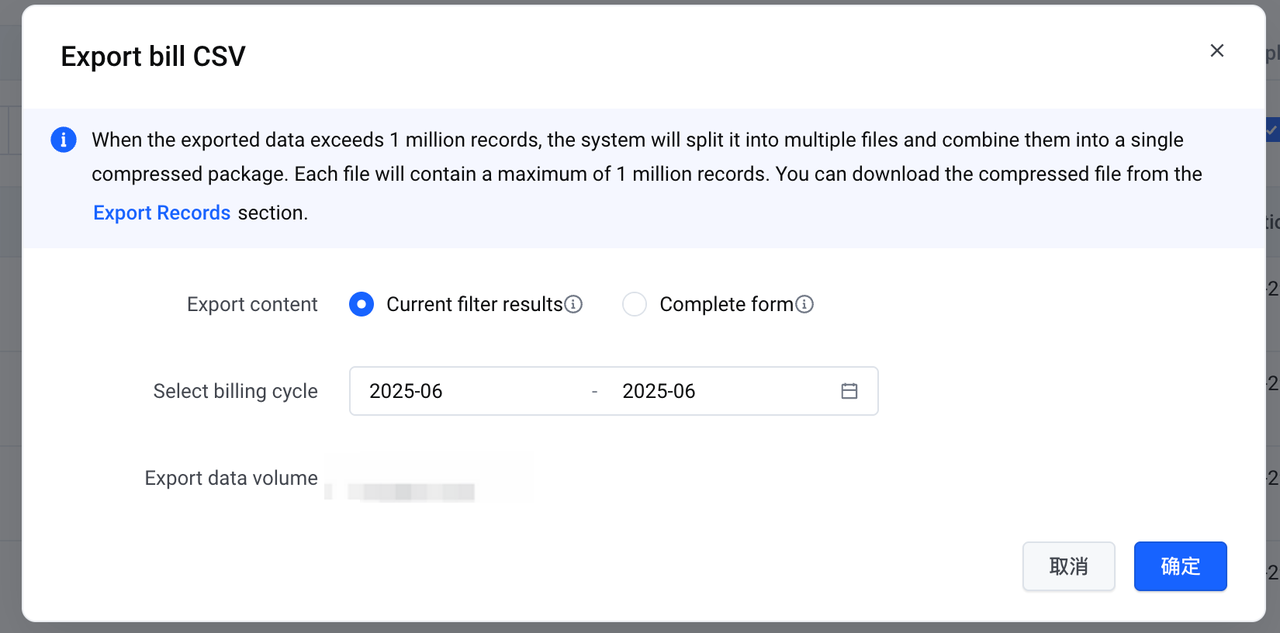
Export bill(CSV): You can export all fields of bill data or specific parameters based on your applied filters.
Current filter results: Export the exact data that is displayed on the page.
Whole table: Export all fields of the bill data.
- Filter:
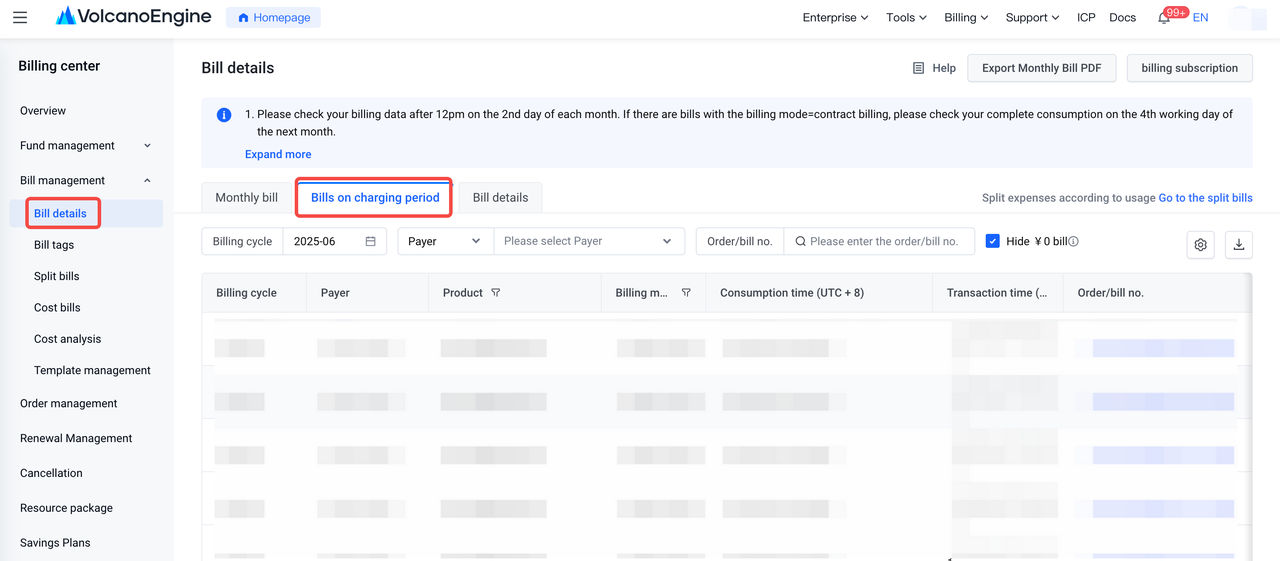
Billing cycle: The billing cycle is the current month by default. You can select one billing cycle only.
Account: View the bills in both the Payer and Owner accounts.
Order/Bill no.: Search for a bill by its order number or bill number.
- Table columns:
Billing cycle: The cycle to which the bills belong.
Business cycle: The cycle in which business activities occur. It is important to note that the billing cycle and the business cycle may differ in specific scenarios, such as when adjusting billing between different months. For example, when adjusting a January bill to March, the billing cycle would be March, while the business cycle would still be January.
Payer: The account responsible for paying the bill.
Seller: The account associated with the entity that sells the service.
Owner: The account held by the individual or entity that uses the service.
Country/Region: The country or region selected when you register the account.
Product: The name of the cloud product.
Business mode: Byteplus provides common business and financially-hosted business.
Billing mode: The billing mode for consumption, such as subscription, pay-as-you-go, and contractual payment.
Usage period: The payment time in the case of pre-payment, or the start and end time in the case of post-payment with the entire settlement cycle.
Transaction time: The deduction time of a consumption record. If the product or service is billed but not paid, the parameter is empty.
Order/Bill no.: The order number of pre-payment, or the bill number of post-payment.
Billing type: The type of the bill, such as consumption, refund, and billing adjustment.
Settlement type: The settlement type of the bill, including no settlement, settlement by balance, and settlement by quota.
Gross amount: The consumption amount calculated based on the list of products. Certain offline contractual bills have no discount, which means, the gross amount is equal to the amount after discount.
Saving plan deduction gross amount: The amount of the gross amount deducted through the savings plan;
Discount amount: The amount of discount generated based on contracts, activities, and other applicable factors.
Amount(truncated): The amount that is distributed among corresponding bill details based on the rounded amount of the bill. In certain cases, if a bill number corresponds to multiple bill details, the rounded amount of specific bill details may be negative.
Amount after discount: The amount is calculated by subtracting the discount amount and truncated amount from the gross amount.
Coupon used: The amount that is deducted from the total cost using coupons.
Payable amount:Payable amount=Amount after discount - Coupon used - Amount(truncated)=Amount paid + credit refund deduction + Amount due.
Amount paid: The amount paid using a credit card.
Credit refund deduction:If the credit refund deduction is > 0, it represents the amount of arrears deducted by the credit control limit refund; if the credit refund deduction is < 0, its absolute value represents the credit refund deductionl refund amount.
Amount due: The amount that has been billed but remains unpaid. In particular, the amount paid using a credit card is recorded as part of the overdue amount.
Payment status: Includes unpaid, paid, and unsettled. If the overdue amount is greater than 0, the status is unpaid. If the overdue amount is equal to 0, the status is paid. If the bill is generated but not settled, the status is unsettled.
Seller entity: The entity that provides services.
Custom column: You can select specific data fields that you want to display. The bill details page displays data as you selected.
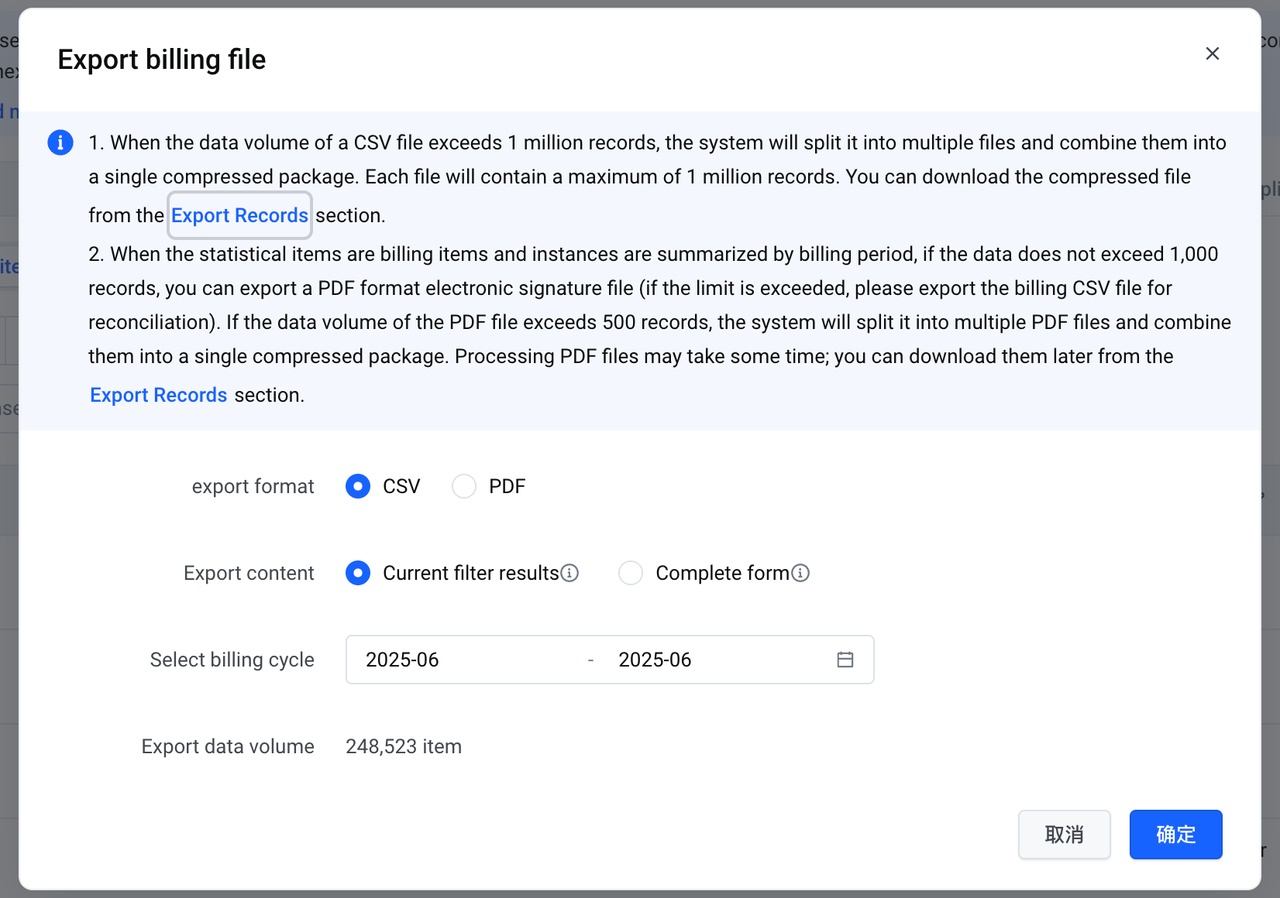
Export bill(CSV): You can select "Current filter results" or "Whole table" as needed.
Current filter results: Export the exact data that is displayed on the page.
Whole table: Export all fields of the bill data.
- Filter:
Billing cycle: The billing cycle is the current month by default. You can select one billing cycle only.
Account: View the bills in both the Payer and Owner accounts.
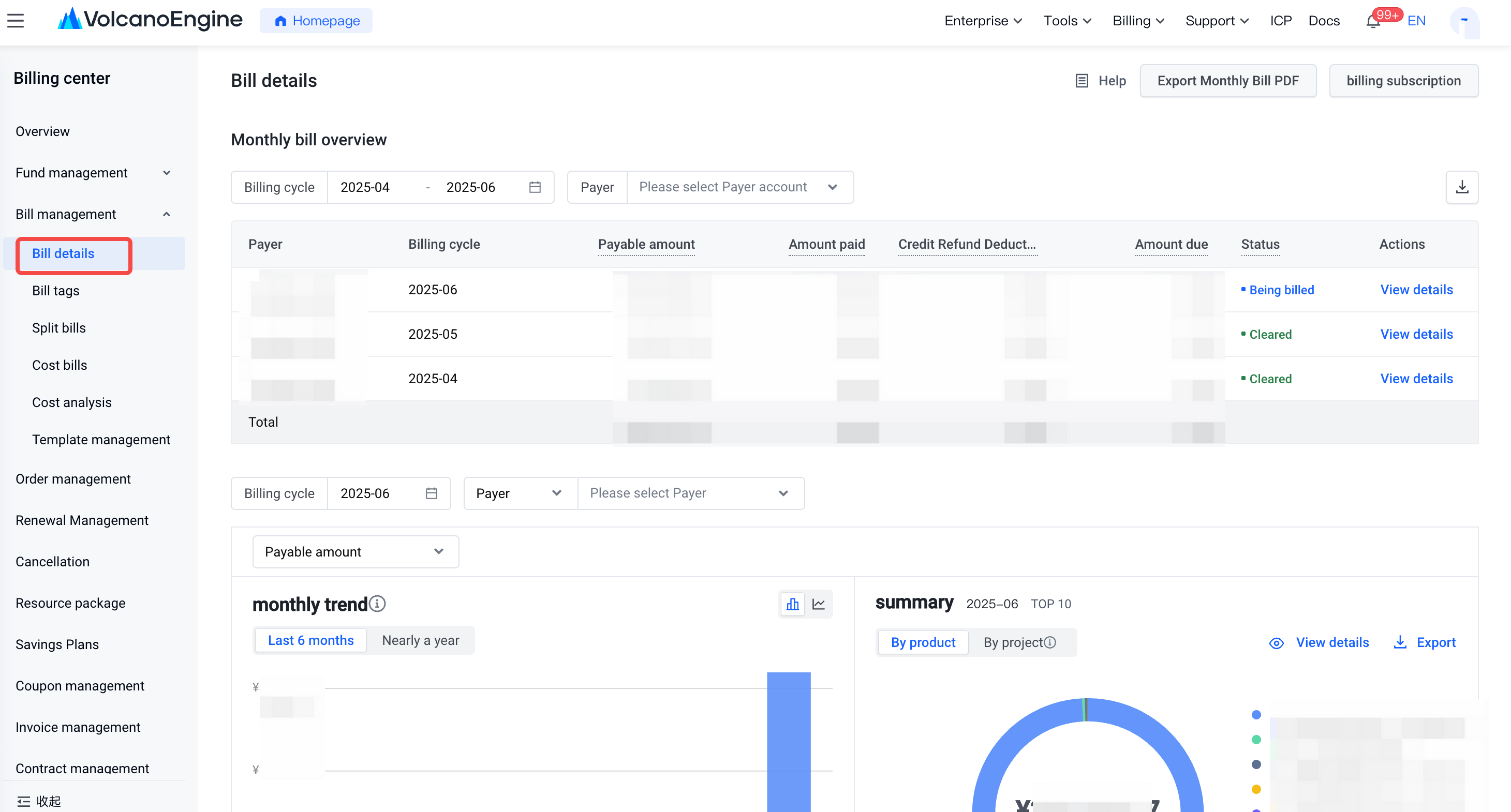
- Monthly bill overview
- viewing the aggregated amount data (based on Payer account and billing cycle) and the billing status within the selected billing cycle range.
- Monthly trend
- viewing the consumption data of the selected billing cycle in the past half year/one year in the form of bar charts or line charts. Also support viewing separately by payment amount, amount paid and price after discount.
- products/projects summary
- viewing the top 10 products/projects under the selected billing cycle, based on the distribution of payment amount, amount paid and price after discount. This includes the products/projects, consumption amount, and the proportion of consumption amount.
- Product summary:
Bill data summarized based on billing cycle, Payer account, Seller account, Owner account, product, business mode, billing mode, and bill type (consumption, billing adjustment, refund).
Billing cycle: The cycle to which the bills belong.
Payer: The account responsible for paying the bill.
Seller: The account associated with the entity that sells the service.
Owner: The account held by the individual or entity that uses the service.
Country/Region: The country or region selected when you register the account.
Product: The name of the cloud product.
Business mode: Byteplus provides common business and financially-hosted business.
Billing mode: The billing mode for consumption, such as subscription, pay-as-you-go, and contractual payment.
Billing type: The type of the bill, such as consumption, refund, and billing adjustment.
Gross amount: The consumption amount calculated based on the list of products. Certain offline contractual bills have no discount, which means, the gross amount is equal to the amount after discount.
Saving plan deduction gross amount: The amount of the gross amount deducted through the savings plan;
Discount amount: The amount of discount generated based on contracts, activities, and other applicable factors.
Amount(truncated): The amount that is distributed among corresponding bill details based on the rounded amount of the bill. In certain cases, if a bill number corresponds to multiple bill details, the rounded amount of specific bill details may be negative.
Amount after discount: The amount is calculated by subtracting the discount amount and truncated amount from the gross amount.
Coupon used: The amount that is deducted from the total cost using coupons.
Payable amount:Payable amount=Amount after discount - Coupon used - Amount(truncated)=Amount paid + credit refund deduction + Amount due.
Amount paid: The amount paid using a credit card.
Credit refund deduction:If the credit refund deduction is > 0, it represents the amount of arrears deducted by the credit control limit refund; if the credit refund deduction is < 0, its absolute value represents the credit refund deductionl refund amount.
Amount due: The amount that has been billed but remains unpaid. In particular, the amount paid using a credit card is recorded as part of the overdue amount.
Seller entity: The entity that provides services.
Custom column: You can select specific data fields that you want to display. The bill details page displays data as you selected.
Export bill(CSV): You can select "Current filter results" or "Whole table" as needed.
Current filter results: Export the exact data that is displayed on the page.
Whole table: Export all fields of the bill data.