Direct Connect
Direct Connect
Direct Connect


Document
What's New
Product announcements
Overview
Getting Started
Interconnecting on-premises data centers and VPCs
User Guide
DC Connection
Dedicated Line
DC Gateway
DX Gateway
Virtual Interface
Outbound traffic package
Health check
Line health check
Monitoring and alerts
QoS Management
Identity and Access Management
Projects and Tags
Best Practices
On-premises to Cloud migration
Single-line access
Dual-line access
Interconnection between IDCs
Cloud data interconnection
On-premises IDC reference configuration
API Reference
DC Connection
DC Gateway
DC Virtual Interface
Health check
Qos policy
BGP Peer
DC Gateway route
Failure drill
Tag
Troubleshooting
- Documentation
 Direct ConnectUser GuideHealth checkDirect Connect Health Check overview
 Copy page
 Download PDF
Health check
Direct Connect Health Check overview
Copy pageDownload PDFDirect Connect Health Check overview
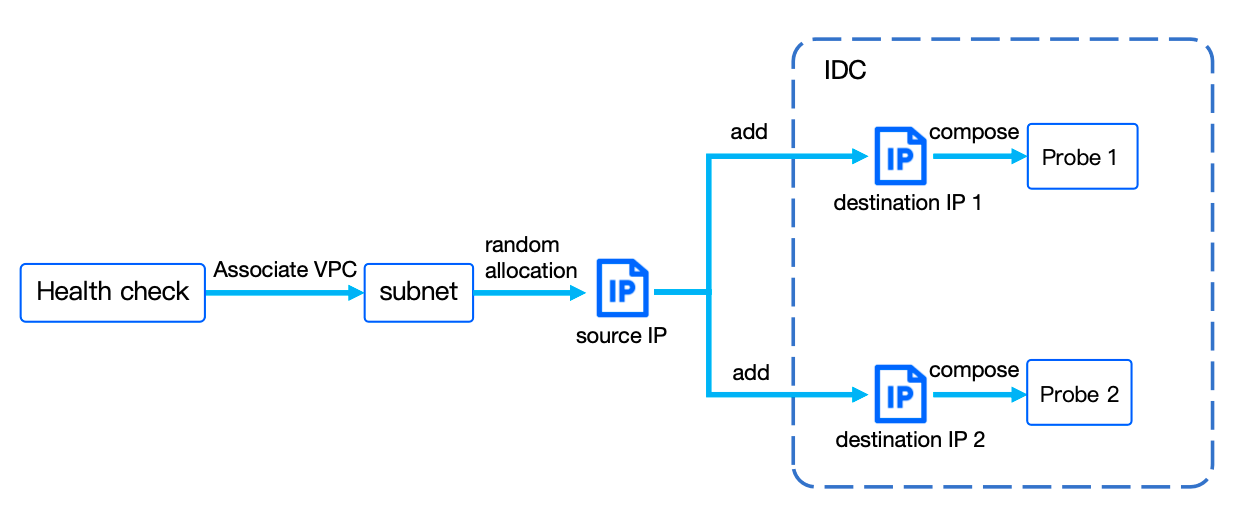
When you transmit business data between cloud/on-premises VolcanoEngine and the third-party cloud via a Direct Connect (DC) Connection, and any significant network fluctuations or unstable transmission links occur, you can use the DC health check to identify and detect network issues. The health check sets source and destination IPs in the DC Connection to form probes, and provides real-time feedback on network health by actively sending detection requests. This helps you quickly identify network issues and take appropriate actions to ensure stable business operation.
warning
- Health checks may consume some network resources. We recommend configuring the packet size of health check data reasonably based on your business requirements.
- Health checks do not provide fault route switching capability. For such business needs, see Line health check.
Terms
Name | Description |
Health check | DC health check is a mechanism for monitoring the quality of the network link from VPC to the remote. Test network connectivity by actively sending probe requests. As the health check integrates with Cloud Monitor metrics and alerts, you will receive notifications when network exceptions occur. |
Probe | A probe consists of a set of cloud source IPs and on-premises destination IPs. The source IPs continuously send data packets (ICMP) to the destination IPs to collect latency and packet loss rate data for the link, with the data updated in real time. |
Usage process
Last updated: 2026.08.24 11:30:50
All rights reserved © Beijing Volcano Engine Technology Co., Ltd2024
