Message Queue for RocketMQ
Message Queue for RocketMQ
Message Queue for RocketMQ


Document
What's New
Overview
Billing
Getting Started
User Guide
Instance management
Connections
Topic management
Group management
Key management
Permission management
Message query
Dead letter management
Monitoring and alerting
Background task management
Allowlist management
Access control
RocketMQ Agent
API Reference
How to call the API
Resource check
Instance management
Network management
Topic management
Group management
Message query
Dead letter queue
Key management
Risk inspection
Allowlist management
Tag management
Endpoint service
SDK Reference
RocketMQ 5.x
RocketMQ 4.x
Java SDK
Go SDK
Python SDK
RocketMQ management SDK
Best Practices
Business migration
- Documentation
 Message Queue for RocketMQGetting StartedOverview
 Copy page
 Download PDF
Getting Started
Overview
Copy pageDownload PDFOverview
This topic aims to help you quickly get started with Message Queue for RocketMQ.
Steps
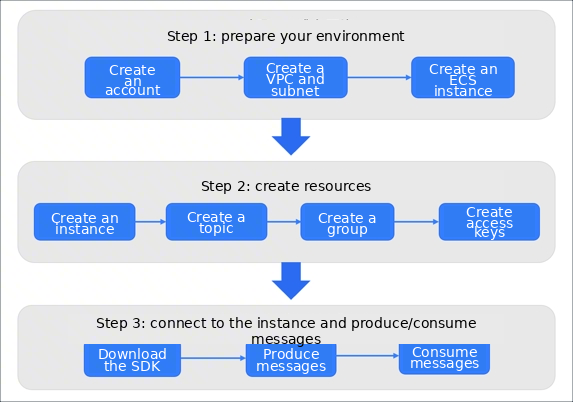
The basic workflow for getting started with RocketMQ includes three steps: setting up your development environment, creating the necessary resources, and producing and consuming messages.
- Create a Volcano Engine account, complete the real-name verification process, and set up the necessary cloud resources, such as Elastic Compute Service (ECS) and Virtual Private Cloud (VPC).
- Create a RocketMQ instance and all related resources in the console, such as topics, groups, and access keys.
- Once you have set up your development environment and created the necessary resources, you can use the open-source RocketMQ SDK via TCP to produce and receive normal messages.
Last updated: 2026.08.28 10:19:42
All rights reserved © Beijing Volcano Engine Technology Co., Ltd2024
