Cloud Backup and Recovery
Cloud Backup and Recovery


Document

- Documentation
 Cloud Backup and RecoveryUser GuidePublic cloud backupECS instance backupECS full machine backup overview
 Copy page
 Download PDF
ECS instance backup
ECS full machine backup overview
Copy pageDownload PDFECS full machine backup overview
This document introduces the ECS full machine backup feature overview, backup methods, working principles, operation processes, and costs.
Feature overview
ECS full machine backup is an agentless backup service for cloud servers (ECS instances) provided by Volcengine. This service is based on the EBS cloud disk snapshot service and allows you to create crash-consistent backups for all or some cloud disks of an ECS instance, used for backing up or restoring the entire ECS instance or a single EBS cloud disk.
Working principle
The cloud backup ECS full machine backup service relies on the EBS cloud disk snapshot service. It automates orchestration of snapshot lifecycle management and snapshot rollback to achieve ECS full machine backup and recovery.
- ECS full machine backup
- Specify the cloud disks to back up. After enabling backup, CBR creates a snapshot consistency group for the selected cloud disks. This group serves as an ECS full machine backup recovery point, visible in the console, providing backup data recovery functions.
- ECS full machine recovery
- When restoring data through a recovery point in the console, CBR uses the cloud disk snapshot rollback function to roll back the corresponding snapshot to the original cloud disk.
Backup methods
Cloud Backup offers automatic and manual backup methods. The detailed descriptions and differences between these two backup methods are as follows:
Operation process
The operation process for manual and automatic full ECS backups using the Cloud Backup console is shown below.
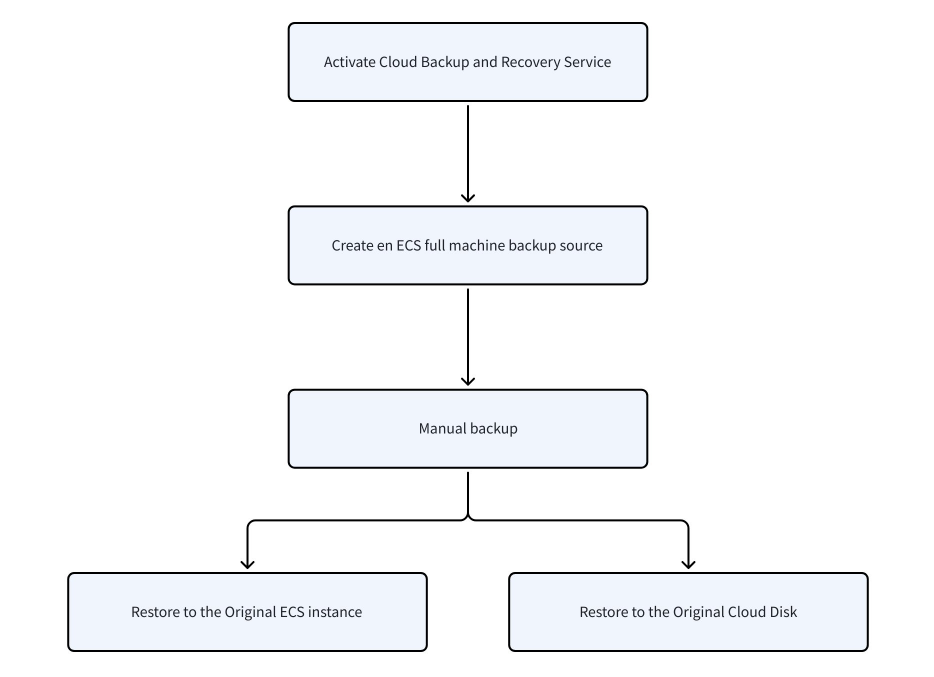
- Activate cloud backup service.
- Cloud backup is currently in public beta. You can activate it for free on the Cloud Backup page.
- The cloud backup service itself does not charge any fees. Using cloud backup depends on other cloud service products, which may incur charges. The cost of ECS full machine backup is charged by the snapshot service. For snapshot service billing details, see Snapshot Billing.
- Create an ECS full machine backup source.
- For detailed steps, see Create ECS full machine backup source.
- Create an ECS full machine backup source on the Cloud Backup console. The backup source is the object to be backed up, namely the ECS instance.
- Manual backup.
- For detailed steps, see Operating steps.
- Perform a manual backup of the backup source to create a manual backup task. The system will automatically generate the corresponding restore point.
- Restore backup data.
- For detailed operations, see Operating steps.
- When an ECS instance or cloud disk encounters an issue, restore the backup data to the original ECS instance or cloud disk using the corresponding recovery point based on the backup time.
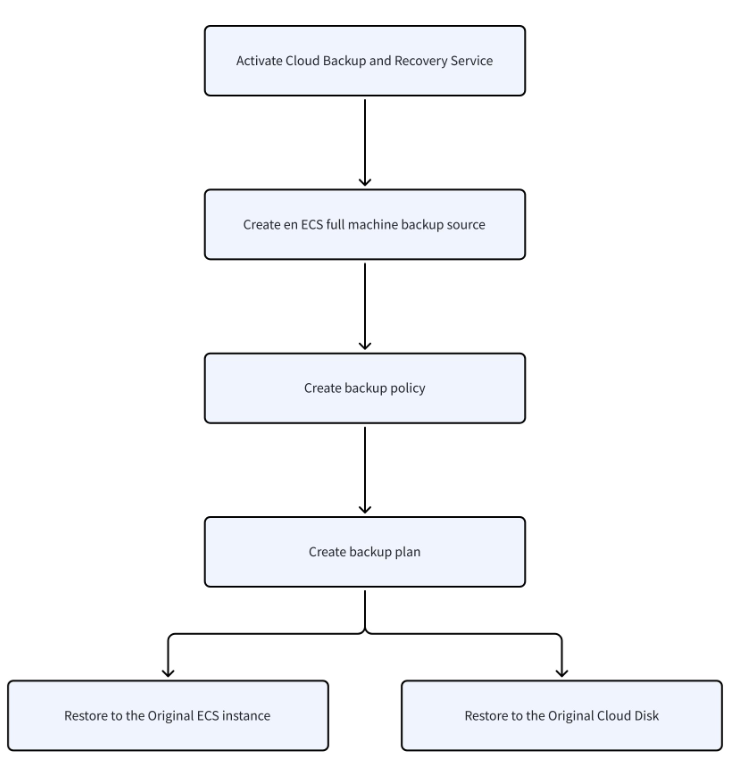
- Activate cloud backup service.
- Cloud backup is currently in public beta. You can activate it for free on the Cloud Backup page.
- The cloud backup service itself is free. However, using cloud backup depends on other cloud services that may incur charges. Fees for ECS full machine backup are charged by the snapshot service. For billing details, see Snapshot Billing.
- Create an ECS full machine backup source on the cloud backup console. The backup source is the object being backed up, namely the ECS instance.
- Specify backup rules and retention rules in the backup policy.
- The backup plan links the backup source and backup policy. After successful creation, the system automatically backs up the specified backup source according to the backup policy on a regular schedule.
- Each time a backup task runs, the system automatically generates the corresponding restore point.
- If the ECS instance or cloud disk fails, restore the backup data to the original ECS instance or cloud disk according to the backup time using the corresponding restore point.
Notes
- The ECS full backup service relies on the EBS snapshot service. Before performing a full ECS backup, activate the snapshot service on the ECS side by logging into the Cloud Server Console, then navigate to Storage > Snapshots to enable or view snapshots.
- Backing up performance SSDs is not supported. Performance SSDs belong to a previous generation cloud product and have been gradually discontinued.
- A single backup source supports creating up to 10 recovery points (including manual and automatic backup points). When the number of recovery points exceeds 10, backup operations will be blocked. In this case, delete some recovery points first. Refer to Deleting Recovery Points for detailed steps.
- A single backup source can have only 1 ongoing task at the same time (including backup and restore tasks). New tasks will enter a queue automatically, with a maximum queue length of 2 tasks. Tasks exceeding this limit will fail to create.
Usage limits
Restrictions | Limitations |
Backup source |
|
Backup plan |
|
Backup policy | The maximum number of backup policies that a single account can add within a single region: 300. |
Recovery point | The maximum number of recovery points per single backup source: 10 |
Cost
The cost of ECS full machine backup is charged by the snapshot service. For detailed billing methods of the snapshot service, see Snapshot Billing.
Last updated: 2025.08.13 11:35:53
All rights reserved © Beijing Volcano Engine Technology Co., Ltd2024
