Database Workshop
Database Workshop
Database Workshop


Document
What's new
Announcement
Overview
Billing
Permission management
Quick start
Operation guide
Data management
Data interaction platform
Ticket list
Operation and maintenance management
Enterpise security
Approval workflow
Action trail management
User guide (RDS for MySQL)
Instance list
Data management
SQL window
Database management
Ticket list
Data change ticket
SQL review ticket
Clear table tickets
Data cleanup and archiving ticket
Data import and export ticket
Permission application ticket
Operation and maintenance management
Observation and diagnosis
Session management
Monitoring
Enterprise security management
User guide (veDB for MySQL)
Instance List
Data management
SQL window
Database management
Ticket list
Data change ticket
SQL review ticket
Clear table ticket
Data cleanup and archiving ticket
Data import and export ticket
Permission application ticket
Operation and maintenance management
Observation and diagnosis
Session management
Log management
Enterprise security management
User guide (RDS for PostgreSQL)
Instance list
Data management
SQL window
Ticket list
Data change ticket
SQL review ticket
Permission application ticket
Operation and maintenance management
Enterprise security management
User guide (RDS for SQL Server)
Instance list
Data management
Ticket management
Permission application ticket
Operation and maintenance management
Enterprise security management
User guide (Cache for Redis)
Instance list
Data management
SQL window
Ticket list
Permission application ticket
Operation and maintenance management
Enterprise security management
User guide (Document Database for MongoDB)
Instance list
Data management
SQL window
Ticket management
Permission application ticket
Operation and maintenance management
Enterprise security management
User guide (External instance user guide)
Developer tools
Best practices
API reference
Compliance Agreement
Instance access
SQL task
Operation and maintenance management
SQL throttling
Audit log management
Slow log and optimization suggestions
Diagnostics and Snapshots
SQL insights and auditing
Ticket management
Security control
Appendixes
FAQ
FAQ about permission management
Troubleshooting
- Documentation
 Database WorkshopUser guide (Document Database for MongoDB)Enterprise security managementGranting operation permissions for system roles
 Copy page
 Download PDF
Enterprise security management
Granting operation permissions for system roles
Copy pageDownload PDFGranting operation permissions for system roles
Database Workshop (DBW) supports unified management of database instances and collaborative management through multiple roles, such as system roles and ticket approval roles. This simplifies and standardizes database management and improves enterprise security efficiency. This topic describes how to grant operation permissions for DBW system roles on the Database Workshop (DBW) console.
Prerequisites
Procedure
- Log on to the DBW console.
- On the top menu bar, select the region.
- On the left navigation bar, select Corporate security > User management.
- On the User management page, select the authorization target as needed:
- Authorize personal users
- Authorize permissions for specified users:
- On the User management page, click Personal user management.
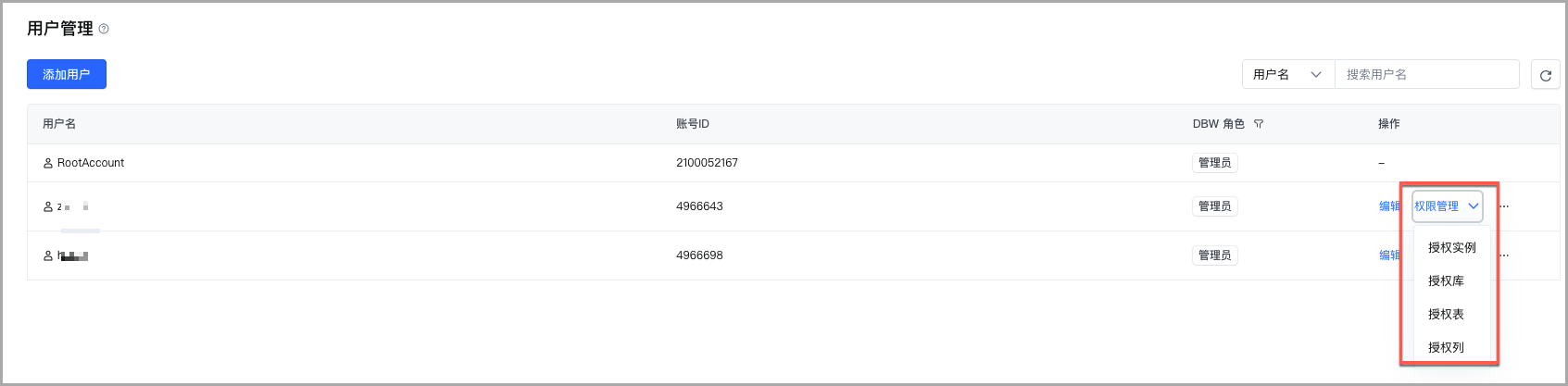
- On the Personal user management sub-tab, click Permission management in the Actions column of the target user, and select the permissions to be granted.
-
- Batch authorize user permissions:
- On the User management page, click Personal user management.
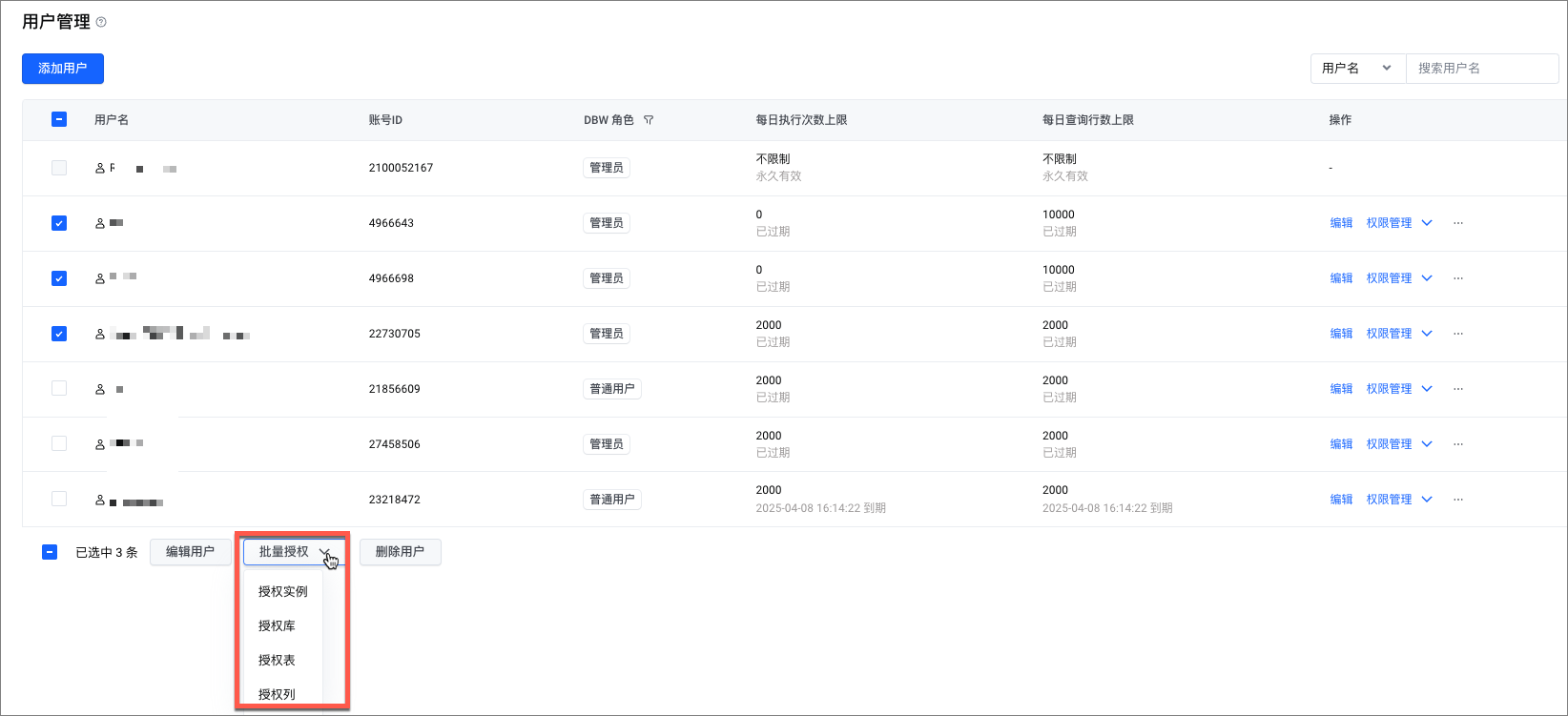
- On the Personal user management sub-tab, select the users to be authorized as needed. Click Batch Authorize in the bottom menu bar, and select the permissions to be authorized.
-
- Authorize user groups
- On the User management page, click User group management.
- On the User group management sub-tab, click Permission management in the Actions column of the target user group, and select the permissions to be granted.
- In the displayed control panel, configure the following information.
tip
Document Database for MongoDB currently only supports Authorize instance.
- Authorization typeParameterDescriptionAuthorize instanceDatabase instanceSelect Document Database for MongoDB.Authorization methodSelect an authorization method as required. You can select instances to be authorized by Directly select or Select based on the project it belongs to.Authorize instanceCheck the instance to be authorized from the drop-down list. Multiple selections are supported.Permission typeCheck the permission type as needed. Currently, the following options are supported.
- SQL change: Refers to operations that add, modify, and delete data in the database.
- SQL query: Refers to the operation of retrieving the required data from the database.
- Structural change: Represents operations that can modify, add, or delete a database structure.
- Operation and maintenance read-only: Refers to read-only permissions for operation and maintenance management capabilities, such as viewing real-time sessions and database audit logs.
- Operation and maintenance read/write: Refers to full permissions for operation and maintenance management capabilities, such as Kill sessions.
Effective timeSelect the validity period of the authorization from the drop-down list, with options including 1 month (default), 3 months, 6 months, and 1 year. Additionally, custom days can be set as the validity period, with a default of 1 day and a range of [1, 365].
- Click OK.
Last updated: 2025.10.11 11:06:13
All rights reserved © Beijing Volcano Engine Technology Co., Ltd2024
