Cloud Monitor
Cloud Monitor


Document

- Documentation
 Cloud MonitorUser GuideEvent centerViewing events
 Copy page
 Download PDF
Event center
Viewing events
Copy pageDownload PDFViewing events
Event Center enables you to monitor the faults of cloud services. After an event of a cloud service occurs, information about the event, such as the occurrence time, source, name, and details, will be saved in Event Center. You can view cloud service events to promptly identify and resolve issues.
Considerations
Occurred events are saved for 30 days by default.
View cloud service events
- Log in to the Cloud Monitor console.
- In the left navigation bar, click Event Center > Cloud product event.
- On the Cloud Service Event page, view the information about cloud service events within the specified time period.
-
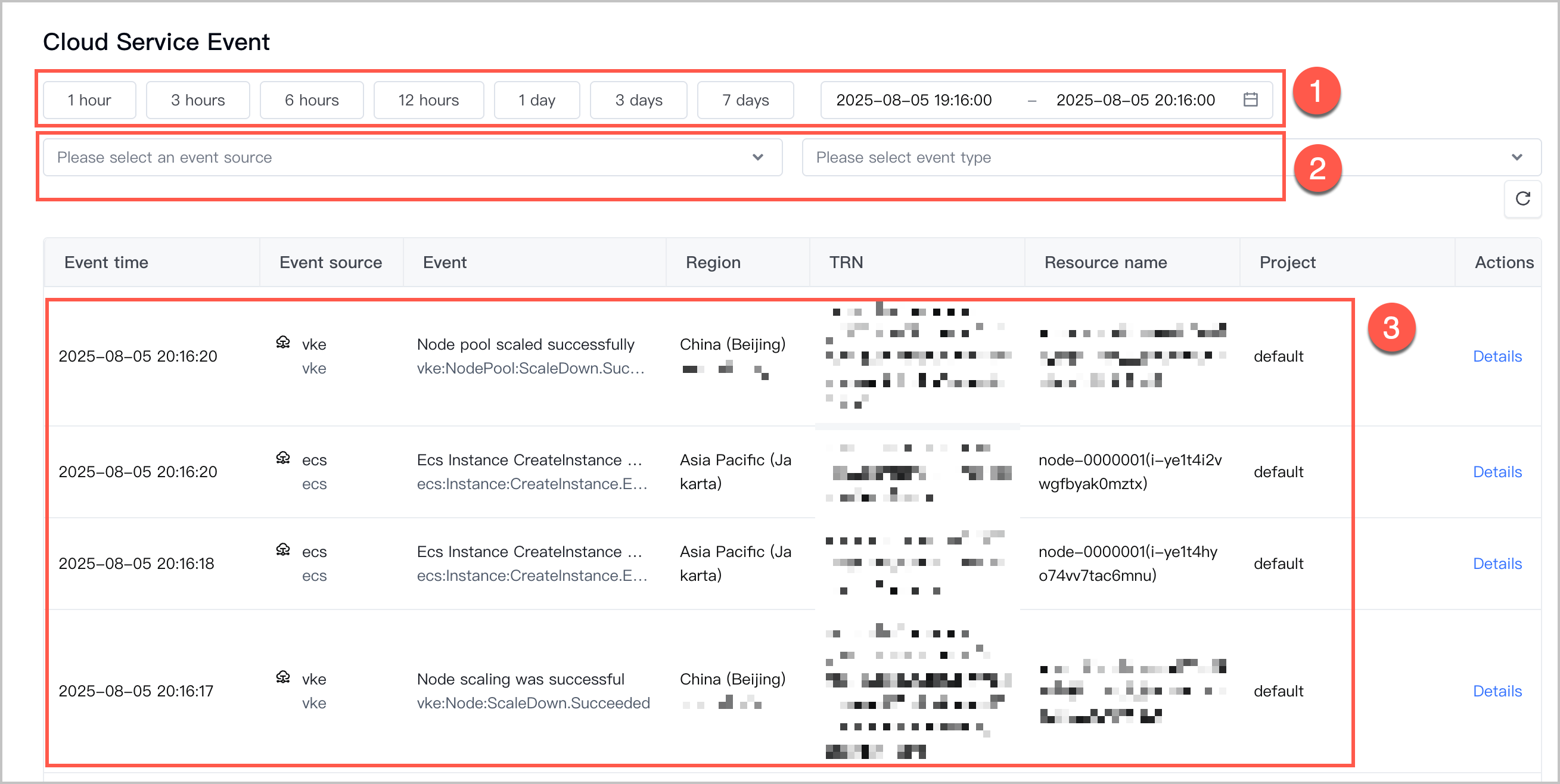
- You can filter events by specifying the time period, cloud service, and event type. The following table describes the specific operations.
- SectionDescriptions①You can select a time period or specify a custom time period to filter events that occurred during the specified time period.warning
- You can query event information within the last hour by default. You can query data within the last 30 days at most.
- The specified time period can be accurate to minutes, with seconds set to 00 by default.
②You can filter events by selecting a cloud service and selecting one or more event types.③View the list of events that meet the filter criteria. The string displayed in the Event column consists of three parts, which is in the format of service name:event type:event content.For example, the event ecs:Instance:RunInstance.Executing indicates that the service name is ECS, the event type is the instance resource, and the event content is that the instance is being started.
- Click Details in the Actions column that corresponds to an event to view the event details in JSON format.
Last updated: 2026.07.10 14:02:23
All rights reserved © Beijing Volcano Engine Technology Co., Ltd2024
