GPU Compute Service
GPU Compute Service


Document

- Documentation
 GPU Compute ServiceGPU Compute ServiceBest PracticesInstalling RDMA Agent in HPC-optimized instances
 Copy page
 Download PDF
Best Practices
Installing RDMA Agent in HPC-optimized instances
Copy pageDownload PDFInstalling RDMA Agent in HPC-optimized instances
RDMA (Remote Direct Memory Access) is a network technology for remote direct memory access. It is a common end-to-end transmission technology in high-speed networks and is widely applied to ECS instances. The RDMA Agent is designed to enhance the reliability and stability of RDMA networks. You can use RDMA Agent to manage RDMA configuration of HPC-optimized instances, with its main functions as follows:
- Delivers and manages configurations related to RDMA network interfaces, such as QoS, DSCP, PFC, and MTU.
- Generates GPU Topo files.
- Generates RDMA policy-based routes.
- Deploys self-developed congestion control algorithms.
warning
- In an HPC-optimized instance created based on a public image, the RDMA Agent is preinstalled by default. No additional installation is required. For a non-GPU instance, you do not need to install the RDMA Agent.
- If the RDMA Agent is installed in instances created based on non-public images, normal service operations can not be guaranteed. When exceptions occur, please contact technical support timely.
Usage notes
- The instance must be in the Running status.
- Recommended operating systems for using the RDMA Agent include:
- Debian 10
- Ubuntu 20.04/22.04
- CentOS 8.3
- Rocky Linux 9.1
- veLiunx 1.0
- Hardware driver dependency: Network interface driver and the corresponding version of Firmware.
- The naming format of RDMA network interfaces is eth* (standard), and that of their device names is mlx5_*.
Install RDMA Agent
tip
Script-based installation is strongly recommended. Due to its automatic download and OS-based installation operations, you only need to select an appropriate region.
- Pull the deployment script.
- Download via the public network:
- Download link: https://rdma-toc-config-cn-beijing.tos-cn-beijing.volces.com/install_new.sh. If direct access fails, download the script to your local computer first, and then manually upload it to your ECS instance. How to upload files to an ECS instance?
- Download via the private network:
- REGION=$(wget -O - -a /var/log/wget.log -t 1 --timeout=10 "http://100.96.0.96/latest/region_id" 2>/dev/null)wget "https://rdma-toc-config-${REGION}.tos-${REGION}.ivolces.com/install_new.sh"
- Execute the following command to install. Replace <version> with the actual version number (for example, bash ./install.sh 1.1.11).
- bash ./install.sh <version>
- Download the package.
- Download via the public network:
- VERSION=1.1.11deb:https://rdma-toc-config-cn-beijing.tos-cn-beijing.volces.com/rdma-agent_${VERSION}-0_all.debrpm:https://rdma-toc-config-cn-beijing.tos-cn-beijing.volces.com/rdma-agent-${VERSION}-0.noarch.rpm
- Download via the private network:
- deb:
- REGION=$(wget -O - -a /var/log/wget.log -t 1 --timeout=10 "http://100.96.0.96/latest/region_id" 2>/dev/null)RDMA_BUCKET_URL="rdma-toc-config-${REGION}.tos-${REGION}.ivolces.com"PKG_FILE="rdma-agent_${VERSION}-0_all.deb"PKG_URL="http://${RDMA_BUCKET_URL}/$PKG_FILE"wget "$PKG_URL"
- rpm:
- REGION=$(wget -O - -a /var/log/wget.log -t 1 --timeout=10 "http://100.96.0.96/latest/region_id" 2>/dev/null)RDMA_BUCKET_URL="rdma-toc-config-${REGION}.tos-${REGION}.ivolces.com"PKG_FILE="rdma-agent-${VERSION}-0.noarch.rpm"PKG_URL="http://${RDMA_BUCKET_URL}/$PKG_FILE"wget "$PKG_URL"
- Execute the following commands to install.
- deb:
- dpkg -i rdma-agent_${VERSION}-0_all.deb
- rpm:
- rpm -i rdma-agent-${VERSION}-0.noarch.rpm
View RDMA Agent status
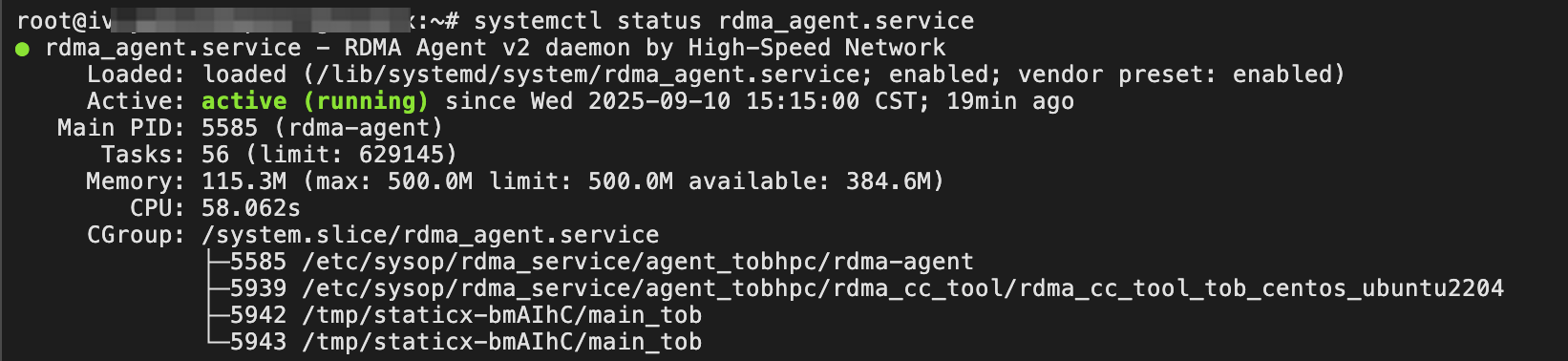
- Execute the following command to check the status of rdma_agent.service.
- systemctl status rdma_agent.service
- If active (running) is returned, the service is running normally.
-
- During normal operations of the service, execute the following commands to check whether the configuration items delivered by rdma_agent meet your expectations.
- /etc/sysop/rdma_service/agent_tobhpc/rdma-agent-check &> /dev/nullecho $?
- If a number that is not 0 is returned, this indicates that an unexpected configuration exception occurs.
-

- Execute the following commands to view the rdma_agent version.
- Manage rpm package:
- rpm -qa | grep rdma-agent
- Manage deb package:
- dpkg -l | grep rdma-agent
- Execute the following command to check whether the network congestion control configuration is correct.
- tail /var/log/rdma/rdma_cc_tool.log
Version release notes
RDMA Agent version | Release content |
1.1.11 |
|
1.1.10 |
|
1.1.9 | Supported: the NPU model. |
1.1.8 |
|

FAQ
How can I determine whether to update the version of the current rdma-agent component?
You can check the current component version by executing the following commands. Note that version 1.0.x does not support persistent configuration processes or the new version algorithm for congestion control. As a result, if your current component version is 1.0.x, configuration failures, connectivity issues, or performance problems may occur in some scenarios. Therefore, we strongly recommend that you upgrade the version to 1.1.11 or later. For upgrade methods, refer to Installing RDMA Agent.
# Velinux/Ubuntu/Debian
dpkg -l | grep "rdma-agent"
# RockyLinux/CentOS
rpm -qa | grep "rdma-agent"
Last updated: 2025.12.03 15:45:52
All rights reserved © Beijing Volcano Engine Technology Co., Ltd2024
