Growth Analysis (Privatization)
Growth Analysis (Privatization)


- Documentation
 Growth Analysis (Privatization)Developer GuideData Access: SDK and EcologyServer Side AccessJava SDK
 Copy page
 Download PDFCopy pageDownload PDF
Java SDK to simplify the complexity of server level event tracking. By using the SDK, you can focus solely on the event tracking scheme and not on specific reporting details.
1.1 SDK Integration
If you need to use Java SDK, you first need to import the corresponding jar in the pom file:
<dependency>

  <groupId>com.datarangers</groupId>

  <artifactId>datarangers-sdk-core</artifactId>

//latest version is recommended, configuration example: 1.5.12-release.(Note that -release is part of the verison name)
  <version>{version}</version>

</dependency>
If using the SpringBoot framework, we provide a packaged starter package that you can include in your pom as follows:
<dependency>

   <groupId>com.datarangers</groupId>

   <artifactId>datarangers-sdk-starter</artifactId>

//latest version is recommended, configuration example: 1.5.12-release.(Note that -release is part of the verison name)
   <version>{version}</version>

</dependency>
If you don't have access to Volcano's maven repository, or don't have a jar package management tool, you can download offline packages from github, or build offline packages yourself: mvn package -DskipTests , the relevant jar path is:
datarangers-sdk-core/target/datarangers-sdk-core-{version}-release-jar-with-dependencies.jardatarangers-sdk-starter/target/datarangers-sdk-starter-{version}-release-jar-with-dependencies.jar
Version is the version number of the sdk. It is recommended to use the latest version (> = 1.5.7). Configuration example: 1.5.12 -release. (Note that -release is also part of the release.) For the latest version of SDK, please go to: github open source repository
BytePlus warehouse address:
<repositories>
  <repository>
    <id>bytedance-volcengine</id>
    <name>bytedance Volcengine</name>
    <url>https://artifact.bytedance.com/repository/Volcengine/</url>
  </repository>
</repositories>
tip
The above url: https://artifact.bytedance.com/repository/Volcengine/can be used directly for maven configuration, and does not support direct browser open access. If you wish to view the full repository through a browser, use your browser to open the url containing the subdirectories: https://artifact.bytedance.com/repository/Volcengine/com/datarangers/.
1.2 Introduction to SDK reporting mode
The Growth Analytics SDK supports multiple reporting modes, and you need to choose a usage mode first.
- HTTP mode: wide range of use, simple deployment, high QPS. The SDK reports directly through the HTTP interface.
- KAFKA mode (only supports privatization): suitable for the same network environment, simple deployment, high QPS, and high stability. The SDK reports directly through Kafka.
Pattern | Usage scenario | Deployment complexity | Reliability | Performance reporting | Remarks |
|---|---|---|---|---|---|
HTTP | Most scenarios can be used, and if the cross-network latency is relatively high, batch mode can be used. | simple | high | High, support batch reporting. | If you refer to the section "Best Practices" -- > "Viewing Reporting Delays" to view the reported delays. |
KAFKA | The same network, it is recommended to use this mode. | simple | very high | high | SDK version > = 1.5.6, privatization version 4.1 (inclusive) is supported. |
It is recommended to use KAFKA mode for reporting on the same network, and HTTP is recommended for other scenarios. At the same time, logagent is used to make up for failed data due to network jitter and other reasons.
1.3 SDK Initialization
Before using the SDK, you need to initialize the AppEventCollector and then report it using the interface it provides.
1.3.1 Initialization in the SpringBoot framework
It is recommended to use the configuration method for initialization.
1.3.1.1 HTTP mode
Datarangers.sdk.mode = httpmeans to use HTTP mode.
Privatization configuration
Configure the domain.
#privatization configuration example
#Use http reporting mode
datarangers.sdk.mode=http
#SDK report address, starting with http://or https://
datarangers.sdk.domain=${SDK_DOMAIN}

#Number of asynchronous threads, which can be adjusted when there is not enough concurrency
#datarangers.sdk.threadCount=20

#[http config]
The unit is milliseconds
#datarangers.sdk.httpConfig.requestTimeout=10000
#datarangers.sdk.httpConfig.connectTimeout=10000
#datarangers.sdk.httpConfig.socketTimeout=20000

The unit is s.
#datarangers.sdk.httpConfig.keepAliveTimeout=30
If the cross-network latency is relatively large, or the pursuit of higher QPS, batch reporting can be initiated.
# [batch]
#Use the batch method
datarangers.sdk.sendBatch=true
#Number of batches
#datarangers.sdk.batchSize=20
#datarangers.sdk.waitTimeMs=100
1.3.1.2 KAFKA mode
Datarangers.sdk.mode = kafka indicates the use of KAFKA mode, which is only supported in privatization.
#privatization configuration example
#Use the mode reported by Kafka
datarangers.sdk.mode=kafka
datarangers.sdk.kafka.bootstrapServers={ip1}:9192,{ip2}:9192

#Kafka producer properties can be configured here
#datarangers.sdk.kafka.properties.retries=3
- Configure
bootstrapServersas the bootstrapServers address of kafka. - Other kafka parameter configurations, you can use the form of
datarangers.sdk.kafka.properties.xxx = xxxconfiguration, kafkaProducer parameter reference: Kafka official website documentation.
1.3.2 Initialized in the Spring container
It is recommended that initialization operations be assembled into beans and managed by the Spring container. It can be used by injecting it into the class in use.
Using the XML configuration, inject the bean:
<bean name="appEventCollector" class="com.datarangers.collector.AppEventCollector">

    <constructor-arg name="appType" value="app"/>

    <constructor-arg name="properties" ref="dataRangersSDKConfigProperties"/>

</bean>

<bean name="mpEventCollector" class="com.datarangers.collector.AppEventCollector">

    <constructor-arg name="appType" value="mp"/>

    <constructor-arg name="properties" ref="dataRangersSDKConfigProperties"/>

</bean>

<bean name="webEventCollector" class="com.datarangers.collector.AppEventCollector">

    <constructor-arg name="appType" value="web"/>

    <constructor-arg name="properties" ref="dataRangersSDKConfigProperties"/>
</bean>

<!-- sdkMode config -->
<bean name="sdkMode" class="org.springframework.beans.factory.config.FieldRetrievingFactoryBean">
    <property name="staticField" value="com.datarangers.config.SdkMode.HTTP" />
</bean>

<bean name="dataRangersSDKConfigProperties" class="com.datarangers.config.DataRangersSDKConfigProperties">

    <property name="domain" value="{domain}"/>

    <property name="mode" ref="sdkMode"/>

    <property name="httpTimeout" value="500"/>

    <property name="appKeys">
      <map>
        <entry key="${appId}" value="${appKey}"/>
      </map>
    </property>
</bean>
Use annotations to inject beans:
@Configuration
@EnableAsync
@EnableConfigurationProperties(DataRangersSDKConfigPropertiesInfo.class)
public class DataRangersEnableAutoConfiguration {

  @Autowired
  private DataRangersSDKConfigPropertiesInfo dataRangersSDKConfigPropertiesInfo;

  @Bean(name = "appEventCollector")
  public EventCollector defaultAppCollector(Callback callback) {
    return new AppEventCollector("app", dataRangersSDKConfigPropertiesInfo, callback);
  }

  @Bean(name = "webEventCollector")
  public EventCollector defaultWebCollector(Callback callback) {
    return new AppEventCollector("web", dataRangersSDKConfigPropertiesInfo, callback);
  }

  @Bean(name = "mpEventCollector")
  public EventCollector defaultMpbCollector(Callback callback) {
    return new AppEventCollector("mp", dataRangersSDKConfigPropertiesInfo, callback);
  }

  @Bean
  @ConditionalOnMissingBean(Callback.class)
  public Callback callback() {
    return new LoggingCallback(dataRangersSDKConfigPropertiesInfo.getEventSavePath(),
        "error-" + dataRangersSDKConfigPropertiesInfo.getEventSaveName(),
        dataRangersSDKConfigPropertiesInfo.getEventSaveMaxFileSize());
  }
}
1.3.3 Manually initialized in a normal Java program
DataRangersSDKConfigProperties properties = new DataRangersSDKConfigProperties();
//setting mode
properties.setMode(SdkMode.HTTP);

//Set the sdk domain.  Be careful to set it to true parameters
properties.setDomain(System.getenv("SDK_DOMAIN"));

//Initialize collector
EventCollector appEventCollector = new AppEventCollector("app", properties);
EventCollector webEventCollector = new AppEventCollector("web", properties);
EventCollector mpEventCollector = new AppEventCollector("mp", properties);
1.3.4 SDK Configuration Reference
AppEventCollector uses two parameters: appType and properties.
appType only supports:
- App, upload data related to the mobile end of the application at the server level
- Web, upload data related to the web side of the application at the server level
- MP, upload data related to the application Mini Program at the server level
The properties prefix is datarangers.sdk.
Configuration module | Configuration item | Meaning | Remarks |
|---|---|---|---|
Does not involve | mode | Reporting mode (case-insensitive): http, kafka | After the Java SDK version > = 1.5.6 version, it is recommended to use the new configuration. When mode and save coexist, mode shall prevail. |
env | Enumeration type, privatization means privatization, not required, SDK can automatically determine according to the configuration. | without | |
sync | Boolean type, synchronous asynchronous, default to false, using asynchronous reporting. | without | |
save | Boolean variable indicating whether to save to a local file. | This configuration is deprecated after the > = 1.5.6 version, using the | |
HTTP | domain | DataFinder's domain name or ip, supports http and https, for example https://{specific domain address} . | When using HTTP reporting mode, it must be configured. |
threadCount | In the number of core threads in the asynchronous thread pool, the default is 20. | without | |
httpConfig.requestTimeout | The request timed out by HTTP is in milliseconds, the default is 10000. | without | |
httpConfig.connectTimeout | The connection timeout sent by http is in milliseconds, and the default is 10000. | without | |
httpConfig.socketTimeout | The socket timeout sent by http is in milliseconds, and the default is 20000. | without | |
httpConfig.keepAliveTimeout | The keepAliveTimeout of the http connection pool, in seconds, defaults to 30. | without | |
httpConfig.trustDisable | true/false。 Whether to disable two-way authentication. If an SSL-related error occurs, it is recommended to configure the certificate first, or configure it to true to disable two-way authentication. Default is true | without | |
httpConfig.customKeyTrustEnable | True indicates the certificate path and password of the custom client, the default is false | without | |
httpConfig.keyMaterialPath | keyMaterial path | without | |
httpConfig.keyPassword | Key Password | without | |
httpConfig.storePassword | Store password | without | |
httpConfig.trustMaterialPath | trustMaterial path | without | |
httpConfig.trustStrategy | Trust strategy.
| ||
sendBatch | Boolean type, indicating whether to enable bulk reporting. Default is false, do not use batch. | Batch reporting is supported from 1.5.7 version (inclusive). | |
batchSize | Number of batch reports | ||
waitTimeMs | Batch report, when the batchSize is insufficient, the maximum waiting time | ||
appKeys.${SDK_APP_1} | Report the set appkeys, you can set multiple. Several possible ways are:
| Be careful to replace with real app_id and appkey. | |
eventCountFileDisable | Indicates whether to disable the count.log file, the default is false; set to true, there will be no count.log | ||
HTTP (OpenAPI) | openapiConfig.domain | OpenAPI domain name, privatization scenario without configuration. | No configuration is required. |
openapiConfig.ak | OpenAPI AK, privatization scenarios do not require configuration. | ||
openapiConfig.sk | OpenAPI's sk, privatization scenario requires no configuration. | ||
FILE | eventSaveName | The file name to save the log, you need to ensure the write permission of the file, the default is datarangers.log. | without |
eventSavePath | The file path to save the log, you need to ensure write permission and create file permission, the mode is logs/ | without | |
eventSaveMaxFileSize | Represents the maximum file size of the log file to be saved, in MB, with a default of 100. | without | |
eventCountFileDisable | Indicates whether to disable the count.log file, the default is false; set to true, there will be no count.log | ||
eventFilePaths | Represents the location of the log file that needs to be saved, as a string array, each value in the array represents a path, and the user writes the log file to a different folder, which can be used with multiple LogAgent instances. tip If the array is defined, eventSavePath will not take effect. | without | |
eventSaveMaxDays | The maximum number of days to keep the log file, beyond this time the log will be deleted, the default is -1, that is, do not delete the file. Therefore, when running for a long time, in order to avoid taking up too much disk, you need to delete the log file yourself, or configure a reasonable value, such as 7. | without | |
KAFKA | bootstrapServers | The address of Kafka. | Configuration is required to use the Kafka pattern. |
properties | Is a map, other Kafka properties that need to be configured. Parameter reference of kafkaProducer: Kafka official website documentation | ||
verify | verify.url | Server level event tracking url address detected in real time. | SDK version > = 1.5.7 |
1.4 Verify the configuration
1.4.1 View the startup log
Startup prints the following log, which can be monitored to determine if the configuration is as expected. Mainly focus on sdkMode, domain, headersand other configurations.
sdk config properties:
enable: true
env: PRIVATIZATION
sync: false
sdkMode: HTTP
domain: ...
headers: {...}
threadCount: 20
queueSize: 10240
sendBatch: false
batchSize: 20
waitTimeMs: 100
httpConfig: {...}
eventSavePath: logs/
eventSaveName: datarangers.log
eventFilePaths: [logs/]
eventSaveMaxFileSize: 100
eventSaveMaxDays: -1
openapiConfig: {...}
kafka: null
1.4.2 HTTP Mode Debug Validation
Check the configuration or automatic log to make sure the configured sdkModeis HTTPand check:
- Check whether there is data in the datarangers.log file. If there is event tracking data, it is an exception. Please check whether the switch is correct or whether the configuration takes effect.
- Check the error-datarangers.log file, and check for error messages if there is data present
Debug Validation Request/Response Messages
Debug breakpoint HttpUtils class 167 lines (different versions may have different lines, but the logic is to get request and response messages)//The following screenshot is 1.5.3 version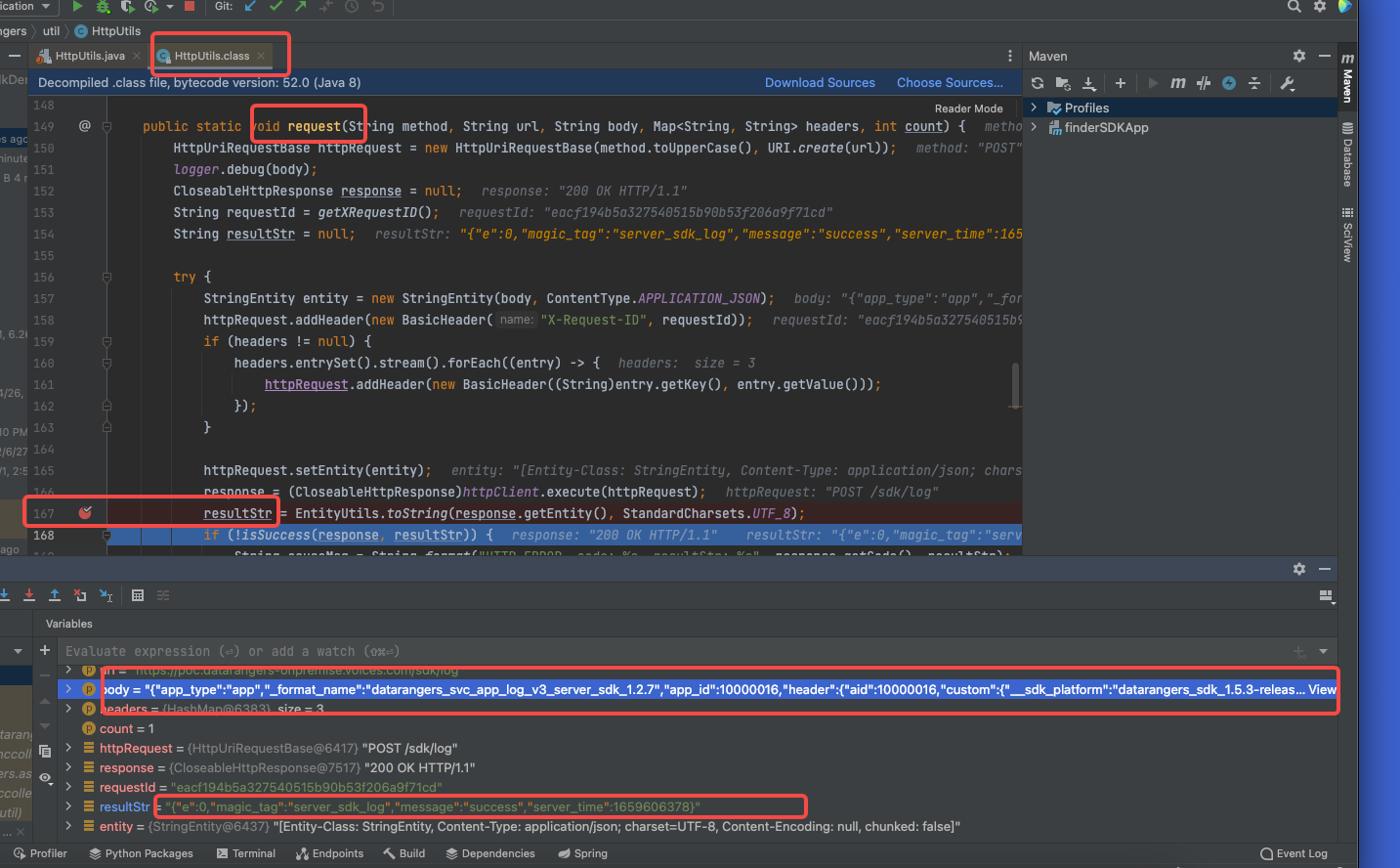
resustStr is the response message, where if e is not 0, it means that the reporting failed, otherwise it means that the reporting was successful
The body is a request message. If the response message learns that there is an error, you can get it to see if the data format is correct.
1.4.3 HTTP mode curl authentication
You can use the curl command to see if it can be reported normally:
Note: Modify the local_time_msand datetimefields in the script to the current time .
Privatized environment
The domain is replaced with the corresponding configuration, app_id also modified to the corresponding configuration.
curl --location --request POST '${domain}/sdk/log' \
--header 'User-Agent: DataRangers Java SDK' \
--header 'Content-Type: application/json' \
--data '{
    "app_type": "app",
    "_format_name": "datarangers_svc_app_log_v3_server_sdk_1.2.7",
    "app_id": 10000000,
    "header": {
        "custom": {
            "client": "fdaf",
            "__sdk_platform": "datarangers_sdk"
        },
        "device_id": 0,
        "timezone": 8,
        "tz_offset": 28800,
        "tz_name": "Asia/Shanghai",
        "user_unique_id": "test_sdk_user",
        "app_id": 10000000
    },
    "user_unique_id": "xxxx",
    "event_v3": [
        {
            "event": "补贴查询",
            "params": {
                "cardNum": "cardNum",
                "year": "2021"
            },
            "local_time_ms": 1637734994778,
            "datetime": "2021-12-15 14:23:14"
        }
    ]
}'
The following return indicates successful reporting:
{
    "e":0,
    "magic_tag":"server_sdk_log",
    "message":"success",
    "server_time":1664352669
}
1.4.4 KAFKA mode (only supports privatization)
Check the kafka topic: sdk_origin_event if there is any data, refer to the documentation for how to use kafka:
Kafka Subscription Event Tracking Data (Privatization)
1.5 Using the SDK
When using it, you need to inject beans first. There are three types of beans, as follows:
// App
@Resource(name = "appEventCollector")
private EventCollector appEventCollector;

// Web
@Resource(name = "webEventCollector")
private EventCollector webEventCollector;

//Mini Program
@Resource(name = "mpEventCollector")
private EventCollector mpEventCollector;
Or customize an EventCollector. For the definition method, please refer to the "SDK Initialization" chapter.
If you have completed the injection, you can call the bean to send the event. The interface sent is:
/** * Function description: Send events asynchronously * *@param appId application id *@param custom user defined public parameters *@param eventName event name *@param eventParams event parameter *@param userUniqueId user uuid *@return: void *@date: 2020/8/26 12:24 */
void sendEvent(String userUniqueId, int appId, Map<String, Object> custom, String eventName, Map<String, Object> eventParams);

/**  * Function description: Send events asynchronously  *  *@param  appId application id  *@param  custom user defined public parameters  *@param  eventName event name  *@param  eventParams event parameter  *@param  userUniqueId user uuid  *@param  localTimeMs Event time, milliseconds  *@return:  void  *@date:  2020/8/26 12:24  */
void sendEvent(String userUniqueId, int appId, Map<String, Object> custom, String eventName, Map<String, Object> eventParams,long localTimeMs);

/** * Function description: Send events in batches * *@param The public property of the header event, which can be built by calling HeaderV3.Builder ().build () *@param Events event array. Generally, it is not recommended to build the event array yourself. We recommend using the EventsBuilder class to construct multiple events and calling the build method to generate the event array. *@return: void *@date: 2020/12/25 15:57 */
void sendEvents(Header header, List<Event> events);

/** * Function description: Send a single event * *@param The public property of the header event, which can be built by calling HeaderV3.Builder ().build () *@param eventName event name *@param eventParams event parameter *@return: void *@date: 2020/9/28 22:00 */
void sendEvent(Header header, String eventName, Map<String, Object> eventParams);

/**  * Function description: Send a single event  *  *@param  The public property of the header event, which can be built by calling HeaderV3.Builder ().build ()  *@param  eventName event name  *@param  eventParams event parameter  *@param  localTimeMs Event time, milliseconds  *@return:  void  *@date:  2020/9/28 22:00  */
void sendEvent(Header header, String eventName, Map<String, Object> eventParams,long localTimeMs);

/** * Function description: Send events in batches * *@param The public property of the header event, which can be built by calling HeaderV3.Builder ().build () *@param eventName event name array, which needs to be the same length as the eventParams array *@return: void *@date: 2020/12/25 15:59 */
void sendEvent(Header header, List<String> eventName, List<Map<String, Object>> eventParams);

/** * Function description: Set the profile attribute for the user of userUniqueId * *@param appId        app id *@param userUniqueId user id *@param eventParams user properties to be set *@return: void *@date: 2020/12/23 10:43 */

/** * Function description: Set the user's properties *@param appId  app id *@param userUniqueId uuid *@param The user properties that params needs to set *@return: void *@date: 2020/12/25 16:11 */
void profileSet(String userUniqueId, int appId, Map<String, Object> eventParams);

/** * Function description: Set user properties, do not set if they exist, and create if they do not exist. It is suitable for first-time related user properties, such as first access time, etc. *@param appId  app id *@param userUniqueId uuid *@param The user properties that params needs to set *@return: void *@date: 2020/12/25 16:11 */
void profileSetOnce(String userUniqueId, int appId, Map<String, Object> eventParams);

/** * Function description: Set user properties of numeric types, which can be accumulated *@param appId  app id *@param userUniqueId uuid *@param The user properties that params needs to set *@return: void *@date: 2020/12/25 16:11 */
void profileIncrement(String userUniqueId, int appId, Map<String, Object> eventParams);

/** * Function description: Set the user properties of the List type, which can be continuously added to the List *@param appId  app id *@param userUniqueId uuid *@param The user properties that params needs to set *@return: void *@date: 2020/12/25 16:11 */
void profileAppend(String userUniqueId, int appId, Map<String, Object> eventParams);

/** * Function description: Delete user's attributes *@param appId  app id *@param userUniqueId uuid *@param Params The user property name to delete *@return: void *@date: 2020/12/25 16:11 */
void profileUnset(String userUniqueId, int appId, List<String> params);

/** * Function description: Set up business objects * *@param appId app id *@param Name The name of the business object *@param The class of the items business object needs to inherit the Items class, note *@return: void *@date: 2020/12/23 10:47 */
void itemSet(int appId, String name, List<Item> items);

/** * Function description: Delete the properties of the item *@param appId *@param id *@param name *@param Params The item property to delete *@return: void *@date: 2020/12/25 16:13 */
void itemUnset(int appId, String id, String name, List<String> params);
1.6 SDK demo
Reference code:
https://github.com/volcengine/datarangers-sdk-java/tree/main/datarangers-sdk-example
2.1 Sending ordinary events
@Resource(name = "appEventCollector")
private EventCollector appEventCollector;

appEventCollector.sendEvent("uuid2", 10000000, null, "test_event_java_sdk", new HashMap<String, Object>() {{
    put("date_time", LocalDateTime.now().format(DateTimeFormatter.ofPattern("yyyyMMdd")));
    put("current_time", LocalDateTime.now().format(DateTimeFormatter.ofPattern("yyyyMMdd HH:mm:ss")));
}});
2.2 Setting user properties
User attributes need to be created in the system before being reported
eventCollector.profileSet("uuid-1", 10000028, new HashMap<String, Object>() {{
    put("profile_1", "param_1");
    put("profile_2", "param_2");
    put("profile_3", "param_3");
    put("profile_4", "param_4");
}});
2.3 Setting Item Properties
The Item attribute needs to be created in the system before being reported
warning
If you create a business object (Item), the business object name ( property name ) is named in the hump way, it will be automatically converted to underscore format when reporting with the Java SDK. For example, you create a business object named FirstName that is converted to a First_Name when the data is reported. If you want to keep the hump format, you can change the HTTP API way data is reported.
The built-in id attribute of the business object, the corresponding field name is called item_id, so there is no need to define an id attribute.
List<Item> items = new ArrayList<>();
items.add(new BookItem("1000", "book").setName("Java").setPrice(100).setPublishDate(LocalDate.now()).setAuthors(author).setCategory("computer"));
items.add(new BookItem("1002", "book").setName("PHP").setPrice(100).setPublishDate(LocalDate.now()).setAuthors(author).setCategory("computer"));
eventCollector.itemSet(10000028, "book", items);
2.4 Send events carrying items
List<Item> items = new ArrayList<>();
items.add(new BookItem("1000", "book"));
items.add(new BookItem("1002", "book"));
items.add(new PhoneItem("1002", "phone"));
eventCollector.sendEvent("user-001", 10000028, null, "set_items", new HashMap<String, Object>() {{
    put("param1", "params");
    put("param2", items.get(0));
    put("param3", items.get(1));
    put("param4", items.get(2));
}});
2.5 Reporting anonymous user events
If you need to use the server to report anonymous user event information, you need to set the value of the user_unique_id to " (empty string), and then set other device information that can be associated, such as device_id, web_id, anonymousId. If the user logs in, can get user_unique_id, and want to log in after the real name behavior can be associated with the behavior before anonymity, then after setting the correct user_unique_id, but also need to bring the time set anonymous device_id, web_id or anonymousId.
2.5.1 Use device_id/web_id to report anonymous user events
When using appEventCollector , deviceId is device_id, when using webEventCollector, mpEventCollector, deviceId is web_id.
Map<String, Object> eventParams = new HashMap<>();
eventParams.put("date_time", new SimpleDateFormat("yyyyMMdd").format(new Date()));
eventParams.put("event_param1", "value1");

//app/web/mp are all deviceId here.
Long deviceId = 10000L;
Header header = new HeaderV3.Builder()
        .setAppId(appId)
        .setDeviceId(deviceId)
        .setUserUniqueId("")
        .build();

//app/web/mp3 Use different EventCollectors
// app
appEventCollector.sendEvent(header,"test_app_event_anonymous", eventParams, System.currentTimeMillis());

//After the real name, associate the anonymous behavior, u1 will associate the anonymous user behavior set before (associate according to deviceId)
Header header2 = new HeaderV3.Builder()
        .setAppId(appId)
        .setDeviceId(deviceId)
        .setUserUniqueId("u1")
        .build();
appEventCollector.sendEvent(header2,"test_app_event_anonymous", eventParams, System.currentTimeMillis());

// web
webEventCollector.sendEvent(header,"test_web_event_anonymous", eventParams, System.currentTimeMillis());

// mp
mpEventCollector.sendEvent(header,"test_mp_event_anonymous", eventParams, System.currentTimeMillis());
2.5.2 Use anonymousId to report anonymous user events
User device_id/web_id are long type, if the user's custom anonymous ID is string, then device_id/web_id can not be satisfied, you can use anonymousId string type field to report.
warning
AnonymousId only supports web/mp, that is, to use webEventCollector or mpEventCollector to report.
Map<String, Object> eventParams = new HashMap<>();
eventParams.put("date_time", new SimpleDateFormat("yyyyMMdd").format(new Date()));
eventParams.put("event_param1", "value1");

String anonymousId="test_anonymousId1";
Header header = new HeaderV3.Builder()
        .setAppId(appId)
        .setAnonymousId(anonymousId)
        .setUserUniqueId("")
        .build();
// web
webEventCollector.sendEvent(header,"test_web_event_anonymous", eventParams, System.currentTimeMillis());

//After the real name, associate the anonymous behavior, u1 will associate the anonymous user behavior set before (associate according to anonymousId)
Header header2 = new HeaderV3.Builder()
        .setAppId(appId)
        .setAnonymousId(anonymousId)
        .setUserUniqueId("u1")
        .build();
webEventCollector.sendEvent(header2,"test_web_event_anonymous", eventParams, System.currentTimeMillis());

// mp
mpEventCollector.sendEvent(header,"test_mp_event_anonymous", eventParams, System.currentTimeMillis());
2.6 Validate event tracking data
Verify the metadata first, and then check it in the behavioral scrutiny.
Metadata: "data management" > "metadata management".
2.6.1 Validation event
After the event is successfully sent, if it is reported for the first time in a new event, it may take up to 5 minutes to check. First check whether the metadata is normal:
- Check if there are any reported events under "Data Management" > "Metadata Management" > "General Events".
- Under "Data Management" > "Metadata Management" > "Event Properties", check whether there are reported attributes, and whether the type of attribute and the event associated with the attribute are correct.
When the event exists in the metadata, it can be directly checked by the user.
2.6.2 Validate user properties
(1) First verify whether the user attribute exists in "Data Management" > "Metadata Management" > "User Attributes", and check whether the attribute type meets expectations.
(2) Then in "Analysis Tools" > "User Analysis" > "User Detail", click and enter one of the user details pages to view the recently reported user attributes.
- After the user attributes are reported, you can view the corresponding user attributes in the most recent profile of the user.
- After events related to user properties are also reported synchronously, you can view the corresponding user properties in the public properties list at the bottom right.
However, after reporting user attributes, be sure to report an event, otherwise the user may not be able to find the public attribute list here, because the user scrutiny is associated with the event.
2.6.3 Validate business objects
First check whether the business object is bound to the event under "Data Management" > "Business Objects". Then you can query in the behavior review, and the item_id will be displayed in the behavior review.
If you want to view the attribute values of business objects, you can check them in "Analysis Tools" > "Advanced Analysis" > "Business Object Analysis".
2.6.4 event tracking
Select "server level event tracking" on "Data Management" > "General Events" > "Verification Event Tracking", then enter the user_unique_id to be detected, and then set the url parameter to verified.url.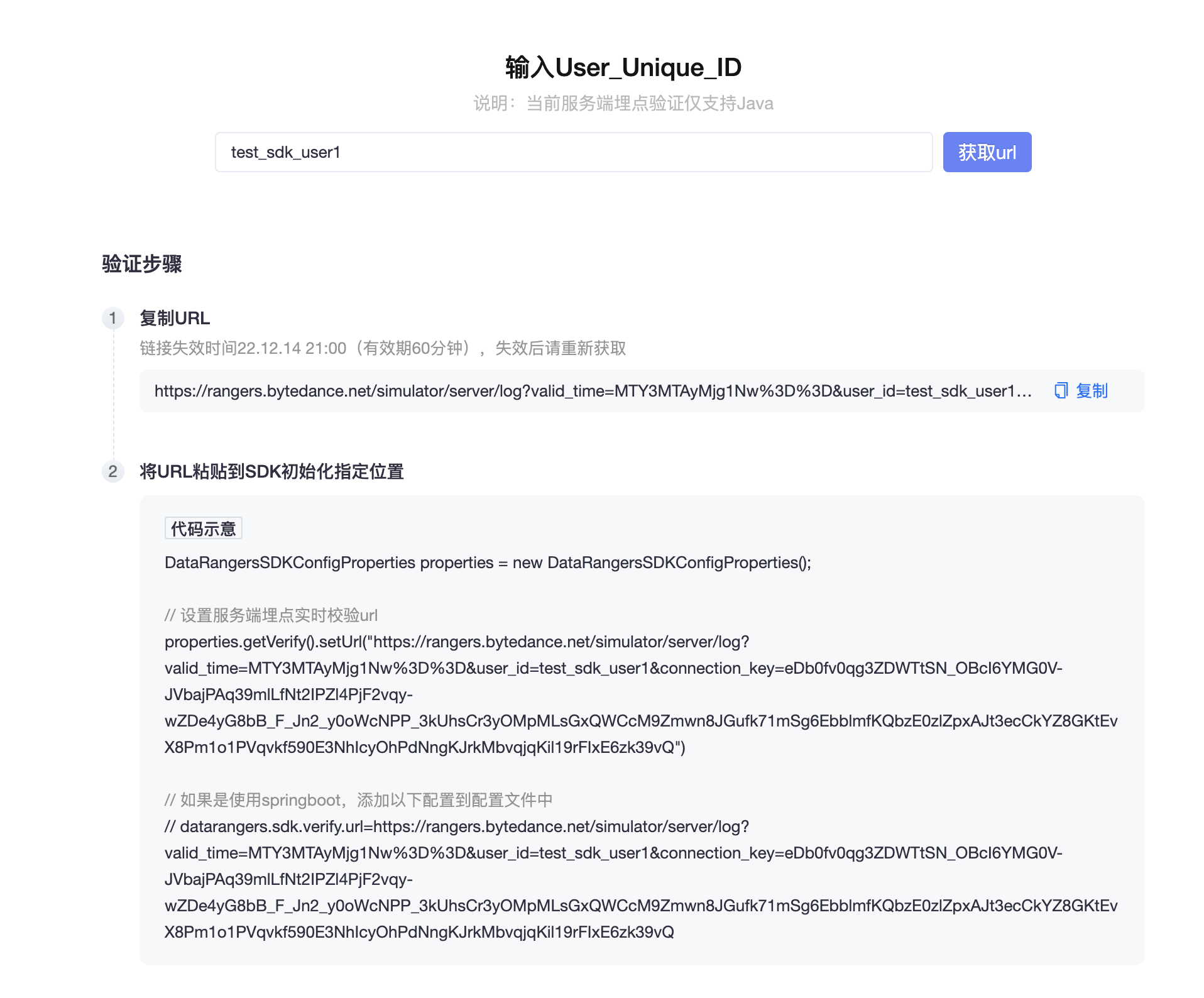
When the user's event tracking data is reported, you will see the reported content data.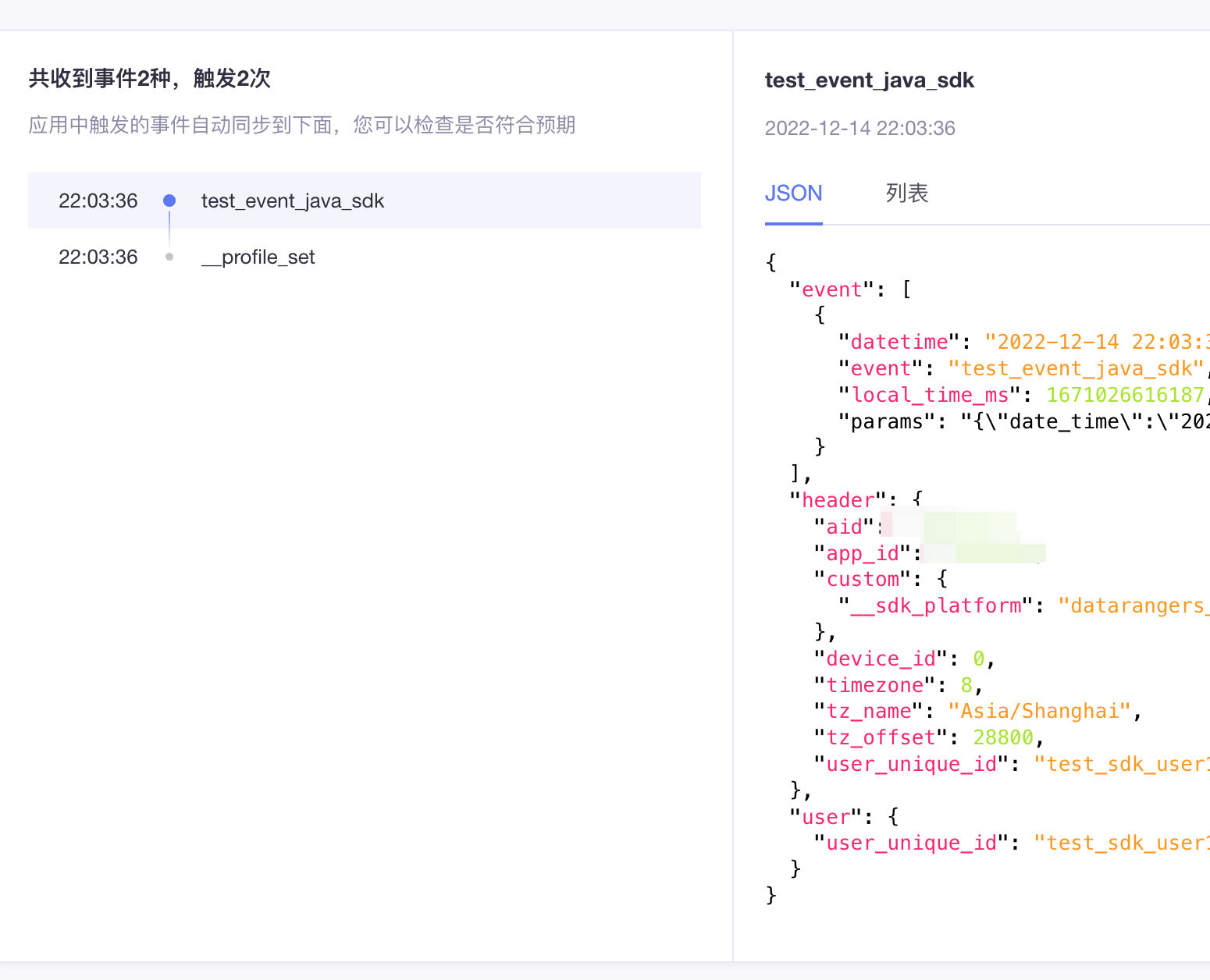
warning
- Note that the URL valid period is only 60 minutes.
- SDK version > = 1.5.7.
- If the URL is wrong or expired, the real-time detection will not be reported or failed, but it will not affect the normal event tracking report.
- If you can't view the content data on the page, you can check the log of the real-time event tracking report first:
- Search for the keywords ERROR logs, as well as "verify request" and "verify config".
- The related class reported in real time is
com.datarangers.sender. VerifySender, which can be debugged. - There is no error log, but the real-time report does not display the content. You can refresh the next page to regenerate the URL.
2.6.5 Attention
If the data cannot be found on the page, you can try to refresh the page.
2.7 Importing historical data
Note: The [Privatization] version can be viewed in real time
If the client side time of the data exceeds seven days, it cannot be imported under normal circumstances. If you need to import historical data, you need to add the identity __is_historyof the historical data in the customfield of the header, and the attribute value is set to string "true".
The code example is as follows:
appEventCollector.sendEvent(userUniqueId, appId, new HashMap<String, Object>() {{
                    put("__is_history","true");
                }}, "test_event",
                new HashMap<String, Object>() {{
                    put("date_time", new SimpleDateFormat("yyyyMMdd").format(new Date()));
                    put("current_time",
                            new SimpleDateFormat("yyyyMMdd HH:mm:ss").format(new Date()));
                }},
                1637734994778);
3.1 Using custom local_time_ms
Datafinder analyzes the event occurrence time, which is calculated based on the occurrence time of the reported event on the client (i.e. local_time_ms). For example, if a user purchases an event at 2022-09-01 23:58:00, but the event is not actually received by Datafinder until 2022-09-02 00:03:00 due to network latency or other reasons, then at the time of analysis, the event is still considered to have occurred 2022-09-01 time, not 2022-09-02.
Use interface:
/**  * Function description: Send events asynchronously  *  *@param  appId application id  *@param  custom user defined public parameters  *@param  eventName event name  *@param  eventParams event parameter  *@param  userUniqueId user uuid  *@param  localTimeMs Event time, milliseconds  *@return:  void  *@date:  2020/8/26 12:24  */
void sendEvent(String userUniqueId, int appId, Map<String, Object> custom, String eventName, Map<String, Object> eventParams,long localTimeMs);

/**  * Function description: Send a single event  *  *@param  The public property of the header event, which can be built by calling HeaderV3.Builder ().build ()  *@param  eventName event name  *@param  eventParams event parameter  *@param  localTimeMs Event time, milliseconds  *@return:  void  *@date:  2020/9/28 22:00  */
void sendEvent(Header header, String eventName, Map<String, Object> eventParams,long localTimeMs);
3.2 High-performance scenarios
If the user already has their own event tracking, or their own server level services are particularly large, in order to avoid each service integrating the DataFinder SDK, the business can uniformly report their business tracking to a kafka topic, and then start a new integrated SDK service to consume business tracking information. Use the API provided by the SDK to report the event tracking information to the DataFinder. The process is as follows:

In this case, users usually report all the information about event tracking, including the event tracking time, to Kafka. If the local_time_ms is not set when using the server level SDK, the event occurrence time will be considered as the SDK processing time, which is generally different from the event tracking occurrence time. When the system is busy and the kafaka topic lags, this difference is even greater, causing the amount of events seen on the DataFinder at the same time to vary more than expected.
3.3 Check the reporting delay
The server level is reported to the applog service, which can be viewed on the granafa of the service:
http://{IP}:{port}/d/applog/applog?refresh=1m&orgId=1The average delay can be obtained by curl.
warning
Domain needs to be replaced with real values; app_id, user_unique_id are also replaced with real app_id, user_unique_id.
You can execute the following commands multiple times:
curl -o /dev/null -s -w 'Total: %{time_total}s\n'   --location --request POST '${domain}/sdk/log' \
--header 'User-Agent: DataRangers Java SDK' \
--header 'Content-Type: application/json' \
--data '{
    "app_type": "app",
    "_format_name": "datarangers_svc_app_log_v3_server_sdk_1.5.6",
    "app_id": 10000000,
    "header": {
        "aid": 10000000,
        "custom": {
            "client": "fdaf",
            "__sdk_platform": "datarangers_sdk_1.5.6-release"
        },
        "device_id": 0,
        "timezone": 8,
        "tz_offset": 28800,
        "tz_name": "Asia/Shanghai",
        "user_unique_id": "dkqfn5ku9zk8",
        "app_id": 10000000
    },
    "user_unique_id": "xxxx",
    "event_v3": [
        {
            "event": "补贴查询",
            "params": {
                "cardNum": "cardNum",
                "year": "2021"
            },
            "local_time_ms": 1637734994778,
            "datetime": "2021-12-15 14:23:14"
        }
    ]
}'
More ways to curl:
curl -w "@curl-format.txt" -o /dev/null -s  --location --request POST '${domain}/sdk/log' \
--header 'User-Agent: DataRangers Java SDK' \
--header 'Content-Type: application/json' \
--data '{
    "app_type": "app",
    "_format_name": "datarangers_svc_app_log_v3_server_sdk_1.5.6",
    "app_id": {replace with the real app_id},
    "header": {
        "custom": {
            "client": "fdaf",
            "__sdk_platform": "datarangers_sdk_1.5.6-release"
        },
        "device_id": 0,
        "timezone": 8,
        "tz_offset": 28800,
        "tz_name": "Asia/Shanghai",
        "user_unique_id": "{replace with the real user_unique_id}",
        "app_id": {replace with the real app_id}
    },
    "user_unique_id": "xxx",
    "event_v3": [
        {
            "event": "补贴查询",
            "params": {
                "cardNum": "cardNum",
                "year": "2021"
            },
            "local_time_ms": 1637734994778,
            "datetime": "2021-12-15 14:23:14"
        }
    ]
}'
The content of the curl-format.txt file is:
time_namelookup:  %{time_namelookup}s\n
            time_connect:  %{time_connect}s\n
     time_appconnect:  %{time_appconnect}s\n
    time_pretransfer:  %{time_pretransfer}s\n
       time_redirect:  %{time_redirect}s\n
  time_starttransfer:  %{time_starttransfer}s\n
                     ----------\n
          time_total:  %{time_total}s\n
3.4 How to handle data that fails to be sent
By default, the data that fails to be sent will be written to the error-datarangers.log file in the eventSavePath (default is logs/) directory. The following is the general processing method:
- If partial failure is tolerated, it will not be dealt with.
- Cooperate with the provided logagent (only privatized, contact the account manager to obtain) to monitor failed files and make up for failed reports.
- Custom failure handling logic, such as sending failed messages to another kafka-topic, and then compensating for consumption after the system is restored.
Spring injection callback:
@Configuration
public class SdkConfiguration {

//  @Bean
  public Callback callback() {
    return new Callback() {

      @Override
      public void onFailed(FailedData failedData) {
      // handle  failed data
      //cause exception is exception information
      //message is the complete message reported
        System.out.println(failedData.getCause());
        System.out.println(failedData.getException());
        System.out.println(failedData.getMessage());
      }
    };
  }
}
Or set one when initializing the collector:
EventCollector appEventCollector =  new AppEventCollector("app", dataRangersSDKConfigPropertiesInfo, new Callback() {
  @Override
  public void onFailed(FailedData failedData) {
    // handle the failed data
  }
})
3.5 Report performance debugging
If it is found that the reported QPS does not meet the requirements, it can be handled:
- Extended services app_log services.
- Debug the relevant configuration of SDK:
- Increase the number of threadCount, you can report the delay, simple and quick estimate ( not necessarily a linear relationship ):
1s/delay * threadCount * batchSize. - Use batch reporting.
- Increase the number of threadCount, you can report the delay, simple and quick estimate ( not necessarily a linear relationship ):
- Contact DataFiner operations to expand.
4.1. SDK log
The logging of the SDK uses the slf4j interface to support logback and log4j logging. The package where you are located is: com.datarangers , you need to view the log, please configure the package log path. You can also view the logs under the package under the console.
First determine if there is an ERROR log, and check whether the startup parameters are configured as expected.
4.2. Use the SDK to report events, but the data cannot be queried in the finder system
Check according to the following path:
- First check the curl command provided by "How to use" > "Verify configuration" to verify the basic configuration.
- Check the version of the SDK and finally use the latest version; check the configuration save or mode to determine what mode is reported. When using FILE reporting mode, the data is only saved locally and is not reported.
- Check the log for errors.
- Check whether the reported event name conforms to the specification and whether the local_time_ms of the event is normal. If local_time_ms is a future data or is too old (more than 7 days old), it will be discarded.
- You can check whether there is any abnormal data in "Data Management" > "Data Quality".
- Wait 5 minutes, refresh the page, and check if the metadata exists. When metadata exists, go to behavioral scrutiny or event analysis to query.
- Contact the account manager.
4.3. The event was reported successfully, but the event property does not exist in the finder behavior review
Check according to the following path:
- In "Data Management" > "Event Properties", check whether the event property exists and whether the property type meets expectations.
- Check whether there is a "number of abnormal attributes" in the reported event in "Data Management" > "Data Quality".
- Check whether the event property is an event property or a public event property in "Data Management" > "Event Properties".
- If the property is under the "any_event" event, it is the event public property, otherwise it is the event property.
- When the event public attribute is reported, it is placed under the custom field of the header, that is, the custom parameter of the interface.
- The event property is placed under params.
4.4. SDK debugging
The core logic of SDK sending is com.datarangers.asynccollector. Consumer #run (), HTTP sending logic, and finally use com.datarangers.util. HttpUtils #requestto send. You can debug and debug in relevant places to further locate the problem.
4.5. SSL Certificate Configuration
- Certificate error: PKIX path building failed: sun.security .provider.certpath
This error is due to the lack of trust certificates in the local JDK. It is recommended that customers import certificates first.
Or configure: datarangers.sdk.htpConfig.trustDisable = true.
- Custom certificate path configuration
If the customer's certificate location is not in the default location and needs to be customized, you can configure the relevant parameters:
#Enable certificate path custom configuration
datarangers.sdk.httpConfig.customKeyTrustEnable=true

#configure the keyMaterial path
datarangers.httpConfig.keyMaterialPath={keyMaterialPath}
#Configure keyword Password
datarangers.httpConfig.keyPassword={keyPassword}
#Configure storePassword
datarangers.httpConfig.storePassword={storePassword}
#Configure the trustMaterial path
datarangers.httpConfig.trustMaterialPath={trustMaterialPath}

#Trust strategy, only support self, all two
datarangers.httpConfig.trustStrategy=self
- If the server level can obtain the device information of users such as client_ip, device_model, etc., it can be reported using the interface with imported parameter as Header, otherwise, the public properties of the event are null or known by default.
- The built-in id attribute of the business object, the corresponding field name is called item_id, so there is no need to define an
idattribute. - When reporting server level data, please note that the reported uuid cannot be NULL, or set uuid = "+ device_id to report, otherwise the reported data will be abnormal.
