Transit Router
Transit Router


Document

- Documentation
 Transit RouterProduct BillingExpiration
 Copy page
 Download PDF
Product Billing
Expiration
Copy pageDownload PDFExpiration
After a Subscription bandwidth package expires, its status and the limits on permissible actions vary depending on the time elapsed since expiration. After a bandwidth package expires, the platform reserves a Grace Period for your resource during which you can renew or unsubscribe it based on your actual needs.
This topic mainly describes the expiration of Subscription bandwidth packages and the actions (renewal and unsubscription) after expiration.
Expiration overview
Purchased bandwidth packages expire at 23:59:59 on the expiration date. At seven days, three days, and one day before, and on the expiration date for Subscription bandwidth packages, the platform will send text messages, emails, or internal messages based on your reminder settings to notify you that bandwidth packages are about to expire. To avoid disruption to your business, renew your bandwidth package promptly before it expires. For details, see Renewal overview.
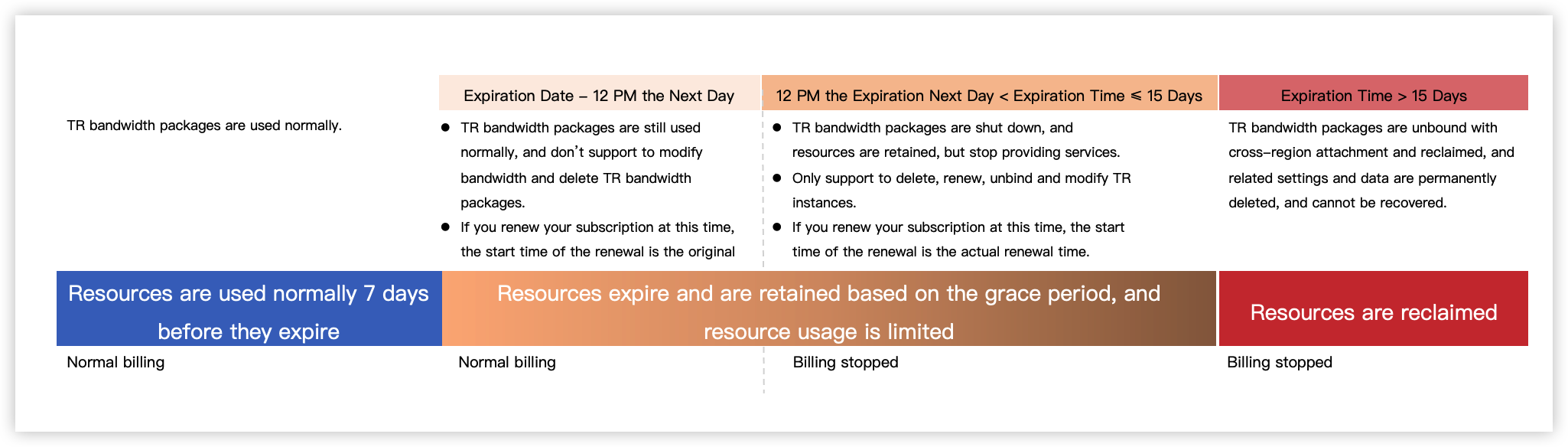
Depending on the time elapsed since expiration, the status of the Transit Router (TR) bandwidth package changes as shown in the following diagram.
Renewal overview
Subscription bandwidth packages support both automatic and manual renewal methods. For instructions on switching renewal methods, see Renewal Management.
- Automatic renewal
- If you enable automatic renewal when creating a bandwidth package, the system automatically renews it 7 days before expiration. The fee is deducted from your account balance (including cash balance and available coupons), prioritizing coupons.
- Upon successful automatic renewal, your service is extended for a new term that starts immediately after the previous term ends. If the account balance is insufficient during automatic renewal, the renewal will fail.
- Manual renewal
- If you do not enable automatic renewal when creating a bandwidth package, renew the package in time before the resource is reclaimed upon expiration to avoid service disruption.
- If you renew the bandwidth package before suspension, a new term starts immediately after the previous term ends. If you renew the package after suspension, the new term starts from the time when the package is renewed.
- The manual renewal procedure is as follows:
- Log in to the Bandwidth Package console.
- Click the renewal button on the right of the instance, confirm the renewal resource information, and select the purchase duration as needed.
tip
Cross-border bandwidth packages only support monthly purchases. For long-term use, renew promptly each month or enable automatic renewal.
- Follow the console guidance to review and accept the legal terms.
- Click Pay and complete the payment according to the guidance.
- The renewal is completed immediately after successful payment.
Unsubscription overview
If a TR bandwidth package is no longer required due to business changes before its expiration time, you may unsubscribe it. After unsubscription, the associated resources will be automatically deleted. For detailed unsubscription actions, see Unsubscription.
Unsubscription is not supported after the bandwidth package is suspended upon expiration. You can manually delete the instance to release resources. For procedure, see Deleting a bandwidth package.
TR bandwidth packages support two unsubscription types: 7-day free cancellation and Non-7-day cancellation.
- 7-day free cancellation: Full refunds are available within 7 days after order payment, regardless of reason. Each account can unsubscribe only one TR bandwidth package per calendar year under the 7-day free cancellation policy. Fore more general cancellation rules, see Seven-Day Unconditional Refund Policy.
- Non-7-day free cancellation: Refunds will be issued based on the remaining value of the actual payment amount. Used coupons are non-refundable. For the detailed refund formula, see Non-seven-day unconditional unsubscribe rules.
tip
Cross-border bandwidth packages do not support refunds.
Last updated: 2026.09.01 11:37:09
All rights reserved © Beijing Volcano Engine Technology Co., Ltd2024
