Transit Router
Transit Router


Document

- Documentation
 Transit RouterUser GuideRoute tablesRoute Table overview
 Copy page
 Download PDF
Route tables
Route Table overview
Copy pageDownload PDFRoute Table overview
Overview
Transit Router (TR) route table consists of a series of route entries and supports association forwarding, route learning, and static routing. This allows quick addition of routes and flexible control of traffic direction in and out of the TR. For details, see Route planning.
Route type
Route table type
TR route table includes System Route Table and Custom Route Table. After a TR route table is created, it contains no route entries by default. You need to configure route learning and auto publishing for it based on List of routing capabilities.
tip
Route entries are isolated between separate route tables. Route tables do not learn from each other.
The differences between System Route Table and Custom Route Table are shown in the table below.
Route entry type
The TR routes include the following three types:
- Blackhole route: This route is manually configured by the user. All traffic matching this route entry will be automatically discarded.
- Static route: This route is manually configured by the user. All traffic matching this route entry will be forwarded to the next hop.
- Auto-learned route: This route is automatically learned from the network instance through the route learning feature. All traffic matching this route entry will be forwarded to the next hop.
List of routing capabilities
TR offers rich routing capabilities that you can flexibly combine and use. The table below details all routing capabilities.
Routing capability | Principle description | Configuration procedures |
Custom route table | A route table is manually created by the user. You can use multiple TR route tables to define different interconnectivity scopes for network instances. | |
Association forwarding | Used to specify the TR route table for the TR instance to forward traffic of a network instance. As shown below, vpc01 and vpc02 each establish an attachment with the TR. vpc01 connects and associates with TR Route Table A for forwarding, while vpc02 connects and associates with TR Route Table B for forwarding. The numbered labels indicate the traffic flow when a client in vpc01 accesses a server in vpc02. The traffic flow is similar when vpc02 accesses vpc01. 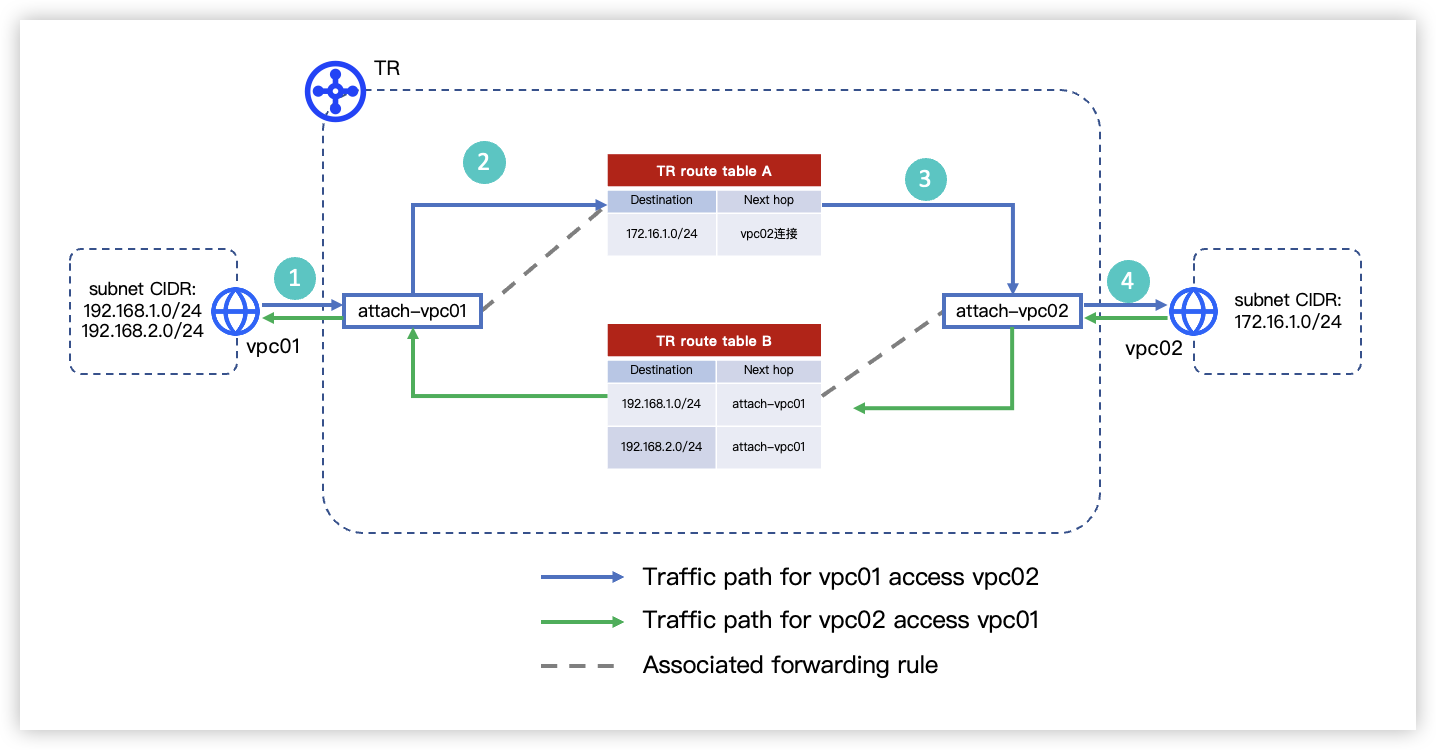 | |
Static routes | Manually configure routes on the TR instance side. This applies to scenarios with a small number of routes. | |
Route propagation | Used to configure TR-side routes by route learning. Applicable to scenarios with a large number of network instance routes. After configuring route learning, the TR route table automatically generates routes with the next hop set to the attachment. | |
Auto Publish Route | Used to configure routes on the network instance side by auto publishing. After enabling auto publishing, the system automatically publishes routes from the TR route table associated with forwarding of the target instance into the route table of that network instance. | |
Route policy | Used to filter routes received and sent by the TR, which can change route propagation behavior and selection results. | |
Forwarding policy | Used to specify the TR route table for the TR instance to forward traffic of a CIDR block in the network instance. Forwarding policies cannot be used alone and must be configured together with association forwarding. For a single attachment, a forwarding policy takes precedence over association forwarding. As illustrated in the diagram below, two subnets in a VPC run different services. Subnet A forwards traffic based on TR Route Table A. Subnet B forwards traffic to the destination CIDR block (172.16.1.0/24) based on TR Route Table B, while traffic from Subnet B to other destination CIDR blocks still forwards based on TR Route Table A. This can be achieved by configuring forwarding policies. 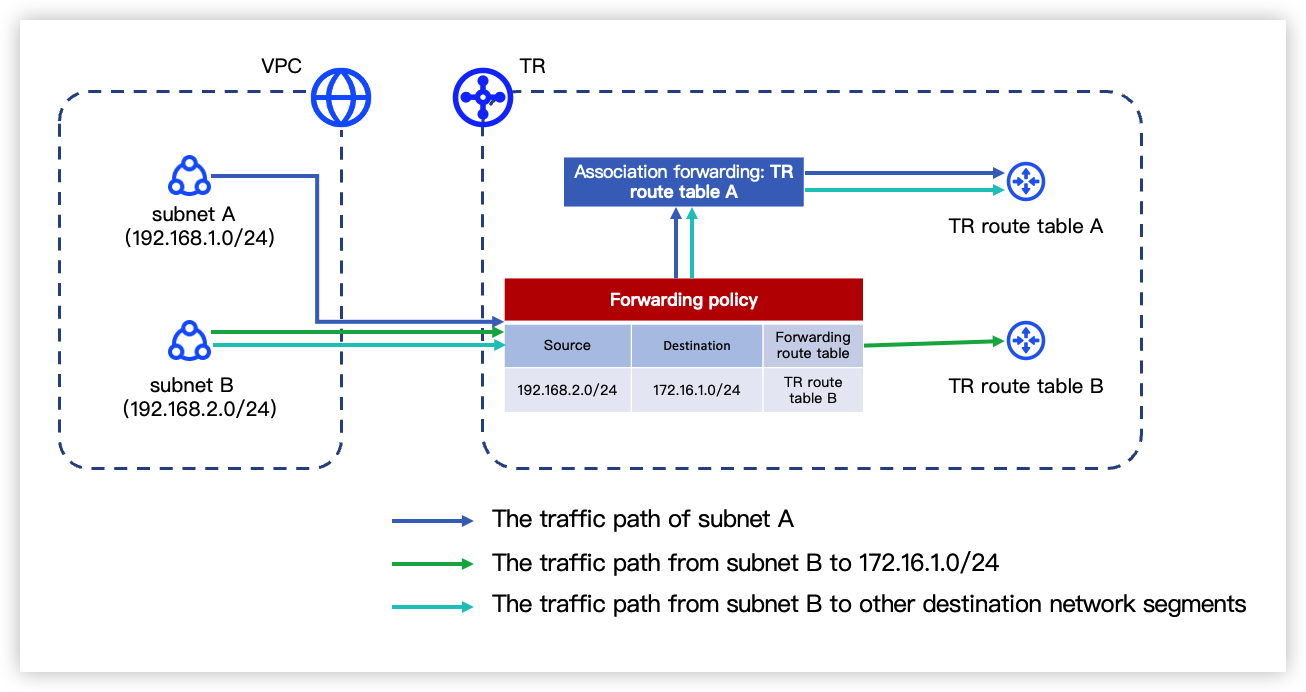 |
Route matching and synchronization
Route matching
The priority order for route matching in the TR is as follows:
- Follow the Longest Prefix Match (LPM) principle to prefer the route with the longest mask of the destination CIDR block.
- For routes with an identical destination CIDR block, the priority order is as follows:
- Static routes
- Auto-learned VPC routes
- For routes that have the same destination CIDR block and learned from multiple VPCs, prefer the earliest learned route. Later learned routes become not effective.
- After the TR forwards traffic to a VPC, the VPC's routing subsystem performs a second route lookup. This lookup queries the route table of the specific subnet where the attachment point resides. The subsystem then applies the Longest Prefix Match (LPM) rule to select the most specific route from that subnet's route table.
- Routes that are automatically learned from the TR, Direct Connect (DC) and Virtual Private Network (VPN) instances in the same region and the TR instances across regions.
- Prefer the route with the shortest AsPath.
- For DC routes that lack an AsPath attribute, the AsPath length defaults to 0. A common example is static routes learned from the DC Gateway.
- When the AsPath length is identical, the routing priority order is as follows:
- Routes learned from DC Gateways
- Routes from multiple DC Gateways with identical CIDR blocks and AsPath lengths form equal-cost multi-path routing (ECMP).
- Routes learned from VPNs
- Routes from multiple IPsec-VPN connections with identical CIDR blocks and AsPath lengths form ECMP.
- Routes learned from inter-region TRs
- Routes from multiple TRs across regions with identical CIDR blocks and AsPath lengths are sorted by the string comparison of peer TR instance IDs, preferring the route with the smallest TR instance ID.
Route synchronization
The logic for TR synchronizing routes to network instances is described in the following table.
Route limits
- Each network instance attachment can configure only one TR route table associated with forwarding.
- When creating a cross-account network instance attachment, if you need to configure association forwarding or route learning simultaneously, you can only select the TR system route table, which can only be modified by the TR instance’s Owner.
Last updated: 2026.09.01 11:37:11
All rights reserved © Beijing Volcano Engine Technology Co., Ltd2024
