Transit Router
Transit Router


Document

- Documentation
 Transit RouterUser GuideQoS managementQoS overview
 Copy page
 Download PDF
QoS management
QoS overview
Copy pageDownload PDFQoS overview
Scenarios
Transit Router (TR) provides Quality of Service (QoS) management through two functional modules: traffic marking policies and traffic queue policies. Traffic marking policies classify and tag traffic, while traffic queue policies handle traffic scheduling. You can use either module independently or combine both to optimize bandwidth utilization and ensure the performance of critical business traffic.
Terms
Principles
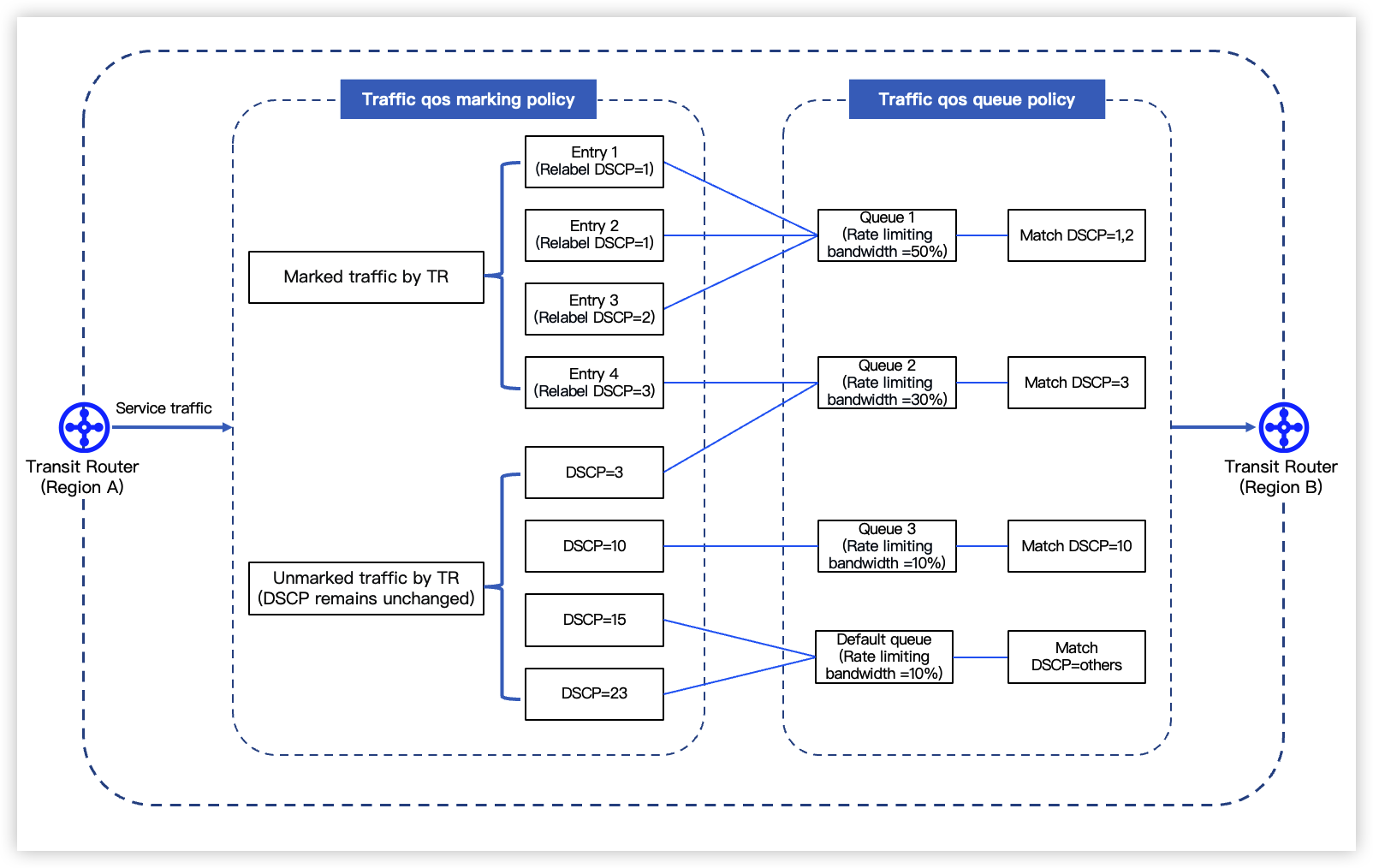
As shown in the figure below, if you combine traffic marking and traffic queue policies on an inter-region attachment, the outbound traffic path is as follows:
- Traffic first passes through the traffic marking policy, where it is classified by matching marking entries and assigned a DSCP value.
- The traffic then enters the traffic queue policy. Based on its DSCP value, traffic is scheduled into different queues with varying bandwidth allocations.
Traffic marking policy
A traffic marking policy can contain multiple marking entries. It matches business traffic using a 6-tuple (protocol type, source CIDR, source port, destination CIDR, destination port, and DSCP value). For details on the 6-tuple, see Creating a traffic marking policy.
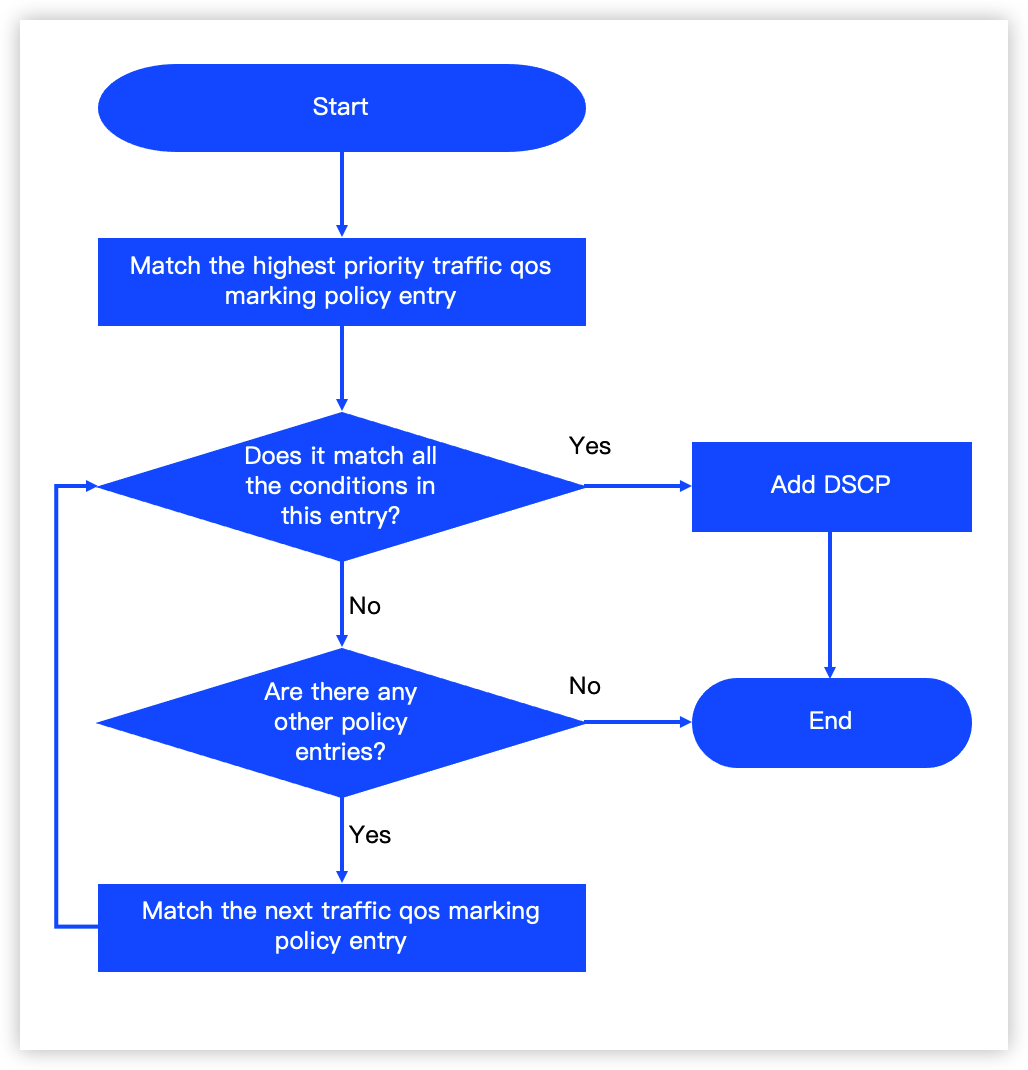
Once a traffic marking policy is enabled on an inter-region attachment, the matching principles for outbound traffic are as follows:
- Match business traffic against entries in the traffic marking policy from the highest to lowest priority.
- Match found: The system marks the traffic with the retagged DSCP configured for this marking entry.
- No match: If the traffic does not match any entry in the policy, its DSCP value remains unchanged.
- Stop matching after the first successful entry. Traffic will not be evaluated against subsequent entries.
- Leave all 6-tuple fields in an entry unset to match all outbound traffic on the inter-region attachment.
Traffic queue policy
A traffic queue policy can contain multiple queues with different priorities. It ensures traffic forwarding for high-priority queues first. You can assign different bandwidth limits to different queues. Each queue enforces its own bandwidth limit independently, preventing queues from contending with each other.
- Match traffic to a queue based on its DSCP value. Forward matched traffic through its assigned queue.
- Forward traffic that has no DSCP value or fails to match any custom queue through the default queue.
- The sum of the bandwidth for all queues in a single policy must not exceed the bandwidth cap of the inter-region attachment.
Limits
Configuration procedures
To configure business QoS management through TR, follow these steps:
- Configure traffic classification and marking
- Create traffic marking policy: Create a traffic marking policy and add marking entries as needed.
- Enable traffic marking for an inter-region attachment: Enable the traffic marking feature on the inter-region attachment and specify the traffic marking policy.
- Configure traffic scheduling
- Create traffic queue policy: Create a traffic queue policy and set bandwidth for its queues as needed.
- Enable traffic queues for an inter-region attachment: Enable the traffic queue feature on the inter-region attachment.
Last updated: 2026.09.01 11:37:14
All rights reserved © Beijing Volcano Engine Technology Co., Ltd2024
