You need to enable JavaScript to run this app.
Transit Router

Transit Router

Copy page
Download PDF
Route policy
Route Policy overview
Copy page
Download PDF
Route Policy overview
Introduction​​
Route policies filter routes inbound to and outbound from the Transit Router (TR). With set match conditions and route attributes (AsPath), route policies can change route propagation behavior and path selection outcomes.​
  • Inbound: The direction that the TR learns routes from the network instance. The inbound route policy applies directly to routes that are automatically learned via the route learning feature in the associated TR route table. That is, routes whose route type is Route learning in the TR route table associated with the inbound policy.​
  • Outbound: The direction in which the TR publishes routes to the network instance. The outbound route policy applies directly to the routes published to the network instance via the auto publishing feature in the associated TR route table.​
Application scenarios​
  • By using route policies to restrict the routes inbound and outbound of the TR, you can control the propagation scope of routes and reduce the number of route entries as needed.​
  • For example: When Not effective routes exist, you can configure route policy to deny routes preferred to take effect in the TR, activating those Not effective routes.​
  • By setting AsPath with the route policy, you can change the priority of routes to flexibly alter the route selection results.​
Matching rules​
Mechanism overview​
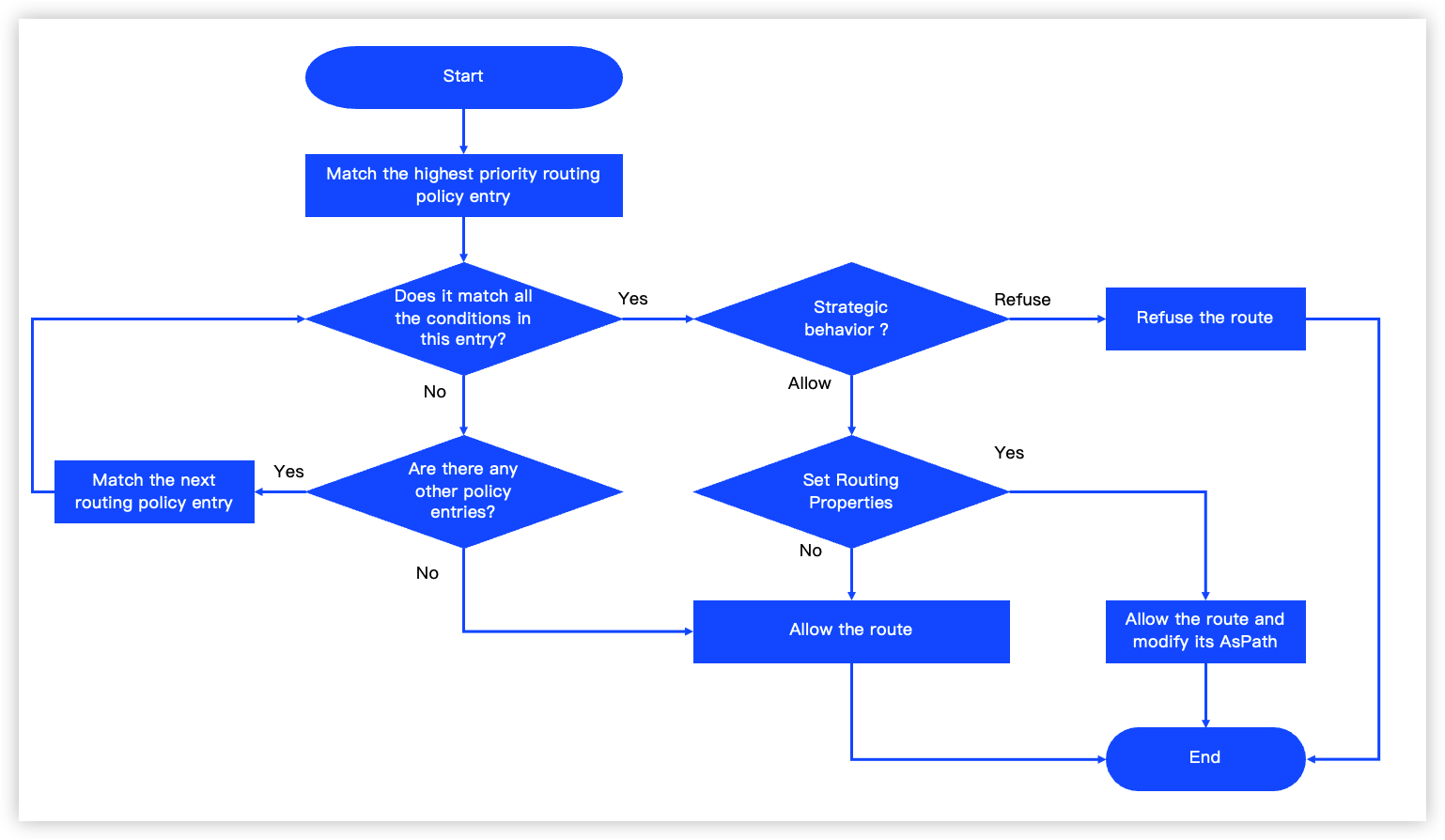
A route policy comprises multiple policy entries. It filters routes in the inbound and outbound directions of a TR based on the match results of these entries. For detailed match conditions, see Creating a route policy.​
The matching rules for the route policy can be summarized as ordered evaluation, unique match, and implicit allow. The description of matching rules is shown below:​
In the following, the target route refers to the route in the TR route table to be matched against the route policy.​
  • Ordered evaluation: The policy processes all entries sequentially, from the highest to the lowest priority, matching the target route against each entry.​
  • A lower priority value indicates a higher precedence for a policy entry.​
  • Unique match: The target route must satisfy all match conditions in a policy entry to be considered a match. Upon a successful match, the system executes the entry's configured action (allow/deny) on the route.​
  • Within a single route policy entry, different match condition fields are combined with a logical "AND", while multiple values for the same condition field are combined with a logical "OR".​
  • Route prefixes support exact match and fuzzy match.​
  • Exact match: The match is successful only when the target route's destination CIDR block exactly matches the specified CIDR block. Otherwise, the match fails.​
  • Fuzzy match: The match is successful when the target route's destination CIDR block matches or is contained within the specified CIDR block. Otherwise, the match fails.​
  • When matching by route prefix, both exact and fuzzy matching are supported for IPv4/IPv6 CIDRs and prefix lists. The specific rules are as follows:​
  • IPv4/IPv6 CIDR exact match: The match succeeds if the destination CIDR block of the target route is identical to​ the specified CIDR block. Otherwise, it fails.​
  • IPv4/IPv6 CIDR fuzzy match: The match succeeds if the destination CIDR block of the target route is identical to or contained within​ the specified CIDR block. Otherwise, it fails.​
  • Prefix list exact match: The match succeeds if the destination CIDR block of the target route is identical to any CIDR in the prefix list. Otherwise, it fails.​
  • Prefix list fuzzy match: The match succeeds if the destination CIDR block of the target route is identical to or contained within any CIDR​ in the specified prefix list. Otherwise, it fails.​
  • If the policy action is Allow and the route attributes are set, the system will allow the matched routes. Additionally, it will modify the route AsPath based on the route attribute settings.​
  • Implicit allow: When the target route does not match any of the policy entries, the system implicitly allows this route.​
​​​
Matching examples​
The following specific scenarios illustrate the matching process of a route policy and the actual effects after a successful match.​
The TR (tr01) is connected with the following network resources:​
  • vpc01 (the corresponding VPC attachment has auto publishing enabled)​
  • dcg01 and dcg02 (two DC Gateways are connected to the same data center in active-standby redundancy)​
  • vpn01​
  • tr02 (the corresponding inter-region attachment has auto publishing enabled)​
tip​
  • The default ASNs of tr01 and tr02 are 64512 and 64513, respectively.​
  • The default ASNs of dcg01 and dcg02 are both 137718.​
All attachments in tr01 use the same TR route table for association forwarding. The route entries in this TR route table are listed in the "TR route entry" column of Table 2. After associating the inbound and outbound route policies shown in Table 1 with this TR route table in sequence, the route changes of the TR route table and its associated network resources are described in the "Matching description" column of Table 2.​
Table 1 Route policies​
​
Route policy​
​
Priority​
Match conditions​
Policy action​
Route attribute settings​
Inbound​
Entry 1​
2​
  • Route prefix (IPv4/IPv6 CIDR exact match): 172.16.1.0/24, 172.16.2.0/24​
  • Source instance ID: Instance ID of dcg01​
Deny​
-​
​
Entry 2​
5​
  • Route prefix (IPv4/IPv6 CIDR exact match): 192.168.2.0/24​
  • Source instance type: VPC​
Deny​
-​
​
Entry 3​
10​
  • Route prefix (IPv4/IPv6 CIDR fuzzy match): 192.168.2.0/24, 192.168.16.0/20​
  • Source instance type: VPC, inter-region TR​
Allow​
Append AsPath, 123​
​
Entry 4​
12​
  • Route prefix (prefix list fuzzy match): prelist01 (including 192.168.1.0/20, 192.168.3.0/24, 192.168.4.0/24)​
  • Source instance type: VPC​
Allow​
-​
Outbound​
Entry 1​
1​
  • Route prefix ( IPv4/IPv6 CIDR exact match): 172.16.1.0/24​
  • Destination instance ID: Instance ID of vpc01​
Allow​
Replace AsPath, 12, 356​
​
Entry 2​
2​
  • Route prefix (IPv4/IPv6 CIDR fuzzy match): 172.16.0.0/20​
  • Destination instance type: Inter-region TR​
Deny​
-​
​
Entry 3​
3​
  • Route prefix (IPv4/IPv6 CIDR exact match): 192.168.1.0/24​
  • Destination instance type: DC Gateway​
Allow​
Append AsPath, 22​
​
Entry 4​
5​
  • Route prefix (prefix list exact match): 192.168.16.0/20​
  • Destination instance type: Inter-region TR​
Deny​
-​
​
Table 2 TR route details​
​
TR route entry​
​
​
​
​
​
Matching description​
​
Destination CIDR​
Next Hop​
Route status​
Route type​
Attachment type (network instance)​
Route attribute​
Inbound route policy​
Outbound route policy​
192.168.1.0/24​
attach-vpc01​
Available​
Route learning​
Virtual Private Cloud (vpc01)​
-​
Successfully matched Entry 4 of an inbound route policy.​ The TR route table allows the route. ​
  • The route sent to the DC Gateway successfully matches Entry 3 of the outbound route policy. This route is allowed to be published to the route tables of dcg01 and dcg02. Its route attribute is appended with 22, being 64512, 22.​
  • The route sent to the inter-region TR fails to match. By default, this route can be published to the tr02 route table. Its route attribute is appended with tr01's ASN, 64512.​
192.168.2.0/24​
attach-vpc01​
Available​
Route learning​
Virtual Private Cloud (vpc01)​
-​
The route successfully matches Entry 2 of the inbound route policy and is therefore denied into the TR route table.​
Since this route has been removed from the TR route table, it no longer matches the outbound policy.​
192.168.16.0/24​
attach-vpc01​
Available​
Route learning​
Virtual Private Cloud (vpc01)​
-​
The route successfully matches Entry 3 of the inbound route policy and is therefore allowed into the TR route table. Its AsPath is appended as 123.​
  • The route sent to the VPC fails to match. By default, this route is allowed to be published to the vpc01 route table. Since the VPC route lacks AsPath, it carries no route attributes when published to the vpc01 route table.​
  • The route sent to the inter-region TR fails to match. By default, this route is allowed to be published to the route table of the inter-region TR.​
  • The route sent to the DC Gateway fails to match. It is published by default into the dcg01 route table.​
172.16.1.0/24​
attach-dcg01​
Available​
Route learning​
DC Gateway (dcg01)​
137718, 123​
The route successfully matches Entry 1 of the inbound route policy and is therefore denied into the TR route table. The route with the same CIDR block, originating from dcg02, is now in the Available status.​
Since this route has been removed from the TR route table, it no longer matches the outbound policy.​
172.16.1.0/24​
attach-dcg02​
Not effective​
Route learning​
DC Gateway (dcg02)​
137718, 12, 34​
Match failed. The TR route table allows the route by default. The status of the route is Available​
  • The route sent to the VPC successfully matches Entry 1 of the outbound route policy, allowing the synchronization of the route to the vpc01 route table. AsPath replacement takes effect properly. Since the VPC route lacks AsPath, it carries no route attributes when published to the vpc01 route table.​
  • The route sent to the inter-region TR successfully matches Entry 2 of the outbound route policy, denying the synchronization of this route to the tr02 route table.​
  • The route sent to the DC Gateway fails to match. It is published by default into the dcg01 route table. However, it is not effective because its CIDR block conflicts with that of an existing route entry in dcg01.​
172.16.2.0/24​
attach-vpn01​
Available​
Static​
VPN Connect (vpn01)​
-​
Static routes are exempt from inbound route policy matching and take effect in the TR route table by default.​
  • The route sent to the VPC fails to match. By default, this route is allowed to be published to the tr01 route table. Since the VPC route lacks AsPath, it carries no route attributes when published to the vpc01 route table.​
  • The routes sent to the DC Gateway and inter-region TR fail to match. By default, these routes are allowed to be published to the route tables of dcg01, dcg02, and tr02. Their route attributes are added with tr01's ASN, 64512.​
192.168.3.0/24​
attach-tr02​
Available​
Route learning​
Transit Router (tr02)​
64513​
The route successfully matches Entry 3 of the inbound route policy and is therefore allowed into the TR route table. Its AsPath is appended, being 64513, 123.​
  • The route sent to the VPC fails to match. By default, this route is allowed to be published to the vpc01 route table. Since the VPC route lacks AsPath, it carries no route attributes when published to the vpc01 route table.​
  • The route sent to the DC Gateway fails to match. By default, this route can be published to the route tables of dcg01 and dcg02. Its route attribute includes tr01's ASN: 64512, 64513, 123​
​
Limits​
For route policy quotas and usage limits, see Limits.​
Last updated: 2026.09.01 11:37:10