托管 Prometheus
托管 Prometheus


文档指南

请输入


- 文档首页
 托管 Prometheus最佳实践多渠道告警通知使用 vmalert 对接 VMP 进行告警
 复制全文
复制全文 下载 pdf
使用 vmalert 对接 VMP 进行告警
 文档反馈
文档反馈 问问助手
问问助手本文介绍自建监控环境如何使用托管 Prometheus 工作区作为数据源配置告警。
背景信息
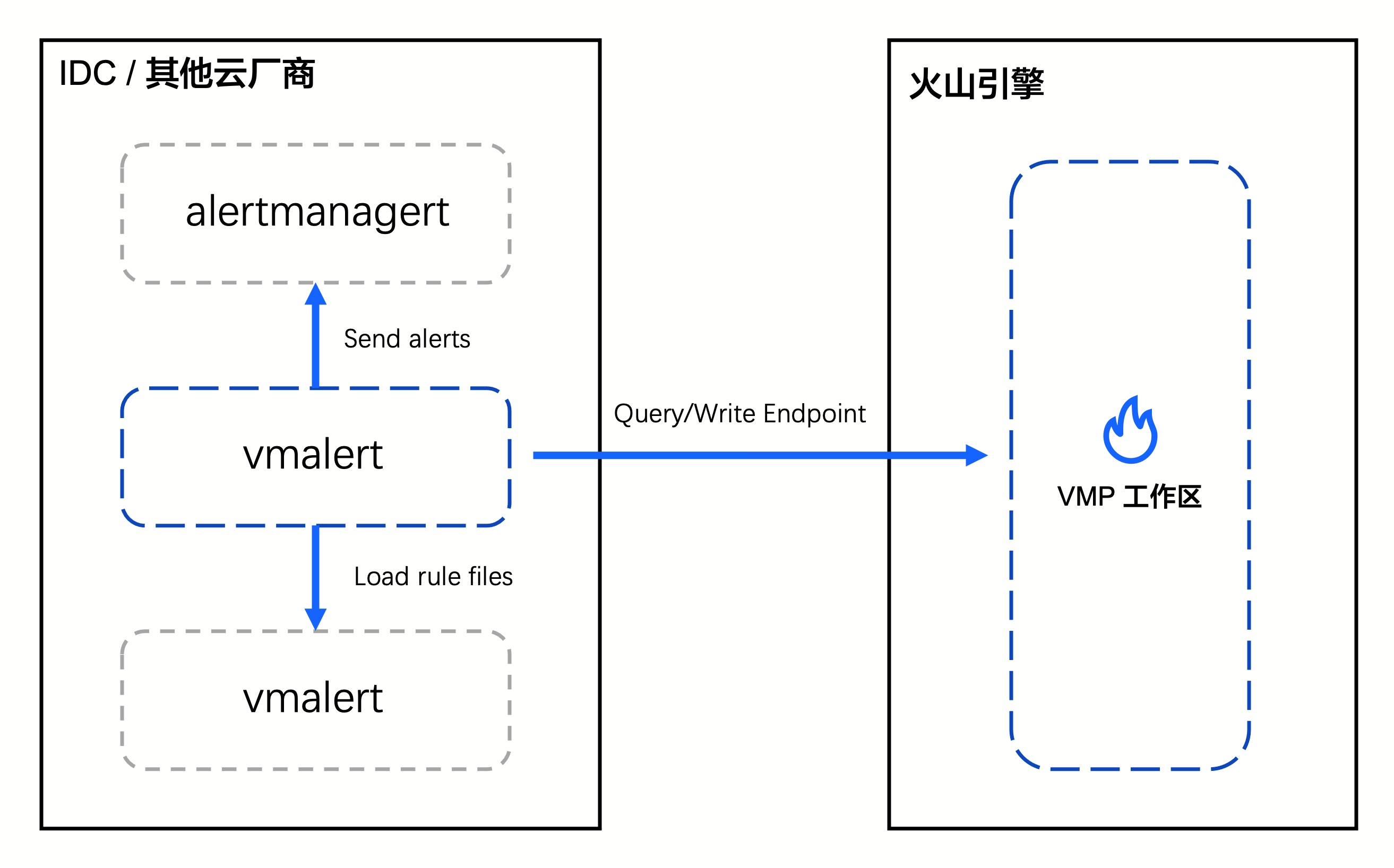
自建环境可以通过 vmalert 插件将工作区作为数据源进行配置告警,并将产生的告警回调到自建 alertmanager。vmalert 组件完全兼容 Prometheus 的告警规则配置文件。
前提条件
- 已创建工作区,详情请参见 创建工作区。
- 已完成私网连接接入工作区,详情参考 使用私网连接实现多云指标接入。
操作步骤
步骤一:获取 vmalert 插件
- 通过二进制获取
- 请参见 此处 获取 vmutils-linux-amd64-vxxx.tar.gz。
- 通过容器镜像获取
- 镜像地址 https://hub.docker.com/r/victoriametrics/vmalert。
步骤二:启动 vmalert
RuleFiles="rules/*" # 告警规则文件目录,支持通配符,兼容prometheus的告警规则文件
QueryURL=http://query.prometheus-cn-guangzhou.ivolces.com/workspaces/0df18f14****** # VMP Workspace 查询地址
WriteURL=http://write.prometheus-cn-guangzhou.ivolces.com/workspaces/0df18f14******/api/v1/write # VMP Workspace 写入地址
AUTH_USER=alarm # VMP Workspace basic auth 账号
AUTH_PSW=Alarm@test # VMP Workspace basic auth 密码
AlertmanagerURL=http://localhost:9093 # 自建 Alertmanager地址
启动参数
./vmalert-prod -rule=$RuleFiles \
-datasource.url=$QueryURL \
-datasource.basicAuth.username=$AUTH_USER \
-datasource.basicAuth.password=$AUTH_PSW \
-notifier.url=$AlertmanagerURL \
-remoteWrite.url=$WriteURL \
-remoteWrite.disablePathAppend \
-remoteWrite.basicAuth.username=$AUTH_USER \
-remoteWrite.basicAuth.password=$AUTH_PSW \
-remoteRead.url=$QueryURL \
-remoteRead.basicAuth.username=$AUTH_USER \
-remoteRead.basicAuth.password=$AUTH_PSW
- 如果需要配置更多的启动参数,请参见 更多配置。
- 如果要动态监听规则配置文件变化,需要新增如下配置。
- -configCheckInterval durationInterval for checking for changes in '-rule' or '-notifier.config' files. By default, the checking is disabled. Send SIGHUP signal in order to force config check for changes.
- 如果要新增全局 label,告警产生时带上对应 label。
- -external.label=cluster=east-1支持重复设置多个参数 -external.label=a=1 -external.label=b=2
- vmalert 自定义 GeneratorURL
- 默认 vmalert 生成的 GeneratorURL 是请求到 /api/v1/groupID/alertID/status 的接口,与 Prometheus 不一样。如果需要定制,请在 vmalert 的启动参数中添加以下参数:
- -external.url="http://grafana.com" \-external.alert.source="?expr={{ \$expr }}"
- 修改后效果如下:
-
步骤三:查看 vmalert 运行状态
- 查询 vmalert 的接口。
-
- 访问接口,查看 vmalert 运行状态。
-
最近更新时间:2025.09.03 15:13:02
这个页面对您有帮助吗?
有用
有用
无用
无用