ArkClaw 企业版
ArkClaw 企业版
ArkClaw 企业版


文档指南
请输入


ArkClaw 企业版
产品动态
ArkClaw性能说明
员工使用ArkClaw
管理Agent
ArkClaw快捷功能
Hermes Agent
ArkClaw高级功能
管理 ArkClaw 实例
查看 ArkClaw 详情
管理 ArkClaw 插件与连接器
管理企业服务智能体
员工观测ArkClaw
管理员管理ArkClaw
Claw 实例
管理席位下的 Claw 实例
用户管理
网络管理
公网出口
私网出口
安全管理
管理员观测ArkClaw
管理员批量运维ArkClaw
最佳实践
开发者指南
API 参考
ClawSpace
Template
ClawInstance
Image
UserManagement
UserSeatQuota
PrivateEgressService
ArkClaw
产品动态
控制台操作指南
管理 Agent
使用技巧
快捷功能
Hermes Agent
管理 ArkClaw
观测 ArkClaw
常见问题
- 文档首页
 ArkClaw 企业版ArkClaw故障处理ArkClaw 运行快速排查手册
 复制全文
复制全文 下载 pdf
ArkClaw 运行快速排查手册
 文档反馈
文档反馈 问问助手
问问助手说明
调试信息
在飞书 /WebUI 等 Channel 中输入:
命令 | 用途 | 示例 |
命令 | 用途 | 示例 |
/help | 显示帮助信息 | /help |
/commands | 列出所有可用命令 | /commands |
/status | 当前状态:模型、token 用量、provider 配额 | /status |
/whoami | 显示发送者 ID(别名:/id) | /whoami |
/context | 上下文构成明细 | /context list、/context detail、/context json |
/usage | 控制每轮 token/费用显示 | /usage off、/usage tokens、/usage full、/usage cost |
/verbose | 详细输出模式 | /verbose on |
问题快速排查
快速分类
快速定位问题层级:
# 第一步:整体状态(最重要)
openclaw status
# 第二步:Gateway 服务状态
openclaw gateway status
# 第三步:自动诊断
openclaw doctor
# 第四步:实时日志
openclaw logs --follow
排查三板斧
遇到任何问题,执行以下命令获取原因:
90% 的问题都能从这三条命令的输出中找到答案。
openclaw status --all
openclaw doctor --repair
openclaw logs --follow
关键命令速查
命令 | 用途 |
命令 | 用途 |
openclaw status | 整体状态概览 |
openclaw status --all | 完整诊断报告(可安全分享) |
openclaw status --deep | 深度探测(含 provider 检查) |
openclaw gateway status | 服务/进程状态 |
openclaw gateway restart | 重启 Gateway |
openclaw doctor | 自动诊断 |
openclaw doctor --fix | 自动修复 |
openclaw doctor --repair | 激进修复 |
openclaw models status | 模型认证状态 |
openclaw channels status --probe | 渠道连接状态 |
openclaw logs --follow | 实时日志 |
openclaw security audit | 安全审计 |
问题快速处理
飞书收不到消息
openclaw channels status --probe
openclaw pairing list --channel feishu
openclaw config get channels
openclaw logs --follow
排查方向:
- DM 配对:发消息的人需要先被批准。
- openclaw pairing list --channel feishuopenclaw pairing approve <requestId>
- 群组提及:群里需要 @机器人 才回复
- 检查requireMention设置
- 权限 /Scope:看日志是否有 `403` / `missing_scope`
飞书没有流式返回
- 升级飞书插件到最新版。
- npx -y @larksuite/openclaw-lark-tools update
- 开启流式输出。
- openclaw config set channels.feishu.streaming true
- 确认飞书应用已开通 cardkit:card:write 权限。
飞书其他问题
- 运行飞书诊断。
- # 在终端执行npx @larksuite/openclaw-lark-tools doctor
- 诊断可以手动修复,或者执行命令自动修复。
- # 在终端执行npx @larksuite/openclaw-lark-tools doctor --fix
不回复或报错
openclaw models status
openclaw models status --probe
openclaw logs --follow
常见问题:
错误 | 修复 |
错误 | 修复 |
HTTP 429 rate limit | 降低请求频率,或升级 API 额度。 |
HTTP 401/403 | API Key 过期或无效,重新配置。 |
说明
建议切换模型,如果是 coding plan 则在页面修改后3-5分钟生效。
命令无反应/执行很慢
问题
- 用户发送/new、/reset、/status等命令后无反应。
- 或等待很长时间才有回复。
排查流程
- 确认 Gateway 存活。
- openclaw gateway status
- 确认Runtime状态为running。
- 确认RPC probe为ok。
- 核查日志中是否有接收到消息的记录。
- # 开启日志,让客户发一条消息tail -f /tmp/openclaw/openclaw-$(date +%Y-%m-%d).log
- 定位问题所处环节。
- 环节判断方式修复环节判断方式修复消息未到 Gateway日志无任何输出。重启 Gateway。命令未识别日志收到消息但无命令处理。检查 commands.text / commands.native。会话操作卡住日志显示处理开始但无 API 调用。检查会话文件大小,考虑清理。模型 API 超时日志显示 API 请求已发出。检查 provider 状态、网络、API key。响应生成慢API 返回了但 streaming 慢。模型本身慢(Opus 等大模型正常)。
- 常见根因与修复。
- 根因 A:Startup prompt 过重。
- /new会触发 startup prompt(如果有 BOOTSTRAP.md)
- 若system prompt过大,且叠加多个project context文件,会导致首次响应缓慢。
- 修复方案:精简BOOTSTRAP.md内容,减少不必要的启动检查逻辑。
- 根因 B:会话文件过大。
- ls -lhS ~/.openclaw/agents/*/sessions/*.jsonl | head -10du -sh ~/.openclaw/agents/*/sessions/
- 判定标准:单个JSONL > 50MB。
- 修复方案:
- 手动压缩超大会话文件或重置会话。
- 重启网关。
- openclaw gateway restart
模型认证/ API 错误
问题
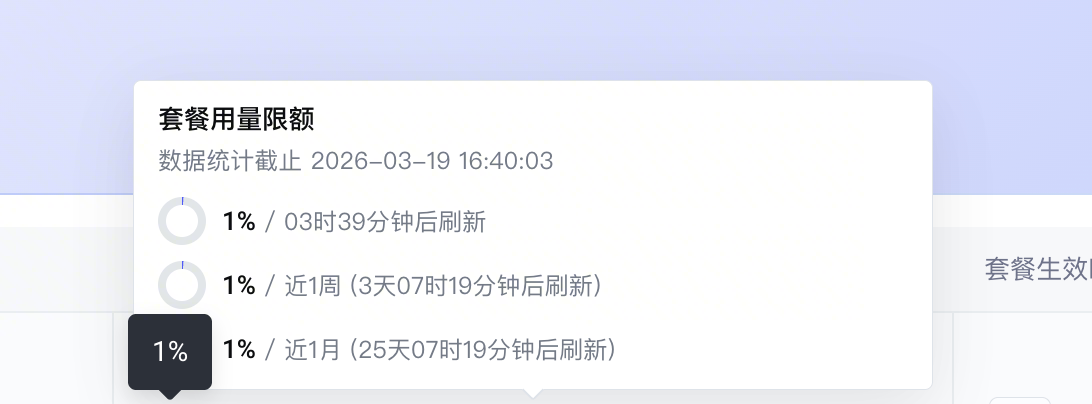
- "429 You have exceeded the weekly usage quota. It will reset at 2026-03-23 00:00:00 +0800 CST. We recommend upgrading your plan for more quota, or waiting for the reset"
- "401 The API key doesn't exist. "
常见原因与修复
- 原因 A:Coding Plan 额度已用完。
-
- 原因 B:API Key 错误。
- 检查 API Key 是否正确
- 原因 C:模型未开通。
- 前往火山方舟控制台开通管理页开通模型
消息未触发/收不到回复
问题
- 发消息给 bot 没有任何反应。
- 群聊中 @ bot 没反应。
- 某些人能触发,某些人不能。
排查流程
# 查看白名单和渠道配置
openclaw status
# 确认日志中是否有 blocked/skip/unauthorized
tail -f /tmp/openclaw/openclaw-$(date +%Y-%m-%d).log | grep "blocked\|skip\|unauthorized"
常见原因与修复
原因 | 检查方式 | 修复 |
原因 | 检查方式 | 修复 |
发送者不在白名单。 | openclaw status 查看 AllowFrom。 | 添加到 channels.<provider>.allowFrom。 |
群聊需要 @ 提及。 | 检查 requireMention 设置。 | 设置 requireMention: false 或确保正确 @。 |
dmPolicy设置问题。 | 检查 dmPolicy。 | 设置为 open 或 allowlist。 |
群聊未在白名单。 | 检查 groups 或 guilds 配置。 | 添加群 ID 到配置。 |
Telegram bot 未收到消息。 | 检查 bot token 和 webhook。 | 确认 bot token 正确。 |
配对模式等待审批。 | openclaw pairing list <channel> | 审批或调整 dmPolicy。 |
最近更新时间:2026.04.08 11:24:03
这个页面对您有帮助吗?
有用
有用
无用
无用