实时音视频
实时音视频


文档指南
请输入


实时音视频
快速入门
场景方案
开发指南
Token 鉴权
音频管理
视频管理
屏幕共享
SDK 升级指南
客户端 API 参考
服务端 API 参考
房间管理
转推直播
输入在线媒体流
WTN 流(原公共流)
实时数据监控
历史数据查询
业务标识管理
实时消息通信
历史版本(文档停止维护)
2023-08-01
2023-06-01
转推直播
2022-06-01
2020-12-01
转推直播
输入在线媒体流
获取数据指标
常见问题
集成相关
质量相关
AI 音视频互动方案
开发指南
配置 ASR/LLM/TTS 服务
API 参考
硬件对话智能体
用户指南
服务端 API
智能体
实时信令
互动白板
客户端 API 参考
服务端 API 参考
- 文档首页
 实时音视频实时音视频场景方案秀场直播连麦视频互动场景搭建(iOS)
 复制全文
复制全文 下载 pdf
场景搭建(iOS)
 文档反馈
文档反馈 问问助手
问问助手SDK集成
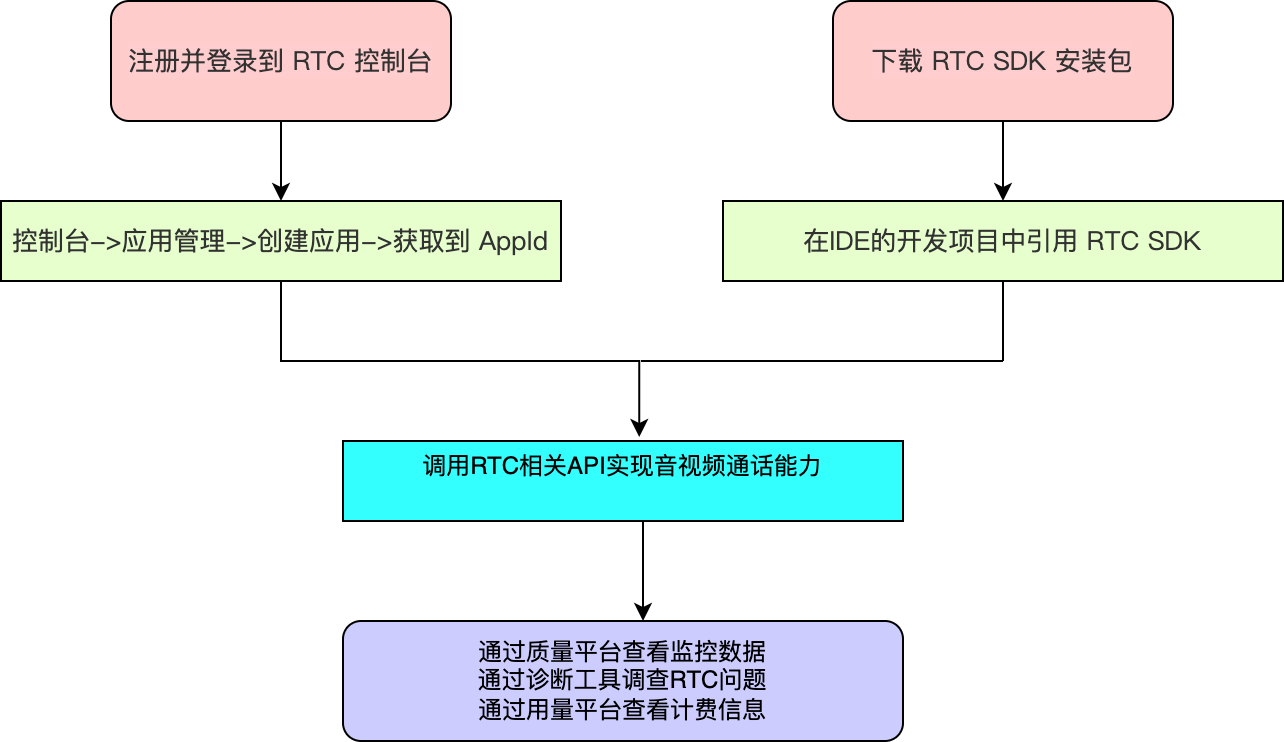
整体实现流程
主播与主播连麦pk
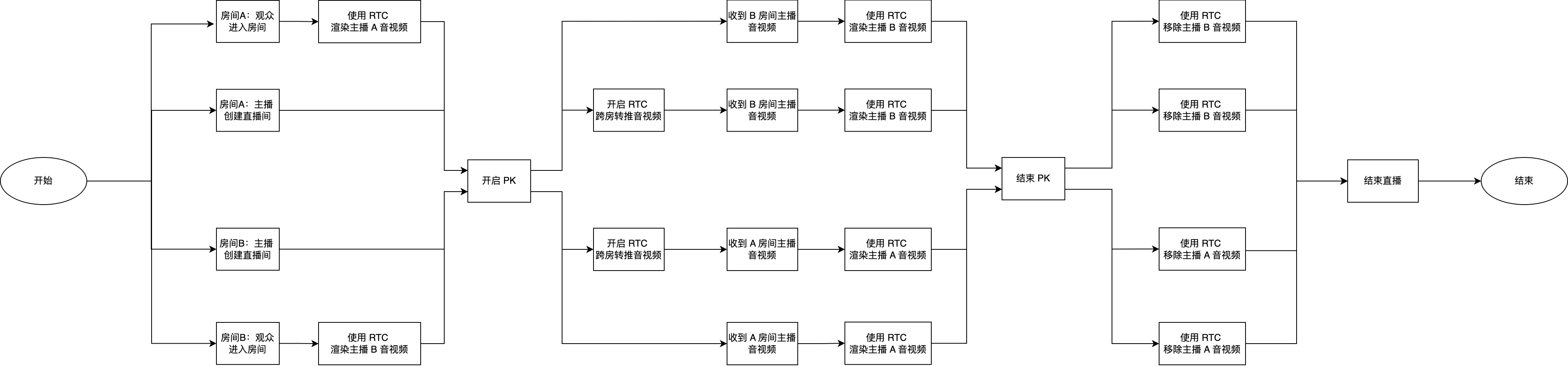
主播与观众连麦互动

核心功能实现
主播开启直播和观众进房
时序图
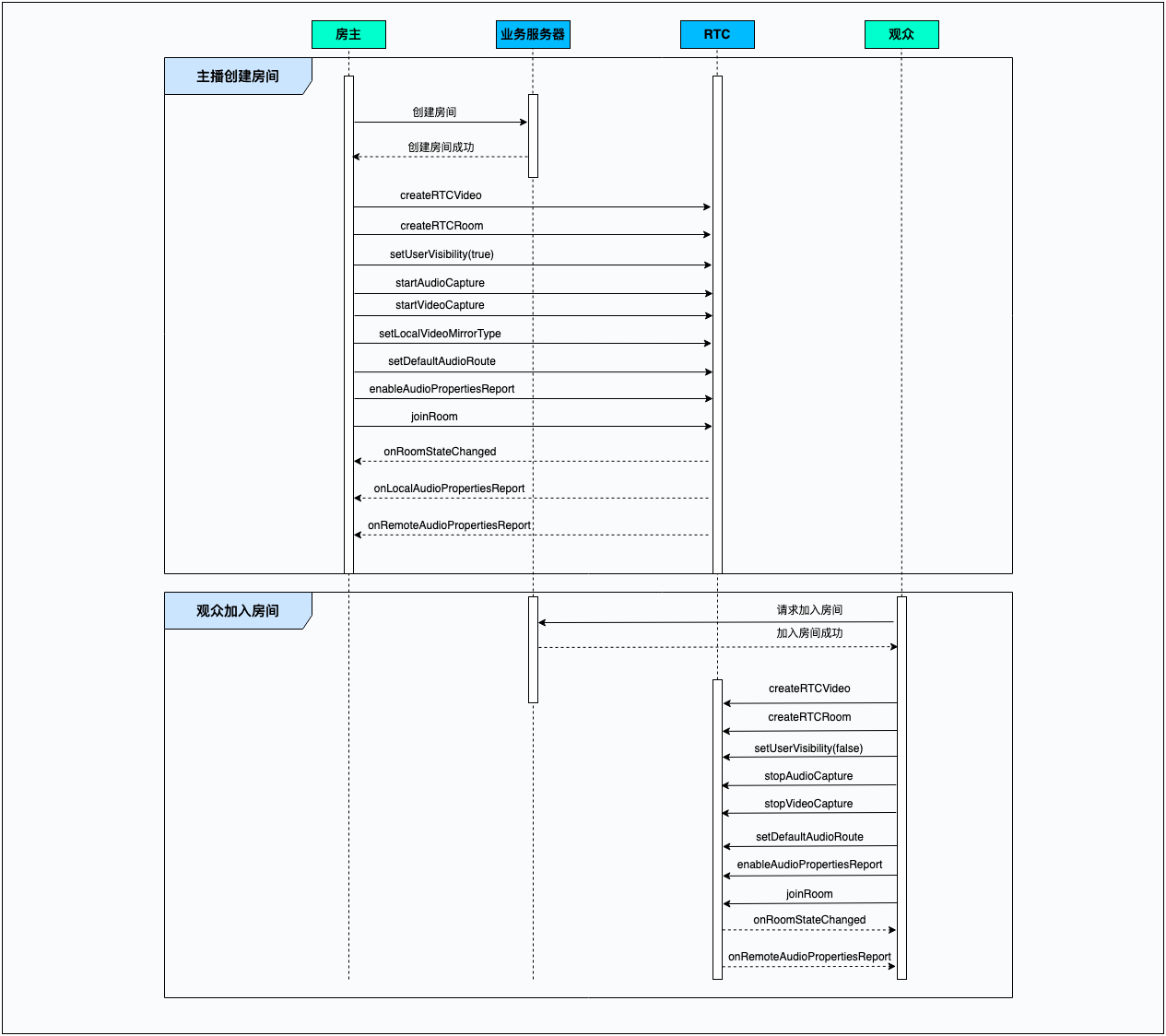
示例代码
/**
* 加入RTC房间并初始化参数
* @param token: RTC Token
* @param roomID: RTC room id
* @param uid: RTC user id
* @param isHost: YES 业务上主播 ; NO 业务上观众
**/
- (void)joinRTCRoomWithToken:(NSString *)token
roomID:(NSString *)roomID
uid:(NSString *)uid
isHost:(BOOL)isHost {
// 初始化 ByteRTCVideo 对象
self.rtcEngineKit = [ByteRTCVideo createRTCVideo:APPID
delegate:self
parameters:@{}];
// 初始化 ByteRTCRoom 对象
self.rtcRoom = [self.rtcEngineKit createRTCRoom:roomID];
self.rtcRoom.delegate = self;
// 设置主播为可见,观众为隐身
[self.rtcRoom setUserVisibility:isHost ? YES : NO];
// 加入房间时主播需要开启麦克风、相机,观众需要关闭麦克风、相机
if (isHost) {
[self.rtcEngineKit startVideoCapture];
[self.rtcEngineKit startAudioCapture];
// 设置本地渲染和编码镜像
[self.rtcEngineKit setLocalVideoMirrorType:ByteRTCMirrorTypeRenderAndEncoder];
} else {
[self.rtcEngineKit stopVideoCapture];
[self.rtcEngineKit stopAudioCapture];
}
// 设置音频路由模式
[self.rtcEngineKit setDefaultAudioRoute:ByteRTCAudioRouteSpeakerphone];
// 开启发言者音量监听
ByteRTCAudioPropertiesConfig *audioPropertiesConfig = [[ByteRTCAudioPropertiesConfig alloc] init];
audioPropertiesConfig.interval = 300;
[self.rtcEngineKit enableAudioPropertiesReport:audioPropertiesConfig];
// 加入房间,开始连麦,需要申请AppId和Token
ByteRTCUserInfo *userInfo = [[ByteRTCUserInfo alloc] init];
userInfo.userId = uid;
ByteRTCRoomConfig *config = [[ByteRTCRoomConfig alloc] init];
config.profile = ByteRTCRoomProfileInteractivePodcast;
config.isAutoPublish = YES;
config.isAutoSubscribeAudio = YES;
config.isAutoSubscribeVideo = YES;
[self.rtcRoom joinRoom:token userInfo:userInfo roomConfig:config];
}
主播与主播连麦 PK
时序图
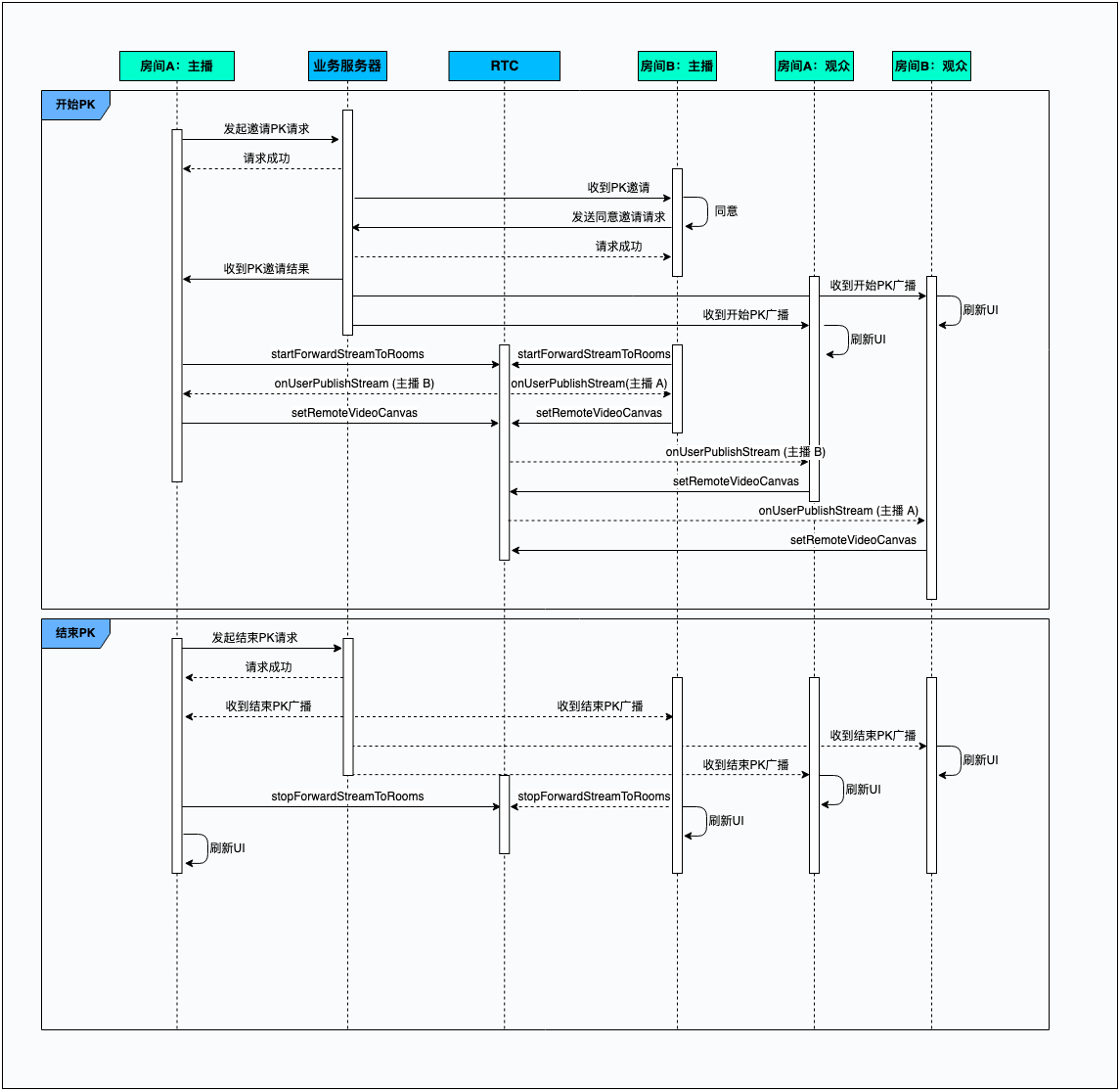
示例代码
/**
* 开启跨房间转推
* @param roomID 对方房间的 room Id
* @param token 加入房间所需要的 token, 由业务服务器下发
**/
- (void)startForwardStream:(NSString *)roomId token:(NSString *)token {
ForwardStreamConfiguration *configuration = [[ForwardStreamConfiguration alloc] init];
configuration.roomId = roomId;
configuration.token = token;
int res = [self.rtcRoom startForwardStreamToRooms:@[configuration]];
if (res != 0) {
NSLog(@"开启跨房转推失败 code:%d", res);
}
}
/**
* 房间内新增远端媒体流流的回调
* @param rtcRoom ByteRTCRoom 的对象
* @param userId 用户的用户 ID
* @param type 远端媒体流的类型
**/
- (void)rtcRoom:(ByteRTCRoom *)rtcRoom onUserPublishStream:(NSString *)userId
type:(ByteRTCMediaStreamType)type {
if (type == ByteRTCMediaStreamTypeVideo ||
type == ByteRTCMediaStreamTypeBoth) {
// 获取业务层渲染View
UIView *renderView = [self getRenderView];
ByteRTCVideoCanvas *canvas = [[ByteRTCVideoCanvas alloc] init];
canvas.renderMode = ByteRTCRenderModeHidden;
canvas.view.backgroundColor = [UIColor clearColor];
canvas.view = renderView;
ByteRTCRemoteStreamKey *streamKey = [[ByteRTCRemoteStreamKey alloc] init];
streamKey.userId = userId;
streamKey.roomId = self.rtcRoom.getRoomId;
streamKey.streamIndex = ByteRTCStreamIndexMain;
[self.rtcEngineKit setRemoteVideoCanvas:streamKey withCanvas:canvas];
}
}
/**
* 结束跨房间转推
**/
- (void)stopForwardStream {
[self.rtcRoom stopForwardStreamToRooms];
}
主播与观众连麦互动
时序图
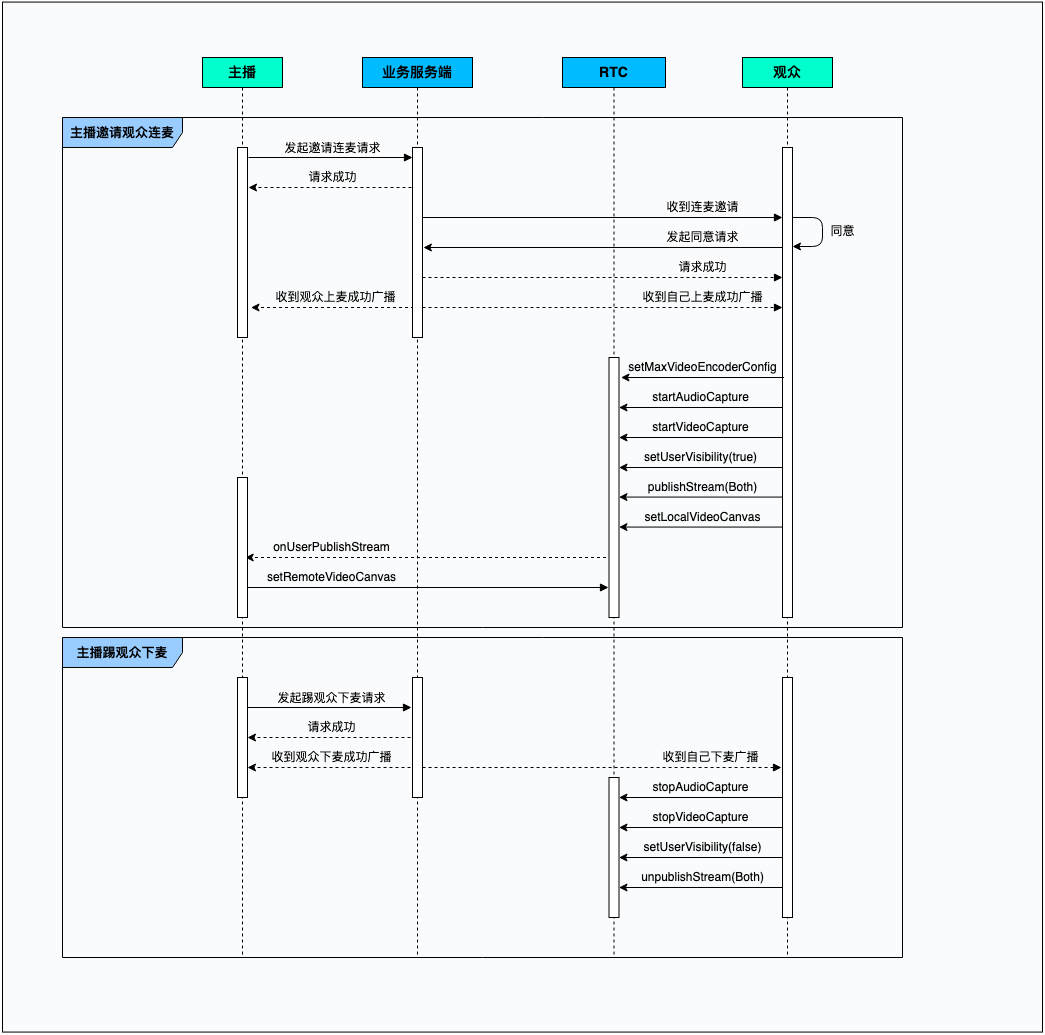
示例代码
/**
* 主播和观众连麦成功
* @param userID 上麦用户的 User ID
**/
- (void)receivedJoinInteractWithUser:(NSString *)userID {
// 模拟登录用户 User ID
NSString *LoginUserID = @"";
// 上麦的用户是登录用户
if ([userID isEqualToString:LoginUserID]) {
// 更新 RTC 编码分辨率、帧率、码率,具体数值可以联系技术支持。
// 参考:https://rtc.topic.bytedance.net/set-video-publish-parameters
ByteRTCVideoEncoderConfig *videoEncoderConfig = [[ByteRTCVideoEncoderConfig alloc] init];
videoEncoderConfig.width = width;
videoEncoderConfig.height = height;
videoEncoderConfig.frameRate = frameRate;
videoEncoderConfig.maxBitrate = maxBitrate;
[self.rtcEngineKit setMaxVideoEncoderConfig:videoEncoderConfig];
// 观众开启相机、麦克风采集
[self.rtcEngineKit startAudioCapture];
[self.rtcEngineKit startVideoCapture];
// 观众开启音视频推流
[self.rtcRoom publishStream:ByteRTCMediaStreamTypeBoth];
// 观众设置为可见状态
[self.rtcRoom setUserVisibility:YES];
}
}
/**
* 收到观众下麦
* @param userID 下麦用户的 User ID
**/
- (void)receivedLeaveInteractWithUser:(NSString *)userID {
// 模拟登录用户 User ID
NSString *LoginUserID = @"";
// 下麦的观众是登录用户
if ([userID isEqualToString:LoginUserID]) {
// 观众开启相机、麦克风采集
[self.rtcEngineKit stopAudioCapture];
[self.rtcEngineKit stopVideoCapture];
// 观众开启音视频推流
[self.rtcRoom unpublishStream:ByteRTCMediaStreamTypeBoth];
// 观众设置为隐身状态
[self.rtcRoom setUserVisibility:NO];
}
}
核心功能 API 与回调参考
API
功能点 | API |
功能点 | API |
创建 ByteRTCVideo 实例 | createRTCVideo:delegate:parameters: |
创建 ByteRTCRoom 实例 | |
设置用户可见性 | |
开启内部视频采集 | |
关闭内部视频采集 | |
开启内部音频采集 | |
关闭内部音频采集 | |
设置 RTC 编码分辨率等参数 | |
为采集到的视频流开启镜像 | |
设置当前音频播放路由 | |
开启音量信息提示 | |
加入 RTC 房间 | joinRoom:userInfo:roomConfig: |
离开 RTC 房间 | |
销毁房间对象 | |
在当前所在房间内发布媒体流 | publishStream: |
停止媒体流发布到当前所在房间中 | unpublishStream: |
开始跨房间转发媒体流 | |
停止跨房间转发媒体流 | |
设置本地视频渲染 | setLocalVideoCanvas:withCanvas: |
设置远端视频渲染 |
回调
功能点 | 回调 |
功能点 | 回调 |
本地用户加入 RTC 回调 | rtcRoom:onRoomStateChanged:uid:state:extraInfo |
远端用户加入 RTC 回调 | rtcRoom:onUserJoined:elapsed: |
本地用户音量回调 | |
远端用户音量回调 | |
房间内新增远端媒体流回调 | rtcRoom:onUserPublishStream:type: |
跨房间媒体流转发状态和错误回调 |
最近更新时间:2026.09.22 14:41:49
这个页面对您有帮助吗?
有用
有用
无用
无用